Imagine never losing your Wi-Fi signal, no matter where you are in your home. With Google Nest Mesh WiFi, you can say goodbye to dead zones and slow connections.
If you want fast, reliable internet that follows you everywhere, this system could be exactly what you need. You’ll discover the top features of Google Nest Mesh WiFi that make it stand out from the rest. Keep reading to find out how it can transform your home internet experience.
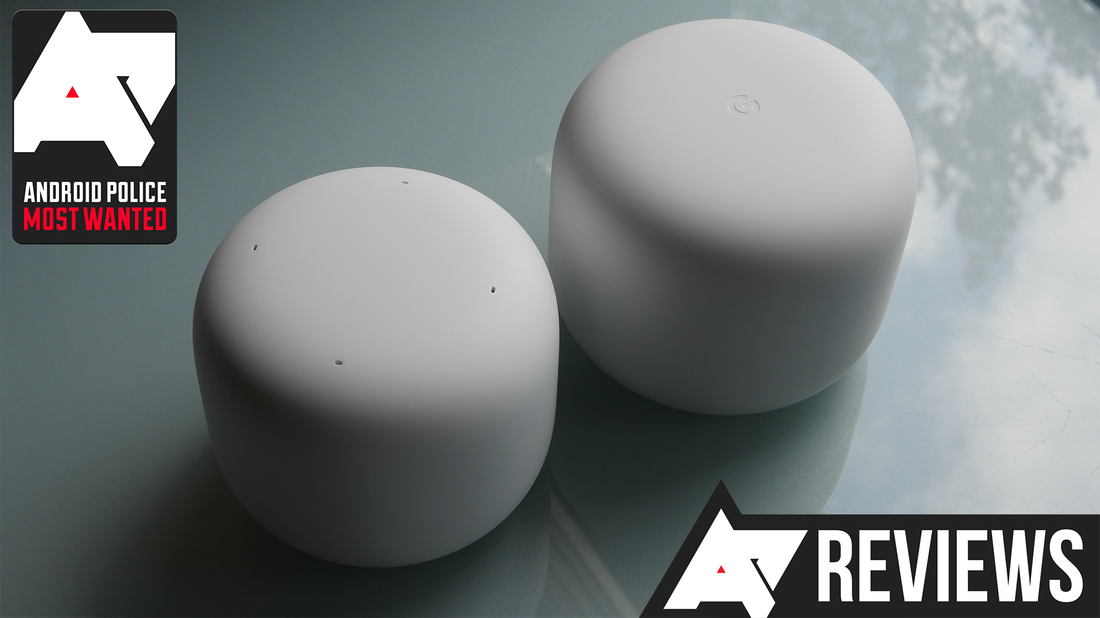
Credit: www.androidpolice.com
Key Benefits Of Google Nest Mesh Wifi
Google Nest Mesh Wifi helps improve your home internet. It gives better coverage and stable connections.
This system is easy to set up and grow as your needs change. It works well in large spaces and busy homes.
Seamless Coverage Across Large Areas
Google Nest Mesh Wifi spreads signal evenly in big houses or offices. It removes dead spots where Wi-Fi is weak.
Multiple units work together to cover every corner. This means you can move around without losing internet.
- Strong signal in every room
- Works well in multi-story buildings
- Stops Wi-Fi dropouts in far areas
Consistent Connection Quality
The system keeps your internet speed steady. It adjusts to avoid slowdowns and interference.
Devices connect to the best unit automatically. This keeps video calls clear and streaming smooth.
- Stable speeds even with many devices
- Automatic switching to the strongest signal
- Reduced buffering and lag
Easy Network Expansion
Add more units to grow your network anytime. The system updates itself to include new devices.
You do not need extra cables or complex settings. Just plug in a new unit and connect it through the app.
- Simple plug-and-play setup
- Works with existing Nest Wifi units
- Flexible for changing space needs
Speed Enhancements
Google Nest Mesh Wifi offers features to boost your internet speed. It helps devices connect faster and work smoothly.
These speed improvements make streaming, browsing, and online tasks more reliable across your home.
Optimized Data Routing
The system sends data through the best path available. It reduces delays and keeps your connection stable.
Smart routing avoids slow links and balances traffic well, so your devices get faster speeds.
Dual-band And Tri-band Options
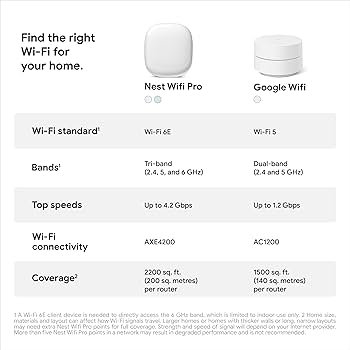
Google Nest Mesh Wifi supports both dual-band and tri-band setups. This lets you choose the best option for your home.
| Band Type | Frequency | Benefit |
|---|---|---|
| Dual-Band | 2.4 GHz & 5 GHz | Good for most homes with moderate devices |
| Tri-Band | 2.4 GHz, 5 GHz, & another 5 GHz | Better for busy networks and more devices |
Automatic Speed Adjustments
The network adjusts speeds based on your current use. It gives priority to devices needing faster connections.
- Speeds increase during video calls or streaming
- Slower devices do not slow down the whole network
- Bandwidth is shared fairly among devices
Smart Home Integration
Google Nest Mesh Wifi connects your home devices with ease. It helps create a smart home network that works well with many products.
With strong integration features, it brings convenience and control to your fingertips.
Compatibility With Google Assistant
The Nest Mesh Wifi works smoothly with Google Assistant. This allows your smart devices to communicate without issues.
- Connects to Google Assistant-enabled devices
- Supports voice commands for device control
- Works with smart lights, thermostats, and cameras
- Updates automatically to keep compatibility
Centralized Control Via App
Use the Google Home app to manage your Wifi and connected devices. The app gives you full control in one place.
| Feature | Description |
| Network Settings | Manage Wifi speed and security |
| Device Management | See and control connected devices |
| Parental Controls | Set limits and schedules for kids |
| Guest Network | Create a separate network for visitors |
Voice Command Features
Voice commands make it easy to control your Wifi and smart home devices hands-free.
- Turn Wifi on or off with voice
- Pause internet access for specific devices
- Check network status by asking Google Assistant
- Control smart home devices connected to the network
Security Features
The Google Nest Mesh Wifi system offers robust security features. These ensure a safe and private internet experience for users.
Explore the key security features that help protect your network and data.
Automatic Updates
Automatic updates keep your system secure. They install the latest security patches without manual intervention.
- Receive updates directly from Google
- No need to schedule or remember updates
- Minimize security vulnerabilities
Built-in Firewall
The built-in firewall acts as a barrier. It protects your network from unauthorized access and potential threats.
| Feature | Benefit |
| Data Filtering | Blocks harmful traffic |
| Access Control | Restricts unauthorized devices |
| Monitoring | Tracks suspicious activity |
Guest Network Controls
Guest network controls offer a separate network for visitors. This ensures your main network remains secure.
Use custom settings to manage:
- Network access for guests
- Bandwidth limits
- Time restrictions
Setup And User Experience
The Google Nest Mesh Wifi system offers an intuitive setup and user-friendly experience. Its features ensure that users enjoy seamless connectivity across their homes.
This guide explores the key aspects of the Nest Mesh Wifi, focusing on its installation, app interface, and network management tools.
Simple Installation Process
The installation of Google Nest Mesh Wifi is straightforward. Users can set it up quickly without any technical expertise.
- Unbox the device and plug it into a power source.
- Connect the primary unit to your modem using the provided cable.
- Follow the on-screen instructions in the Google Home app.
User-friendly App Interface
The Google Home app provides an easy-to-navigate interface. It is designed to guide users through the setup and management of their network.
With the app, users can:
- Monitor network usage in real-time
- Set up guest networks
- Manage connected devices
Network Management Tools
Google Nest Mesh Wifi comes with comprehensive network management tools. These tools help users optimize their internet experience.
| Feature | Description |
| Parental Controls | Manage screen time and block sites |
| Priority Device | Allocate more bandwidth to specific devices |
| Speed Test | Check internet speed directly from the app |
Comparison With Other Mesh Systems
Google Nest Mesh Wifi is a popular choice for home networking. It competes with many other mesh systems in performance and features. This comparison helps you understand how it stands out.
We will look at key areas like performance metrics, pricing and value, and unique features. This will give you a clear picture of what to expect from Google Nest Mesh Wifi.
Performance Metrics
Google Nest Mesh Wifi offers reliable coverage and stable speeds. It uses dual-band technology with smart routing to keep your connection smooth. Compared to other systems, it performs well in most home environments.
| Feature | Google Nest Mesh Wifi | Other Popular Mesh Systems |
|---|---|---|
| Wi-Fi Standard | Wi-Fi 5 (AC1200) | Wi-Fi 6 or Wi-Fi 5 |
| Coverage Area | Up to 4400 sq ft (3-pack) | 4000-6000 sq ft |
| Max Speed | 1200 Mbps | Up to 3000 Mbps |
| Device Support | Up to 100 devices | Varies, often 150+ |
Pricing And Value
The Google Nest Mesh Wifi is priced in the mid-range for mesh systems. It offers good value for users who want easy setup and decent coverage. Some competitors offer higher speed or newer technology at a higher price.
- Google Nest 3-pack costs around $270
- Other mesh systems range from $200 to $400
- Some brands charge extra for advanced security
- Google includes free software updates
Unique Features
Google Nest Mesh Wifi has some features that set it apart. Its integration with Google Assistant allows voice control for network settings. The design is compact and blends well in home spaces. Other systems may focus on gaming or business features.
- Built-in Google Assistant support
- Simple app for setup and controls
- Automatic network optimization
- Parental controls and guest network
- Seamless integration with other Google devices
Tips For Maximizing Coverage And Speed
Google Nest Mesh Wifi can improve your internet speed and coverage at home. Proper setup helps you get the best results.
This guide covers key tips to place your nodes well, keep the firmware updated, and manage connected devices.
Optimal Placement Of Nodes
Place nodes where the signal travels easily. Avoid thick walls and metal objects. Keep nodes in open spaces and away from floors.
- Put the main node near your modem in a central spot.
- Place additional nodes where coverage is weak.
- Keep nodes visible and not inside cabinets.
- Space nodes evenly to cover large areas.
Regular Firmware Updates
Firmware updates improve performance and fix bugs. Check for updates often in the Google Home app. Set auto-updates to keep your system secure.
| Update Type | Purpose |
| Security Patch | Protects your network from threats |
| Performance Boost | Improves speed and stability |
| New Features | Adds tools and options |
Managing Device Connections
Too many devices can slow your network. Manage connections to keep speed stable. Prioritize important devices for better performance.
- Disconnect devices not in use.
- Use the Google Home app to see connected devices.
- Limit guest network access to avoid overload.
- Set bandwidth priorities for work or streaming devices.
Credit: www.engadget.com

Credit: www.wave-electronics.com
Frequently Asked Questions
What Makes Google Nest Mesh Wifi Stand Out?
Google Nest Mesh Wifi offers seamless coverage by connecting multiple nodes. It ensures strong, reliable internet throughout your home. The system supports easy setup and smart device integration, enhancing user experience and home connectivity.
How Does Google Nest Mesh Wifi Improve Internet Speed?
It optimizes network traffic across multiple nodes, reducing congestion. The system intelligently routes data for faster, stable connections. This ensures consistent high-speed internet even in large or multi-story homes.
Can Google Nest Mesh Wifi Support Multiple Devices?
Yes, it efficiently handles many devices simultaneously without slowing down. It prioritizes bandwidth to ensure smooth streaming, gaming, and browsing. This makes it ideal for busy households with numerous smart devices.
Is Google Nest Mesh Wifi Easy To Set Up?
Setup is quick and user-friendly via the Google Home app. The app guides you through each step with clear instructions. You can manage settings and troubleshoot directly from your smartphone.
Conclusion
Google Nest Mesh Wifi offers strong and reliable internet everywhere. It adapts well to different home sizes and shapes. Easy setup helps users get online fast without stress. The system keeps connections stable, even with many devices. Smart features improve security and control for peace of mind.
Overall, this mesh wifi fits well in homes needing better coverage. A solid choice for smooth and steady internet access.


