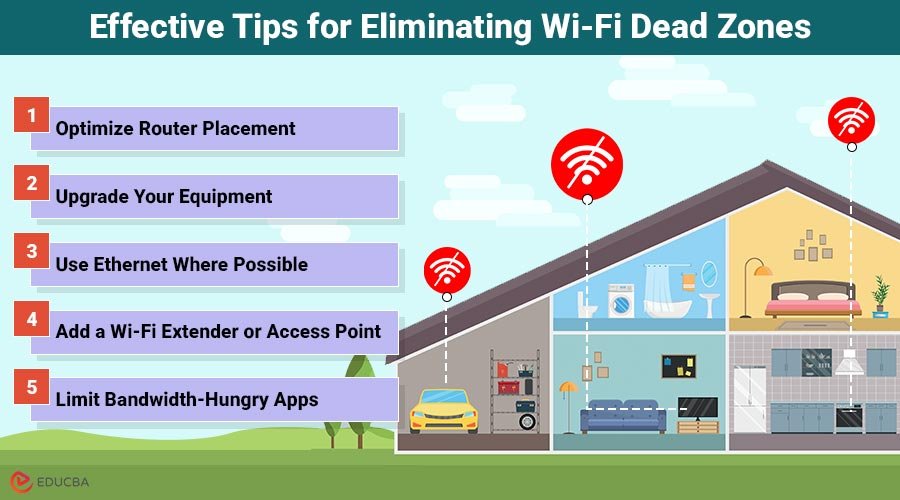
Are you tired of slow internet and dead zones in your large house? You’re not alone.
When your WiFi signal drops in certain rooms, it can feel frustrating and limit what you can do online. But what if there was a simple way to boost your connection and make dead zones disappear? Mesh WiFi systems promise to do just that.
You’ll discover how mesh WiFi works and whether it’s the solution your home needs. Keep reading to find out how you can enjoy strong, reliable internet in every corner of your house.
Why Dead Zones Occur
Dead zones are areas in a house where the Wi-Fi signal is weak or missing. This makes it hard to connect to the internet in those spots.
Large houses often have more dead zones because the Wi-Fi signal cannot reach every corner well. Understanding why dead zones happen helps fix them.
Common Causes In Large Homes
Walls, floors, and furniture can block Wi-Fi signals. Thick walls made of brick or concrete are worse at letting signals pass.
Distance from the Wi-Fi router also matters. The farther you are, the weaker the signal becomes.
- Thick walls and floors reduce signal strength
- Distance weakens the Wi-Fi signal
- Interference from other devices can cause problems
- Large layouts create areas without coverage
Impact On Connectivity
Dead zones cause slow internet and dropped connections. This can stop streaming, gaming, and working smoothly.
Devices in dead zones may not connect at all or take a long time to load web pages.
- Slow downloads and uploads
- Unstable video calls
- Poor online gaming experience
- Frustration when devices lose connection
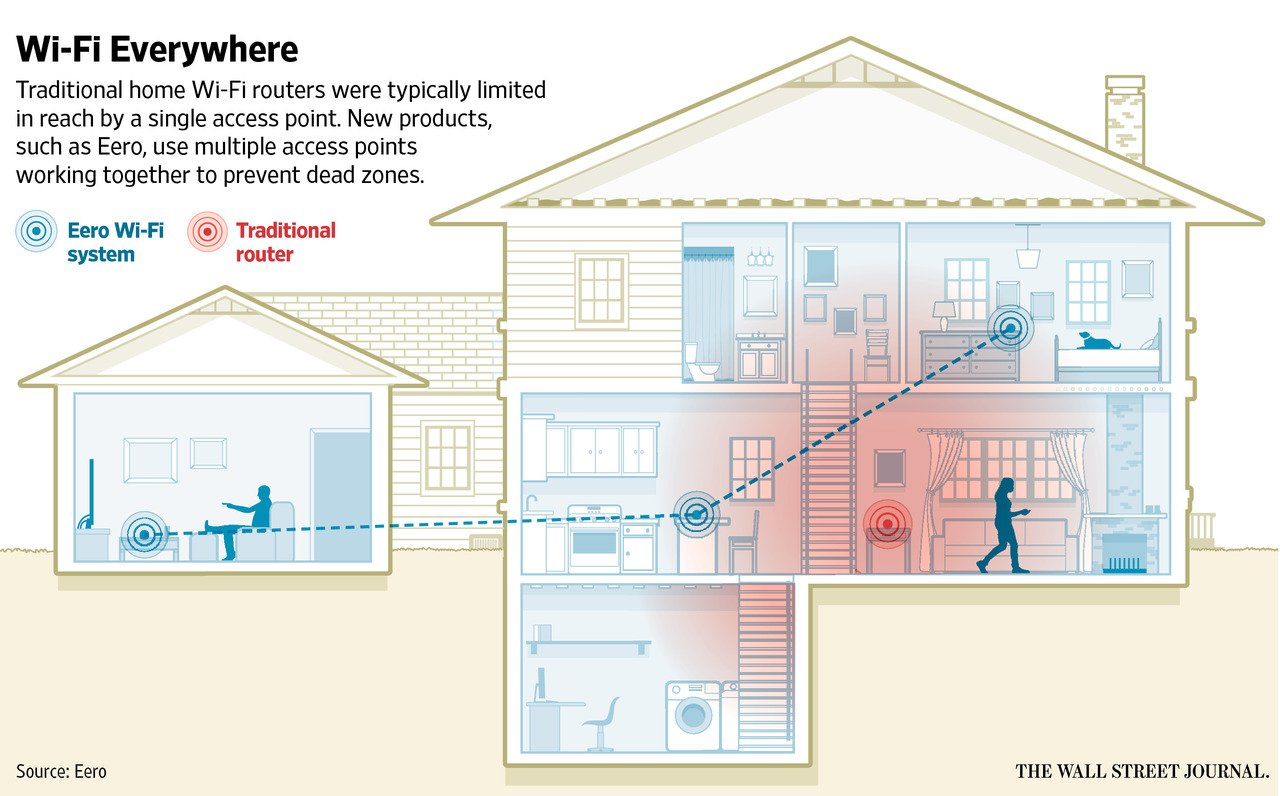
Credit: blog.eero.com
How Mesh Wifi Works
Mesh wifi improves internet coverage in large houses. It uses multiple devices to spread the signal evenly. This helps reduce dead zones where wifi is weak or missing.
Instead of one router, mesh systems have several units that work together. These units communicate to create a strong, seamless network across your home.
Basic Components
A mesh wifi system has key parts that make it work well. These include the main router, satellite nodes, and the software that controls them.
- Main Router:Connects to the internet and controls the network.
- Satellite Nodes:Spread the wifi signal to far areas in the house.
- Software:Manages how the devices talk and switch connections.
Signal Distribution
Mesh wifi shares the signal between nodes to cover all rooms. Nodes connect with each other and your devices to keep a strong link.
| Node | Function | Location |
| Main Router | Internet source and control | Central spot in the home |
| Satellite Node 1 | Extends signal to upstairs rooms | Second floor hallway |
| Satellite Node 2 | Improves coverage in basement | Basement living area |
Benefits For Large Houses
Large houses often have WiFi dead zones. These are areas where the signal is weak or lost.
Mesh WiFi systems help reduce these dead zones. They use multiple devices to spread WiFi evenly.
Improved Coverage
Mesh WiFi covers large areas better than single routers. Each mesh unit sends WiFi signals to different parts of the house.
This means fewer dead spots and stronger connections in every room. Even far rooms get good signal strength.
- Multiple units work together to expand coverage
- Better signal in basements, attics, and far rooms
- Supports many devices without losing speed
Seamless Roaming
Mesh WiFi allows devices to switch between units smoothly. You stay connected while moving around the house.
This means no drops or slowdowns when you walk from one room to another. Your phone or laptop stays linked to the best signal.
- Automatic connection to the strongest mesh unit
- No need to manually change networks
- Better experience for video calls and streaming
Comparing Mesh Wifi To Traditional Routers
Large houses often have wifi dead zones. These are areas where the signal is weak or missing. Choosing the right wifi system can help fix this issue. Mesh wifi and traditional routers are two common options.
This article compares mesh wifi to traditional routers. It looks at range, coverage, setup, and maintenance. This can help you decide which system fits your home better.
Range And Coverage
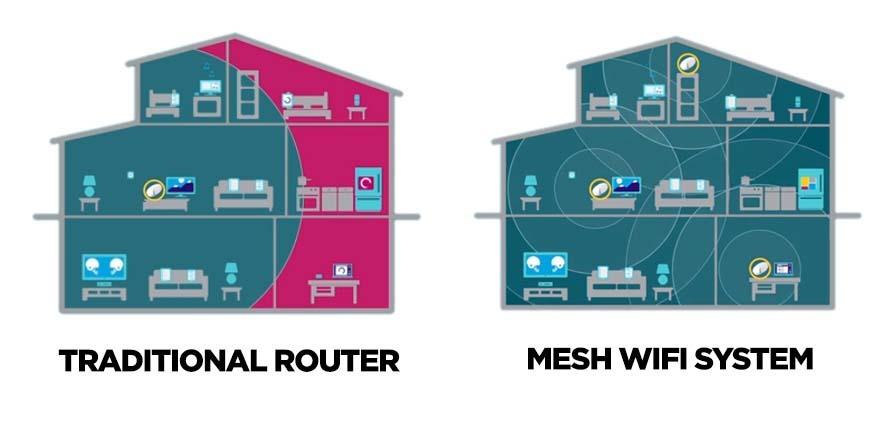
Traditional routers send wifi signals from one device. The signal strength drops as you move farther from the router. Walls and floors can block the signal. This causes dead zones in large houses.
Mesh wifi uses several devices called nodes. These nodes spread wifi across the whole house. They work together to cover large areas. The system switches your device to the strongest signal automatically.
| Feature | Traditional Router | Mesh Wifi |
| Signal Source | Single device | Multiple nodes |
| Coverage | Limited to router range | Wide and flexible |
| Dead Zones | Common in large homes | Reduced or eliminated |
| Signal Handover | No automatic switching | Automatic between nodes |
Setup And Maintenance
Setting up a traditional router is simple. You connect it to your modem and power source. But adding range needs extra devices like extenders. These can be hard to configure and manage.
Mesh wifi systems come with easy setup apps. These apps guide you through placing nodes around your house. The system manages connections automatically. It also updates software without much user input.
- Traditional Router Setup:
- Plug in router
- Connect to modem
- Manual extender setup for range
- Mesh Wifi Setup:
- Install app
- Place nodes in rooms
- Automatic network management
Factors Affecting Mesh Wifi Performance
Mesh WiFi helps reduce dead zones in large houses. Its performance depends on many factors.
Understanding these factors can help you get better WiFi coverage and speed.
Placement Of Nodes
Where you place mesh nodes greatly affects signal strength. Nodes should be spread evenly across the house.
Keep nodes in open areas away from walls and metal objects. This helps signals travel freely.
- Place nodes on higher shelves or tables
- Avoid placing nodes near thick walls or appliances
- Keep nodes within a good range of each other
Number Of Devices
More devices using the network can slow down your mesh WiFi. Each device shares the bandwidth.
Too many devices on one node may cause weak signals or slower speeds for all users.
- Limit devices per node for better speed
- Disconnect devices not in use
- Use newer devices that support fast WiFi standards
Interference Sources
Other electronics can interfere with mesh WiFi signals. This lowers the quality of your network.
Common sources include microwaves, cordless phones, and baby monitors. Walls and furniture also block signals.
- Keep mesh nodes away from electronics that emit signals
- Use the 5GHz band for less interference
- Remove or reposition objects blocking the signal path
Choosing The Right Mesh System
Mesh WiFi systems can help reduce dead zones in large houses. They work by using multiple nodes to spread the WiFi signal evenly. Picking the right system ensures better coverage and connectivity.
With the right mesh system, everyone can enjoy a strong WiFi connection. It’s important to select a system that meets your home’s needs and size.
Top Brands And Models
Several brands offer reliable mesh WiFi systems. These brands have models that are suitable for large houses.
- Netgear Orbi: Known for its strong coverage and easy setup.
- Google Nest WiFi: Offers seamless integration with smart home devices.
- Eero Pro: Provides fast speeds and a user-friendly app.
Budget Considerations
Mesh systems come in different price ranges. It is important to consider your budget when choosing a system.
Higher-priced models often offer more features and better performance. However, there are also affordable options that provide good coverage.
| Price Range | Features |
| $100 – $200 | Basic coverage, fewer nodes |
| $200 – $400 | Better coverage, more nodes, advanced features |
| $400+ | Premium features, maximum coverage, many nodes |
Installation Tips For Large Homes
Mesh WiFi systems help reduce dead zones in big houses. Correct installation is key for the best performance.
Follow these tips to set up your mesh WiFi system effectively. Proper placement and configuration are essential.
Optimal Node Placement
Place nodes in open areas for better signal spread. Avoid placing them in closed spaces like cabinets.
Ensure nodes are within range of each other. This helps maintain a strong connection throughout the house.
- Keep nodes away from metal objects
- Place nodes on different floors for vertical coverage
- Avoid interference from microwaves and cordless phones
Network Configuration
Use the mesh system’s app for easy setup. Follow the step-by-step instructions provided by the app.
Ensure your router is updated to the latest firmware. This can improve network stability and performance.
- Set the same SSID for all nodes
- Enable automatic updates for the mesh system
- Check for device compatibility with your existing network

Credit: www.excitel.com
Troubleshooting Common Issues
Mesh WiFi systems help reduce dead zones in large houses by spreading the signal evenly. Still, some issues can occur that affect performance. Knowing how to fix these problems can improve your network.
This guide covers common problems like signal drops, slow speeds, and device compatibility. Each section offers simple tips to keep your mesh WiFi running smoothly.
Signal Drops
Signal drops happen when your device loses connection or the network is unstable. This can be caused by too much distance between nodes or physical obstructions.
- Place mesh nodes closer together to strengthen the signal.
- Avoid placing nodes near thick walls or metal objects.
- Keep nodes away from microwaves and cordless phones.
- Restart your mesh system regularly to clear glitches.
Slow Speeds
Slow internet can happen even with mesh WiFi. Many factors affect speed, such as interference or network congestion.
| Cause | Fix |
| Too many devices connected | Limit the number of devices or upgrade your plan |
| Interference from other electronics | Move mesh nodes away from other devices |
| Old firmware | Update mesh system software regularly |
| Weak backhaul connection | Use wired Ethernet for node connections if possible |
Device Compatibility
Some devices may not work well with mesh WiFi due to outdated hardware or software. This can cause connection issues or slow speeds.
To improve compatibility:
- Check if your device supports the WiFi standards used by the mesh system.
- Update your device’s operating system and network drivers.
- Forget the network and reconnect to refresh settings.
- Try connecting devices to different nodes for better signal.
Credit: kb.pineapple.net.au
Frequently Asked Questions
What Is Mesh Wifi And How Does It Work?
Mesh WiFi uses multiple nodes to create one seamless network. It improves coverage by spreading signals evenly throughout large homes. Nodes communicate to route data efficiently, reducing dead zones and providing consistent internet access in every room.
Can Mesh Wifi Eliminate Dead Zones In Large Houses?
Yes, mesh WiFi significantly reduces dead zones. Its multiple access points cover wide areas, ensuring strong signals everywhere. This system adapts to obstacles and distance, delivering reliable internet even in traditionally weak signal spots within large homes.
How Does Mesh Wifi Compare To Traditional Routers?
Mesh WiFi offers better coverage and flexibility than traditional routers. Unlike single routers, mesh uses several nodes to cover large spaces. It handles multiple devices smoothly, reduces dead zones, and provides consistent speeds throughout your entire home.
Is Mesh Wifi Easy To Set Up In Big Homes?
Yes, mesh WiFi is user-friendly and easy to install. Most systems come with simple apps guiding node placement and setup. This makes it convenient for homeowners to extend coverage quickly without technical expertise.
Conclusion
Mesh WiFi helps reduce dead zones in large houses effectively. It spreads the signal evenly across rooms and floors. This system improves internet speed and connection stability. You get better coverage without complicated wiring or extra devices. Many homeowners notice fewer interruptions and faster streaming.
It suits big homes with thick walls or multiple floors. Choosing the right Mesh system fits your house size and needs. Overall, Mesh WiFi offers a practical way to improve home internet. No more searching for signal or dealing with slow spots.
A simple step for better online experience.


