Struggling with slow WiFi in some rooms? You’re not alone.
A mesh WiFi system can fix dead zones and keep your connection strong everywhere. But how do you pick the right mesh WiFi nodes without spending a fortune? Choosing budget-friendly options doesn’t mean settling for less. In fact, you can get reliable coverage and fast speeds without breaking the bank.
Keep reading to discover simple tips that will help you find the perfect mesh WiFi nodes for your home and budget. Your internet experience is about to get a serious upgrade!
Benefits Of Mesh Wifi Systems
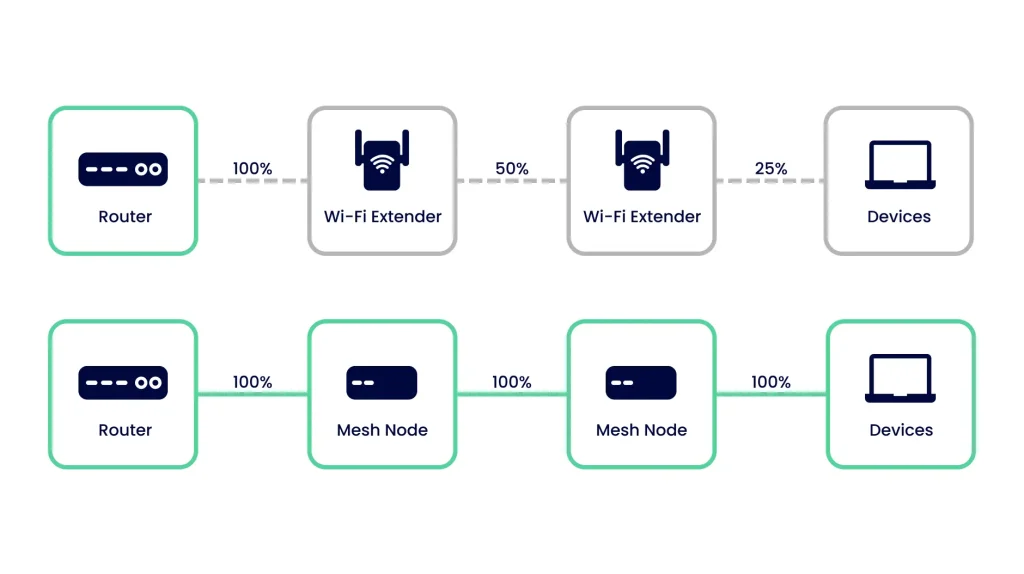
Mesh wifi systems spread your internet signal across your home. They use multiple nodes to cover larger areas.
This design helps reduce dead zones and keeps your devices connected smoothly.
Improved Coverage
Mesh wifi nodes work together to cover every corner of your home. This helps you get strong signals in rooms far from the main router.
- Eliminates wifi dead zones
- Covers multiple floors easily
- Works well in large or oddly shaped homes
Seamless Connectivity
Mesh systems let your devices switch between nodes without losing connection. This makes streaming and browsing smooth as you move around.
| Feature | Benefit |
| Single Network Name | No need to switch wifi networks manually |
| Automatic Node Switching | Devices connect to the strongest signal |
| Consistent Speeds | Better performance across all areas |
Easy Expansion
You can add more nodes to your mesh system anytime. This lets you increase coverage without complicated setup or extra wiring.
- New rooms or outdoor areas need coverage
- More devices connect to your network
- Improve signal in weak spots

Credit: gizmodo.com
Key Features To Look For
Choosing budget-friendly mesh WiFi nodes means finding the right balance of features and price. Look for key features that fit your home and internet needs.
Good mesh WiFi nodes improve your signal and cover every corner without costing too much.
Speed And Performance
Speed is one of the most important things to check. Look for nodes that support fast WiFi standards like WiFi 5 or WiFi 6. This helps devices connect smoothly and stream videos without lag.
Good performance also means the nodes can handle many devices at once without slowing down your network.
Number Of Nodes
The number of nodes you need depends on your home size and layout. More nodes give better coverage in large or multi-story houses.
Start with a pack that fits your space. You can add extra nodes later if needed.
- Small apartments: 2 nodes
- Medium homes: 3 nodes
- Large homes: 4 or more nodes
Compatibility With Devices
Check if the mesh nodes work well with your devices. They should support common WiFi standards and frequencies like 2.4 GHz and 5 GHz.
Some nodes work better with certain routers or smart home devices. Make sure they fit your current setup to avoid problems.
Security Options
Security keeps your network safe from hackers. Look for mesh nodes with strong encryption like WPA3.
Extra features like guest networks and automatic updates help protect your devices and personal data.
- WPA3 encryption for better security
- Guest network to keep visitors separate
- Automatic firmware updates
Budget Considerations
Choosing mesh WiFi nodes requires careful budget planning. You want good coverage without overspending.
Understanding costs helps you pick the right system for your home and wallet.
Setting A Realistic Budget
Start by deciding how much you can spend on mesh WiFi nodes. Look at your monthly internet bill and home size.
Think about how many nodes you need to cover your space fully. More nodes mean higher costs.
Balancing Cost And Quality
Cheap devices may save money upfront but might not last long or offer good speeds.
- Check product reviews for reliability
- Look for features like easy setup and security
- Compare warranty lengths
- Consider brands with good support
Investing a bit more can give better performance and reduce future expenses.
Avoiding Hidden Expenses
| Expense Type | Description | Tips |
| Installation Fees | Costs for professional setup | Choose self-install options |
| Subscription Services | Extra fees for advanced features | Check if needed before buying |
| Replacement Parts | Cost to replace lost or broken nodes | Buy from official sources |
| Upgrade Costs | Fees for software or hardware updates | Confirm update policies |

Credit: www.reddit.com
Top Brands For Budget Mesh Wifi
Choosing the right mesh wifi nodes can improve your home internet. Many brands offer budget-friendly options without losing quality.
This guide highlights top brands that balance cost and performance. You will find options that fit your budget and needs.
Affordable Yet Reliable Options
Brands like TP-Link, Netgear, and Google provide mesh wifi nodes at low prices. These products often include easy setup and good coverage.
TP-Link’s Deco series is popular for its simple design and solid performance. Netgear’s Orbi offers strong signals and user-friendly apps. Google Nest Wifi balances cost and smart features well.
- TP-Link Deco: budget-friendly, good speed, easy setup
- Netgear Orbi: wide coverage, reliable connection, simple controls
- Google Nest Wifi: smart home integration, good performance
Customer Reviews And Ratings
Customer feedback helps find the best budget mesh wifi nodes. Look for products with high ratings and positive reviews about speed and coverage.
Many users praise TP-Link Deco for its value. Netgear Orbi gets high marks for signal strength. Google Nest Wifi is noted for easy setup and smart features.
| Brand | Average Rating | Common Praise |
|---|---|---|
| TP-Link Deco | 4.5/5 | Easy setup, good speed, affordable price |
| Netgear Orbi | 4.4/5 | Strong signal, reliable connection |
| Google Nest Wifi | 4.3/5 | Smart features, user-friendly |
Placement Tips For Optimal Coverage
Choosing the right spots for your mesh WiFi nodes helps get better signal. Good placement can cover your whole home with strong WiFi.
Follow simple tips to put nodes where the WiFi works best. This guide shows how to place nodes for clear and fast internet.
Strategic Node Positioning
Place nodes in open areas, not hidden behind furniture. Walls and doors block WiFi signals and lower speed.
Try to keep nodes at about eye level and in central spots. This helps signals reach all rooms evenly.
- Put the main node near your modem.
- Place other nodes where signal starts to weaken.
- Avoid placing nodes on the floor or inside cabinets.
- Space nodes 30 to 50 feet apart for best results.
Avoiding Interference
Keep nodes away from devices that cause interference. Microwaves, cordless phones, and baby monitors can disrupt WiFi.
Metal objects and thick walls also weaken signals. Avoid placing nodes near metal shelves or concrete walls.
- Do not place nodes near microwave ovens.
- Avoid thick walls made of concrete or brick.
- Keep nodes away from large metal appliances.
- Move nodes away from cordless phone base stations.
Testing Signal Strength
Check signal strength after placing each node. Use WiFi apps to find weak spots in your home.
Move nodes slightly if signals are weak or slow. Test in different rooms to ensure strong coverage everywhere.
- Use apps like NetSpot or WiFi Analyzer.
- Check signal bars in rooms far from nodes.
- Adjust node position and retest for better results.
- Repeat tests at different times of day.

Credit: www.pcmag.com
Setup And Maintenance Tips
Choosing budget-friendly mesh WiFi nodes can enhance your home network. It is essential to ensure they are easy to set up and maintain.
This guide provides simple steps for installation, regular updates, and solutions for common issues. Follow these tips for a smooth experience.
Easy Installation Steps
Setting up your mesh WiFi nodes doesn’t have to be complicated. Follow these steps to get started quickly.
- Place nodes in central locations to cover more area.
- Connect the primary node to your modem with an Ethernet cable.
- Power on the nodes and wait for the indicator lights.
- Use the app provided by the manufacturer for configuration.
- Ensure all nodes are connected and syncing properly.
Regular Updates And Security
Keeping your mesh WiFi nodes updated is crucial for performance and security. Regular updates help protect your network from threats.
Check for firmware updates monthly. Enable automatic updates if available.
Use strong, unique passwords for your network to enhance security.
Consider enabling guest networks to limit access to your primary network.
Troubleshooting Common Issues
Sometimes, you may face issues with your mesh WiFi nodes. Here are some common problems and how to fix them.
| Issue | Solution |
| Node not connecting | Restart the node and check connections |
| Slow speeds | Reposition nodes closer to devices |
| Intermittent signal | Reduce interference from other electronics |
Frequently Asked Questions
What Factors Should I Consider For Budget Mesh Wifi Nodes?
Consider coverage area, speed, number of nodes, and device compatibility. Also, check ease of setup and security features. These factors ensure good performance without overspending.
How Many Mesh Nodes Do I Need For My Home?
Typically, 2 to 3 nodes cover a medium-sized home. Larger homes may require more nodes for seamless coverage. Assess your home size and WiFi dead zones before buying.
Are Budget Mesh Wifi Nodes Reliable For Streaming?
Yes, many budget mesh systems support smooth streaming. Look for nodes with dual-band or tri-band technology for better bandwidth. This minimizes buffering on multiple devices.
Can Budget Mesh Wifi Improve My Slow Internet?
Budget mesh nodes can boost WiFi coverage and reduce dead zones. However, they don’t increase your internet speed from the provider. They optimize signal distribution for better performance.
Conclusion
Choosing budget-friendly mesh WiFi nodes takes some thought and care. Focus on coverage, speed, and easy setup. Think about the size of your home and the number of devices. Check user reviews to see real experiences. Don’t forget to compare prices and features.
A good mesh system can improve your internet without breaking the bank. Simple steps like these help you find the right fit for your needs. Enjoy better WiFi everywhere in your home.


