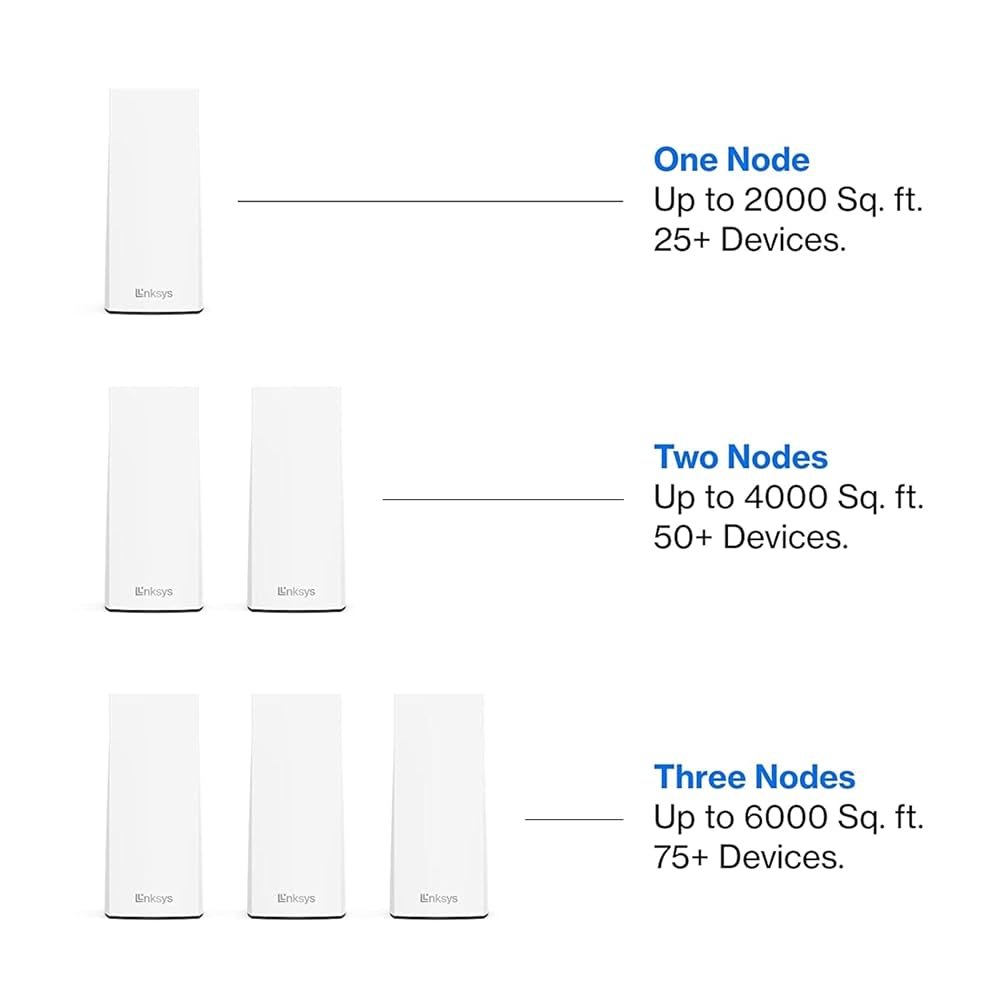
Are you struggling with slow WiFi or dead zones in your 2000 sq ft house? You’re not alone.
Getting the right number of mesh WiFi nodes can make a huge difference in how fast and reliable your internet feels in every corner of your home. But how many nodes do you really need to cover 2000 square feet without overspending or creating unnecessary complexity?
Keep reading, and you’ll discover the simple answer that fits your space perfectly—so you can enjoy seamless internet everywhere, right now.

Credit: gajed.com
Mesh Wifi Basics
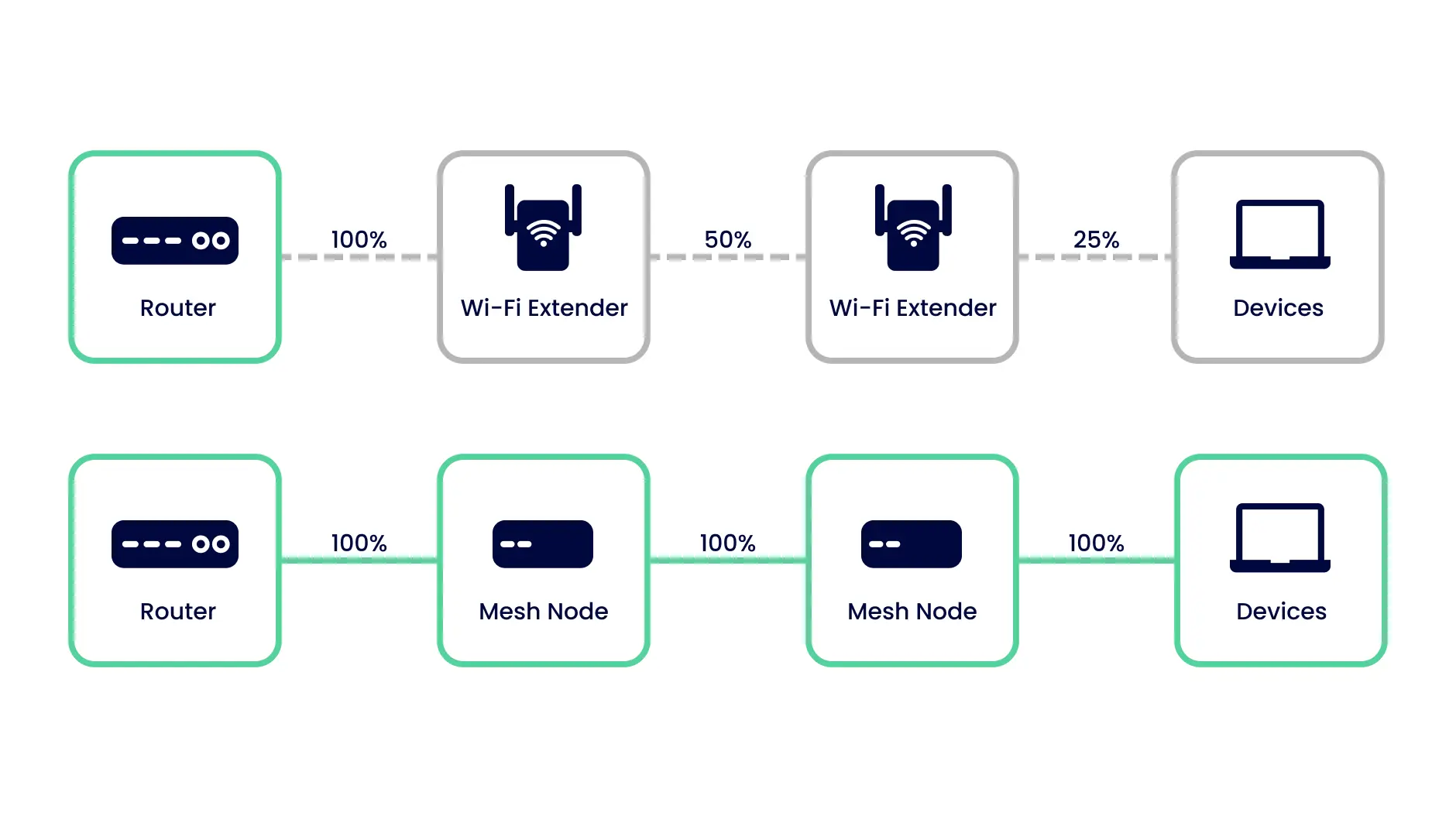
Mesh wifi helps spread internet signal all over your home. It uses multiple devices called nodes.
This system gives better coverage than one router alone. It works well in large houses or places with walls.
What Is Mesh Wifi
Mesh wifi is a group of devices that work together to cover your home with wifi. Each device is a node.
- A main router connects to your internet
- Other nodes connect to the main router and to each other
- Nodes share the same network name (SSID)
- This creates one strong wifi network everywhere
Benefits Over Traditional Wifi
Mesh wifi gives many advantages compared to a single traditional router. It improves coverage and speed.
| Benefit | Mesh Wifi | Traditional Wifi |
| Coverage | Wide and even | Limited, weak far away |
| Speed | Stable in all rooms | Slower in distant areas |
| Network Name | One SSID for whole home | May need many SSIDs |
| Setup | Easy with app guidance | Can be complex |
| Cost | Usually higher | Lower upfront |
Factors Affecting Node Count
Choosing the right number of mesh WiFi nodes for a 2000 sq ft house depends on many factors. These factors affect how well the network covers your home.
Understanding these factors helps you place the right number of nodes. This improves your WiFi speed and reliability.
House Layout And Walls
The shape and size of your home impact WiFi coverage. Open floor plans allow signals to travel farther.
Walls and floors block WiFi signals. Thick or dense materials reduce signal strength more.
- Concrete and brick walls block signals strongly
- Wood and drywall cause less signal loss
- Multiple floors need nodes on each level
- Rooms far from the router may need extra nodes
Interference And Signal Strength
Other wireless devices can interfere with your WiFi signal. This interference lowers signal quality and speed.
Signals weaken over distance. Placing nodes too far apart creates weak spots in coverage.
- Microwaves and cordless phones cause interference
- Neighboring WiFi networks can overlap signals
- Keep nodes close enough to maintain strong links
- Avoid placing nodes near metal objects
Device Density And Usage
More devices need more WiFi capacity. High device use can slow your network if nodes are few.
Streaming, gaming, and video calls use a lot of bandwidth. This affects how many nodes you need.
- Homes with many smart devices need extra nodes
- Heavy internet use benefits from more nodes
- Nodes share the load to keep speeds steady
Estimating Nodes For 2000 Sq Ft
Mesh WiFi systems use multiple nodes to cover large areas. For a 2000 square foot house, it is important to know how many nodes you need. The right number ensures strong WiFi in every room.
Understanding coverage per node, where to place the nodes, and changes for multi-story homes helps you set up your mesh system well. This guide explains each factor clearly.
Coverage Per Node
Each mesh node covers a certain area. Most nodes cover about 1000 to 1500 square feet. Walls and furniture can reduce coverage. For a 2000 sq ft house, you need enough nodes to cover all spaces without dead zones.
- One node covers about 1000 to 1500 sq ft in open spaces.
- Obstacles like walls reduce signal strength and coverage.
- For 2000 sq ft, at least two nodes are needed for full coverage.
- Extra nodes improve speed and reduce weak signals.
Ideal Node Placement
Correct node placement helps WiFi signals travel better. Place nodes where signals can reach all rooms. Avoid places near metal objects or microwaves that block signals.
| Placement Area | Reason |
| Central hallway or open area | Allows even signal spread |
| Near main living spaces | Covers most used rooms |
| Away from thick walls | Reduces signal blockage |
| Elevated spots | Improves signal reach |
Adjusting For Multi-story Homes
Multi-story homes need nodes on each floor. Signals do not pass well through floors. Place at least one node on each level to keep strong WiFi everywhere.
- Place a node on each floor for full coverage.
- Position nodes above or below each other if possible.
- Check signal strength after setup and move nodes if needed.
Popular Mesh Wifi Systems
Mesh wifi systems help spread wifi signals evenly in a house. They are useful in large homes or places with thick walls.
This guide looks at popular mesh wifi brands and how many nodes you need for a 2000 sq ft house.
Top Brands And Models
Several brands lead the mesh wifi market. Each offers models with different features and coverage areas.
- Google Nest Wifi:Known for easy setup and good speed.
- Netgear Orbi:Offers strong signals and wide coverage.
- TP-Link Deco:Budget-friendly with reliable performance.
- Amazon Eero:Simple design and good app controls.
- Linksys Velop:Modular system for flexible coverage.
Node Coverage Comparison
Each mesh system covers a different area per node. This affects how many nodes you need for your home.
| Brand & Model | Coverage per Node (sq ft) | Recommended Nodes for 2000 sq ft |
|---|---|---|
| Google Nest Wifi | 1600 | 2 |
| Netgear Orbi RBK50 | 2500 | 1-2 |
| TP-Link Deco M5 | 1700 | 2 |
| Amazon Eero Pro 6 | 1600 | 2 |
| Linksys Velop | 2000 | 1-2 |
Installation Tips
Setting up mesh WiFi nodes for a 2000 sq ft house needs careful planning.
Good installation helps cover all rooms with strong internet signals.
Optimal Node Setup
Place nodes in open areas away from thick walls and metal objects.
- Start with one node near your modem or router.
- Put the second node about halfway to the farthest room.
- Add a third node if the house has many walls or floors.
- Keep nodes visible and not hidden in cabinets.
- Ensure nodes are at least 30 feet apart for best coverage.
Avoiding Common Mistakes
Many users place nodes too close or block signals by furniture.
| Common Mistakes | Fix |
| Placing nodes inside cabinets | Put nodes in open spaces |
| Too many nodes close together | Space nodes evenly |
| Ignoring device placement height | Place nodes at chest or head level |
| Using different brands of nodes | Use same brand and model |

Credit: dongknows.com
Troubleshooting Coverage Issues
Mesh WiFi systems help extend internet coverage in homes. Sometimes, even with a mesh system, you might face coverage issues. Understanding how to solve these problems is key to enjoying a stable connection.
Let’s explore how to identify dead zones and boost signal strength in a 2000 sq ft house. This ensures a smooth internet experience in every corner.
Identifying Dead Zones
Dead zones are areas where WiFi signals are weak or absent. These spots can disrupt your internet usage. Identifying them is the first step to improving your network.
- Walk around your home with a smartphone.
- Use a WiFi analyzer app to check signal strength.
- Note areas where the signal drops significantly.
Boosting Signal Strength
Once you find dead zones, focus on boosting signal strength. This helps extend the WiFi reach to cover every room.
Place nodes strategically to ensure optimal coverage. Avoid obstacles like thick walls or large furniture that block signals.
- Place nodes at equal distances from each other.
- Elevate nodes above furniture for better range.
- Use additional nodes if needed for larger areas.
Cost Considerations
Choosing the right number of mesh WiFi nodes for a 2000 sq ft house involves cost considerations. Balancing budget and performance is crucial for an efficient setup.
Understanding long-term savings can help you make an informed decision. Initial costs might be high, but savings over time can justify the investment.
Budget Vs Performance
Balancing budget and performance is key when selecting mesh WiFi nodes. You need enough nodes to cover your house without overspending.
- Consider the size and layout of your home
- Assess the number of devices connected
- Evaluate the speed requirements for your needs
Long-term Savings
Investing in a quality mesh WiFi system can lead to long-term savings. While upfront costs may be higher, efficiency and reduced maintenance costs are beneficial.
| Initial Cost | Ongoing Cost |
| High | Low |
| Medium | Medium |
| Low | High |
Choosing the right system ensures minimal disruptions and lower replacement needs. This approach is cost-effective over time.
Credit: inseego.com
Frequently Asked Questions
How Many Mesh Wifi Nodes Cover 2000 Sq Ft Effectively?
For a 2000 sq ft house, 2 to 3 mesh WiFi nodes usually provide optimal coverage. This setup ensures strong signal strength and minimal dead zones throughout the home.
Can One Mesh Wifi Node Cover 2000 Sq Ft Alone?
One mesh WiFi node typically cannot cover 2000 sq ft effectively. Larger spaces require multiple nodes to avoid weak signals and ensure consistent connectivity.
Where Should Mesh Wifi Nodes Be Placed In A 2000 Sq Ft House?
Place mesh nodes centrally in different areas, preferably on each floor or major zone. Avoid walls and obstructions to maximize signal distribution and network performance.
Does The Number Of Floors Affect Mesh Node Requirements?
Yes, multiple floors often need additional mesh nodes. Signals weaken through floors, so adding nodes per level improves coverage and reduces dead zones.
Conclusion
A 2000 sq ft house usually needs two or three mesh WiFi nodes. This helps cover all rooms with strong internet signals. Place nodes in open spaces for best results. Avoid walls or large objects blocking the signal. Test your network speed in different areas to check coverage.
Adjust node positions if some spots have weak signals. Good WiFi means smoother streaming, faster downloads, and better work from home. Choose the right number of nodes for your house size. Enjoy reliable internet throughout your home with proper mesh setup.


