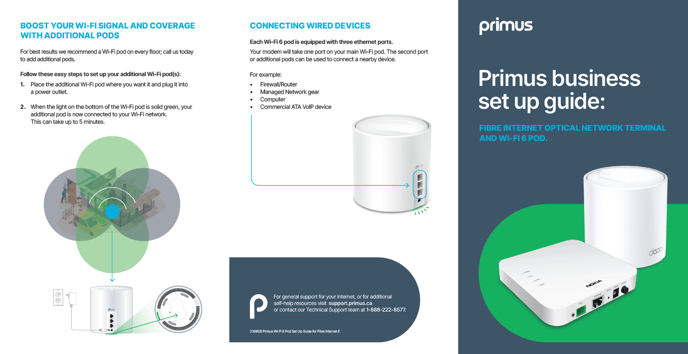
Are you tired of dead zones and slow internet in your smart home? Setting up a reliable network can feel frustrating when your devices keep losing connection.
That’s where mesh WiFi comes in—designed to bring seamless coverage to every corner of your home. Imagine controlling your smart lights, security cameras, and speakers without interruptions or delays. You’ll discover how mesh WiFi can transform your smart home experience and why it might be the perfect solution for your network setup.
Keep reading to unlock the full potential of your connected devices.
Benefits Of Mesh Wifi
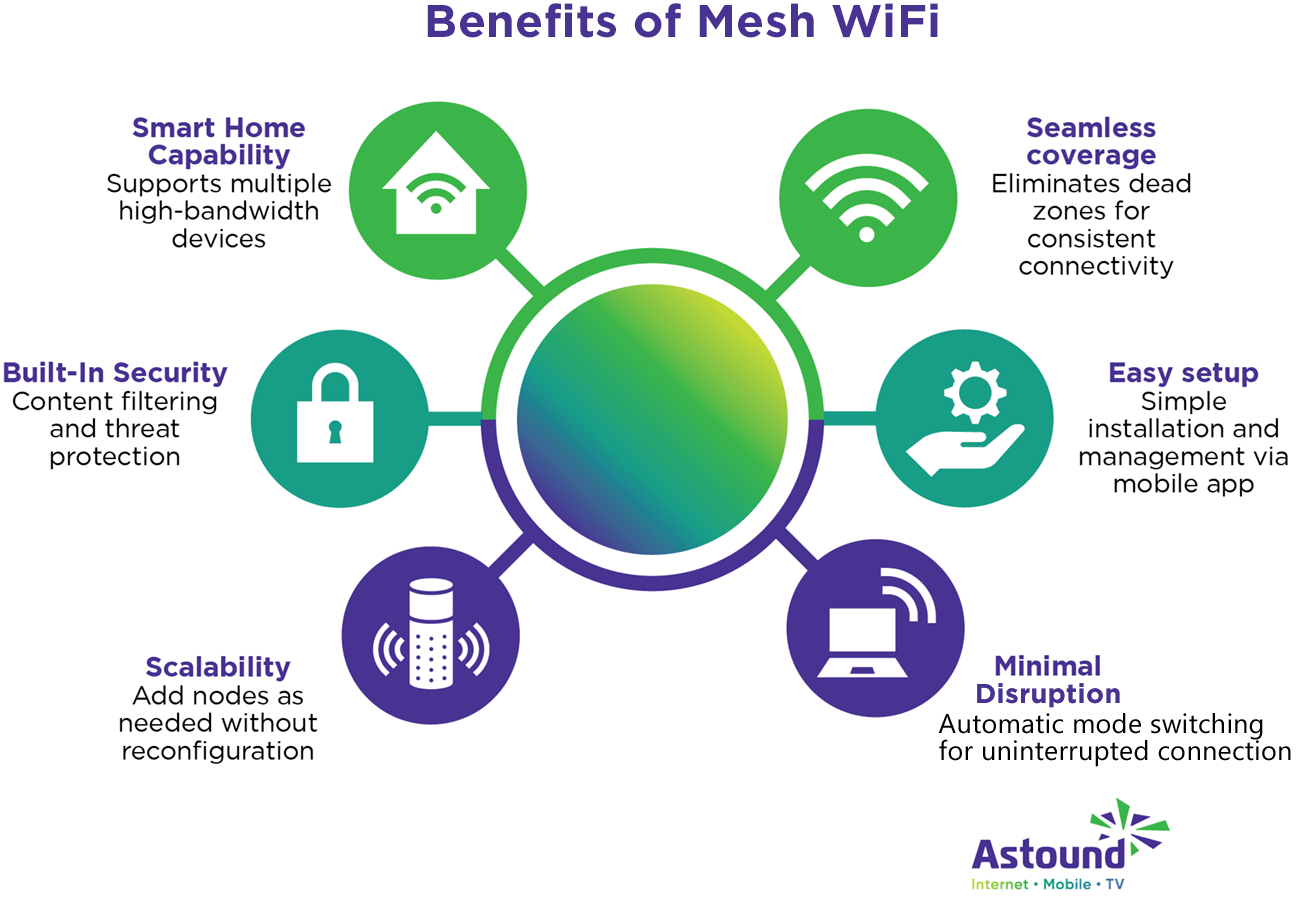
Mesh WiFi improves your smart home network by spreading WiFi evenly. It helps all your devices connect better without interruptions.
This system uses multiple WiFi points to cover your entire home. It is a smart way to get strong signals everywhere.
Eliminating Dead Zones
Dead zones are areas with weak or no WiFi signal. Mesh WiFi places points in different rooms to cover these gaps.
This setup stops spots where the internet drops or is very slow. You get smooth WiFi in every corner of your home.
Enhanced Device Capacity
Smart homes have many devices like cameras, lights, and speakers. Mesh WiFi can handle many devices at once without slowing down.
Each WiFi point shares the load. This means your devices get a steady and reliable connection all the time.
Simplified Network Management
Mesh WiFi systems usually come with easy apps to control your network. You can see all connected devices and adjust settings quickly.
These apps help you update the network and fix issues without needing technical skills. Managing your smart home WiFi becomes simple.

Credit: www.amazon.ca
Choosing The Right Mesh System
Setting up a smart home network requires a reliable mesh WiFi system. The right system keeps all your devices connected smoothly. Picking one means thinking about your home’s size and devices.
This guide covers key points to help you find the best mesh WiFi for your smart home.
Coverage Area Needs
Measure your home’s size and shape to decide how many nodes you need. Larger homes or houses with many walls may need more units.
- Small apartments usually need 1 or 2 nodes.
- Medium homes benefit from 2 to 3 nodes.
- Large or multi-story homes might require 3 or more nodes.
Speed And Performance
Check the speed ratings of mesh systems. Look for devices that support the latest WiFi standards like WiFi 6. This ensures faster data transfer and better performance.
| WiFi Standard | Max Speed | Best Use |
| WiFi 5 (802.11ac) | Up to 3.5 Gbps | General browsing, HD streaming |
| WiFi 6 (802.11ax) | Up to 9.6 Gbps | Smart homes, multiple devices |
Compatibility With Smart Devices
Choose a mesh system that works with your smart home gadgets. Some systems support voice assistants and smart hubs better than others.
Compatibility checklist:
- Supports WiFi frequency bands your devices use (2.4 GHz or 5 GHz)
- Works with popular voice assistants like Alexa or Google Assistant
- Offers easy app control for device management
- Allows guest network access for visitors
Budget Considerations
Mesh systems come in different price ranges. Balance cost with features and coverage to get good value.
- Set a maximum budget before shopping.
- Compare features at different price points.
- Look for systems with good customer reviews.
- Consider future expansion options.
Setting Up Your Mesh Network
A mesh WiFi network helps connect all your smart home devices. It spreads WiFi signals evenly across your home.
Setting up a mesh network is simple if you follow key steps. This guide explains how to place nodes, connect to your modem, and configure settings.
Placement Of Nodes
Place mesh nodes in open areas for better coverage. Avoid walls or metal objects that block signals.
- Put the main node near your modem.
- Place secondary nodes in rooms with weak WiFi.
- Keep nodes at least 15 feet apart.
- Elevate nodes off the floor for better reach.
Connecting To The Modem
Connect your main mesh node to the modem using an Ethernet cable. This link shares the internet with all nodes.
| Device | Connection Type | Purpose |
| Modem | Internet | Source of internet signal |
| Main Mesh Node | Ethernet cable | Distributes internet to mesh network |
| Secondary Nodes | Wireless | Extend WiFi coverage |
Configuring Network Settings
Use the mesh system app or web interface to set up your network name and password. Choose a strong password for security.
Here are key network settings to configure:
- Network Name (SSID): Pick a unique name.
- Password: Use at least 8 characters with letters and numbers.
- Guest Network: Enable it to separate visitors from your devices.
- Automatic Updates: Turn on to keep the system secure.
Optimizing Smart Home Connectivity
Setting up a mesh WiFi system can improve your smart home’s internet connection. It helps devices work smoothly without interruptions.
Good connectivity makes it easier to control smart lights, cameras, and other devices from anywhere in your home.
Prioritizing Smart Devices
Not all devices need the same internet speed. You can set priority for important devices to get faster connections.
- Give priority to security cameras and smart locks
- Allow moderate speed for smart speakers and lights
- Lower priority for devices like smart plugs or sensors
Managing Bandwidth
Bandwidth is the amount of internet your home uses. Managing it well prevents slowdowns and keeps devices responsive.
| Device Type | Recommended Bandwidth |
| Security Cameras | 3-5 Mbps |
| Smart TVs | 5-10 Mbps |
| Smart Speakers | 1-2 Mbps |
| Light Bulbs | Less than 1 Mbps |
Using Guest Networks
Guest networks keep visitors’ devices separate from your smart home system. This adds security and limits bandwidth use.
Benefits of Guest Networks:
- Protects smart devices from outside access
- Keeps your main network faster
- Allows easy internet access for visitors
Troubleshooting Common Issues
Mesh WiFi systems help cover your whole home with internet. Sometimes, they face problems that stop them from working well.
Fixing these common issues can keep your smart home network running smoothly. Let’s look at some simple ways to solve them.
Dealing With Signal Interference
Signal interference can slow down or block your WiFi. Other devices and walls can cause this problem.
Try moving your mesh nodes away from microwaves, cordless phones, or thick walls. Clear paths help signals travel better.
- Place nodes in open areas, not inside cabinets
- Keep nodes away from electronic devices that use the same frequency
- Use different WiFi channels if your router allows it
Resolving Connection Drops
Connection drops happen when your devices lose contact with the mesh network. This can be frustrating for smart home use.
Check if the mesh nodes are too far apart. Also, restart your mesh system to refresh connections.
- Move mesh nodes closer for better coverage
- Restart mesh nodes and main router regularly
- Limit the number of devices connected at once
Firmware Updates And Maintenance
Keeping your mesh WiFi updated is important. Updates fix bugs and improve performance.
Check your mesh system’s app or website for updates. Install them when available and reboot the system after.
- Set automatic updates if your system supports it
- Regularly check for firmware updates
- Restart your mesh system after updates

Credit: dongknows.com
Future-proofing Your Network
Setting up a mesh Wi-Fi system helps keep your smart home connected. It is important to think about future needs when designing your network.
As technology grows, your network should be ready to handle new devices and demands. Future-proofing ensures your system stays efficient and reliable.
Scaling Your Mesh System
A scalable mesh system allows you to expand your network easily. This is crucial for large homes or adding more devices.
- Choose a system that supports multiple nodes.
- Check compatibility with additional units.
- Plan for potential interference in your home layout.
Integrating New Smart Devices
New smart devices are always being introduced. Your network should be flexible to integrate these with ease.
| Device Type | Integration Method |
| Smart Lights | Wi-Fi or Zigbee |
| Smart Speakers | Bluetooth or Wi-Fi |
| Security Cameras | Wi-Fi Direct |
Staying Updated With Technology
Technology changes rapidly. Keeping your mesh system updated is key to maintaining performance and security.
Credit: www.astound.com
Frequently Asked Questions
What Is Mesh Wifi For Smart Home Networks?
Mesh WiFi uses multiple nodes to create a seamless wireless network. It improves coverage and reliability for smart homes. Devices connect to the strongest node automatically, enhancing internet speed and reducing dead zones.
How Does Mesh Wifi Improve Smart Home Connectivity?
Mesh WiFi ensures stable connections by distributing WiFi signals evenly. It prevents interruptions caused by distance or obstacles. This leads to better performance for smart devices like cameras, lights, and thermostats.
Can Mesh Wifi Support Many Smart Home Devices?
Yes, mesh WiFi supports numerous devices without slowing down. It balances the load among nodes, maintaining fast speeds. This makes it ideal for busy smart homes with multiple connected gadgets.
Is Mesh Wifi Easy To Set Up For Smart Homes?
Most mesh WiFi systems offer simple app-guided setup processes. Users can quickly install and manage nodes without technical knowledge. This ease of use suits homeowners wanting hassle-free smart network setups.
Conclusion
A mesh WiFi system makes your smart home network strong and reliable. It spreads WiFi evenly, so devices stay connected everywhere. No more dead zones or slow internet in rooms. Setting it up is simple, even for beginners. A smooth network helps smart devices work better and faster.
Choosing the right mesh WiFi improves your daily life at home. Trust this system to keep your smart home running without interruptions. A smart choice for steady and easy internet access.


