
Are you wondering if you can use any router with your Spectrum Gigabit internet? It’s a question many people ask when setting up their home network.
Choosing the right router can make a big difference in your internet speed and overall experience. But not all routers are created equal, and using the wrong one might slow you down or cause connection issues. You’ll discover what types of routers work best with Spectrum Gigabit, what to look for, and how to get the most out of your high-speed internet.
Keep reading to make sure your setup is fast, reliable, and hassle-free.

Credit: www.reddit.com
Spectrum Gigabit Basics
Spectrum Gigabitis a high-speed internet service. It offers speeds up to 1 gigabit per second. This means you can download and upload files very fast. The service is good for streaming, gaming, and working from home. It supports many devices at the same time without slowing down.
The service uses a special network called fiber optic and cable. This helps provide a stable and reliable connection. Low latencymeans less delay during online activities. Spectrum Gigabit also has wide coverageacross many areas.
| Key Feature | Benefit |
|---|---|
| High Speed | Fast downloads and smooth streaming |
| Multiple Device Support | Connect many devices without slowdowns |
| Low Latency | Better gaming and video calls |
| Wide Coverage | Service available in many locations |
Router Requirements For Spectrum Gigabit
Spectrum Gigabitneeds a router that can handle high speeds. A router with gigabit Ethernet portsis best. It supports fast wired connections without slowing down. The router should also have a strong processorto manage large data flow smoothly.
For modem compatibility, the router must work with your modem type. Spectrum often uses DOCSIS 3.0 or 3.1 modems. Make sure your router supports these to avoid connection issues.
Wi-Fi standardsaffect wireless speed and range. Routers with Wi-Fi 5 (802.11ac)or newer Wi-Fi 6 (802.11ax)provide better performance. These standards handle more devices and offer faster connections. Older standards like Wi-Fi 4 (802.11n) may slow down your network.
Types Of Routers Compatible With Spectrum Gigabit
Spectrum Gigabit works with many routers that support high-speed internet. Choose routers that handle gigabit speeds and have compatible ports for best results. Not all routers deliver the full Spectrum experience, so check compatibility before buying.
Isp-provided Routers
Spectrum often provides a router with their Gigabit service. These routers are set up to work well with their network. They usually come with easy setup and good support. Using the ISP-provided router can save time and avoid compatibility issues. Yet, some users want more control or features than these routers offer.
Third-party Routers
Many third-party routers work with Spectrum Gigabit. Look for routers that support high speeds and have a DOCSIS 3.1 modem or connect to the modem provided by Spectrum. Popular brands include Netgear, Asus, and TP-Link. These routers often offer better range and more features. Make sure the router supports gigabit speeds to get the best performance.
Mesh Network Systems
Mesh systems help cover large homes with strong Wi-Fi. They use multiple devices that work together. Mesh networks are compatible with Spectrum Gigabit. They connect to the Spectrum modem or gateway. This setup helps reduce dead zones and keeps internet fast in every room.

Credit: www.amazon.ca
How To Check Your Router’s Compatibility
Check your router’s firmware versionby logging into its settings page. Make sure it supports the latest security updates and speed standards like 802.11acor higher. Look for hardware specssuch as processor speed and RAM, as these affect performance.
| Spectrum Approved Router | Max Speed | Features | Price Range |
|---|---|---|---|
| NETGEAR Nighthawk R7000 | Up to 1 Gbps | Dual-band, Beamforming | Mid |
| TP-Link Archer A7 | Up to 1 Gbps | Dual-band, Easy Setup | Low |
| Asus RT-AC68U | Up to 1 Gbps | Dual-band, VPN Support | Mid |
Test your current router by connecting to Spectrum Gigabit. Run a speed test online. Check if speeds match your plan. Notice any lag or disconnections. If speeds are low, your router might not be compatible.
Setting Up Your Router With Spectrum Gigabit
Start by plugging the modem into a power source. Connect the modem to the router using an Ethernet cable. Use the router’s WAN or Internet port for this connection. Turn on both devices and wait for the lights to stabilize. This shows the devices are ready.
Access the router’s setup page through a web browser. Enter the default IP address found in the router manual. Log in with the default username and password. Change the network name (SSID) to something easy to recognize. Set a strong password to keep your network safe.
Check all cables are firmly connected if the internet does not work. Restart both modem and router to reset the connection. Make sure firmware is updated on your router. Contact Spectrum support if problems continue.
Benefits Of Using A Compatible Router
A compatible router helps you get faster internet. It boosts your connection for streaming and gaming. Speeds can stay high even with many devices online. This means less waiting and more fun!
Security is important for your internet. A good router has strong security tools. It keeps your data safe from bad people. This means you can browse without worry.
A stable network keeps your internet smooth. Less lag and fewer drops happen with a good router. Everyone in your home can enjoy steady internet. Whether watching videos or doing homework, it stays reliable.
When To Upgrade Your Router
Old routers can slow your internet speed. Pages load very slowly. Videos buffer too much. Devices disconnect often. Your router might be the problem. New routers can handle more devices. They keep your internet fast and stable.
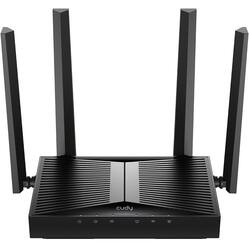
Pick a router that fits your internet speed. Check the router’s features. Make sure it supports gigabit speeds. Dual-band routers are good. They reduce interference. Look for models with good reviews.
You don’t need to spend a lot. Good routers come in many price ranges. Compare prices online. Look for sales or discounts. Refurbished models can save money. Always read reviews before buying.
Credit: www.bestbuy.com
Frequently Asked Questions
Can Spectrum Gigabit Work With Any Router?
Yes, Spectrum Gigabit is compatible with most modern routers. Ensure your router supports gigabit speeds for optimal performance. Using a high-quality router improves your internet experience and network stability.
Do I Need A Special Router For Spectrum Gigabit?
No special router is required, but a gigabit-capable router is recommended. Routers with at least 802. 11ac or Wi-Fi 5 support provide better speed and coverage for Spectrum Gigabit.
How To Choose The Best Router For Spectrum Gigabit?
Look for routers supporting gigabit Ethernet ports and the latest Wi-Fi standards. Features like MU-MIMO and dual-band support enhance speed and device connectivity. Also, consider brand reliability and customer reviews.
Can I Use My Old Router With Spectrum Gigabit?
You can use an old router if it supports gigabit speeds. However, older routers may limit your internet speed and reduce overall network performance. Upgrading is advisable for the best experience.
Conclusion
Spectrum Gigabit works with most modern routers, but check compatibility first. Your router should support high speeds to avoid slow internet. Using an old or basic router might limit your connection. Choose a router with Gigabit Ethernet and strong Wi-Fi signals.
This ensures you get the best performance from Spectrum Gigabit. Always update your router’s firmware for better security and speed. A good router helps you enjoy fast and stable internet at home. Simple steps can improve your online experience significantly.


