Are you tired of dead zones and slow Wi-Fi in your home? Your Eero mesh Wi-Fi system can fix that—but only if you place the nodes in the right spots.
Finding the best placement for your Eero mesh nodes can make a huge difference in speed, coverage, and reliability. In this guide, you’ll discover simple tips that help you get the strongest signal exactly where you need it. Keep reading to unlock the full power of your Eero system and enjoy seamless internet everywhere in your space.
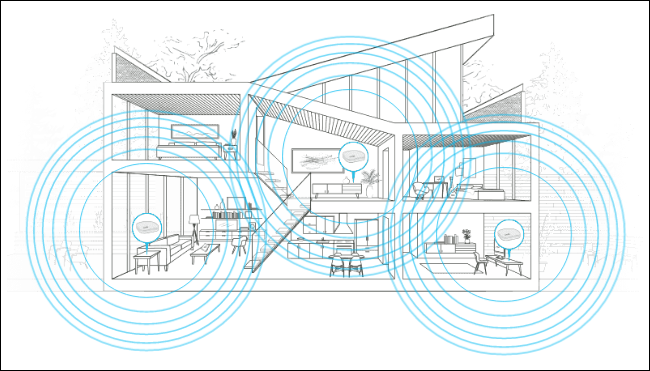
Credit: medium.com
Eero Mesh Wifi Basics
Eero mesh wifi helps spread internet all over your home. It uses small devices called nodes.
These nodes work together to give strong wifi in every room. This stops weak signals and dead zones.
How Eero Mesh Works
Eero mesh uses multiple nodes to create one big wifi network. Each node connects to others wirelessly.
When you move around your home, your device switches to the closest node. This keeps your connection fast and stable.
- One node connects to your modem
- Other nodes spread wifi to far rooms
- Nodes talk to each other to share data
- Devices connect to the strongest node
Benefits Of Mesh Wifi
Mesh wifi gives better coverage than a single router. It covers large areas with strong signals.
It also helps when many devices use wifi at once. The network stays fast without slowdowns.
- Eliminates wifi dead zones in your home
- Keeps wifi strong on all floors
- Easy to add more nodes if needed
- Devices connect automatically to best node
- Simple setup and management with an app
Ideal Node Placement
Placing Eero mesh WiFi nodes correctly helps your network work better. Good placement gives strong signals in every room.
It is important to think about where to put each node for the best coverage and speed.
Central Location Importance
Put the main Eero node in the center of your home. This helps the signal reach all areas evenly.
A central spot reduces dead zones and gives better internet to all rooms.
Avoiding Physical Obstacles
Keep nodes away from metal objects, thick walls, and appliances. These things block WiFi signals.
Open spaces work best because the signal can travel without problems.
- Do not place nodes inside cabinets or behind TVs.
- Avoid placing nodes near microwaves or cordless phones.
- Try to keep nodes on higher surfaces, like shelves.
Optimal Distance Between Nodes
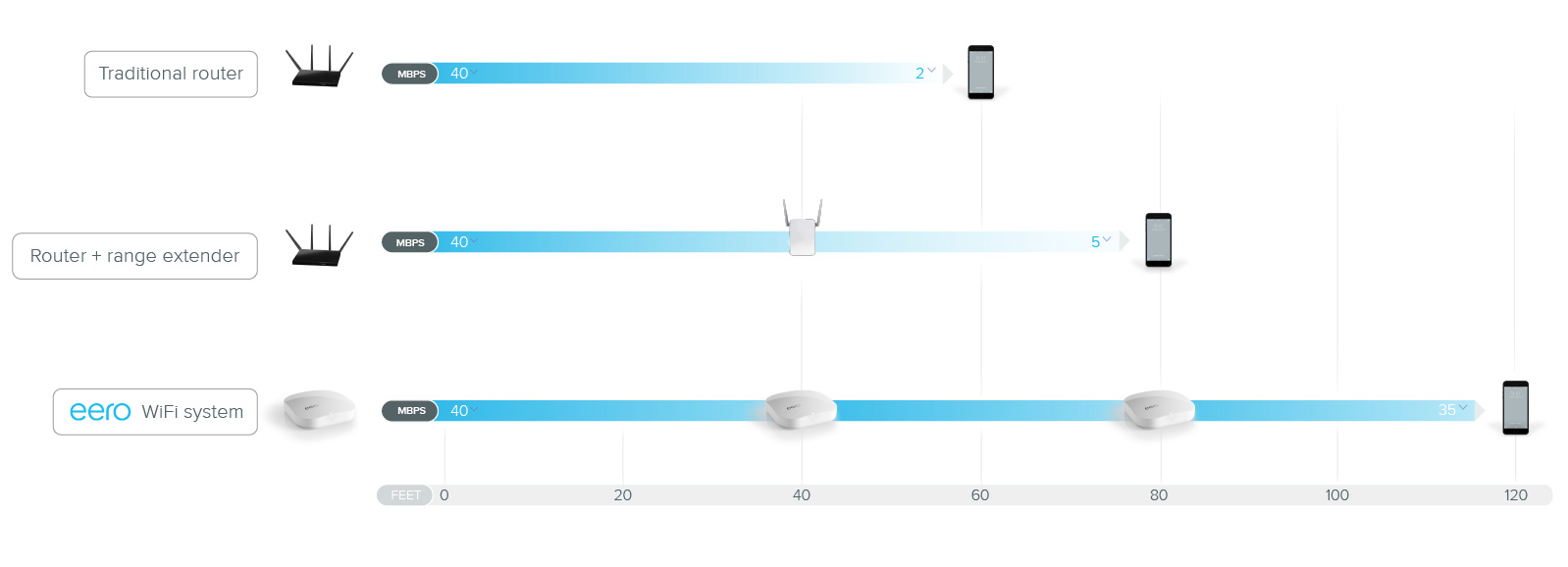
Keep Eero nodes about 30 to 40 feet apart. This distance keeps the signal strong between them.
If nodes are too far, the signal weakens. If they are too close, they may cause interference.
- Measure the space to place nodes evenly.
- Adjust placement if signals are weak in some rooms.
- Use the Eero app to check signal strength and move nodes as needed.
Room-by-room Placement Tips
Placing Eero mesh WiFi nodes well improves your home internet. Each room has unique needs. Adjust placement to get better coverage.
This guide gives tips for living rooms, bedrooms, kitchens, and dining areas. Use these tips to get strong WiFi signals everywhere.
Living Room Setup
Put a node in the living room center for best signal spread. Avoid placing it behind large furniture or inside cabinets. Keep it off the floor and away from thick walls.
- Place near the TV or entertainment center
- Keep at least 2 feet from electronic devices
- Position at eye level or higher
- Avoid corners and enclosed spaces
Bedroom Placement
In bedrooms, place nodes where you use devices most. This might be near the desk or bedside. Keep the node clear of metal objects and mirrors to reduce interference.
| Placement Location | Reason |
| Near desk | Strong signal for work or study |
| Beside bed | Good for phones and tablets |
| On dresser | Elevated and away from clutter |
Kitchen And Dining Areas
Kitchens can block WiFi signals with appliances. Place nodes away from microwaves and refrigerators. Dining areas benefit from central placement to cover the whole space.
- Keep nodes on open counters or shelves
- Avoid placing near metal surfaces
- Use a node between kitchen and dining space if large
- Check signal strength and adjust if needed
Handling Large Homes
Large homes need strong WiFi signals in every room. Eero mesh WiFi helps by spreading the signal evenly.
Placing the Eero nodes correctly makes the WiFi faster and more reliable throughout your home.
Adding Extra Nodes
Extra nodes help cover big areas and remove weak spots. Place nodes where the signal starts to drop.
Try to keep nodes in open spaces and avoid walls or metal objects that block signals.
- Place nodes about 30 feet apart
- Keep nodes in central open areas
- Avoid placing nodes near microwaves or thick walls
Using Wired Backhaul
Wired backhaul connects nodes with Ethernet cables. It gives faster and more stable links than wireless.
Use wired backhaul if your home has Ethernet ports or you can run cables between nodes.
- Connect nodes with Ethernet cables
- Reduces wireless interference
- Improves speed and reliability
Multi-story Placement Strategies
Place one node on each floor near the stairs or open areas. This helps signals reach all levels.
Keep nodes away from thick floors and metal objects. These can block signals between floors.
- Put nodes near the center of each floor
- Place nodes close to staircases or open spaces
- Avoid basements or areas with thick concrete
Troubleshooting Coverage Issues
Good WiFi coverage is key for a strong home network. Eero mesh WiFi nodes can help extend your signal.
This guide helps you fix common coverage problems by placing your nodes better.
Spotting Dead Zones
Dead zones are areas where your WiFi signal is weak or missing. These spots cause slow speeds and dropped connections.
Check your home for dead zones by testing the signal in each room. Use a phone or laptop to see where WiFi is poor.
Node Repositioning Techniques
Moving your Eero nodes can fix many coverage problems. Try these tips to find the best spots:
- Place nodes in open areas, not inside cabinets.
- Keep nodes at least 20 feet apart for good coverage.
- Avoid placing nodes near large metal objects or thick walls.
- Elevate nodes off the floor for better signal spread.
- Use the Eero app to check signal strength between nodes.
Signal Interference Solutions
Other devices can interfere with your WiFi signal. Here is a table of common causes and fixes:
| Interference Source | How to Fix |
| Microwaves | Move nodes away from kitchen area |
| Bluetooth Devices | Turn off unused devices or move nodes |
| Baby Monitors | Place nodes in different rooms |
| Thick Walls | Use more nodes to cover blocked areas |
| Other WiFi Networks | Change your WiFi channel in settings |
Credit: justjooz.com
Advanced Placement Tips
Placing Eero Mesh Wifi nodes correctly improves your network performance. Discover advanced tips for optimal placement.
These tips help you make the most out of your Eero system. Learn how to use app features and customize settings.
Leveraging Eero App Features
The Eero app provides tools to enhance your network’s performance. Use these features for better placement insights.
- Run a speed test to identify weak spots
- Check device connections for optimal node placement
- Utilize the signal strength meter for adjustments
Customizing Network Settings
Customizing network settings can improve your Wifi coverage. Adjust settings based on your home layout.
| Setting | Recommendation |
| SSID Name | Use a unique and recognizable name |
| Channel Selection | Set to automatic for best results |
| Guest Network | Enable for visitors to secure main network |
Integrating With Smart Home Devices
Integrate Eero with smart home devices for seamless connectivity. Proper placement ensures devices work efficiently.
Smart speakers and cameras benefit from strong Wifi signals. Position nodes where signal strength is highest.

Credit: www.amazon.ca
Frequently Asked Questions
Where Should I Place The Main Eero Mesh Wifi Node?
Place the main Eero node near your modem in a central location. Avoid placing it inside cabinets or behind large objects. This helps ensure strong signal distribution throughout your home.
How Far Apart Should Eero Nodes Be Placed?
Keep Eero nodes about 30 feet apart for optimal coverage. Avoid placing them too close or too far to maintain a strong mesh connection. Adjust placement based on home size and layout.
Can Eero Nodes Be Placed On Different Floors?
Yes, placing Eero nodes on different floors improves whole-home coverage. Position nodes near stairways or open spaces for better signal flow between floors. This helps reduce dead zones in multi-story homes.
Should Eero Nodes Be Placed Near Walls Or Open Spaces?
Place Eero nodes in open spaces away from thick walls. Walls and metal objects can block wifi signals, reducing performance. Open areas help maximize signal strength and mesh network efficiency.
Conclusion
Placing Eero mesh WiFi nodes well improves your home internet. Spread nodes evenly for strong, consistent signals. Avoid walls and metal objects that block WiFi. Keep nodes in open areas, not hidden. Test different spots to find the best coverage.
Good placement means fewer dead zones and faster speeds. Enjoy smooth streaming, gaming, and browsing everywhere. Simple steps make your WiFi work better. Try these tips to get the most from your Eero system.