Are you tired of weak WiFi signals and dead zones in your two-story home? You’re not alone.
Figuring out how many mesh WiFi nodes you need can feel confusing and overwhelming. But don’t worry—getting the right number of nodes can transform your internet experience, giving you fast, reliable coverage in every room. You’ll discover exactly how many mesh WiFi nodes your home needs and why it matters, so you can finally enjoy seamless connectivity without frustration.
Keep reading to unlock the secret to strong WiFi on every floor.
Factors Affecting Node Count
Choosing the right number of mesh WiFi nodes is important for good internet coverage. Several factors affect how many nodes you need for a two-story home.
Understanding these factors helps you plan the best WiFi setup for your house.
Home Size And Layout
The size of your home decides how far the WiFi signal must travel. Bigger homes need more nodes to cover all areas.
The layout also matters. Open floor plans let signals travel easier. Rooms separated by walls or floors may need extra nodes.
- Large square footage means more nodes
- Open layouts require fewer nodes
- Multiple rooms and floors need more nodes
Wall And Floor Materials
Walls and floors can block WiFi signals. Thick or dense materials reduce signal strength and coverage.
Materials like concrete, brick, and metal cause more interference than wood or drywall.
- Concrete and brick block signals more
- Metal can reflect or absorb signals
- Wood and drywall allow signals to pass easier
Device Density And Usage
The number of devices connected affects how many nodes you need. More devices need stronger and wider coverage.
Heavy internet use like streaming or gaming also requires better WiFi performance and possibly more nodes.
- Many devices need more nodes
- Streaming and gaming need stable connections
- Light use may work with fewer nodes
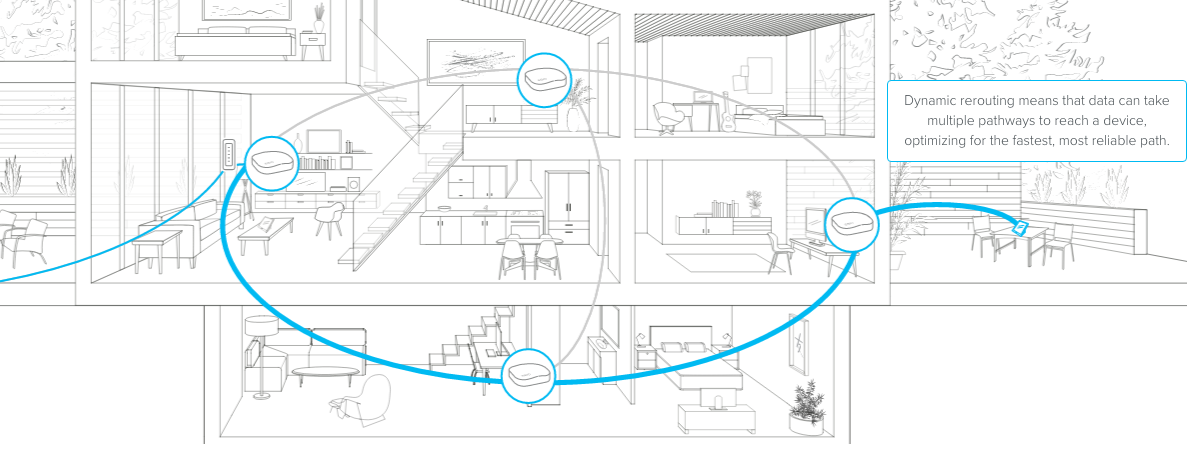
Credit: blog.eero.com
Ideal Node Placement
Placing mesh WiFi nodes correctly helps cover your entire two-story home. Good placement ensures strong signal and fast internet.
This guide focuses on where to place nodes on each floor and how to avoid signal problems.
First Floor Positioning
Place the main mesh node near the center of the first floor. Avoid placing it close to thick walls or metal objects.
- Keep the node in an open area for better signal spread.
- Place nodes away from microwaves or cordless phones.
- Use a shelf or table about waist height for the node.
- Make sure the node is not hidden behind furniture.
Second Floor Positioning
Put the second-floor node directly above or close to the first-floor node. This helps signals travel easily between floors.
| Room | Suggested Node Spot |
| Bedroom | Near center, on a desk or shelf |
| Hallway | Open area, away from metal doors |
| Living Room | Above first-floor main node, clear space |
Avoiding Signal Interference
Signal interference lowers WiFi speed and range. Keep nodes away from devices that cause interference.
Common interference sources include:
- Microwaves
- Bluetooth devices
- Wireless cameras
- Thick concrete or brick walls
Recommended Node Numbers
Mesh WiFi systems use multiple nodes to cover your home with strong WiFi. The number of nodes depends on your home size and layout.
This guide helps you decide how many mesh nodes you need for a 2-story home.
Small 2-story Homes
Small 2-story homes are usually under 1,500 square feet. One or two nodes can cover this size well.
Place one node on each floor for even WiFi coverage.
- 1 node can work if placed in a central spot
- 2 nodes give better speed and coverage
- Avoid placing nodes near thick walls or metal objects
Medium 2-story Homes
Medium 2-story homes range from 1,500 to 2,500 square feet. You will need more nodes for good coverage.
Three nodes spread across both floors work best. One node on the first floor and two on the second floor is common.
- 1 node near the router on the first floor
- 2 nodes placed to cover far rooms on the second floor
- Keep nodes in open areas for best signal
Large 2-story Homes
Large 2-story homes are over 2,500 square feet. They need several nodes to avoid dead zones.
Four or more nodes help cover large spaces and thick walls. Spread nodes evenly on both floors.
- 2 nodes on the first floor in main living areas
- 2 or more nodes on the second floor near bedrooms
- Consider extra nodes for basements or large open spaces

Credit: www.reddit.com
Mesh Wifi Setup Tips
Setting up mesh wifi in a two-story home can improve your internet coverage. You need the right number of nodes and good placement.
This guide helps you choose devices, optimize settings, and keep your network working well.
Choosing Compatible Devices
Pick mesh wifi nodes that work well together. Using devices from the same brand can make setup easier.
Check if the devices support the latest wifi standards like Wi-Fi 6 for better speed and range.
- Use nodes from the same manufacturer
- Choose devices with good speed ratings
- Look for support of current wifi standards
Optimizing Network Settings
Place your mesh nodes in open areas, not inside cabinets or behind furniture. This helps signals travel better.
Set your wifi channels to avoid interference from neighbors. Use automatic channel selection if available.
- Place nodes on different floors centrally
- Keep nodes at least 30 feet apart
- Use automatic or less busy wifi channels
Regular Maintenance
Update your mesh system’s firmware often. Updates fix bugs and improve performance.
Restart your router and nodes sometimes to keep your network fast and stable.
- Check for firmware updates monthly
- Reboot devices if internet slows down
- Monitor network speed and coverage regularly
Troubleshooting Coverage Issues
Mesh WiFi systems help cover large homes with strong signals. Sometimes, coverage issues happen. Knowing how to find and fix these problems can improve your WiFi.
This guide explains how to identify dead zones, test signal strength, and adjust node positions for better coverage in a two-story home.
Identifying Dead Zones
Dead zones are areas with weak or no WiFi signal. These spots cause slow internet or dropped connections. You can find dead zones by checking where devices struggle to connect or have low speeds.
- Walk through your home with a mobile device.
- Note areas with slow or no internet.
- Check different floors and rooms.
- Test near walls, corners, and appliances.
Signal Strength Testing
Testing signal strength helps you understand WiFi coverage. Use a signal meter app on your phone or laptop to measure the WiFi signal in various spots.
| Signal Level | Quality |
| -30 dBm | Excellent |
| -50 dBm | Good |
| -70 dBm | Weak |
| -90 dBm | No Signal |
Check signal levels in dead zones and compare them to good areas. This helps decide if you need more nodes or better placement.
Adjusting Node Positions
Changing the location of mesh nodes can fix coverage problems. Nodes should be near dead zones but not too far from each other.
- Place nodes in open spaces, away from thick walls.
- Avoid metal objects and large appliances near nodes.
- Try moving nodes closer to dead zones step by step.
- Check signal strength after each move.
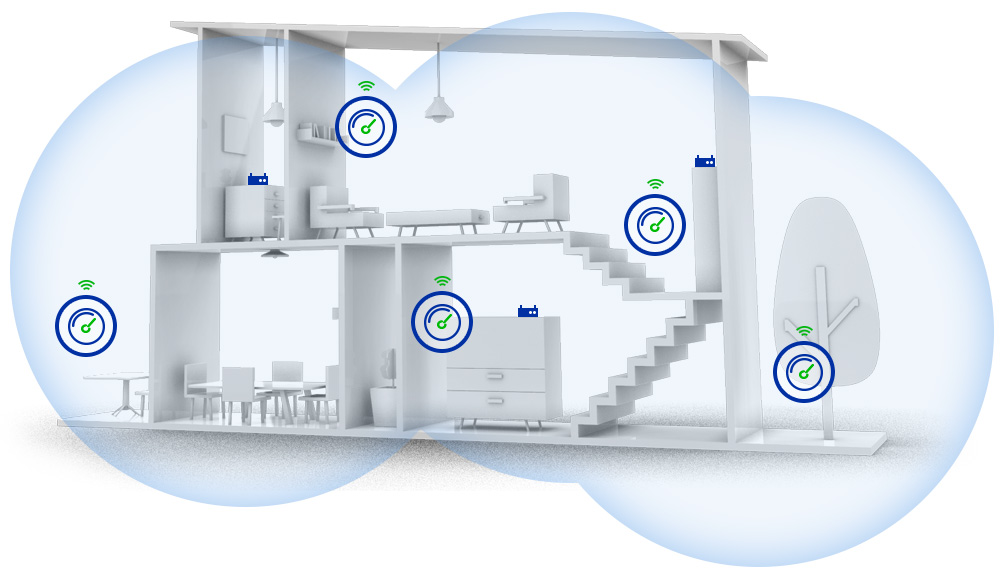
Credit: caspianprimesolutions.com
Frequently Asked Questions
How Many Mesh Wifi Nodes For A Two-story House?
Typically, 2 to 3 mesh WiFi nodes cover a two-story home effectively. One node on each floor ensures strong coverage. Placement near high-use areas boosts signal strength and reduces dead zones.
Where Should I Place Mesh Nodes In A Two-story Home?
Place one node near the main router on the first floor. Position additional nodes centrally on each floor. Avoid walls and electronic interference for optimal signal distribution and speed.
Can One Mesh Wifi Node Cover Both Floors?
One node may cover both floors in small homes. However, signal strength and speed decrease with distance and obstacles. Multiple nodes ensure reliable coverage and better performance throughout the house.
Does House Size Affect Number Of Mesh Nodes Needed?
Yes, larger homes require more mesh nodes for full coverage. Complex layouts and thick walls increase the number of nodes needed. Assess your home’s size and structure before deciding.
Conclusion
A two-story home usually needs two to three mesh WiFi nodes. One node connects to the modem, and others spread the signal. Place nodes on each floor for the best coverage. Walls and floors can block WiFi signals. More nodes might help if your home is large or has many walls.
Keep nodes in open spaces, away from metal objects. This setup helps you enjoy strong internet everywhere in your home. Choose the right number of nodes for smooth, fast WiFi all day.