Are you tired of WiFi dead zones in your home? Imagine having strong, reliable internet in every corner, whether you’re in the basement, backyard, or attic.
That’s exactly what Orbi Mesh WiFi promises—seamless coverage without frustrating drops. But how much area can it actually cover? Understanding the Orbi Mesh WiFi coverage area can help you decide if it’s the right solution for your space. Keep reading to discover how Orbi can transform your internet experience and finally say goodbye to weak signals.
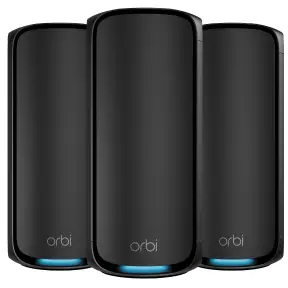
Credit: www.netgear.com
Orbi Mesh Wifi Basics
Orbi Mesh Wifi is a system that helps spread Wifi signals evenly in your home. It covers large areas with strong internet connection.
This system uses multiple devices to create one big Wifi network. It stops weak signals and dead zones.
How Orbi Mesh Works
Orbi Mesh works by linking several devices called nodes. These nodes talk to each other to share the Wifi signal.
The main node connects to your modem. Other nodes spread the signal to farther rooms and floors.
- Devices connect to the nearest node automatically
- Nodes use a special backhaul channel for fast data transfer
- The system changes connections to keep speed strong
Components Of Orbi System
The Orbi system has two main parts: the router and the satellites. Each has a role in spreading Wifi.
The router connects to your internet source. Satellites sit in rooms away from the router to extend coverage.
- Router:Connects to the modem and sends Wifi signal
- Satellites:Receive signal from router and boost it further
- App:Helps set up and manage the system easily

Credit: www.amazon.ca
Coverage Area Factors
The coverage area of your Orbi Mesh WiFi depends on many factors. These factors affect how far the signal can reach in your home or office.
Understanding these factors helps you get better WiFi coverage and fewer dead spots.
Router Placement Tips
Place your Orbi router in a central spot for the best signal spread. Avoid corners or hidden places.
Keep the router elevated, like on a shelf or table, to reduce obstructions.
- Place the router in an open area
- Keep it away from metal objects
- Elevate the router above the floor
- Avoid placing it near windows or outside walls
Influence Of Walls And Floors
Walls and floors can block or weaken WiFi signals. Thick walls reduce signal strength more than thin ones.
Different materials like concrete, brick, or metal affect the signal in different ways. Floors also reduce signal when the router and device are on different levels.
- Concrete and brick block signals strongly
- Wood and drywall reduce signals less
- Metal surfaces reflect or absorb signals
- Signals weaken when passing through multiple floors
Interference Sources
Other electronic devices can interfere with your Orbi WiFi signal. These devices use the same radio frequencies or create noise.
Interference causes slow speeds and dropped connections. Keep devices that cause interference away from your router.
- Microwaves operate on 2.4 GHz frequency
- Bluetooth devices share frequencies with WiFi
- Baby monitors can cause signal noise
- Wireless phones may interfere with the signal
Maximizing Coverage
Orbi Mesh WiFi systems help spread WiFi signals across large spaces. You can make your coverage stronger and wider with a few easy tips.
Good WiFi coverage means fewer dead spots and better internet in every room. Learn how to get the best from your Orbi system.
Optimal Satellite Placement
Place your Orbi satellites where the signal is strong but still near the main router. Avoid walls, metal, and big objects that block signals.
Try to put satellites in open areas, about halfway between the router and the farthest device you want to connect.
- Keep satellites visible to the main router
- Place them high, not on the floor
- Stay away from microwaves and cordless phones
Adding More Satellites
Adding more Orbi satellites can extend your WiFi range. Each satellite covers a new area and links back to the main router.
Use satellites in large homes or offices to cover spots with weak signals. Don’t place them too close to each other to avoid overlap.
- Use up to six satellites for big coverage
- Space satellites evenly throughout the building
- Check signal strength after adding each satellite
Using Wired Backhaul
A wired backhaul uses Ethernet cables to connect satellites to the router. This method makes the connection faster and more stable.
Wired backhaul reduces wireless traffic between devices. It is best if your home has Ethernet wiring or you can use powerline adapters.
- Connect satellites with Ethernet cables
- Reduce wireless interference
- Improve speed and reliability

Credit: www.netgear.com
Performance Optimization
Orbi Mesh Wifi systems cover large areas with strong signals. To get the best speed and range, you need to optimize performance. Small changes can improve your connection and reduce dead zones.
Focus on keeping your system updated, adjusting settings, and managing devices. These steps help your Orbi mesh work smoothly and cover your space well.
Firmware Updates
Firmware updates fix bugs and add new features. They also improve the system’s speed and security. Check for updates regularly to keep your Orbi system running well.
Automatic updates are helpful, but you can also update manually from the Orbi app or web interface. Always update all nodes to keep the network stable.
Channel Settings
Channel settings control how your Orbi uses radio frequencies. Choosing the best channel reduces interference from other networks. This helps your wifi stay fast and clear.
You can set channels automatically or pick them yourself. Use a wifi analyzer app to find less crowded channels near you. Change both 2.4 GHz and 5 GHz channels for better results.
- Scan for nearby wifi networks
- Choose channels with fewer users
- Apply changes and test connection speed
Device Prioritization
Device prioritization lets you give fast wifi to important devices. You can prioritize work laptops, streaming devices, or gaming consoles. This keeps these devices running smoothly even with many users.
Set priorities in the Orbi app by selecting devices and marking their priority level. This makes sure critical devices get bandwidth first during busy times.
Troubleshooting Coverage Issues
Orbi Mesh Wifi covers large areas with strong signals. Sometimes, coverage problems may occur.
Fixing these issues helps you get better wifi in every corner of your home.
Identifying Dead Zones
Dead zones are places without wifi signal or very weak signal. These areas cause slow internet or no connection.
Check your home for dead zones by walking with a device and testing the wifi speed in different rooms.
- Use a wifi speed test app on your phone or tablet
- Look for spots with low or no signal
- Mark these areas for further action
Resetting And Reconfiguring
Resetting your Orbi system can fix many coverage problems. This clears errors and refreshes settings.
After resetting, set up your Orbi nodes again. Place them away from walls and metal objects for better signal.
- Press the reset button on your router and satellites
- Wait for all devices to restart
- Follow setup instructions in the Orbi app
- Place satellites in open spaces between dead zones and the router
When To Contact Support
If coverage issues continue after resets and moving devices, contact Orbi support. They can help diagnose problems.
Support can guide you through advanced fixes or check if your devices have hardware issues.
- Contact support if wifi drops often in some areas
- Ask for help if devices do not connect after setup
- Reach out if you see error lights on your Orbi units
Comparing Orbi With Other Mesh Systems
Mesh Wi-Fi systems help to extend internet coverage in homes and offices. Orbi is one popular choice among many. Let’s see how Orbi compares with other mesh systems.
We will look at coverage range, speed, reliability, price, and features. This helps you decide which system suits your needs best.
Coverage Range Comparison
Coverage is a key factor in choosing a mesh Wi-Fi system. Orbi offers wide coverage, but how does it stack up against others?
| System | Coverage Area (sq ft) |
| Orbi | 5,000 |
| Google Nest | 4,400 |
| Eero | 5,000 |
Speed And Reliability
Speed and reliability are important for seamless browsing and streaming. Orbi promises high speeds. Let’s compare its performance with others.
- Orbi: Consistent speed with fewer interruptions.
- Google Nest: Good speed but may slow with many devices.
- Eero: Reliable but speed varies with distance.
Price And Features
Price and features are crucial for budget-friendly choices. Orbi has advanced features, but at what cost?
Frequently Asked Questions
What Is The Orbi Mesh Wifi Coverage Area Range?
Orbi Mesh WiFi typically covers up to 5,000 square feet per system. Adding satellites extends coverage to larger homes or offices. This ensures strong, seamless WiFi throughout your space without dead zones.
How Many Devices Can Orbi Mesh Support Simultaneously?
Orbi Mesh supports up to 100 connected devices at once. It manages multiple connections efficiently, maintaining fast speeds. This makes it ideal for smart homes and busy networks.
Can Orbi Mesh Improve Wifi In Large Homes?
Yes, Orbi Mesh improves WiFi by using multiple nodes. Each node extends coverage and reduces signal loss. This creates a reliable network even in large or multi-story homes.
How Do Orbi Satellites Extend Wifi Coverage?
Orbi satellites connect wirelessly to the main router. They rebroadcast the signal to distant areas. This expands WiFi range and eliminates weak spots in your home.
Conclusion
Orbi Mesh Wifi covers a large area with strong signals. It helps reduce dead zones in your home or office. You can enjoy fast internet in many rooms at once. Setting it up is simple and does not take long.
Think about your space size before choosing the right model. Good wifi makes work and entertainment easier every day. Orbi offers a reliable way to stay connected. Choose the system that fits your needs best.