Are you tired of weak Wi-Fi signals and dead zones in your multi-story home? If your internet connection drops every time you move between floors, you’re not alone.
Choosing the right Wi-Fi setup can make a huge difference in how smoothly your devices connect and perform. But is a mesh Wi-Fi system really better than a traditional router for covering every corner of your house? Keep reading to find out which option gives you stronger, faster internet on every floor—so you can enjoy seamless streaming, gaming, and browsing without frustration.
Benefits Of Mesh Wifi
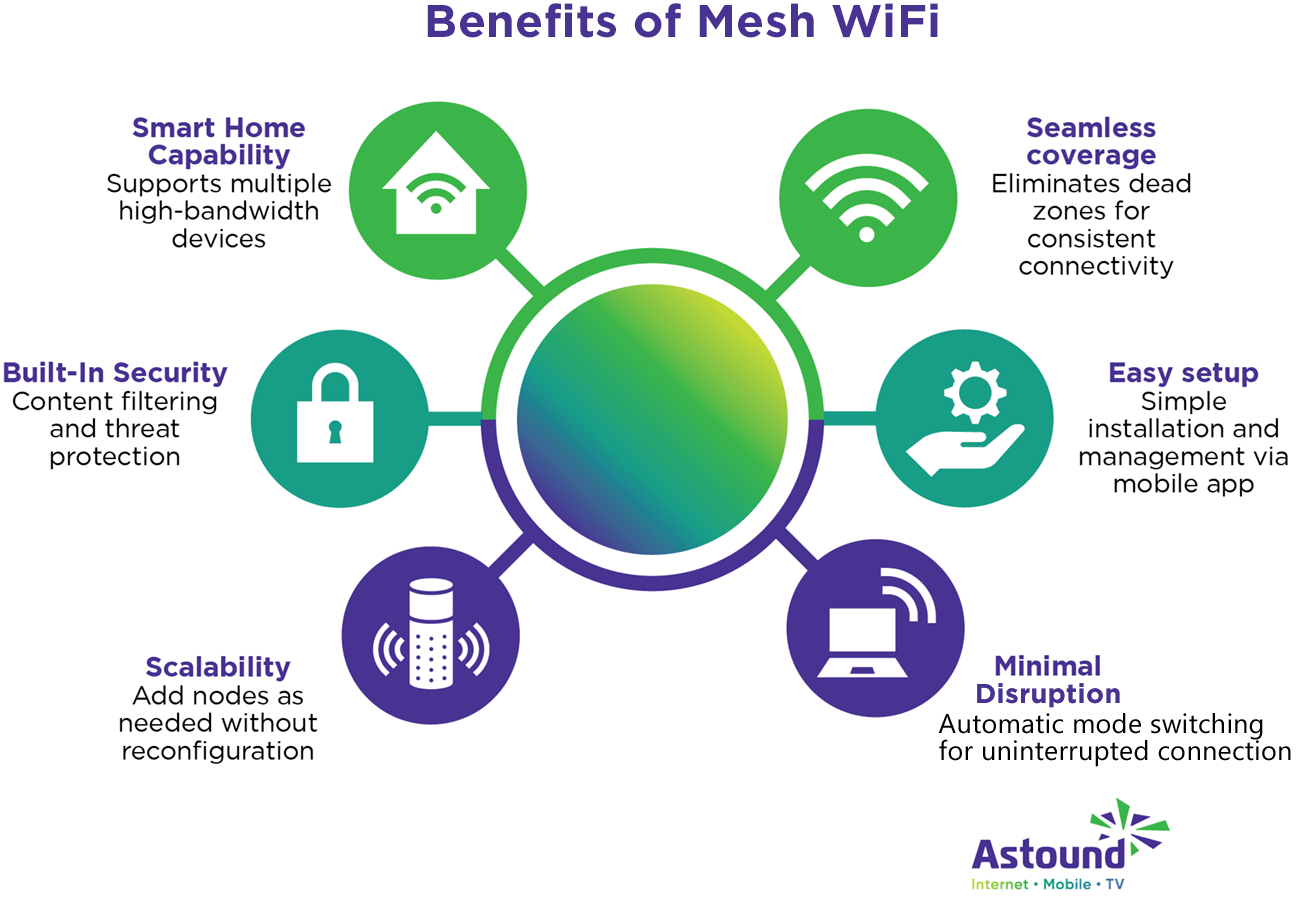
Mesh wifi systems offer a strong wireless network for multi-story homes. They help avoid dead zones and keep your connection steady on every floor.
This setup works well with many devices and grows easily as your home network needs change.
Seamless Coverage Across Floors
Mesh wifi uses several units that work together to cover all floors. This design lets the signal move smoothly from one floor to another without drops.
Unlike traditional routers, mesh systems reduce weak spots and keep your devices connected as you move around your home.
Easy Expansion And Scalability
Mesh wifi systems let you add more units to cover larger or more complex areas. This keeps the wifi strong no matter how big your home is.
- Add a mesh unit in the basement for better downstairs coverage
- Place another unit on the top floor for strong signals upstairs
- Expand your network without complicated setup or new wiring
Smart Device Management
Mesh wifi systems often come with apps that help you control your network easily. You can see all connected devices and manage them in one place.
| Feature | Benefit |
|---|---|
| Device Prioritization | Give faster speeds to important devices |
| Parental Controls | Limit internet time for children’s devices |
| Network Monitoring | See real-time device use and block unknown devices |
Limitations Of Traditional Routers
Traditional routers often struggle to provide strong WiFi signals in multi-story homes. Their design focuses on a central point, which can lead to weak coverage on other floors.
Many users face dead zones and slow connections despite having good internet plans. Extending WiFi with extra devices can also add complexity and frustration.
Signal Weakness In Multi-story Homes
WiFi signals from traditional routers weaken as they pass through walls and floors. This problem grows in homes with several stories. The higher or lower floors may get poor signal strength.
Dead Zones And Connectivity Issues
Dead zones are areas in the house where WiFi does not reach or is very slow. These spots cause frustration and disrupt daily online activities like streaming and video calls.
- Basements often have weak signals due to thick walls.
- Rooms far from the router lose connection or speed.
- Interference from appliances can worsen connectivity.
- Multiple floors create physical barriers for signals.
Complex Setup For Extenders
Adding extenders to improve coverage can be tricky. Users must place extenders carefully to avoid poor connection between devices. Setup often requires extra steps and troubleshooting.
| Challenge | Description |
|---|---|
| Placement | Extenders need to be close enough to the router and dead zones. |
| Compatibility | Not all extenders work well with every router brand or model. |
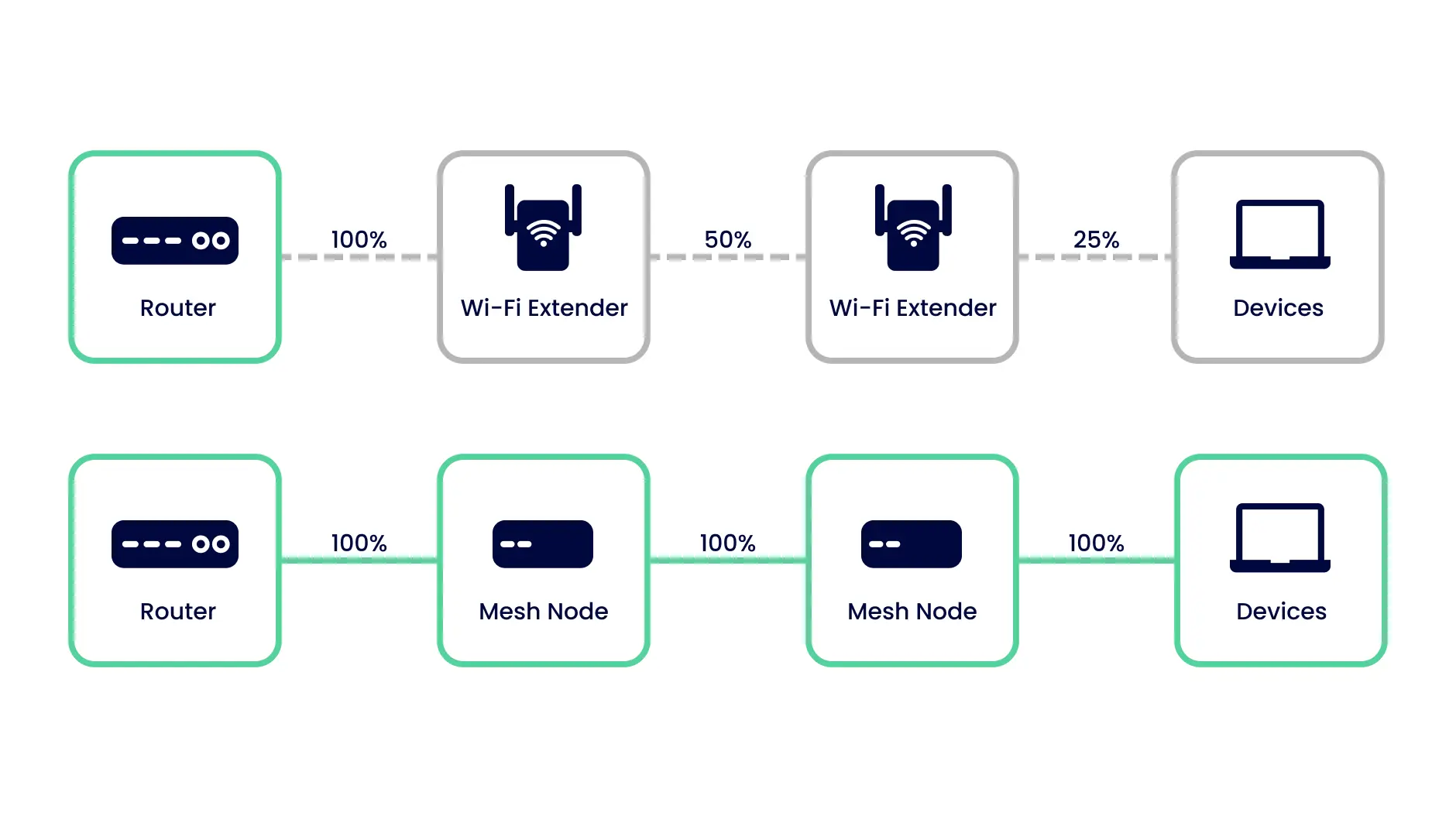
| Speed Loss | Extenders can reduce overall network speed due to signal repeating. |
| Setup Difficulty | Configuring extenders can confuse users without technical skills. |
How Mesh Wifi Works
Mesh wifi uses multiple devices to spread internet in your home. It helps cover big spaces with strong signals.
This system is good for multi-story houses where one router can’t reach every room well.
Multiple Nodes And Their Roles
Mesh wifi has several nodes placed around your home. Each node works together to share the internet.
One node usually connects to the modem. Other nodes spread the wifi to different floors and rooms.
- Main node links to the internet source
- Secondary nodes extend wifi coverage
- Nodes communicate to keep signal strong
Self-healing Networks
If one node stops working, the mesh network fixes itself. The other nodes find new ways to send data.
This helps keep your internet stable even if a device has issues or loses power.
- Network detects broken or slow nodes
- Data reroutes to working nodes
- Internet stays connected without interruption
Unified Network Name
Mesh wifi uses one network name (SSID) for all nodes. Your devices connect to the best node automatically.
This means no need to switch networks when you move around your home.
- Single wifi name for entire home
- Devices switch nodes without dropping connection
- Simple setup and use for everyone
Credit: www.pocket-lint.com
Router Setup In Multi-story Homes
Setting up a router in a multi-story home can be tricky. Walls and floors block Wi-Fi signals. This makes the internet slow or spotty in some rooms.
You must plan the router placement and network design carefully. This helps get good Wi-Fi coverage on every floor.
Placement Strategies
Put the main router in a central spot in your home. This spreads the signal evenly to all floors. Avoid placing it near thick walls or metal objects.
Try to keep the router high, like on a shelf or table. This helps the Wi-Fi travel better up and down stairs.
- Place the router near the middle of the house
- Keep it away from thick walls and metal appliances
- Elevate the router to improve signal reach
Using Range Extenders
Range extenders boost Wi-Fi signals to far parts of your home. They catch the router’s signal and repeat it. This helps cover dead zones on other floors.
Extenders work best if placed where they still get a strong signal from the main router. Placing them too far lowers speed and performance.
- Put extenders halfway between router and dead zones
- Use multiple extenders for large homes
- Remember extenders may reduce speed a bit
Wired Vs Wireless Backhaul
Backhaul means how devices like extenders or mesh points connect to the main router. Wired backhaul uses Ethernet cables. Wireless backhaul uses Wi-Fi signals.
Wired backhaul is faster and more stable. It avoids Wi-Fi interference from walls and floors. Wireless backhaul is easier to set up but can be slower and less reliable.
- Wired backhaul needs Ethernet cables installed
- Wired gives better speed and stable connection
- Wireless backhaul is simpler but may lose speed
- Choose wired for best performance in multi-story homes
Performance Comparison
Choosing the right WiFi system is important for multi-story homes. Both mesh WiFi and traditional routers offer different benefits.
This comparison focuses on key performance areas to help you decide which fits your home better.
Speed And Latency
Speed shows how fast data moves through your network. Latency is the delay before data transfer starts.
Mesh WiFi systems often maintain steady speeds on all floors. They reduce latency by using multiple access points.
- Mesh WiFi spreads signals evenly, reducing speed drops.
- Routers may lose speed on upper floors due to distance.
- Mesh systems lower latency by connecting devices to the nearest node.
- Routers can have higher latency far from the device.
Coverage Consistency
Coverage means how well WiFi signals reach all parts of your home. Consistency means signal strength stays stable everywhere.
Mesh WiFi offers better coverage in multi-story homes. It uses several nodes placed around the house to cover dead zones.
- Mesh nodes work together to cover all floors evenly.
- Traditional routers may have weak spots on upper floors.
- Mesh systems automatically switch devices to the best node.
- Routers rely on one device, limiting coverage.
Device Handling Capacity
Device handling capacity is how many devices the network supports at once. This is important for busy homes.
Mesh WiFi systems are designed to manage many devices smoothly. Routers can slow down when too many connect at once.
- Mesh networks share the device load among nodes.
- Routers may get overloaded with many devices.
- Mesh WiFi helps keep speeds stable with many users.
- Routers may cause lag when many devices connect.
Cost Considerations
Choosing between mesh WiFi and a traditional router can be challenging. Cost is a big factor to consider, especially in multi-story homes.
Let’s explore the financial aspects of both options. We will look at initial investment, long-term value, and maintenance expenses.
Initial Investment
A traditional router often costs less upfront. You may need a single unit for a small home.
Mesh WiFi systems require multiple units. This makes them more expensive initially.
- Single Router: $50 – $200
- Mesh WiFi System: $200 – $500
Long-term Value
Mesh WiFi offers better coverage in large homes. This can reduce future upgrades.
Traditional routers may need extenders or upgrades. This can increase costs over time.
- Mesh WiFi covers all floors
- Routers may need additional extenders
Maintenance Expenses
Maintaining a mesh system can be simpler. They often have automatic updates.
Routers may require manual updates. This can be time-consuming and costly.
- Mesh: Automatic updates
- Routers: Manual updates needed
Security Features
Choosing between mesh WiFi and a traditional router for a multi-story home involves many factors. Security is one of the most important considerations.
Let’s explore how mesh WiFi systems and traditional routers differ in terms of security features.
Encryption Standards
Encryption standards protect your network from unauthorized access. Both mesh WiFi systems and traditional routers offer robust encryption options.
- WPA3 for stronger security
- WPA2 as a common standard
- Advanced encryption for sensitive data
Automatic Updates
Automatic updates ensure that your network is protected against the latest threats. Mesh WiFi systems often handle updates seamlessly.
Parental Controls And Guest Access
Parental controls and guest access features are essential for managing who uses your network and how it is used. Mesh systems provide flexible options.
| Feature | Mesh WiFi | Traditional Router |
| Parental Controls | Yes | Yes |
| Guest Access | Easy Setup | Manual Setup |
Credit: inseego.com
Choosing The Right Solution
Deciding between mesh WiFi and a traditional router is important for multi-story homes. The right choice improves internet speed and coverage.
This guide helps you pick the best option based on your home’s needs and devices.
Home Size And Layout
Large or multi-story homes often have WiFi dead spots. Walls and floors can block signals from one router.
Mesh WiFi uses multiple units to cover all areas evenly. This helps avoid weak signals in far rooms.
- Small homes may work well with one strong router
- Mesh systems fit best in homes with many walls or floors
- Open layouts may need fewer mesh units
Number Of Devices
Homes with many devices need a system that handles high traffic well. Routers can slow down if many devices connect.
Mesh WiFi handles multiple devices better by spreading connections across units. This keeps speeds steady.
- Few devices work fine with a single router
- Many devices benefit from mesh WiFi
- Smart home gadgets increase device count quickly
Budget And Future Needs
Routers usually cost less upfront than mesh systems. But mesh units offer easier upgrades later.
Think about future needs like adding more devices or expanding coverage. Mesh systems are flexible for growth.
- Budget limits may favor a single router
- Mesh WiFi can be added to over time
- Consider long-term internet use and device growth
Credit: www.astound.com
Frequently Asked Questions
What Is Mesh Wifi And How Does It Work?
Mesh WiFi uses multiple nodes to create a seamless network. Each node communicates to cover large areas, ideal for multi-story homes. It eliminates dead zones and offers consistent speeds throughout the house.
Why Is Mesh Wifi Better For Multi-story Homes?
Mesh WiFi provides even coverage on every floor. It avoids signal drops caused by walls and floors. This ensures stable, fast internet in all rooms, unlike traditional routers.
Can Mesh Wifi Replace A Traditional Router?
Yes, mesh WiFi systems include a main router and satellite nodes. They work together to provide better coverage and performance than a single router.
How Does Mesh Wifi Improve Internet Speed Upstairs?
Mesh nodes reduce distance to devices and avoid obstructions. This means less signal loss and faster speeds on upper floors compared to a single router.
Conclusion
Mesh WiFi often works better than a single router in multi-story homes. It spreads the signal evenly across floors and rooms. This means fewer dead spots and stronger connections everywhere. Setting up mesh systems is usually simple and flexible. For bigger homes, mesh networks keep all devices online smoothly.
Choosing the right system depends on your house size and internet needs. Overall, mesh WiFi offers a smart way to improve home internet on multiple floors.