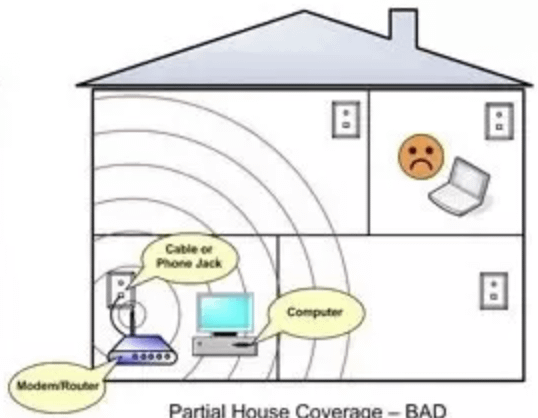
Are you struggling with slow WiFi or dead zones in your 3000 sq ft house? You’re not alone.
Getting the right number of mesh WiFi nodes can make all the difference in how fast and reliable your internet feels throughout your home. But how many do you actually need to cover every room without wasting money or creating interference?
You’ll discover exactly how to figure out the perfect setup for your space. Keep reading, and you’ll soon enjoy seamless WiFi that follows you everywhere.

Credit: www.reddit.com
Factors Affecting Mesh Wifi Coverage
Mesh wifi systems help cover large homes with strong internet signals. The number of nodes needed depends on many things. Understanding these factors helps you place nodes correctly.
Good coverage means fewer dead zones and better connection. Let’s look at key factors that affect mesh wifi coverage in a 3000 sq ft house.
House Layout And Walls
The shape and size of your house matter for wifi coverage. Open floor plans let signals travel farther. Many rooms and hallways can block signals.
Walls block or weaken wifi signals. Thicker walls reduce coverage more than thin ones. The number and placement of walls affect how many nodes you need.
- Open layouts need fewer nodes
- Many rooms need more nodes
- Long hallways may require extra nodes
Materials Impacting Signal
Different building materials affect wifi signals in different ways. Some materials block signals more than others. Knowing what your walls and floors are made of helps plan coverage.
Metal, concrete, and brick block signals strongly. Wood and drywall block less. Glass may let signals pass but sometimes weakens them.
- Metal walls or pipes reduce signal
- Concrete walls block most signals
- Brick walls lessen signal strength
- Wood and drywall allow better signals
- Glass offers moderate signal passage
Device Usage And Bandwidth Needs
The number of devices in your home changes your wifi needs. More devices use more bandwidth. High-bandwidth activities need strong coverage.
Streaming videos, gaming, and video calls use more data than browsing or emails. Plan your mesh system to handle your typical device use.
- More devices need more nodes
- High-bandwidth needs require stronger signals
- Devices far from nodes may get weak signals

Credit: www.amazon.com
Estimating Number Of Nodes
Mesh WiFi systems use multiple nodes to cover large spaces. You need to estimate how many nodes fit your 3000 sq ft house. This helps to avoid weak signals and dead zones.
The number of nodes depends on coverage per node, house size, and floors. Let’s look at these factors to find the right number of nodes.
Typical Coverage Per Node
Each mesh WiFi node covers a certain area. Most nodes cover about 1000 to 1500 sq ft indoors. Walls and furniture can reduce this coverage.
Open spaces help nodes cover more area. Dense walls or metal objects reduce coverage, so you may need more nodes in those cases.
- Average indoor coverage: 1000 – 1500 sq ft per node
- Thick walls reduce coverage
- Open spaces increase coverage
Calculating Based On Square Footage
Divide your house size by coverage per node to get the number of nodes. For a 3000 sq ft house, divide 3000 by coverage per node.
If each node covers 1200 sq ft, you need about 2.5 nodes. Since you can’t have half nodes, round up to 3 nodes.
| Coverage per Node (sq ft) | Nodes Needed for 3000 sq ft |
|---|---|
| 1000 | 3 |
| 1200 | 3 |
| 1500 | 2 |
Adjusting For Multiple Floors
Multiple floors affect WiFi signals. Signals weaken when passing through floors. You may need extra nodes for each floor.
For a two-story 3000 sq ft house, split the area by floors. Then calculate nodes for each floor. Add extra nodes for better coverage.
- Split total sq ft by number of floors
- Calculate nodes per floor
- Add one extra node if floors have thick ceilings
Placement Tips For Optimal Coverage
Choosing the right spots for your mesh wifi nodes matters. Proper placement helps cover your entire 3000 sq ft house. It reduces dead zones and keeps signals strong.
This guide looks at three key factors. Learn about centralized vs distributed placement, avoiding interference, and where to set nodes high or low.
Centralized Vs Distributed Placement
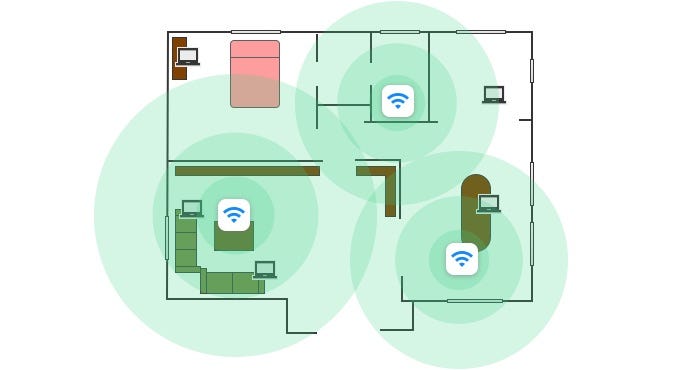
Centralized placement means putting the main node in the middle of your home. Other nodes connect around it. Distributed placement spreads nodes evenly across rooms.
- Centralized nodes work best in open floor plans.
- Distributed nodes suit large homes with many walls.
- Place nodes near where you use the internet most.
- Keep nodes in sight of each other for strong links.
Avoiding Signal Interference
Interference lowers wifi speed and coverage. Keep nodes away from devices that send out signals or block wifi waves.
| Common Interference Source | Impact on Signal |
| Microwaves | Blocks 2.4 GHz signals |
| Thick Walls | Weakens signal strength |
| Bluetooth Devices | Causes channel noise |
| Metal Objects | Reflects and scatters signals |
Elevated Vs Low Placement
Placing nodes higher often improves signal reach. Low placement can trap signals and cause dropouts. Aim for spots about 5 to 7 feet off the floor.
- Place nodes on shelves or high furniture.
- Avoid floors, basements, or behind large objects.
- Keep nodes away from windows to reduce outdoor interference.
Credit: medium.com
Popular Mesh Wifi Systems
Mesh wifi systems help cover large homes with strong internet. They use multiple nodes to spread wifi signals evenly.
Choosing the right number of nodes is important for a 3000 sq ft house. This keeps your connection fast in every room.
Top Brands For Large Homes
Some brands are known for strong mesh wifi systems. They offer good coverage and easy setup for big houses.
- Netgear Orbi
- Google Nest Wifi
- Amazon Eero
- TP-Link Deco
- Linksys Velop
These brands have models made for large areas. They often include 2 or 3 nodes in one package.
Features To Look For
Look for fast speeds that match your internet plan. This stops slowdowns and buffering.
Check how many nodes come with the system. More nodes cover bigger homes better.
- Easy setup and app control
- Good security features
- Strong signal range per node
- Support for many devices at once
Also, pick a system that updates automatically. This keeps your network safe and fast.
Budget-friendly Options
You can find mesh wifi systems that cost less but still work well. These are good if you want to save money.
- TP-Link Deco M4
- Amazon Eero 6
- Google Nest Wifi (single pack)
Buying a 2 or 3 node pack can cover 3000 sq ft. Adding more nodes later is possible if needed.
Troubleshooting And Maintenance
Mesh WiFi systems help cover large homes with strong internet. For a 3000 sq ft house, keeping nodes working well is key. Troubleshooting and maintenance keep your network fast and reliable.
This guide covers how to find dead zones, update firmware, and move nodes to improve coverage.
Detecting Dead Zones
Dead zones are areas with weak or no WiFi signal. Finding them helps place nodes better. Use a phone or laptop to check signal strength in every room.
- Walk around your house with a device
- Check WiFi signal bars or use speed test apps
- Note rooms with slow or no connection
- Mark these dead zones on a map of your home
- Plan to add or move nodes to cover these spots
Firmware Updates
Firmware updates fix bugs and improve mesh node performance. Check for updates regularly on your mesh system app or website.
| Update Task | Reason |
| Check for new firmware | Fix bugs and improve speed |
| Download update | Get latest features |
| Install update on each node | Keep all nodes stable |
| Restart nodes if needed | Apply changes properly |
Repositioning Nodes
Moving mesh nodes can fix weak WiFi areas. Place nodes in open spaces, away from walls and metal objects. Keep nodes within range of each other.
- Place nodes in central locations for best coverage
- Avoid placing nodes near thick walls or appliances
- Keep nodes 30 to 50 feet apart for good signal flow
- Test WiFi after moving nodes to check improvement
- Adjust positions if some dead zones remain
Frequently Asked Questions
How Many Mesh Wifi Nodes Cover 3000 Sq Ft Effectively?
For a 3000 sq ft house, 3 to 4 mesh WiFi nodes usually provide optimal coverage. This setup ensures strong signals in all rooms and reduces dead zones.
Does House Layout Affect The Number Of Mesh Nodes?
Yes, complex layouts with multiple walls or floors may require more mesh nodes for seamless coverage. Open floor plans typically need fewer nodes.
Can One Mesh Node Cover 1000 Sq Ft Efficiently?
Generally, one mesh node covers about 800 to 1200 sq ft, depending on obstacles and interference. Coverage varies by device strength and home environment.
Is It Better To Use More Smaller Nodes Or Fewer Powerful Ones?
Using more smaller nodes often improves coverage and reduces dead zones better than fewer powerful nodes. This creates a more reliable WiFi mesh network.
Conclusion
A 3000 sq ft house usually needs three to four mesh WiFi nodes. This setup helps cover all rooms with strong internet signals. Placing nodes near busy areas improves your connection. Too few nodes cause slow speeds and dead zones.
Too many can create confusion and overlap. Choose a system that fits your home size and layout. Good WiFi keeps everyone connected smoothly. Simple steps lead to better internet at home.


