Is your WiFi slowing down just when you need it most? If you live in a big house, you know the frustration of weak signals and slow internet in certain rooms.
You might wonder if mesh WiFi can really solve this problem and boost your speed throughout your home. This article will help you understand how mesh WiFi works and whether it can give you the fast, reliable connection you deserve.
Keep reading to find out if mesh WiFi is the upgrade your big house needs.

Credit: www.pcmag.com
How Mesh Wifi Works
Mesh wifi uses multiple devices to spread internet signals across large areas. It helps keep a strong connection in every room.
Each device, called a node, talks to others to share wifi smoothly. This way, your devices get a good signal everywhere in your house.
Basic Mesh Network Setup
A mesh network starts with one main node connected to your modem. Other nodes are placed around your home to cover dead spots.
These nodes work together to create one large wifi network. Your devices connect to the closest node automatically.
- Main node links to the internet
- Additional nodes spread signals in different rooms
- Nodes communicate and balance traffic
- Devices switch to the strongest node
Difference From Traditional Routers
Traditional routers send wifi from one point. Signal strength drops the farther you move away from it.
Mesh wifi uses many nodes. They create a wider, stronger signal that covers big houses better than one router.
- Single router covers limited area
- Mesh system uses multiple nodes for full coverage
- Devices stay connected without interruption
- Mesh adapts to changes and keeps signal strong
Speed Challenges In Large Homes
Large homes often face wifi speed problems. The bigger the house, the harder it is to get strong wifi everywhere.
Mesh wifi systems can help by spreading the signal. Still, some issues can slow down the internet speed.
Common Wifi Obstacles
Many things block wifi signals inside a house. These obstacles reduce speed and cause dead zones.
- Electronic devices create interference
- Furniture and appliances block signals
- Metal objects reflect or absorb wifi waves
- Thick walls make it harder for signals to pass
- Floors and ceilings weaken wifi strength
Impact Of Distance And Walls
Wifi signals get weaker as they travel farther from the router or mesh node. This drop lowers internet speed.
Walls, especially thick or concrete ones, reduce signal strength a lot. Each wall can cut the signal by half or more.
- Distance causes slower data transfer
- More walls mean weaker wifi signals
- Open spaces let signals travel better
- Using multiple mesh nodes can reduce distance problems
Benefits Of Mesh Wifi For Speed
Mesh wifi systems help improve internet speed in large houses. They spread wifi signals evenly across all rooms.
These systems make your internet connection faster and more reliable. They fix problems caused by distance and walls.
Seamless Coverage
Mesh wifi uses multiple devices called nodes. These nodes work together to cover the whole house.
This means you can move around without losing your wifi signal. The system connects you to the strongest node automatically.
Automatic Band Steering
Mesh wifi can switch your device between different frequency bands. It moves devices to the best band for speed.
This helps avoid slowdowns caused by crowded wifi channels. Your device uses the fastest band without any action needed.
Reduced Dead Zones
Dead zones are places where wifi is weak or missing. Mesh wifi places nodes in many spots to reduce these areas.
With fewer dead zones, your internet speed stays strong everywhere. You get better connection in every room.

Credit: www.reddit.com
Factors Affecting Mesh Wifi Speed
Mesh wifi systems help spread internet in big houses. They use multiple devices called nodes.
Many things affect the speed of mesh wifi. Understanding these helps improve your internet.
Number Of Nodes
The number of nodes changes wifi coverage and speed. Too few nodes may cause weak signals.
More nodes can cover larger areas but may reduce speed if not set well.
- Few nodes might not reach all rooms
- Many nodes increase coverage but need good setup
- Too many nodes can cause signal overlap and slowdowns
Node Placement
Where you put the nodes matters a lot for speed. Place them in open spaces for best results.
Walls, floors, and furniture block signals and slow down wifi.
- Keep nodes away from thick walls and metal objects
- Place nodes in central locations on each floor
- Try not to put nodes too far from each other
Internet Plan Limitations
Your internet plan sets a maximum speed limit. Mesh wifi cannot go faster than your plan.
Upgrading your plan can improve overall speed if your mesh system is good.
- Check your plan’s max download and upload speeds
- Match your mesh system to your internet plan
- Faster plans help if your mesh wifi is well set up
Comparing Mesh Wifi To Range Extenders
Mesh Wifi systems and range extenders both aim to improve internet coverage in big houses. They work differently but serve a similar purpose.
Understanding their differences helps in choosing the right solution for your home network needs.
Speed Differences
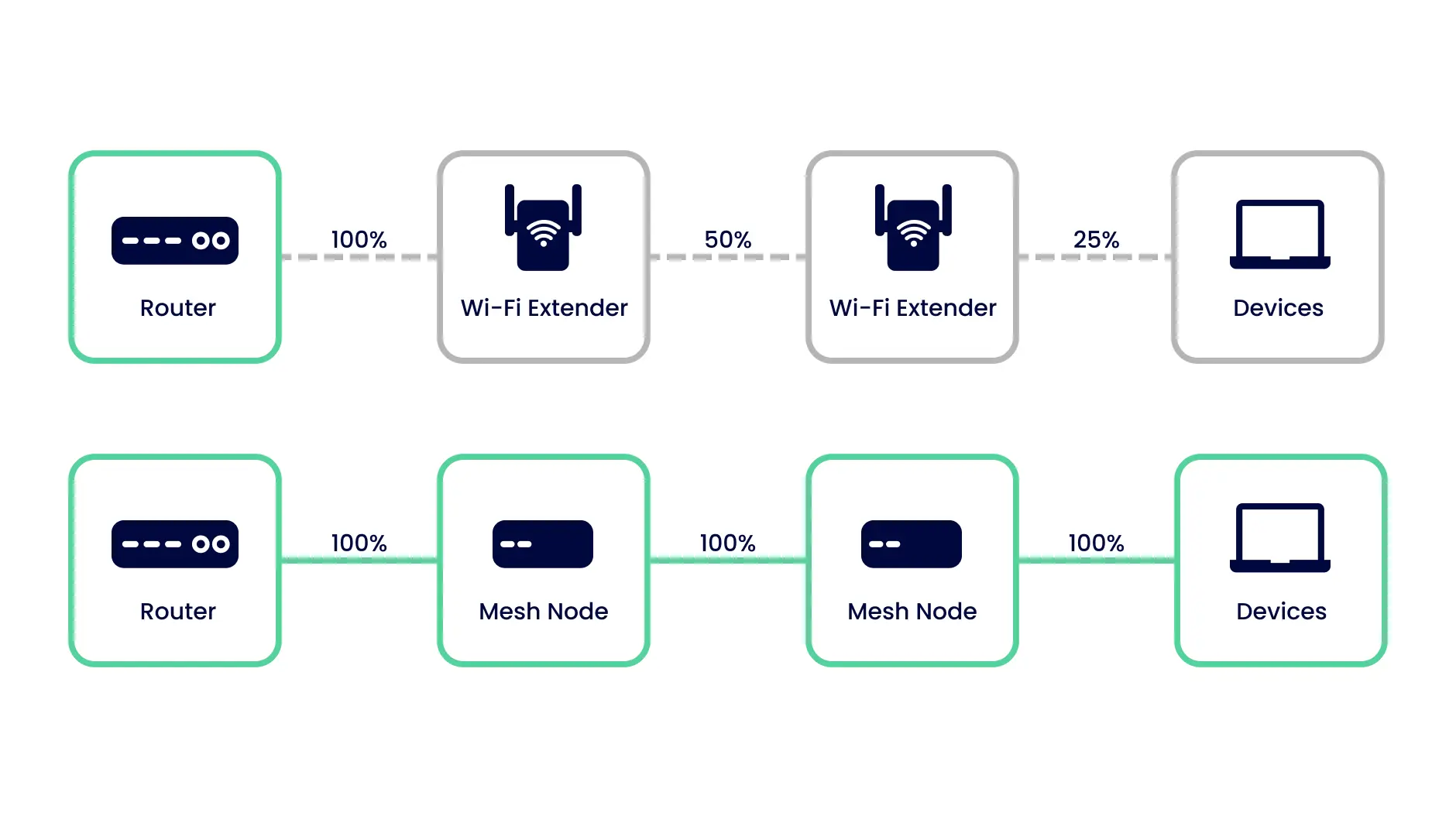
Speed is a key factor when considering Mesh Wifi and range extenders. Mesh systems are designed to provide consistent speed across the home.
| Feature | Mesh Wifi | Range Extender |
| Speed Consistency | High | Variable |
| Signal Strength | Strong | Weakens over distance |
Ease Of Use
Ease of use is important for setting up and managing your network. Mesh Wifi systems are often user-friendly with simple setup processes.
- Plug in the Mesh Wifi nodes.
- Connect them through a mobile app.
- Follow easy steps to complete the setup.
Network Stability
Network stability ensures a reliable connection for all your devices. Mesh systems create a seamless network that adjusts to optimize performance.
In contrast, range extenders may cause dropped connections or frequent buffering, especially when moving between rooms.
Tips To Maximize Mesh Wifi Speed
Mesh Wifi systems can help improve internet speed in big houses. They work by using multiple nodes to cover large areas with strong signals.
Getting the best speed requires some setup. Follow these tips to make your mesh Wifi perform better.
Optimizing Node Locations
Placement of mesh nodes is crucial. Place nodes in open areas to reduce interference.
Avoid placing nodes near thick walls or metal objects. These can weaken the signal.
- Put nodes in central locations
- Keep nodes off the floor
- Ensure clear line of sight between nodes
Firmware Updates
Firmware updates improve mesh Wifi performance. They fix bugs and enhance features.
Check for updates regularly. Install them to keep your network running smoothly.
- Enable automatic updates if possible
- Visit the manufacturer’s website for the latest firmware
- Follow instructions carefully to avoid issues
Device Compatibility
Ensure all devices are compatible with your mesh system. Some older devices may slow down your network.
Check device settings for compatibility modes. Adjust settings to improve speed.
- Upgrade old devices if needed
- Check for dual-band support
- Use Ethernet for stationary devices
Popular Mesh Wifi Systems For Large Homes
Mesh wifi systems help cover big houses with strong internet signals. They use several units to spread wifi evenly.
Choosing the right mesh system can improve your wifi speed and reduce dead zones in large spaces.
Top Brands And Models
Some brands are known for their reliable mesh wifi systems. Popular models fit well in large homes and offer good coverage.
- Netgear Orbi:Offers strong signals and easy setup. Good for homes over 5,000 sq ft.
- Google Nest Wifi:Simple design and stable connections for large spaces.
- Amazon Eero Pro 6:Supports many devices and provides good coverage.
- TP-Link Deco X60:Affordable with fast speeds and strong range.
- Asus ZenWiFi AX:High speed and good for tech-savvy users in big homes.
Price Vs Performance
| Brand & Model | Approximate Price | Coverage Area | Speed | Best For |
| Netgear Orbi | $300 – $500 | Up to 5,000 sq ft | Up to 3Gbps | Large homes with many devices |
| Google Nest Wifi | $200 – $400 | Up to 4,400 sq ft | Up to 2.2Gbps | Simple setup, good for families |
| Amazon Eero Pro 6 | $250 – $450 | Up to 6,000 sq ft | Up to 1Gbps | Smart home integration |
| TP-Link Deco X60 | $200 – $350 | Up to 5,800 sq ft | Up to 3Gbps | Budget option with good speed |
| Asus ZenWiFi AX | $300 – $400 | Up to 5,500 sq ft | Up to 6.6Gbps | High speed for tech users |
Credit: inseego.com
Frequently Asked Questions
Does Mesh Wifi Increase Internet Speed In Large Homes?
Mesh WiFi improves overall coverage, reducing dead zones in big houses. It may not boost your internet plan speed but ensures faster, stable connections throughout.
How Does Mesh Wifi Differ From Traditional Routers?
Mesh WiFi uses multiple nodes to create a unified network. Traditional routers rely on a single device, limiting coverage and speed in larger spaces.
Can Mesh Wifi Handle Multiple Devices Efficiently?
Yes, mesh WiFi supports many devices by distributing traffic evenly. This reduces congestion and maintains consistent speeds in busy home networks.
Is Mesh Wifi Worth The Investment For Big Houses?
For large homes with connectivity issues, mesh WiFi is valuable. It offers better coverage and reliable speeds, justifying its cost for improved user experience.
Conclusion
Mesh WiFi can help boost internet speed in large homes. It spreads the signal evenly to all rooms. This reduces dead zones and weak connections. Devices stay connected without interruptions. Setting up mesh systems is usually simple and user-friendly. While results vary, many users see better coverage and faster speeds.
Consider your home size and layout before choosing. Mesh WiFi offers a practical way to improve your network. A stronger, more reliable connection makes daily tasks easier. Worth thinking about if slow WiFi frustrates you.