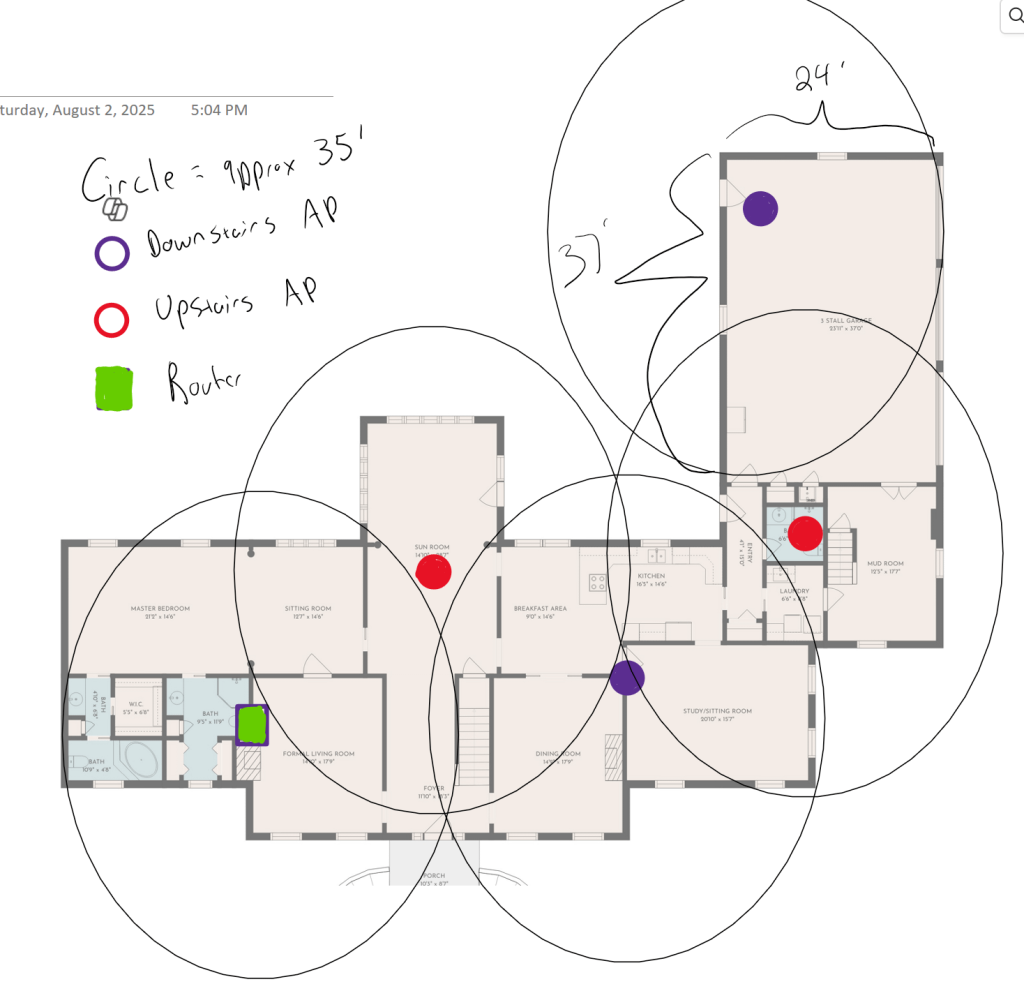
Are you wondering how many nodes you need for a WiFi 7 mesh system in your 6000 sq ft house? Getting the right number can make all the difference between spotty internet and seamless streaming everywhere.
You want every corner of your home covered with fast, reliable WiFi—no dead zones, no frustration. But too few nodes mean weak signals, and too many can be a waste of money. You’ll discover the perfect balance to keep your entire space connected effortlessly.
Keep reading, and you’ll learn exactly how to set up your WiFi 7 mesh for the best performance in your large home.
Wifi 7 Mesh Basics
Wifi 7 is the newest wireless technology standard for home networks. It aims to provide faster speeds and better coverage. Mesh systems use multiple nodes to spread wifi signals evenly in large spaces.
For a 6000 sq ft house, Wifi 7 mesh can offer strong and stable connections by placing enough nodes in key locations. Understanding Wifi 7 features helps decide how many nodes are needed.
Key Features Of Wifi 7
Wifi 7 improves speed, capacity, and reliability. It uses wider channels and advanced methods to reduce interference.
- Supports 320 MHz channel width for faster data transfer
- Uses Multi-Link Operation (MLO) to send data over multiple bands
- Improves latency for smoother connections
- Supports 4K QAM for higher data density
- Better handling of many devices connected at once
Benefits Over Previous Wifi Standards
Compared to older wifi versions, Wifi 7 offers many advantages. It handles more devices and covers larger areas better.
| Feature | Wifi 6 | Wifi 7 |
| Max Speed | 9.6 Gbps | 30 Gbps |
| Channel Width | 160 MHz | 320 MHz |
| Latency | Low | Lower |
| Multi-Link Operation | No | Yes |
| Device Handling | Good | Better |

Credit: www.pcgamer.com
Factors Affecting Node Count
Choosing the right number of WiFi 7 mesh nodes is important for good coverage. A 6000 sq ft house needs several nodes to avoid weak signals.
Different factors affect how many nodes you need. Knowing these helps place nodes correctly and avoid dead spots.
House Layout And Construction
The shape and size of your house change how WiFi signals travel. Large open areas need fewer nodes than many small rooms.
Building materials like brick, concrete, and metal block WiFi signals. Wood and drywall let signals pass easier.
- Open floor plans need fewer nodes
- Thick walls require more nodes
- Multiple floors need nodes on each level
Interference And Signal Obstacles
Other electronic devices can cause WiFi interference. Microwaves, cordless phones, and baby monitors can reduce signal strength.
Furniture, mirrors, and large appliances also block or reflect WiFi signals. This creates weak spots around the house.
- Avoid placing nodes near metal objects
- Keep nodes away from interfering electronics
- Place nodes in open areas for better reach
Device Density And Usage
The number of devices using WiFi affects node count. More devices need more nodes for stable connections.
High bandwidth activities like streaming or gaming need stronger signals. Place nodes where devices are used most.
- Many devices need more nodes
- Streaming areas need better coverage
- Place nodes near heavy usage spots
Estimating Nodes For 6000 Sq Ft
Wifi 7 mesh networks improve internet coverage in large homes. Choosing the right number of nodes helps avoid weak signals.
In a 6000 sq ft house, estimating nodes depends on coverage range and placement. Let’s explore key factors for good wifi.
Typical Coverage Per Node
Each Wifi 7 mesh node covers a certain area depending on walls and interference. On average, one node covers about 1000 to 1500 sq ft indoors.
| Environment | Coverage Area per Node |
| Open Space | 1500 sq ft |
| Typical Home (many walls) | 1000 sq ft |
| Dense Walls or Floors | 800 sq ft |
Node Placement Strategies
Correct node placement avoids dead zones and keeps strong signals throughout the home. Nodes should be evenly spaced and avoid barriers.
- Place nodes near the center of coverage areas
- Keep nodes away from metal objects and microwaves
- Place nodes on different floors for multi-story houses
- Use line of sight when possible between nodes
- Ensure nodes connect wirelessly without large gaps
Balancing Coverage And Performance
Adding more nodes increases coverage but may reduce speed due to interference. Balance is key for best wifi performance.
| Number of Nodes | Estimated Coverage (sq ft) | Performance Notes |
|---|---|---|
| 3 Nodes | 3000 – 4500 | Good speed, might miss some areas |
| 4 Nodes | 4000 – 6000 | Balanced coverage and speed |
| 5+ Nodes | 6000+ | Full coverage, possible speed drop if too close |

Credit: www.amazon.ca
Optimizing Node Placement
Placing WiFi 7 mesh nodes correctly boosts your home network. Good placement covers your whole 6000 sq ft house.
Plan your node setup well. This helps avoid weak signals and slow internet.
Ideal Locations For Mesh Nodes
Put mesh nodes in open spaces near the center of rooms. Avoid walls and large metal objects.
- Place nodes on shelves or tables, not on the floor
- Keep nodes away from microwaves and cordless phones
- Distribute nodes evenly across the house for balanced coverage
- Use higher spots for better signal spread
Avoiding Dead Zones
Dead zones have weak or no WiFi signal. These happen in corners or behind thick walls.
| Common Dead Zone Areas | Why Signal Drops |
| Basements | Concrete walls block signals |
| Bathrooms | Small space with tile and plumbing |
| Far corners | Distance from main router |
| Closets | Enclosed spaces with no airflow |
Using Signal Mapping Tools
Signal mapping apps help find weak spots and test node locations. Use these tools before final setup.
Popular signal mapping tools include:
- NetSpot
- Ekahau HeatMapper
- WiFi Analyzer
- OpenSignal
Walk through your house with the app to see signal strength in each room.
Hardware Recommendations
Choosing the right hardware is key for a Wifi 7 mesh system in a 6000 sq ft house. Good hardware ensures fast, stable internet across all rooms.
Consider the number of nodes and their capabilities. This will help cover large spaces without dead zones or slow speeds.
Top Wifi 7 Mesh Systems
Pick mesh systems designed for high speed and wide coverage. Look for systems that support Wifi 7 standards and offer multiple nodes.
- System A: Supports up to 3 nodes, each with tri-band Wifi 7.
- System B: Offers 4 nodes with strong signal range and low latency.
- System C: Comes with 2 nodes but high-performance antennas for large homes.
Node Specifications To Consider
Nodes must have features that suit a large house. Look at speed, antenna type, and coverage area per node.
| Specification | Recommended Value |
| Max Speed | Up to 10 Gbps |
| Antenna Type | Multi-directional, high gain |
| Coverage per Node | At least 2000 sq ft |
| Number of Bands | At least 3 (tri-band) |
| Ethernet Ports | 2 or more per node |
Setup And Maintenance Tips
Setting up a Wifi 7 mesh network in a 6000 sq ft house can be challenging. It is important to ensure proper coverage and smooth connectivity.
A well-planned setup and regular maintenance keep your network running efficiently. Below are some tips to help you.
Configuring Your Mesh Network
Start by placing your nodes in strategic locations. They should be evenly spaced throughout the house.
Ensure that no node is too far from another. This helps in maintaining strong signals.
- Keep nodes away from thick walls and metal objects
- Place nodes on open shelves or tables
- Ensure each node has a power source
Regular Performance Checks
Conduct regular checks to ensure your network is performing well. Test the speed and reliability in different areas of your home.
Make sure all areas receive adequate coverage. Adjust node positions if you find weak spots.
- Use network testing apps
- Note areas with weak signals
- Reposition nodes if necessary
Firmware Updates And Security
Keep your mesh network secure by regularly updating the firmware. Updates often include security patches.
Make sure your network settings are secure. Use strong passwords and enable encryption.
- Check for updates monthly
- Enable automatic updates if available
- Use WPA3 for better security

Credit: www.pcmag.com
Frequently Asked Questions
How Many Wifi 7 Nodes Cover 6000 Sq Ft House?
For a 6000 sq ft house, 3 to 4 Wifi 7 mesh nodes typically provide full coverage. This depends on home layout and wall materials. More nodes may be needed for complex floor plans or dense walls to maintain strong signal strength.
Why Use Wifi 7 Mesh For Large Homes?
Wifi 7 mesh offers faster speeds, lower latency, and better reliability in large homes. It ensures seamless coverage across multiple rooms. Its advanced technology supports many devices with stable connections, ideal for a 6000 sq ft house.
Where Should Wifi 7 Nodes Be Placed In A Large House?
Place Wifi 7 nodes evenly across the house, ideally in open areas. Avoid thick walls and electronic interference. Central locations on each floor improve signal distribution and reduce dead zones in large homes.
Can One Wifi 7 Node Cover 6000 Sq Ft Alone?
One Wifi 7 node cannot reliably cover 6000 sq ft alone. Large areas cause signal drop and dead zones. Multiple nodes ensure consistent coverage and faster speeds throughout the entire house.
Conclusion
A 6000 sq ft house needs multiple WiFi 7 mesh nodes for full coverage. Three to five nodes usually work well. Place nodes in open areas to avoid signal blocks. This setup ensures fast and steady internet everywhere. Adjust the number of nodes based on walls and floors.
Good placement helps devices connect smoothly. Mesh WiFi 7 brings better speed and range than older systems. Choose the right number of nodes for your home size and layout. Enjoy strong WiFi in every room without dead spots.


