Are you tired of slow internet and dead zones in your home? Imagine a WiFi system that not only boosts your speed but also covers every corner seamlessly.
That’s exactly what a WiFi 7 mesh router promises to do. But how does it work, and why should you care? You’ll discover how this new technology can transform your online experience, making buffering and dropped connections a thing of the past.
Keep reading to find out how your home network can become faster, smarter, and more reliable than ever before.
Evolution Of Wifi Technology
WiFi technology has changed a lot over the years. Each new version brings faster speeds and better connections.
WiFi 7 is the newest step in this journey. It builds on what past versions have done.
From Wifi 5 To Wifi 7
WiFi 5 improved speed and range compared to older versions. It uses better ways to handle data.
WiFi 6 added support for more devices at once. It also lowered delays for better performance.
WiFi 7 takes these advances further. It offers even faster speeds and handles more data smoothly.
- WiFi 5: Faster than WiFi 4, better for streaming
- WiFi 6: Supports many devices, reduces delays
- WiFi 7: Higher speed, more data at once
Key Improvements In Wifi 7
WiFi 7 uses wider channels. This means it can send more data at the same time.
It also supports new ways to split channels. This helps reduce interference and improve speed.
- Wider channels up to 320 MHz
- Multi-Link Operation for better connection
- Improved data packing for faster speeds
- Lower delays for smoother streaming
Credit: www.pcgamer.com
Core Features Of Wifi 7
WiFi 7 is the next step in wireless technology. It offers faster speeds and better connections.
This new WiFi standard includes features that improve performance in busy networks and large homes.
Multi-link Operation
Multi-Link Operation lets devices use several frequency bands at once. This helps send and receive data faster.
It also reduces delays and keeps connections stable even when many devices are online.
320 Mhz Channels
WiFi 7 supports wider channels up to 320 MHz. Wider channels carry more data at the same time.
- Faster downloads and uploads
- Better streaming quality
- Improved performance for many devices
4096-qam Modulation
4096-QAM increases the amount of data sent in each signal. It packs more bits into each transmission.
| Modulation Type | Bits per Symbol |
| 1024-QAM (WiFi 6) | 10 |
| 4096-QAM (WiFi 7) | 12 |
Enhanced Ofdma
Enhanced OFDMA divides channels into smaller parts. This lets many devices share bandwidth efficiently.
Benefits of Enhanced OFDMA:
- Lower latency for gaming and calls
- Better handling of many devices
- Improved battery life for connected devices
Mesh Networking Basics
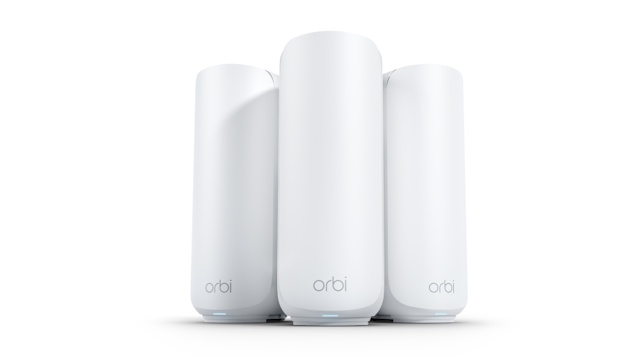
A WiFi 7 mesh router system uses many devices to spread internet in a home or office. These devices work together to create one big network.
This system helps cover large areas with strong WiFi signals. It avoids dead spots where WiFi is weak or missing.
How Mesh Routers Communicate
Mesh routers talk to each other using special wireless signals. They send data back and forth to keep the connection smooth.
Each router node connects to nearby nodes. This creates many paths for data to travel. If one path fails, data uses another path.
- Nodes share internet with each other
- They pick the best route for data
- Communication is fast and automatic
- Signals adjust to avoid interference
Benefits Of Mesh Systems
Mesh systems give better WiFi coverage than one router alone. They can cover big houses and offices well.
They also keep your devices connected without dropping signals. This helps with video calls, streaming, and online games.
- Stronger WiFi in every room
- No need to switch networks manually
- Easy to add more nodes for bigger coverage
- Smart data routing for fast speeds

Credit: www.pcmag.com
Wifi 7 Mesh Router Architecture
WiFi 7 mesh routers create a strong wireless network by using multiple connected devices. They spread WiFi signals evenly across large areas. This setup helps to reduce dead zones and improve internet speed.
The architecture of WiFi 7 mesh systems involves careful design of each node and how they connect to each other. This design ensures fast and stable communication inside the network.
Node Design And Placement
Each node in a WiFi 7 mesh system acts as a small router. The nodes work together to cover the entire home or office. Proper placement of nodes is key for better performance.
- Place nodes in open areas for better signal spread.
- Avoid placing nodes near thick walls or metal objects.
- Keep nodes at a moderate height, not too low or too high.
- Use enough nodes to cover all important areas.
- Ensure nodes are within good range of each other for strong links.
Backhaul Connectivity Options
Backhaul links connect the nodes to each other. They carry data between nodes without using the main WiFi channels. WiFi 7 mesh routers support different backhaul methods.
| Backhaul Type | Description | Advantages | Considerations |
|---|---|---|---|
| Wireless Backhaul | Uses WiFi frequencies to link nodes. | No cables needed, easy setup. | May reduce bandwidth for devices. |
| Wired Backhaul | Uses Ethernet cables between nodes. | Stable, high-speed connection. | Requires cable installation. |
| Hybrid Backhaul | Combines wireless and wired methods. | Offers flexibility and reliability. | Needs careful configuration. |
Speed Enhancements With Wifi 7 Mesh
WiFi 7 mesh routers improve internet speed and connection quality. They connect devices faster and handle more data.
This new technology helps homes and offices get better wireless coverage. It makes online tasks smoother and quicker.
Faster Data Transfer Rates
WiFi 7 supports higher data rates than previous versions. This means files, videos, and games load much faster.
The mesh system uses multiple devices to spread the signal. This reduces slowdowns and keeps speeds high everywhere.
- Supports wider channels for more data
- Uses advanced modulation techniques
- Transfers data up to 30 Gbps
Reduced Latency
Latency is the delay before data moves between devices. WiFi 7 mesh lowers this delay a lot.
Lower latency means less waiting in video calls and online games. The connection feels faster and more reliable.
- Uses multi-link operation to cut delays
- Connects devices through the best path
- Improves real-time communication
Improved Bandwidth Allocation
WiFi 7 mesh routers share bandwidth smartly. They give each device enough speed to work well.
This helps when many devices use the network at once. The router balances traffic to avoid slowdowns.
- Uses advanced scheduling for devices
- Allocates bandwidth based on need
- Supports many devices without lag

Credit: www.youtube.com
Coverage And Signal Stability
WiFi 7 mesh routers enhance internet coverage in your home. They ensure stable signals across all rooms.
The technology connects multiple devices efficiently. You experience fewer interruptions and faster speeds.
Seamless Roaming
Seamless roaming lets you move freely around your home. Your device stays connected without dropping the signal.
Mesh routers switch connections smoothly. This keeps your video calls and streaming uninterrupted.
Interference Management
WiFi 7 routers handle interference better. They reduce disruptions from other electronic devices.
This management improves signal clarity. You enjoy a more consistent browsing experience.
Extended Range Capabilities
Mesh routers extend WiFi range throughout large areas. They cover every corner of your home effectively.
With extended range, dead zones disappear. You get strong signals in basements, attics, and backyards.
- Strong signals in every room
- Consistent internet speed
- Reliable connections outdoors
Setting Up A Wifi 7 Mesh Router
A WiFi 7 mesh router improves internet coverage in your home. It uses multiple nodes to create a seamless connection.
Understanding how to set up and optimize these routers ensures you get the best performance.
Installation Steps
Setting up your WiFi 7 mesh router is straightforward. Follow these simple steps to get started.
- Unbox your router and nodes.
- Connect the main router to your modem.
- Power on all devices.
- Follow the manufacturer’s app instructions.
- Test internet connectivity across nodes.
Optimizing Node Placement
Proper node placement is key to a strong WiFi connection. Nodes should be strategically placed around your home.
- Place nodes on different floors if you have a multi-story home.
- Keep nodes away from thick walls and large metal objects.
- Ensure there is a clear line of sight between nodes when possible.
Configuring Advanced Settings
Advanced settings allow you to customize your WiFi network. Access these settings through the router’s app or web interface.
Use these features for better control:
- Set up a guest network for visitors.
- Adjust bandwidth for different devices.
- Enable parental controls to restrict access.
| Setting | Purpose |
| Guest Network | Separate network for guests |
| Bandwidth Control | Manage device speeds |
| Parental Controls | Limit access times |
Comparing Wifi 7 Mesh With Previous Generations
WiFi 7 Mesh routers bring new features that improve internet speed and coverage. They build on WiFi 6 and earlier models.
These routers use better technology to handle more devices at once. This helps homes and offices stay connected without slowdowns.
Performance Benchmarks
WiFi 7 Mesh routers offer faster data rates than WiFi 6 and WiFi 5. They can support up to 30 Gbps speed.
They also have lower latency, which means less delay in data transfer. This is useful for streaming and gaming.
| Feature | WiFi 5 | WiFi 6 | WiFi 7 Mesh |
|---|---|---|---|
| Max Speed | 3.5 Gbps | 9.6 Gbps | Up to 30 Gbps |
| Latency | High | Medium | Low |
| Device Support | Moderate | High | Very High |
| Frequency Bands | 2.4 GHz, 5 GHz | 2.4 GHz, 5 GHz, Some 6 GHz | 2.4 GHz, 5 GHz, 6 GHz |
Use Case Scenarios
WiFi 7 Mesh works well in large homes or offices with many devices. It keeps all devices connected smoothly.
It suits users who stream high-quality video, play online games, or use smart home devices. The mesh system covers dead zones.
- Multiple 4K or 8K video streams without lag
- Online gaming with quick response times
- Smart home devices working without connection drops
- Large buildings needing strong WiFi in every room
Future Prospects Of Wifi 7 Mesh
WiFi 7 mesh routers promise faster speeds and better connections. They will support many devices at once without slowing down.
This new technology will change how we use the internet at home and in businesses. Let’s look at some future uses.
Emerging Applications
WiFi 7 mesh routers will support new technologies that need fast and stable internet. These include virtual reality, augmented reality, and high-quality video streaming.
- Virtual reality with less lag and better graphics
- Augmented reality for interactive learning and games
- 4K and 8K video streaming without buffering
- Cloud gaming with quick response times
- Smart city devices that collect and share data
Integration With Smart Homes
WiFi 7 mesh routers will connect many smart devices in homes smoothly. This includes lights, locks, cameras, and appliances working together.
| Device Type | Benefit from WiFi 7 Mesh |
| Smart Lights | Instant control with no delay |
| Security Cameras | Clearer video with steady connection |
| Smart Thermostats | Quick response to temperature changes |
| Voice Assistants | Faster voice command recognition |
| Home Appliances | Smoother remote operation |
Frequently Asked Questions
What Is A Wifi 7 Mesh Router?
A Wifi 7 Mesh Router is an advanced networking device. It uses Wifi 7 technology to provide faster speeds and better coverage. It creates a seamless network by connecting multiple nodes, ensuring strong signals throughout your home or office.
How Does Wifi 7 Improve Mesh Network Speed?
Wifi 7 supports wider channels and higher data rates. It offers up to 46 Gbps speed, much faster than Wifi 6. This improvement reduces lag and buffering, enhancing the overall mesh network performance and user experience.
Why Choose A Wifi 7 Mesh Router Over Wifi 6?
Wifi 7 Mesh Routers offer lower latency and higher throughput. They support more devices simultaneously with improved efficiency. This makes them ideal for smart homes, gaming, and 4K streaming, providing a future-proof network solution.
How Does Mesh Technology Enhance Wifi 7 Performance?
Mesh technology uses multiple nodes to cover dead zones. It creates a single, unified network with seamless device handoff. This ensures consistent Wifi 7 speeds and reliability across larger areas without signal drops.
Conclusion
Wifi 7 mesh routers deliver fast and stable internet across your home. They use multiple devices to spread signals evenly. This helps reduce dead zones and keeps connections strong. The technology adapts to your devices and traffic needs. It also supports many devices at once without slowing down.
Understanding how Wifi 7 mesh works can help you choose better network solutions. A reliable mesh router improves your online experience every day. Simple, smart, and efficient.