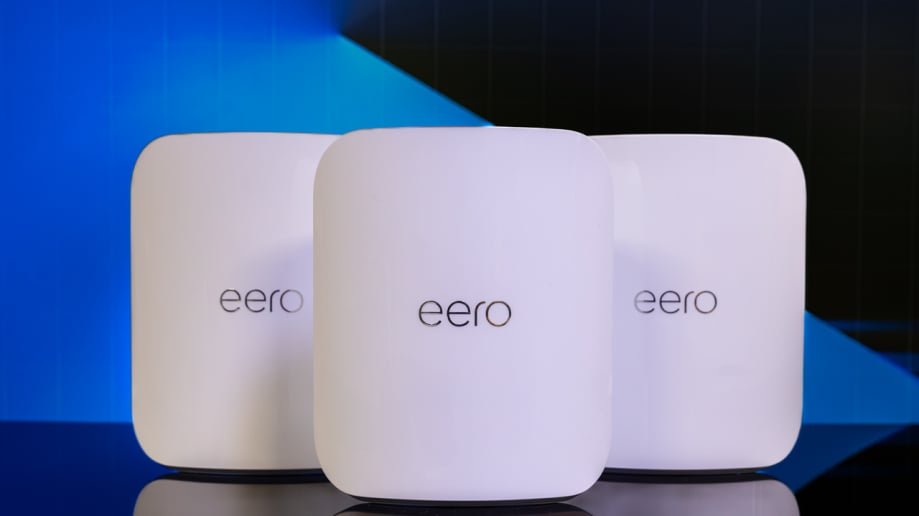
Imagine controlling every corner of your home with ease—lights, security cameras, thermostats—all working seamlessly together. But if your WiFi struggles to reach every room, your smart devices can lag or lose connection, turning convenience into frustration.
That’s where mesh WiFi for home automation hubs becomes a game-changer. You’ll discover how mesh networks can power up your smart home, giving you stronger signals, faster speeds, and uninterrupted control. Ready to transform your home into a truly connected space?
Keep reading to find out how.

Credit: www.amazon.com
Why Mesh Wifi Matters
Mesh Wifi systems help create strong wireless networks at home. They spread the signal evenly in every room. This is important for smart homes with many devices.
Traditional Wifi can struggle with distance and walls. Mesh Wifi improves connection quality for home automation hubs.
Limitations Of Traditional Wifi
Old Wifi setups use one router. This can cause weak signals in some parts of the house. Walls and floors block signals. Devices may lose connection or work slowly.
- Signal drops in far rooms
- Slow speeds with many devices
- Dead zones behind thick walls
- Hard to manage multiple smart devices
Benefits For Home Automation
Mesh Wifi helps smart home hubs stay connected all the time. It sends signals from different points. This keeps devices working well everywhere.
| Benefit | How it Helps |
| Stronger Coverage | Reaches all rooms and corners |
| Faster Speeds | Supports many devices at once |
| Easy Setup | Simple to add more nodes |
| Stable Connections | Reduces dropouts for smart devices |

Credit: www.amazon.com
Key Features Of Mesh Wifi Systems
Mesh wifi systems improve wireless internet in homes. They use many devices to spread wifi signals evenly.
These systems help smart home hubs stay connected without interruption. They offer strong and reliable wifi coverage.
Seamless Coverage
Mesh wifi systems cover every corner of your home. They use multiple units that work together as one network.
This means no dead spots or weak signals. Your home automation hubs get steady internet everywhere.
- Multiple nodes spread wifi evenly
- Devices connect automatically to the strongest signal
- Eliminates wifi dead zones
Self-healing Networks
Mesh wifi networks can fix themselves if one node fails. They find other paths to send data.
This keeps your smart home devices online without delays or outages. The network stays strong and stable.
- Automatically reroutes data if one node stops working
- Keeps network connections stable
- Reduces downtime for home automation
Easy Scalability
You can add more mesh nodes as your home grows or needs change. Setup is simple and fast.
This lets you expand wifi without complex wiring. Your home automation hubs will always have good coverage.
- Add nodes to cover larger areas
- No special tools or skills needed
- Flexible for changing home layouts
Choosing The Right Mesh Wifi For Automation
Mesh wifi helps connect all your home automation devices. It creates a strong network across your entire house.
Picking the right mesh wifi system makes your automation run smoothly. Consider key factors to get the best setup.
Compatibility With Hubs
Check if your mesh wifi works with your home automation hubs. Some hubs need specific network types or settings.
Look for mesh systems that support common smart home protocols. This avoids connection problems and delays.
- Supports Wi-Fi standards used by your hubs
- Works with Zigbee or Z-Wave bridges if needed
- Allows stable IP address assignment
- Compatible with voice assistants linked to hubs
Speed And Bandwidth Needs
Home automation devices need fast and steady wifi. Speed affects how quickly commands reach your devices.
Choose mesh wifi with enough bandwidth for all your devices. Streaming video or security cameras need more speed.
- Supports dual-band or tri-band wifi
- Offers speeds suitable for video and voice devices
- Handles multiple devices without lag
- Includes Quality of Service (QoS) settings
Security Considerations
Security keeps your home automation safe from hackers. Use mesh wifi that offers strong protection features.
Look for regular software updates and strong encryption standards. Secure wifi prevents unwanted access to your devices.
- Supports WPA3 encryption
- Includes automatic firmware updates
- Offers guest network options
- Has built-in firewall and intrusion detection
Setting Up Mesh Wifi With Home Hubs
Mesh wifi systems improve internet coverage in your home. They help connect smart home hubs without drops.
Setting up mesh wifi for home automation needs careful planning. This guide covers placement, device setup, and performance tips.
Placement Strategies
Place mesh nodes where wifi signals reach all smart devices. Avoid walls and metal objects that block signals.
- Put the main node near your internet modem.
- Space additional nodes evenly throughout your home.
- Keep nodes in open areas, not inside cabinets.
- Avoid placing nodes near microwaves or cordless phones.
- Place nodes higher, like on shelves, to improve signal range.
Configuring Devices
Connect your home automation hubs to the mesh wifi network using the device app. Assign fixed IPs if possible.
| Device | Configuration Tip |
| Smart Hub | Use a stable IP to prevent disconnection |
| Security Camera | Connect to the closest mesh node |
| Smart Thermostat | Check firmware updates before setup |
Optimizing Performance
Keep your mesh network fast by updating firmware and managing device load.
- Regularly update mesh node firmware.
- Limit the number of devices connected to each node.
- Use the mesh app to check signal strength.
- Restart nodes if devices lose connection.
- Place heavy data devices on wired connections if possible.
Troubleshooting Common Issues
Mesh WiFi systems help keep your home automation hubs connected. Sometimes, issues can disrupt this connection. Knowing how to fix common problems keeps your devices working well.
This guide covers three main issues: connectivity drops, interference problems, and firmware updates.
Connectivity Drops
Connectivity drops happen when your mesh WiFi loses signal to your automation hubs. This can cause devices to stop responding or work slowly.
- Check if the mesh nodes are too far apart.
- Restart the mesh router and nodes.
- Make sure your hubs are within the mesh network range.
- Reduce the number of devices connected to the network.
- Check for any physical obstructions between nodes and hubs.
Interference Problems
Wireless signals can be blocked or slowed by other devices. This interference affects your mesh WiFi and home automation hubs.
| Common Interference Source | How to Reduce |
|---|---|
| Microwave ovens | Keep mesh nodes away from kitchens |
| Wireless phones | Use cordless phones on different frequency bands |
| Bluetooth devices | Limit Bluetooth use near mesh nodes |
| Thick walls or metal objects | Place nodes in open areas |
Firmware Updates
Firmware updates fix bugs and improve your mesh WiFi system. Outdated firmware can cause issues with home automation hubs.
- Check the router app or web interface for updates regularly.
- Download and install updates when available.
- Restart your mesh system after updating.
- Do not turn off the system during updates.
Future Trends In Mesh And Automation
Mesh Wifi systems are changing how we connect smart devices at home. These systems create seamless and efficient networks. They support a growing number of devices. Future trends look promising in mesh technology and home automation.
Advancements in technology are focusing on integrating Artificial Intelligence, enhancing security protocols, and expanding IoT ecosystems. These trends improve user experience and connectivity.
Ai Integration
AI plays a key role in optimizing mesh networks. It helps in managing device connections and improving network speed. AI can predict and resolve connectivity issues before they occur.
| AI Feature | Benefit |
| Predictive Maintenance | Reduces downtime |
| Smart Device Management | Enhances performance |
| Automated Troubleshooting | Solves problems faster |
Enhanced Security Protocols
Security is crucial in home networks. New protocols protect against cyber threats. They ensure data privacy and safety for all connected devices.
- Implement WPA3 encryption for better security
- Use two-factor authentication for device access
- Regularly update firmware to patch vulnerabilities
Expanding Iot Ecosystems
The Internet of Things is expanding rapidly. More devices are being connected every day. This growth requires robust mesh networks to support multiple devices without loss in performance.
Mesh Wifi systems must handle:
- Smart thermostats
- Connected lights
- Automated security cameras
- Voice-activated assistants

Credit: www.pcmag.com
Frequently Asked Questions
What Is Mesh Wifi For Home Automation Hubs?
Mesh WiFi is a network system using multiple nodes to provide seamless internet coverage. It ensures stable connections for all smart devices in your home automation setup.
How Does Mesh Wifi Improve Smart Home Performance?
Mesh WiFi reduces dead zones and boosts signal strength. This leads to faster response times and reliable connections for home automation hubs.
Can Mesh Wifi Support Multiple Automation Devices?
Yes, mesh WiFi handles many devices simultaneously. It prevents network congestion, allowing smart hubs and gadgets to operate smoothly without interruptions.
Is Mesh Wifi Better Than Traditional Routers For Automation?
Mesh WiFi offers wider coverage and consistent speeds compared to traditional routers. It’s ideal for large homes with many smart devices needing stable connections.
Conclusion
Mesh WiFi helps keep all your home devices connected well. It spreads the signal evenly, so no corners get weak coverage. Smart hubs work best with a strong, steady internet link. This means your lights, cameras, and speakers respond fast.
Setting up mesh WiFi is simple and fits any home size. Choose the right system to match your automation needs. Enjoy smooth control of your smart home every day. Reliable WiFi makes your devices work better together. A good network means less trouble and more comfort.


