Imagine controlling every smart device in your home without any frustrating delays or dropped connections. You want your lights, thermostat, security cameras, and speakers to respond instantly, no matter where you are.
That’s exactly what mesh WiFi can do for you. It creates a strong, seamless network that covers every corner of your space, making your smart devices work smoothly together. Keep reading to discover how mesh WiFi can transform your smart home experience and give you complete control at your fingertips.
Benefits Of Mesh Wifi For Smart Devices
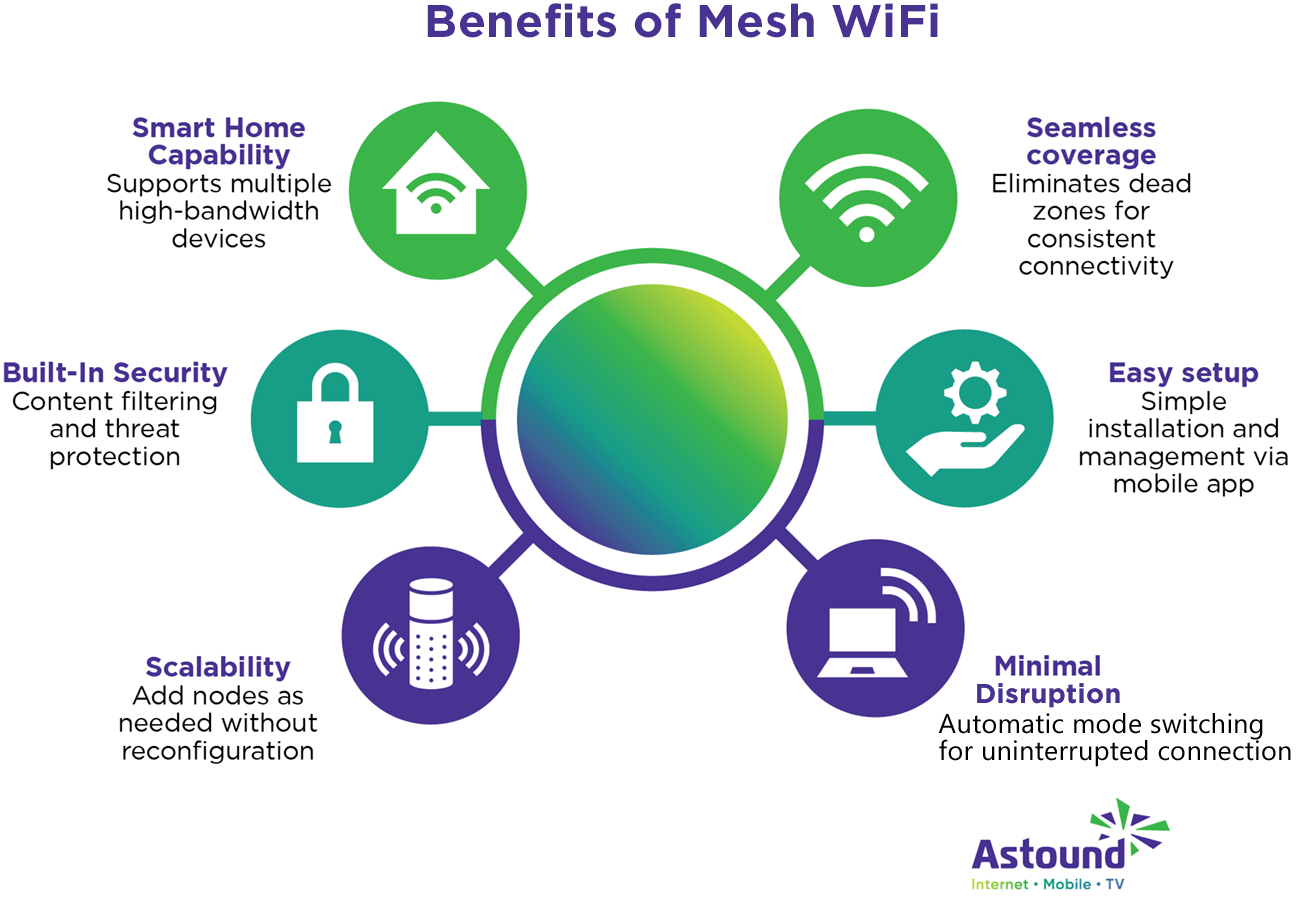
Smart devices need a strong internet connection to work well. Mesh Wifi helps give a better signal in every part of your home.
This system uses many points to spread wifi evenly. It keeps your devices connected all the time.
Consistent Coverage Across Rooms
Mesh Wifi covers your whole house with a steady signal. You can move from room to room without losing connection.
Each mesh point works together. They share the signal and avoid weak spots in your home.
Reduced Dead Zones
- Mesh Wifi places multiple nodes around your home.
- These nodes fill areas where wifi is usually weak.
- Smart devices stay connected even in corners or basements.
- Less dropped connections mean better control of your devices.
Improved Device Performance
| Benefit | Effect on Smart Devices |
| Stronger Signal | Faster response time and fewer errors |
| Lower Interference | Clearer communication between devices |
| Better Bandwidth | Supports multiple devices without slowing down |
With mesh wifi, smart devices can work smoothly. This helps with tasks like streaming, security, and home automation.
Key Features Of Mesh Wifi Systems
Mesh wifi systems help connect many smart devices at home. They create a strong and steady internet signal everywhere.
These systems have special features that improve wifi coverage and device control. Understanding these features helps you use them well.
Multiple Nodes And Extenders
Mesh wifi uses several nodes or extenders to spread the signal. Each node works like a mini router, sharing wifi with smart devices nearby.
- Nodes cover different rooms or floors in your home.
- Extenders boost the signal to reach far corners.
- Devices switch to the closest node for the best connection.
Self-healing Network
A self-healing network fixes connection problems by itself. If one node stops working, others keep the wifi running smoothly.
| Feature | What It Does |
|---|---|
| Automatic Rerouting | Redirects data when a node fails |
| Continuous Connection | Keeps devices online without interruptions |
| Network Stability | Maintains steady wifi signal across nodes |
Easy Scalability
You can add more nodes to your mesh network as your home or device needs grow. This makes it easy to expand wifi coverage.
- Add nodes without complex setup steps.
- Each new node joins the network automatically.
- Supports many devices without slowing down.
Choosing The Right Mesh Wifi
Mesh wifi systems help smart devices connect smoothly in your home. They spread wifi signals evenly for better control.
Picking the right mesh wifi matters. It can improve how your smart devices work and keep your network safe.
Compatibility With Smart Devices
Check if the mesh wifi supports your smart devices. Some systems work better with certain brands or types.
- Look for compatibility with your smart lights, cameras, and speakers.
- Verify support for popular voice assistants like Alexa or Google Assistant.
- Ensure the system can handle many devices at once.
Speed And Bandwidth Considerations
Speed matters for smooth smart device control. High bandwidth lets many devices work without lag.
| Speed | Good For | Notes |
| AC1200 | Small homes, few devices | Basic smart device use |
| AC3000 | Medium homes, many devices | Better for streaming and gaming |
| AX6000 | Large homes, many smart devices | Fastest, future-proof |
Security Features
Security keeps your smart home safe from hackers. Look for mesh wifi with strong protection.
- WPA3 encryption for better data protection
- Automatic firmware updates to fix bugs
- Guest network options to separate visitors
- Built-in firewall to block threats
Credit: www.astound.com
Setting Up Mesh Wifi For Smart Home
Mesh wifi helps connect all your smart devices in the home. It spreads wifi signals evenly for better coverage.
Setting up mesh wifi makes controlling smart devices easier and faster. Follow simple steps to get started.
Optimal Node Placement
Place mesh nodes in open areas to avoid signal blocking. Walls and large furniture can reduce wifi strength.
Keep nodes near smart devices but not too close to avoid interference. Spread nodes evenly across your home.
- Place the main node near your modem
- Put nodes on different floors if you have multiple levels
- Avoid placing nodes near microwaves or cordless phones
- Keep nodes visible and off the floor for best signal
Network Configuration Tips
Use a single wifi name (SSID) for all nodes. This helps devices connect smoothly as you move around.
Set strong passwords to protect your smart home network. Update firmware on your mesh system regularly.
- Enable automatic updates if your system supports it
- Use WPA3 security if available for better protection
- Assign static IP addresses for key smart devices if needed
- Check signal strength with apps to find weak spots
Integrating With Smart Hubs
Connect your smart hub to the mesh wifi main node for stable control. This keeps your hub online all the time.
Use the hub’s app to add devices and check connection status. Make sure the hub and devices are on the same network.
- Restart your hub if it loses connection
- Place the hub near the main node for best signal
- Use ethernet connection for the hub if possible
- Keep hub firmware updated for new features and fixes
Troubleshooting Common Issues
Mesh WiFi helps keep your smart devices connected. Sometimes, you may face issues. This guide helps fix common problems quickly.
Understanding simple troubleshooting steps can improve your device control. Follow the tips for better connectivity and performance.
Connectivity Drops
Connection drops can happen due to interference or distance. Check the placement of your mesh nodes. Keep them within range of each other.
- Place nodes away from walls and metal objects.
- Reduce interference from microwaves and cordless phones.
- Restart your router and mesh nodes regularly.
- Update device settings to optimize network use.
Device Pairing Problems
Pairing smart devices may fail if they are too far from the mesh network. Also, check if the device is compatible with your system.
| Issue | Solution |
| Device not found | Move device closer to mesh node |
| Wrong password | Re-enter WiFi password carefully |
| Compatibility error | Check device specs and update firmware |
| App connection fails | Restart app and reconnect device |
Firmware Updates
Keeping firmware updated is important. Updates fix bugs and improve features. Missing updates can cause issues.
Follow these steps to update firmware:
- Open your mesh WiFi app.
- Go to the settings menu.
- Check for firmware updates.
- Download and install the latest version.
- Restart your devices after update.
Enhancing Smart Device Control
Mesh WiFi systems improve smart device control in homes. They offer better coverage and connectivity for all your devices.
With mesh WiFi, managing smart devices becomes easier. It helps in reducing dead zones and ensures a stable connection.
Voice Assistant Integration
Voice assistants work seamlessly with mesh WiFi. They allow you to control devices using simple voice commands.
- Control lights with your voice
- Adjust thermostat settings easily
- Play music in any room
Automation And Scheduling
Automation helps in setting up tasks for your smart devices. Scheduling ensures that tasks are done at the right time.
Example of a scheduled task:
- Turn on the coffee maker at 7 AM.
- Dim lights at 9 PM for bedtime.
Remote Access And Monitoring
Mesh WiFi enables remote access to your devices. You can monitor and control them from anywhere using an app.
| Feature | Description |
| Remote Access | Control devices from afar |
| Live Monitoring | Check device status in real-time |
| Alerts | Receive notifications for events |
Future Trends In Mesh Wifi And Smart Homes
Mesh Wifi systems are changing how we connect at home. They provide a seamless network for smart devices. As technology advances, these systems will become even more important.
Smart homes rely on reliable networks to control devices. Mesh Wifi ensures smooth communication. Let’s explore some trends shaping the future of mesh Wifi and smart homes.
Ai-driven Network Management
AI helps manage network traffic efficiently. It predicts and fixes issues before they occur. This makes networks more reliable and user-friendly.
AI can adapt to changes in device usage. It learns patterns and optimizes the network. This ensures that all smart devices work smoothly at all times.
- AI predicts network congestion
- AI enhances security by detecting threats
- AI offers personalized user experiences
5g And Mesh Wifi Synergy
5G technology is faster and more reliable. It complements mesh Wifi systems. Together, they provide better connectivity for smart homes.
5G supports more devices on the network. This is crucial for homes with many smart devices. Mesh Wifi and 5G together offer seamless and fast internet access.
| Feature | Benefit |
| Higher speed | Faster downloads and streaming |
| Lower latency | Quicker response times |
| Better coverage | Improved connectivity in all areas |
Expanding Iot Ecosystems
More smart devices are being used at home. This expands the Internet of Things (IoT) ecosystem. Mesh Wifi networks support this growth.
As IoT expands, mesh Wifi ensures all devices stay connected. This makes smart home management easier and more efficient.
- Smart speakers
- Connected appliances
- Home security systems
- Smart lighting

Credit: www.amazon.ca
Credit: www.telus.com
Frequently Asked Questions
What Is Mesh Wifi For Smart Device Control?
Mesh WiFi is a network system that uses multiple nodes for seamless coverage. It ensures strong, reliable connections for smart devices throughout your home. This helps reduce dead zones and improves responsiveness in smart device control.
How Does Mesh Wifi Improve Smart Home Performance?
Mesh WiFi provides consistent, high-speed internet to all smart devices. It eliminates weak signals by routing data through the nearest node. This enhances device reliability, speeds up commands, and supports multiple devices simultaneously.
Can Mesh Wifi Support Many Smart Devices?
Yes, mesh WiFi supports numerous smart devices without slowing down. It manages traffic efficiently across nodes to maintain stable connections. This makes it ideal for homes with many connected smart gadgets.
Is Mesh Wifi Easy To Set Up For Smart Homes?
Mesh WiFi systems are designed for easy installation and use. Most come with user-friendly apps to guide setup and management. This simplifies connecting and controlling smart devices from one network.
Conclusion
Mesh WiFi makes smart device control simple and smooth. It covers every corner of your home with strong signals. Devices stay connected without interruptions or delays. You can control lights, cameras, and more easily. Setting up and managing your network feels natural and fast.
Enjoy a smarter home with less worry about WiFi drops. A good mesh system supports your daily tech needs well. Choose mesh WiFi to keep your smart devices working together.


