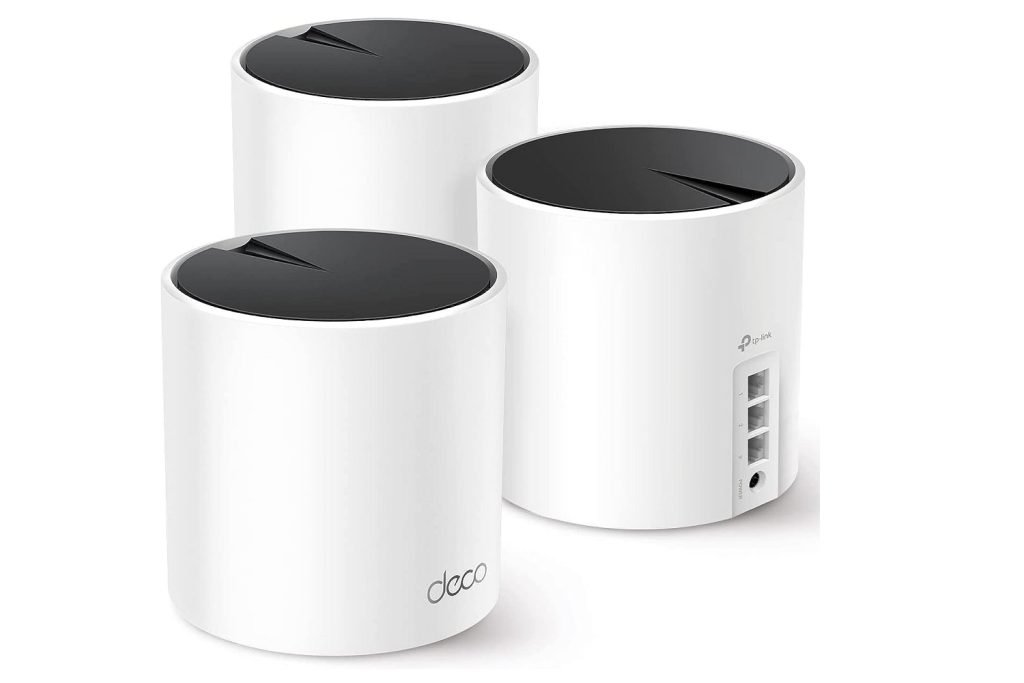
Are you tired of slow internet and dead zones in your home? Choosing the right Wi-Fi setup can make all the difference.
You might be wondering if a Tp-Link Deco system is better than your traditional router. This comparison will help you see which option fits your needs and gives you faster, more reliable internet. Keep reading, and you’ll discover how to get the best connection for your home without the frustration.

Credit: www.reddit.com
Wi-fi Tech Basics
Wi-Fi allows devices to connect to the internet without wires. It uses radio waves to send data between devices and routers.
There are different types of Wi-Fi setups. Two common ones are traditional routers and mesh networks like Tp-Link Deco.
How Traditional Routers Work
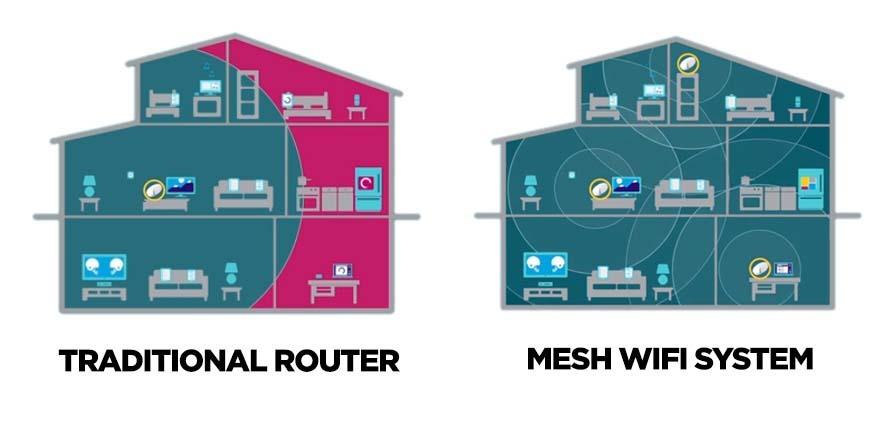
Traditional routers send Wi-Fi signals from one central point. All devices connect directly to this router.
The router connects to the internet and shares the signal. Wi-Fi strength depends on the router’s location.
- One main device handles all connections
- Signal weakens as distance from router grows
- Walls and objects can block signals
- Devices compete for bandwidth
Mesh Network Principles
A mesh network uses multiple devices to spread Wi-Fi evenly. These devices work together to cover larger areas.
Each mesh device talks to others. This creates a strong, flexible network with fewer dead zones.
- Multiple units share Wi-Fi signals
- Devices connect to the nearest mesh point
- Network adapts if one device fails
- Better coverage for big or multi-floor homes
Tp-link Deco Features
The Tp-Link Deco system is a modern way to connect your home. It uses multiple devices to cover large areas with Wi-Fi.
This differs from a traditional router that uses just one device to send signals. Let’s look at Deco’s key features.
Design And Setup
Deco units are small and simple. They look like little cubes that fit easily on shelves or desks.
Setup is easy with an app that guides you step-by-step. You just plug in the Deco and follow the instructions.
- Compact and modern design
- App-based setup for beginners
- No complex wiring needed
Coverage And Performance
Deco uses mesh technology to cover large homes. Multiple units work together to spread Wi-Fi evenly.
This means fewer dead spots compared to one traditional router. It also keeps strong speeds even far from the main device.
- Mesh network with multiple units
- Wide coverage for big houses
- Stable Wi-Fi speed throughout home
Security Features
Deco offers built-in security to protect your network and devices. It includes parental controls and malware protection.
You can easily manage who uses your Wi-Fi and block harmful sites. This helps keep your home safe online.
- Parental controls to limit access
- Malware and virus protection
- Easy security management through app
Traditional Router Strengths
Traditional routers have been the main choice for internet access in homes and offices. They offer several strong features that many users find useful.
This section explains the key strengths of traditional routers, focusing on hardware, customization, and cost.
Hardware And Speed
Traditional routers usually come with powerful hardware that can handle high-speed internet well. They often support the latest Wi-Fi standards and have strong antennas.
These routers can deliver fast and stable connections, especially for single or small networks. They also often have many ports for wired connections.
- Supports high-speed Wi-Fi standards like Wi-Fi 5 and Wi-Fi 6
- Strong antennas for better signal strength
- Multiple Ethernet ports for wired devices
- Good for fast internet and stable connections
Customization Options
Traditional routers offer many ways to customize settings. Users can change network names, passwords, and security types easily.
Advanced users can adjust settings like port forwarding, firewall rules, and Quality of Service (QoS) to control how the network works.
- Change SSID and password freely
- Set up guest networks
- Control firewall and security settings
- Configure port forwarding and QoS
Cost Considerations
Traditional routers can be affordable and offer good value for their features. They come in many price ranges to fit different budgets.
Once bought, there are no extra fees, and users can keep their router for many years without replacing it.
- Wide price range from budget to premium models
- No subscription or extra costs
- Long lifespan with proper care
- Good investment for simple home networks
Credit: kb.pineapple.net.au
Performance Comparison
Comparing the Tp-Link Deco and traditional routers helps understand their performance. This includes speed, signal stability, and how well they handle devices.
Both types of routers serve to connect devices to the internet. But they differ in how effectively they do it.
Speed Tests
Tp-Link Deco offers consistent high-speed performance. It uses a mesh system to enhance coverage.
Traditional routers may have speed drops when many devices connect. Their coverage is often limited to a certain range.
- Tp-Link Deco: Stable speed across large areas
- Traditional Router: Speed may vary with distance
Signal Stability
Tp-Link Deco provides strong and stable signals. It automatically finds the best path for data.
Traditional routers can lose signal strength through walls. This affects the internet experience.
- Tp-Link Deco: Reliable signal even through barriers
- Traditional Router: Signal weakens with obstacles
Device Handling
Tp-Link Deco handles multiple devices efficiently. It balances the load to prevent slowdowns.
Traditional routers might struggle with many devices. This can lead to slow internet connections.
- Tp-Link Deco: Manages many devices smoothly
- Traditional Router: Performance dips with more devices
User Experience
Choosing between a Tp-Link Deco and a traditional router affects how users feel about their network setup. The experience depends on ease of use, control, and fixing issues.
This comparison covers the installation process, management and controls, and how easy troubleshooting is for both devices.
Installation Process
Tp-Link Deco uses a mesh system that connects multiple units for wider coverage. Traditional routers usually use one device to cover the area.
- Deco setup uses a mobile app that guides users step-by-step.
- Traditional routers often require manual configuration via a web interface.
- Deco units automatically sync with each other after placement.
- Traditional routers may need extra devices like range extenders for large spaces.
Management And Controls
Both systems offer ways to control the network, but they differ in ease and options.
| Feature | Tp-Link Deco | Traditional Router |
| Control Interface | Mobile App | Web Browser |
| Parental Controls | Easy to set up | Varies, often complex |
| Device Management | Simple device list | May require technical knowledge |
| Network Updates | Automatic | Manual in most cases |
Troubleshooting Ease
Fixing network problems can be faster or slower depending on the system’s design.
Tp-Link Deco troubleshooting tips:
- Use the app’s diagnostic tools.
- Restart individual Deco units if needed.
- Check internet status in real time.
- Contact support via the app.
Traditional router troubleshooting tips:
- Access the router’s web page.
- Check connection settings manually.
- Restart the router hardware.
- Consult the manual or support site.

Credit: www.amazon.ca
Best Use Cases
Choosing between a TP-Link Deco and a traditional router can be challenging. Each has unique advantages for different living and working spaces.
Understanding the best use cases helps you make an informed decision. Let’s explore the scenarios where each shines.
Small Homes And Apartments
In small homes, a traditional router often provides enough coverage. It covers limited spaces without needing extra units.
The TP-Link Deco is ideal for apartments with thick walls. Its mesh system offers seamless connection across multiple rooms.
- Traditional routers suit one-bedroom apartments
- TP-Link Deco excels in larger apartments
- Mesh systems reduce dead zones
Large Homes And Offices
Large homes need a reliable network. A single traditional router may not cover all areas effectively.
TP-Link Deco’s mesh network is a smart choice for offices. It ensures strong signals in every corner.
- Traditional routers need extenders for full coverage
- TP-Link Deco provides whole-home coverage
- Mesh systems handle multiple devices better
Tech-savvy Vs Casual Users
Tech-savvy users enjoy customizing settings. Traditional routers offer more advanced controls for them.
Casual users prefer easy setup and management. TP-Link Deco provides user-friendly apps for simple control.
| Traditional Routers | TP-Link Deco |
| Advanced settings | Easy setup |
| Ideal for tech enthusiasts | Great for beginners |
| Manual adjustments | App-based management |
Cost And Value
Choosing between a TP-Link Deco system and a traditional router depends on your budget and needs. Both options have different costs and values.
Understanding the costs helps you find the best fit for your home or office network.
Initial Investment
Traditional routers often cost less upfront. You can buy a basic model for a low price. TP-Link Deco systems usually cost more because they include multiple units.
Deco packs cover larger areas with better Wi-Fi signals. This means you pay more at the start but get wider coverage.
- Traditional routers: lower initial cost
- TP-Link Deco: higher initial cost for multiple units
- Deco covers larger areas from the start
Long-term Benefits
Traditional routers may need extra devices to cover big homes. This can add to costs over time. Deco systems offer a strong signal from all units, reducing the need for extra devices.
Deco’s mesh technology helps keep your network fast and stable. This can save money on troubleshooting and upgrades later.
- Traditional routers may require extra devices
- Deco systems provide consistent coverage
- Mesh networks reduce future upgrade costs
Upgrades And Scalability
Traditional routers can be upgraded by replacing the entire device. This means you must buy a new router each time you want better features.
TP-Link Deco systems allow adding more units to increase coverage. You can scale your network by buying one unit at a time, which spreads out expenses.
- Traditional routers need full replacement for upgrades
- Deco systems let you add units as needed
- Adding Deco units spreads out upgrade costs
Future Trends
Networking technology keeps changing fast. The way we use Wi-Fi at home will grow with new tools. Understanding these trends helps us pick the right devices.
Comparing Tp-Link Deco with traditional routers shows how new features shape internet use. Let’s look at three key trends shaping the future.
Wi-fi 6 And Beyond
Wi-Fi 6 offers faster speeds and better connection for many devices. Tp-Link Deco systems already use Wi-Fi 6, while many traditional routers do not. Future Wi-Fi standards will improve this further.
- Faster internet speeds with less delay
- More devices connected without slowdowns
- Improved battery life for smart devices
- Better performance in crowded areas
Smart Home Integration
Tp-Link Deco supports smart home devices easily. Traditional routers often need extra setup. As homes get smarter, integration with voice assistants and smart gadgets will grow.
| Feature | Tp-Link Deco | Traditional Router |
| Built-in Smart Hub | Yes | No |
| Voice Assistant Support | Yes | Limited |
| Device Management App | Easy to use | Basic |
| Automatic Updates | Regular | Manual |
Evolving User Needs
Users want simple, strong Wi-Fi that covers the whole home. Tp-Link Deco uses mesh technology to meet this need. Traditional routers often cover less area and need extra gear.
- Easy setup and control from a phone
- Wide coverage for big or multi-floor homes
- Strong security to protect connected devices
- Support for many devices at once
Frequently Asked Questions
What Is The Main Difference Between Tp-link Deco And Traditional Routers?
Tp-Link Deco uses mesh technology for seamless Wi-Fi coverage. Traditional routers rely on a single device, often causing dead zones. Deco provides better range and reliability in larger homes or offices.
How Does Tp-link Deco Improve Wi-fi Coverage?
Deco units work together to create a unified Wi-Fi network. This eliminates dead spots and maintains fast speeds throughout your space. Traditional routers can struggle to cover large or multi-story areas effectively.
Are Tp-link Deco Systems Easier To Set Up Than Traditional Routers?
Yes, Tp-Link Deco offers a user-friendly app for quick setup and management. Traditional routers often require manual configuration, which can be complex for beginners. Deco simplifies network control for all users.
Can Tp-link Deco Handle More Devices Than Traditional Routers?
Yes, Deco systems are designed to support multiple devices simultaneously without speed drops. Traditional routers may slow down as more devices connect. Deco suits smart homes with many connected gadgets.
Conclusion
Tp-Link Deco offers wider coverage and easier setup than traditional routers. It suits larger homes and multiple devices well. Traditional routers work fine for small spaces and simple needs. Both have pros and cons depending on your internet use. Choose what fits your home size and device number.
Think about your budget and tech comfort too. Either way, a good router helps keep your internet strong and stable. Make a choice that keeps your connection smooth and reliable.


