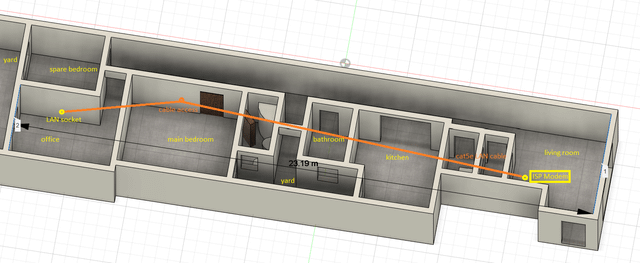
If you live in a concrete house, you might have noticed your WiFi acting up. Thick walls and solid structures can block signals, leaving you with slow internet or dead zones.
You’re probably wondering: does mesh WiFi really work in concrete houses? The answer could change how you connect at home. Keep reading to discover how mesh WiFi can boost your signal, what challenges concrete walls create, and whether it’s the right solution for your space.
Your internet experience might be about to get a whole lot better.
Mesh Wifi Basics
Mesh wifi helps spread internet signals around your home. It uses several devices to cover large areas.
This system is useful in houses with thick walls, like those made of concrete. It improves wifi where signals are weak.
What Is Mesh Wifi
Mesh wifi is a network of routers working together. These routers send wifi signals to each other and your devices.
It is different from a single router that sends signals from one spot. Mesh wifi covers more space and keeps a strong connection.
How Mesh Networks Operate
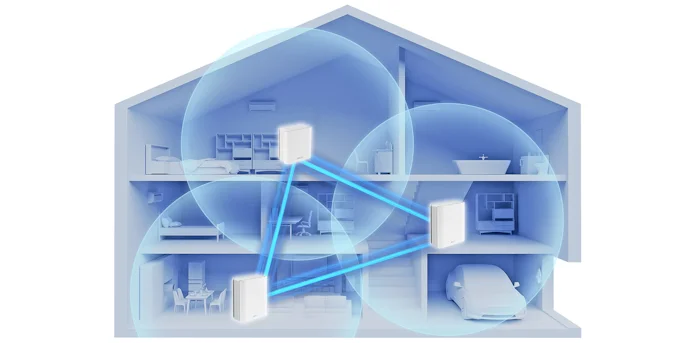
Mesh networks use several nodes to share internet. Each node talks to others to find the best path for data.
This way, if one node has a problem, data moves through another node. It keeps your internet fast and steady.
- Multiple nodes work as one system
- Data chooses the fastest route
- Network adapts if a node fails
- Nodes are placed around your home
Credit: edgeup.asus.com
Challenges Of Concrete Walls
Concrete walls are strong and durable. They protect homes well but can block wifi signals. This makes it hard for mesh wifi systems to work properly inside concrete houses.
Understanding how concrete walls affect wifi helps you improve your home network. Let’s look at the main challenges caused by concrete walls.
Signal Blockage Factors
Concrete walls contain materials that stop wifi signals from passing through easily. Thick walls, metal reinforcements, and moisture all reduce signal strength.
- Wall Thickness:Thicker walls block more signals than thin ones.
- Metal Rebars:Steel rods inside concrete reflect and absorb signals.
- Moisture Content:Wet concrete absorbs wifi signals more than dry concrete.
- Wall Density:Denser concrete means less signal passes through.
Impact On Wifi Performance
When wifi signals cannot pass well through concrete, the mesh network’s speed and coverage drop. Devices may lose connection or have slower internet.
| Effect | Description |
|---|---|
| Reduced Signal Range | Concrete walls shrink the area where wifi works well. |
| Slow Speeds | Blocked signals cause slower data transfer. |
| Connection Drops | Devices may disconnect if the signal is too weak. |
| Interference | Metal in walls can cause signal bounce and interference. |
Mesh Wifi In Concrete Homes
Mesh wifi systems help spread internet signals across large spaces. Concrete walls can block wifi signals. This makes it hard to get a strong connection in concrete houses.
People often wonder if mesh wifi works well in these homes. This article looks at how effective mesh systems are and what users usually experience.
Effectiveness Of Mesh Systems
Mesh systems use several devices called nodes. These nodes share the wifi signal to cover more area. Concrete walls reduce signal strength, but mesh nodes help fix this problem.
- Mesh nodes placed near concrete walls can improve coverage.
- More nodes mean better chances to bypass thick walls.
- Signal speed may drop after passing through concrete.
- Good placement of nodes is key to strong wifi.
- Using wired connections between nodes can boost performance.
Common User Experiences
Many users with concrete homes report mixed results. Some get good coverage, while others face slow speeds in certain rooms.
| User Experience | Details |
| Good Coverage | Most rooms have stable wifi with well-placed nodes. |
| Speed Drops | Speeds slow down behind thick concrete walls. |
| Setup Challenges | Finding the right node spots takes time and testing. |
| Wired Backhaul | Using Ethernet cables between nodes improves speed. |

Credit: www.reddit.com
Optimizing Mesh Placement
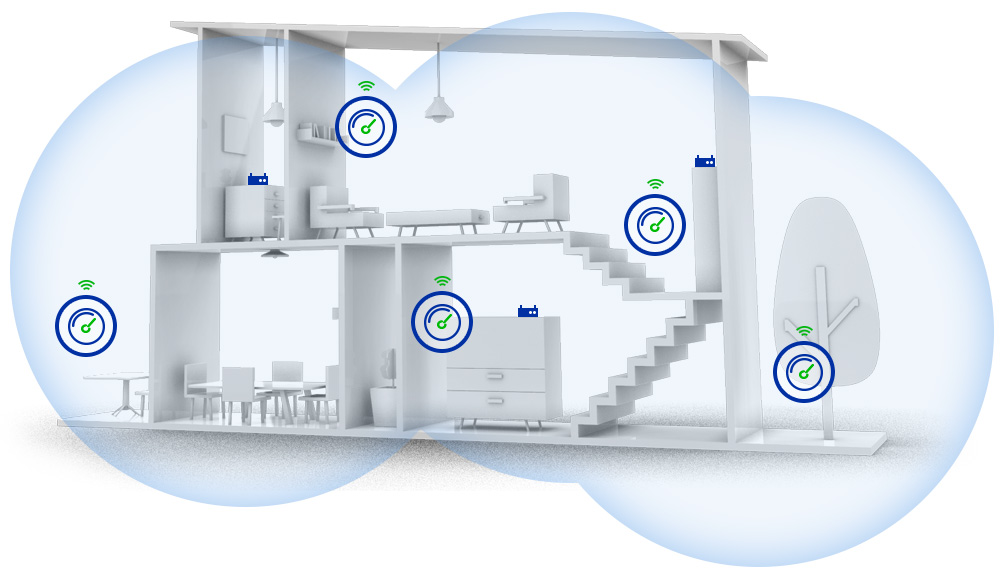
Mesh WiFi can help improve internet in concrete houses. Placement of mesh nodes is very important. Good placement boosts signal strength and coverage.
This guide explains where to place mesh nodes and how to avoid signal issues in concrete homes.
Ideal Node Locations
Place mesh nodes where the signal can travel easily. Avoid thick concrete walls that block WiFi. Rooms near the center of the house work best. High spots help spread signals better.
- Near open spaces or hallways
- Close to where you use the internet most
- Avoid basements or rooms with heavy concrete
- Elevate nodes off the floor for better range
- Keep nodes visible, not hidden behind furniture
Avoiding Signal Interference
WiFi signals can weaken due to interference. Concrete walls add to this problem. Other electronics may also block or reduce signal quality.
| Source | Effect on Signal | How to Reduce Impact |
| Microwaves | Cause signal drops | Keep mesh nodes away from kitchen |
| Wireless Phones | Create noise on WiFi channels | Place nodes far from phone base stations |
| Metal Objects | Reflect and block signals | Avoid placing nodes near metal shelves or appliances |
| Other WiFi Networks | Cause channel interference | Use WiFi analyzer to pick clear channels |
Choosing The Right Mesh System
Mesh WiFi can help improve internet coverage in concrete houses. Concrete walls block signals, so choosing the right system is important. This guide explains features for concrete environments and top mesh WiFi models.
Understanding which mesh system suits your home ensures better WiFi speed and range. Let’s look at important features and some popular models.
Features For Concrete Environments
Concrete walls reduce WiFi signals. You need a mesh system that can handle this challenge. Look for these features:
- Strong signal strength with high-power antennas
- Support for multiple frequency bands (dual-band or tri-band)
- Ability to create a large coverage area
- Easy node placement options to avoid dead zones
- Fast data speeds to maintain performance through barriers
- Good backhaul options, like wired Ethernet or dedicated wireless channels
Systems with tri-band support help keep connections stable by using a separate band for communication between nodes. Wired backhaul is best if possible, since it avoids wireless interference.
Top Mesh Wifi Models
| Model | Frequency Bands | Backhaul Options | Coverage Area |
| Model A | Tri-band | Wired and Wireless | Up to 5,000 sq ft |
| Model B | Dual-band | Wireless only | Up to 4,000 sq ft |
| Model C | Tri-band | Wired and Wireless | Up to 6,000 sq ft |
| Model D | Dual-band | Wired only | Up to 3,500 sq ft |
Credit: caspianprimesolutions.com
Alternative Solutions
Concrete walls can block WiFi signals. This makes internet slow. There are solutions to improve WiFi in concrete houses.
These solutions can help you get a better connection. They work by extending or enhancing the signal.
Wifi Extenders And Boosters
Wifi extenders make your WiFi reach further. They take the signal and rebroadcast it. This helps in rooms far from the router.
Boosters can make the signal stronger. They are good for big homes. You can use them to improve internet speed.
- Easy to install
- Affordable options available
- Works well in large areas
Powerline Adapters
Powerline adapters use electrical wiring to send internet signals. They are useful for houses with thick walls.
They plug into wall outlets. They provide internet through a cable. This can bypass the need for strong WiFi signals.
- Stable connection
- Easy setup
- Good for streaming and gaming
Testing And Troubleshooting
Mesh WiFi can be challenging in concrete houses. Testing and troubleshooting help improve your signal.
Finding the right spots for nodes can solve connectivity problems. Learn how to measure and enhance your WiFi.
Measuring Signal Strength
Signal strength shows how well your WiFi is working. Use a WiFi analyzer to check it in different rooms.
- Download a WiFi analyzer app on your phone
- Check signal strength near each mesh node
- Note areas with weak signals
Improving Connectivity Issues
Concrete walls can block WiFi signals. Move nodes to better positions to improve connectivity.
| Problem | Solution |
| Weak Signal | Reposition nodes closer |
| Interference | Remove electronic devices nearby |
| Obstacles | Place nodes in open spaces |
Frequently Asked Questions
Does Mesh Wifi Work Well In Concrete Houses?
Yes, mesh WiFi works in concrete houses but signal strength may reduce. Placing nodes strategically helps overcome concrete barriers for better coverage.
How Does Concrete Affect Mesh Wifi Signals?
Concrete walls block and weaken WiFi signals. Mesh systems use multiple nodes to bypass these obstacles and maintain a stable connection.
Can Mesh Wifi Improve Coverage In Thick-walled Homes?
Absolutely. Mesh WiFi extends coverage by using multiple access points, effectively reaching areas where single routers struggle in thick-walled houses.
Is Mesh Wifi Better Than Routers For Concrete Buildings?
Yes, mesh WiFi outperforms traditional routers in concrete buildings by providing seamless coverage and reducing dead zones through multiple nodes.
Conclusion
Concrete walls can weaken WiFi signals. Mesh WiFi helps by placing nodes around your home. This setup improves coverage and reduces dead spots. Still, thick concrete may limit signal strength. Positioning nodes in open areas works best. Mesh WiFi offers a practical way to boost internet.
It suits many concrete houses well. Testing your setup helps find the strongest spots. Overall, mesh WiFi can improve your connection inside concrete homes.


