Struggling with slow Wi-Fi or dead zones in your apartment? You’re not alone.
Finding the best setup for mesh Wi-Fi in apartments can transform your internet experience, giving you fast, reliable coverage everywhere—from your living room to your bedroom. Imagine streaming your favorite shows without buffering, enjoying seamless video calls, and connecting all your devices effortlessly.
You’ll discover exactly how to set up mesh Wi-Fi to unlock the full potential of your home network. Ready to say goodbye to weak signals? Let’s dive in.
Credit: edgeup.asus.com
Benefits Of Mesh Wifi In Apartments
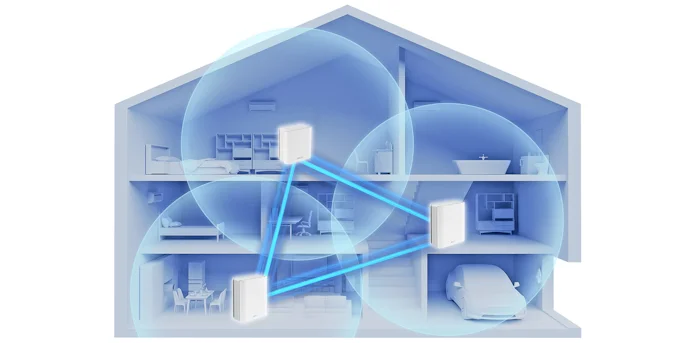
Mesh wifi systems help improve wireless coverage in apartments. They use multiple nodes to spread wifi signals evenly.
This setup works well in buildings with thick walls and many rooms. Mesh wifi reduces dead zones and keeps devices connected.
Strong And Consistent Signal
Mesh wifi creates a single network with several access points. This design gives strong signals throughout your apartment.
Easy To Expand Coverage
You can add more nodes to cover larger areas or tricky spots. This makes mesh wifi flexible for different apartment sizes.
- Add a node in the living room for better video calls.
- Place another node near bedrooms for faster streaming.
- Extend coverage to balconies or home offices.
Simple To Set Up And Manage
Mesh wifi systems often come with apps for easy setup. You can control the network, check status, and troubleshoot quickly.
Better Device Handling
Mesh networks manage many devices well. This is important in apartments with many smartphones, laptops, and smart home devices.
| Benefit | How It Helps |
| Strong Signal | Reduces dead zones and keeps connection stable |
| Easy Expansion | Add nodes to cover difficult areas |
| Simple Management | Use apps to control and monitor the network |
| Device Support | Handles multiple devices without slowing down |

Credit: www.reddit.com
Key Factors To Consider
Setting up mesh WiFi in an apartment needs careful planning. The best setup depends on several key factors. These factors help ensure strong and reliable internet coverage.
Understanding your apartment’s needs will guide you in choosing the right mesh WiFi system. Let’s explore the main points to consider for a good setup.
Apartment Size And Layout
The size and shape of your apartment affect WiFi coverage. Larger apartments need more mesh nodes to cover all areas. Walls and floors can block WiFi signals and reduce speed.
- Small apartments may need only one or two nodes.
- Open floor plans allow signals to travel farther.
- Thick walls or multiple floors require extra nodes.
- Place nodes in central, open spots for best reach.
Number Of Devices
More devices need more bandwidth and better network management. Consider all devices like phones, laptops, smart TVs, and smart home gadgets. A mesh system handles many devices better than a single router.
| Device Type | Typical Number in Apartment |
| Smartphones | 2-4 |
| Laptops/Tablets | 1-3 |
| Smart TVs | 1-2 |
| Smart Home Devices | 3-6 |
Internet Speed Requirements
Your internet speed needs depend on how you use the network. Streaming, gaming, and video calls need faster speeds. A mesh system can help keep speeds steady across all rooms.
- Check your current internet plan speed.
- Match your mesh system to support that speed.
- Consider future upgrades if you add more devices.
- Place mesh nodes to avoid slow zones.
Choosing The Right Mesh Wifi System
Mesh wifi systems improve internet coverage in apartments. They use multiple devices to spread wifi signals evenly.
Picking the right system depends on your needs. Consider the brand, compatibility, and budget before buying.
Top Brands And Models
Some brands are known for reliable mesh wifi systems. These brands offer models with strong signals and easy setup.
- Google Nest Wifi: Easy to use with good speed.
- Netgear Orbi: Covers large spaces well.
- TP-Link Deco: Affordable and stable connection.
- Eero Pro: Simple design and reliable performance.
Compatibility With Internet Providers
Check if the mesh system works with your internet provider. Most systems support major providers but verify before buying.
| Internet Provider | Compatible Mesh Systems |
| Comcast Xfinity | Google Nest, Netgear Orbi, TP-Link Deco |
| ATT | Google Nest, Eero Pro, TP-Link Deco |
| Verizon Fios | Netgear Orbi, Eero Pro, Google Nest |
| Cox | TP-Link Deco, Netgear Orbi, Eero Pro |
Budget Options
Mesh wifi systems come in different price ranges. Choose one that fits your budget but still meets your needs.
Here are budget options and their features:
- TP-Link Deco M4: Affordable, covers up to 5,500 sq ft, supports 100 devices.
- Google Nest Wifi Router: Mid-range price, easy setup, good for small apartments.
- Eero 6: Budget-friendly with Wi-Fi 6, covers 1,500 sq ft.
Credit: edgeup.asus.com
Ideal Mesh Wifi Placement
Mesh Wifi systems help extend internet coverage in apartments. Placing nodes correctly ensures strong and reliable connectivity.
Understanding how to place nodes can maximize Wifi efficiency and minimize dead zones.
Positioning Nodes For Maximum Coverage
Place the main node near the center of your apartment. This helps distribute the signal evenly.
Secondary nodes should be placed halfway between the main node and the edge of the coverage area.
- Avoid placing nodes in corners or near large metal objects
- Height matters; place nodes on shelves or tables
Avoiding Interference
Electronic devices can interfere with Wifi signals. Keep nodes away from microwaves and cordless phones.
WiFi signals can struggle near thick walls or mirrors. Ensure nodes are visible and unobstructed.
- Place nodes away from devices like baby monitors
- Use a mesh system with dual-band support to reduce interference
Using Multiple Floors Effectively
In multi-level apartments, place nodes on each floor. This ensures consistent coverage throughout the apartment.
Align nodes vertically as much as possible. This helps signals travel between floors more efficiently.
| Floor | Node Placement |
| 1st | Near the center of the floor |
| 2nd | Directly above the 1st floor node |
Optimizing Mesh Network Performance
Mesh WiFi systems can improve internet in apartments. They use multiple devices to cover large areas well.
Good setup helps your mesh network work faster and more reliable. Small changes make big differences.
Configuring Network Settings
Set your mesh network with the right options. Choose a strong WiFi channel to avoid interference.
Use the same network name (SSID) on all mesh devices. This helps your devices switch smoothly.
- Pick a less crowded WiFi channel (use apps to check)
- Keep the same SSID and password on all nodes
- Enable band steering to use the best frequency
- Turn on Quality of Service (QoS) for important devices
Firmware Updates
Keep your mesh devices updated with the latest firmware. Updates fix bugs and improve speed.
Check for updates regularly. Some mesh systems update automatically, but manual checks help too.
- Visit your mesh system app or website to check updates
- Install updates when available to improve performance
- Restart devices after updates for best results
Security Best Practices
Protect your mesh WiFi by using strong passwords. Use WPA3 or WPA2 encryption for safety.
Limit guest access and disable remote management if not needed. This keeps your network safe.
- Create a strong, unique WiFi password
- Use WPA3 or WPA2 security settings
- Set up a separate guest network for visitors
- Turn off remote access unless necessary
- Change default admin passwords on mesh devices
Troubleshooting Common Issues
Mesh WiFi systems improve coverage in apartments. Still, some problems can happen. This guide helps you fix common issues.
Knowing how to solve signal drops, slow speeds, and device connection issues saves time. Try simple fixes before calling for help.
Signal Drops
Signal drops often happen when nodes are too far apart or blocked. Walls and metal objects reduce WiFi signals.
- Place mesh nodes in open areas, not inside cabinets.
- Keep nodes within 30 feet of each other for a strong link.
- Avoid placing nodes near microwaves or cordless phones.
- Check for firmware updates for better stability.
Slow Speeds
Slow speeds can occur if many devices use the network. Internet plan limits also affect speed.
| Cause | Fix |
| Too many devices | Disconnect unused devices |
| Old mesh hardware | Upgrade to newer models |
| ISP speed limit | Check your internet plan |
| Interference | Change WiFi channel or band |
Device Connectivity Problems
Devices may fail to connect if settings are wrong or software is outdated. Some devices prefer certain frequency bands.
Try these tips to fix connection problems:
- Restart your device and mesh router.
- Forget the WiFi network and reconnect.
- Update the device’s network drivers or software.
- Connect to the 2.4 GHz band for better range or 5 GHz for faster speed.
Frequently Asked Questions
What Is The Ideal Mesh Wifi Placement In Apartments?
Place mesh nodes centrally and away from obstructions for best coverage. Avoid walls and metal objects that block signals. Position nodes in open spaces to ensure stable connections throughout the apartment.
How Many Mesh Wifi Units Do Apartments Typically Need?
Most apartments require two to three mesh units for full coverage. Larger or multi-room spaces may need more nodes. Start with fewer units, then add based on signal strength and dead zones.
Can Mesh Wifi Improve Apartment Internet Speed?
Yes, mesh WiFi boosts speed by reducing dead zones and signal drops. It creates a seamless network that balances traffic efficiently. This leads to faster, more reliable internet across all rooms.
Does Apartment Building Structure Affect Mesh Wifi Performance?
Yes, thick walls and metal structures can weaken mesh signals. Concrete and steel reduce WiFi range and speed. Choose mesh systems with strong signal penetration for better performance in such buildings.
Conclusion
Choosing the right mesh WiFi setup makes a big difference in apartments. Place nodes in open spots for better signal spread. Avoid walls and metal objects that block signals. Use the main router near the apartment’s center. Test speeds in different rooms to find weak areas.
Adjust node positions until coverage feels strong and steady. Good WiFi helps with work, streaming, and calls. Simple steps bring better internet and less frustration. A solid mesh system keeps you connected without hassle.