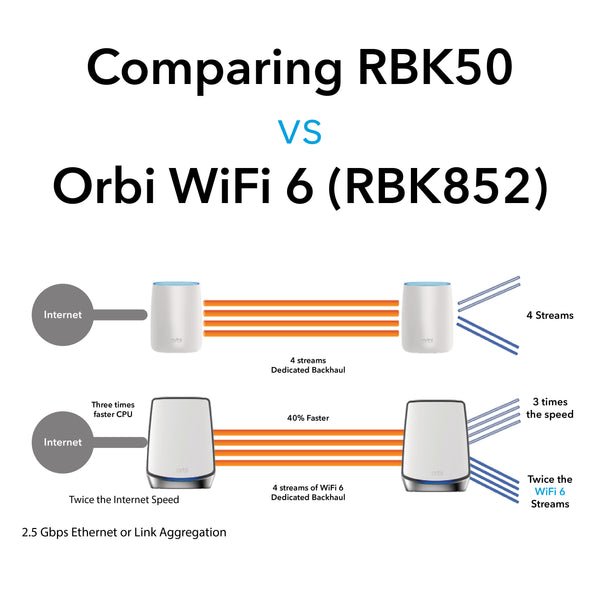
Are you thinking about upgrading your home network with Wifi 6 mesh but worried if it will work with your older devices? You’re not alone.
Many people wonder if investing in the latest Wifi technology means they have to replace everything else too. The good news is, understanding how Wifi 6 mesh systems connect with your current gadgets could save you time and money. Keep reading to discover whether Wifi 6 mesh is backward compatible and how it can improve your internet experience without causing frustration.
Credit: ezeefiber.com
Wifi 6 Mesh Basics
Wifi 6 Mesh is the latest way to connect your devices at home or office. It helps spread the internet signal evenly in large areas.
This technology improves speed, reduces delays, and supports many devices at once. Understanding its basics can help you get better coverage.
What Is Wifi 6 Mesh
Wifi 6 Mesh is a network system that uses multiple devices called nodes. These nodes work together to create a strong wireless signal.
Each node connects to the internet and to each other. This creates a big wireless network that covers a whole building or home.
- Uses Wifi 6 technology for faster speeds
- Nodes communicate to share internet evenly
- Reduces dead zones in large spaces
- Handles many devices connected at once
Key Features Of Wifi 6 Mesh
Wifi 6 Mesh has special features that improve your wireless experience. These features help with speed, capacity, and battery use.
| Feature | Description |
| OFDMA | Allows many devices to share channels efficiently |
| MU-MIMO | Supports multiple devices sending and receiving data at once |
| Target Wake Time | Helps devices save battery by scheduling check-ins |
| Better Security | Uses WPA3 for stronger protection |
Backward Compatibility Explained
Wifi 6 Mesh systems support older wifi devices. This means you do not need to replace all your gadgets.
Backward compatibility helps new and old devices work together in one network.
Compatibility With Older Wifi Standards
Wifi 6 works with devices using wifi 5, 4, and older standards. You can connect your old phone or laptop without issues.
Older devices will not get wifi 6 speed but will still connect and use the network.
- Wifi 6 routers accept connections from wifi 5, 4, and 3 devices
- Old devices keep using their own wifi speed and features
- New wifi 6 devices get faster speeds and better performance
How Mesh Networks Handle Mixed Devices
Mesh networks manage many devices at once. They send data efficiently to each device based on its wifi type.
Mesh routers use smart technology to keep all devices connected smoothly.
- Devices connect to the best mesh node automatically
- Mesh adapts to device speed and wifi standard
- Older devices do not slow down the whole network
- New wifi 6 devices get full speed from the mesh
Benefits Of Wifi 6 Mesh Compatibility
Wifi 6 mesh systems work well with older wifi devices. They can connect to both new and old devices smoothly.
This backward compatibility helps users keep using their old gadgets without problems. It also improves home network quality.
Improved Performance With Older Devices
Older devices get better wifi signals with a Wifi 6 mesh system. The mesh helps spread the signal evenly around the home.
This means older phones, tablets, or laptops can connect faster and more reliably. They do not slow down the whole network.
- Better signal strength for older devices
- More stable connections in different rooms
- Faster speeds compared to older routers
Seamless Network Integration
Wifi 6 mesh systems work well with existing network setups. They fit easily with older routers and devices.
This makes upgrading simple. Users do not need to change all their devices at once. The mesh system manages all connections smoothly.
- Easy to add to current wifi networks
- Supports different wifi standards at once
- Keeps all devices connected without drops
Limitations And Challenges
WiFi 6 mesh systems offer fast and reliable connections. Still, they face some limits when working with older devices.
Understanding these challenges helps users set the right expectations for their network.
Potential Speed Drops
When WiFi 6 mesh points connect to older devices, the overall speed may drop. This happens because the network adapts to the slowest device.
- Older devices use slower WiFi standards.
- Mesh nodes lower speeds to match legacy devices.
- Interference and signal loss can reduce speed further.
- Backhaul links may slow down with mixed device types.
Device-specific Compatibility Issues
Not all devices work smoothly with WiFi 6 mesh systems. Some may have trouble connecting or cause network instability.
| Device Type | Common Issue | Effect on Network |
| WiFi 5 (802.11ac) laptops | Limited speed support | Slows mesh node performance |
| WiFi 4 (802.11n) smartphones | Older security protocols | May cause connection drops |
| IoT devices | Limited band support | Restricts mesh node channels |
| Non-WiFi 6 routers | Compatibility issues | Possible network conflicts |
Setting Up A Wifi 6 Mesh Network
Wifi 6 mesh networks improve your home internet speed and coverage. They use multiple nodes to spread the signal evenly.
Setting up a Wifi 6 mesh is easy if you pick the right devices and configure them well. This guide helps you do both.
Choosing Compatible Devices
Choose mesh devices that support Wifi 6 to get the best speed and range. Check if they work with your current router.
Devices with Wifi 6 work well with older Wifi versions. This means you can add new nodes without replacing all devices.
- Look for Wifi 6 certified mesh routers and nodes
- Check if your internet provider supports Wifi 6
- Confirm backward compatibility with older Wifi standards
Configuring For Mixed Device Environments
Many homes have devices using different Wifi versions. Your mesh network should support both new and old devices smoothly.
Set your mesh network to allow mixed connections. This keeps all devices connected without losing speed or stability.
- Enable dual-band or tri-band settings on your mesh system
- Use the mesh app to prioritize devices if needed
- Keep firmware updated for best compatibility
Troubleshooting Compatibility Problems
WiFi 6 mesh networks are the latest in wireless technology. They promise faster speeds and better connections. But what if your devices aren’t compatible?
Understanding compatibility issues can help you fix problems. Let’s explore common issues and when you should upgrade your devices.
Common Issues And Fixes
Devices not connecting to a WiFi 6 mesh can be frustrating. Older devices may not support the latest standards. This can cause slow speeds or connection drops.
- Ensure your device firmware is up-to-date
- Check if your device supports WiFi 6
- Use dual-band routers for better compatibility
When To Upgrade Devices
Upgrading devices can improve your network experience. It can also prevent future compatibility issues.
| Device Age | Upgrade Recommendation |
| 0-2 years | Likely compatible |
| 3-4 years | Consider upgrade |
| 5+ years | Upgrade needed |
Future Of Wifi Mesh Technology
Wifi mesh technology is evolving quickly. It helps improve internet coverage in homes and offices. Wifi 6 mesh systems bring faster speeds and better connectivity.
These systems are backward compatible with older devices. This means you can use old and new devices together. Let’s explore more about upcoming standards and compatibility trends.
Upcoming Wifi Standards
New wifi standards will offer greater speeds and efficiency. Wifi 7 is already in development. It promises to deliver even faster internet.
These standards will improve data transfer and reduce latency. This means smoother video calls and faster downloads.
- Higher speeds with Wifi 7
- Improved efficiency for multiple devices
- Better performance in crowded areas
Evolving Compatibility Trends
Compatibility is key for wifi mesh systems. New systems still work with older wifi devices. This allows for seamless upgrades without replacing all gadgets.
Manufacturers focus on making devices that work well together. This ensures that users do not face connectivity issues.
- Backward compatibility with older devices
- Seamless integration with new technologies
- Focus on user-friendly upgrades

Credit: www.amazon.com

Credit: www.pcmag.com
Frequently Asked Questions
Is Wifi 6 Mesh Backward Compatible With Older Devices?
Yes, WiFi 6 mesh systems support older WiFi standards like WiFi 5 and WiFi 4. This ensures your older devices connect seamlessly without speed drops.
Can Wifi 6 Mesh Improve Older Device Performance?
WiFi 6 mesh can enhance older device connectivity but won’t boost their max speeds. It provides more stable and wider coverage for all devices.
Do I Need Wifi 6 Devices For Wifi 6 Mesh?
No, you don’t need WiFi 6 devices to use a WiFi 6 mesh. Older devices will still connect but won’t benefit from WiFi 6 features.
Will Wifi 6 Mesh Replace My Existing Router?
WiFi 6 mesh can replace your current router for better coverage and speed. It works well with mixed device types, including older WiFi models.
Conclusion
Wifi 6 mesh systems do work with older devices. They support previous Wifi standards without issues. This means you can upgrade your network step by step. Older devices will still connect and get better coverage. But, to get full Wifi 6 speed, new devices are needed.
Mixing old and new may slow the network a bit. Still, a Wifi 6 mesh can improve your home Wi-Fi experience. It offers better range and fewer dead spots overall. So, upgrading to Wifi 6 mesh is a smart choice.


