Struggling with weak WiFi signals in your multi-story home? You’re not alone.
When your internet slows down as you move between floors, it can be frustrating and disruptive. Choosing the right solution to boost your connection is key. Should you go for a mesh WiFi system or powerline adapters? Both promise better coverage, but which one truly fits your needs?
Keep reading to discover how each option works and which one can give you strong, reliable internet on every floor of your home. Your perfect connection might be just a few clicks away.
Mesh Wifi Basics
Mesh wifi helps spread internet across large homes. It uses several devices working together.
This system can cover many floors and rooms. It gives a strong wifi signal everywhere.
How Mesh Wifi Works
Mesh wifi uses multiple nodes. These nodes connect to each other and the main router.
Each node sends wifi signals to nearby devices. They create a single, strong network.
- One main router connects to the internet.
- Other nodes spread the wifi signal.
- Devices switch to the closest node automatically.
- This keeps the connection fast and stable.
Key Features Of Mesh Systems
Mesh systems have special features that help cover big homes well. They are easy to use.
These features improve wifi speed, coverage, and reliability in multi-story houses.
- Wide coverage with multiple nodes.
- Seamless roaming for devices.
- Simple setup using apps.
- Automatic updates for better security.
- One network name for all nodes.
Powerline Adapter Basics
Powerline adapters use your home’s electrical wiring to send internet signals. They help bring wired internet to parts of your home without extra cables.
This makes them useful in multi-story homes where WiFi may not reach every room well.
How Powerline Adapters Work
Powerline adapters connect to your router and plug into a power outlet. They send internet data through the electrical wires in your home.
Another adapter plugs in where you want internet access. It receives the data from the wires and provides a network connection.
- First adapter connects to router and power socket
- Data travels through electrical wiring
- Second adapter plugs in elsewhere to get internet
- Devices connect to the second adapter via Ethernet or WiFi
Main Features Of Powerline Adapters
Powerline adapters offer easy setup and use existing wiring. They can cover areas where WiFi signals are weak or blocked.
- Plug and play setup—no extra cables needed
- Use existing electrical wiring for data transfer
- Provide wired or wireless connections at remote spots
- Work well in multi-story or large homes
- Speed depends on wiring quality and distance
Performance In Multi Story Homes
Living in a multi story home can create challenges for your internet signal. Different floors and walls can block or weaken signals. Choosing the right network solution helps keep your connection strong and fast.
This guide compares mesh wifi systems and powerline adapters. We focus on how they perform in multi story houses, especially for signal strength and speed.
Signal Strength Across Floors
Mesh wifi systems use several devices placed on different floors. These devices communicate wirelessly and spread the wifi signal evenly. This method helps reduce dead zones and weak signals in corners or far rooms.
- Mesh wifi nodes create a strong network on every floor.
- Devices automatically connect to the nearest node for the best signal.
- Signal strength depends on node placement and building materials.
- Powerline adapters send internet through your home’s electrical wiring.
- Signal strength may drop if wiring is old or complex.
- Adapters need to be plugged into outlets on each floor for coverage.
Speed And Reliability Comparison
Speed and reliability are important for streaming, gaming, and working. Mesh wifi offers consistent speeds because nodes create a strong wireless network. Powerline adapters can be fast but may face speed drops from electrical noise.
| Feature | Mesh Wifi | Powerline Adapters |
| Speed | Stable and high across floors | Can vary with wiring quality |
| Reliability | Strong signal with seamless handoff | Depends on electrical interference |
| Installation | Easy placement of nodes | Needs compatible outlets on each floor |
| Coverage | Wide and flexible | Limited by wiring layout |
Installation And Setup
Setting up internet in a multi-story home can be challenging. Let’s compare mesh wifi and powerline adapters.
Both solutions have their own installation processes. Understanding them helps you choose the right option for your home.
Ease Of Installing Mesh Wifi
Mesh wifi systems are user-friendly and simple to install. They come with a main router and additional nodes.
- Place the main router near your modem.
- Position nodes around the house for full coverage.
- Use the app to connect and configure the network.
Setting Up Powerline Adapters
Powerline adapters use electrical wiring for internet. They are useful in homes where wifi struggles to reach.
| Step | Action |
| 1 | Plug the first adapter into a wall socket near the router. |
| 2 | Connect it to the router using an Ethernet cable. |
| 3 | Place the second adapter in another room. |
| 4 | Connect devices using Ethernet or wifi from the adapter. |
Both mesh wifi and powerline adapters offer unique advantages. Choose based on your home’s needs and layout.
Cost Considerations
Choosing the right network setup for multi story homes depends on cost. Both mesh wifi and powerline adapters have different price points to think about.
Understanding initial and ongoing costs helps you pick a solution that fits your budget and needs.
Initial Investment
Mesh wifi systems usually cost more upfront. They require multiple devices to cover all floors well. Powerline adapters need fewer devices and can be cheaper at first.
- Mesh wifi kits can range from $150 to $400 or more.
- Powerline adapter kits often cost between $50 and $150.
- Mesh systems include routers and satellite units.
- Powerline kits include adapters that use home wiring.
Long-term Expenses
Mesh wifi may need updates or extra units to keep good coverage. Powerline adapters can face issues if home wiring changes or degrades over time.
| Cost Factor | Mesh Wifi | Powerline Adapters |
| Maintenance | Firmware updates, possible new units | Rare updates, possible replacement if wiring fails |
| Electricity Use | Low to moderate | Low |
| Upgrade Frequency | Every 3-5 years | Every 5+ years |
| Reliability Over Time | Consistent with updates | Depends on wiring condition |
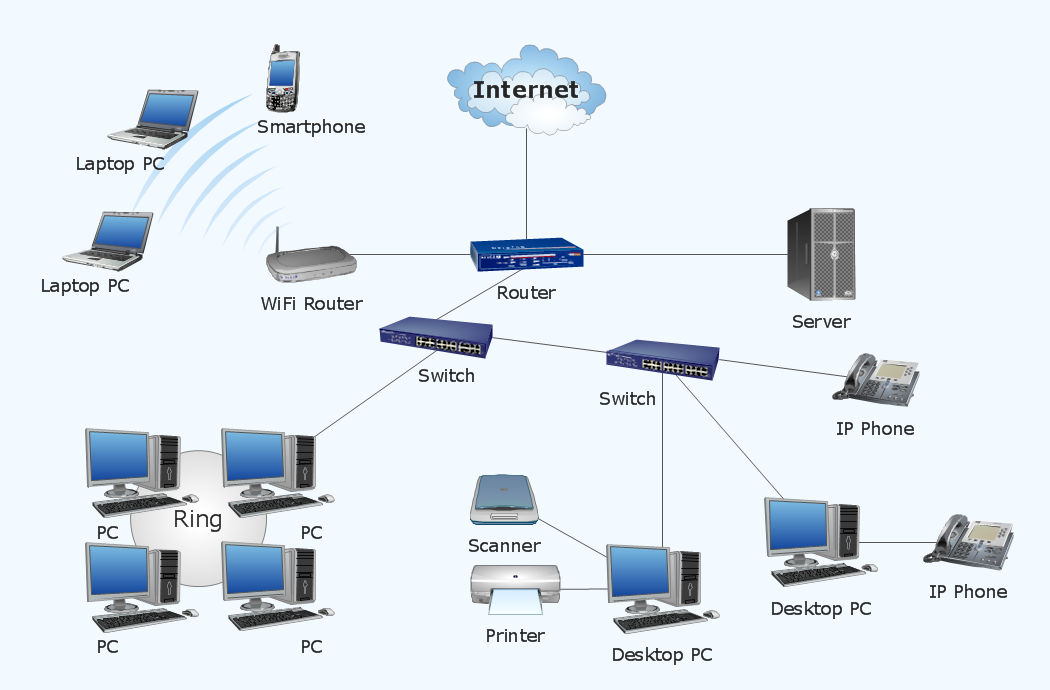
Credit: medium.com
Compatibility And Scalability
Choosing the right network for a multi-story home depends on compatibility and scalability. These features ensure your internet works well and grows with your needs.
Mesh WiFi and powerline adapters offer different ways to connect devices. Understanding their compatibility and scalability helps you decide which fits your home better.
Adding More Devices
Mesh WiFi systems handle many devices easily. Each node shares the network load, keeping speeds steady.
Powerline adapters work well with fewer devices. Adding many devices can slow down the network if adapters compete for bandwidth.
- Mesh WiFi supports many devices without much speed loss
- Powerline adapters may slow down with many connected devices
- Mesh nodes can be added to increase coverage and device support
- Powerline adapters need electrical wiring to connect more devices
Integration With Existing Networks
Mesh WiFi systems usually replace your old router or work alongside it. They use the same WiFi name to keep devices connected smoothly.
Powerline adapters add to your current network by using your home’s electrical wiring. They work with your existing router without much setup.
- Mesh WiFi can replace or extend your current WiFi network
- Powerline adapters extend network via electrical wiring
- Both work with most routers and internet providers
- Mesh WiFi offers seamless roaming across your home
- Powerline adapters may need manual switching between networks
Security Aspects
In multi-story homes, choosing between mesh WiFi and powerline adapters can be crucial for internet security. Let’s explore their security features and potential vulnerabilities.
Encryption And Safety Features
Mesh WiFi systems come with WPA3 encryption, which is the latest security protocol. It helps in protecting your data from unauthorized access.
Powerline adapters use AES encryption to secure data traveling through your electrical wiring. This ensures that your network is not easily intercepted.
- WPA3 offers advanced protection for mesh networks
- AES encryption secures data over powerline adapters
- Both methods aim to safeguard your home network
Potential Vulnerabilities
Mesh WiFi networks can be vulnerable if not properly configured. It’s important to change default passwords and enable network segmentation.
Powerline adapters might suffer from signal interference. This can happen if your wiring is old or if there are too many devices connected.
- Change default passwords on mesh systems
- Network segmentation enhances security
- Monitor powerline adapter connections for interference
Troubleshooting Common Issues
Mesh Wifi and Powerline Adapters help improve internet in multi-story homes. Sometimes, they face problems that slow down your connection. Fixing these issues can bring back fast and stable internet.
This guide covers common problems and easy fixes for both Mesh Wifi and Powerline Adapters. Follow these tips to keep your home network working well.
Mesh Wifi Problem Solving
Mesh Wifi systems may lose connection or have weak signals in some areas. This happens when nodes are too far apart or have obstacles like walls.
Restart your mesh nodes by unplugging them for 10 seconds. Place nodes closer to each other or in open spaces to improve signal.
- Check if firmware is up to date and update if needed
- Reduce interference by moving nodes away from microwaves or cordless phones
- Use the mesh app to test signal strength and node placement
- Reset the mesh network if connection issues persist
Powerline Adapter Fixes
Powerline adapters can lose speed or stop working due to electrical noise or poor wiring. They work best when plugged directly into wall outlets, not power strips.
Try moving adapters to different outlets on the same electrical circuit. Avoid outlets near large appliances that cause interference.
- Make sure adapters are paired correctly following the manufacturer’s instructions
- Check for firmware updates and apply them if available
- Test the network speed with adapters connected alone, without other devices on the circuit
- Use a powerline adapter tester or app to check connection quality
Best Use Cases
Choosing the right network setup for multi-story homes can be tough. Both mesh wifi and powerline adapters help expand internet access across different floors.
This guide explains when to pick mesh wifi or powerline adapters based on your home’s needs and layout.
When To Choose Mesh Wifi
Mesh wifi works well for large homes where one router cannot cover all floors. It uses multiple nodes to create one seamless network.
- You want strong wifi signals everywhere, even in far rooms.
- Your home has many walls or obstacles that block wifi.
- You need automatic connection switching as you move around.
- You want easy setup and management through an app.
- Your devices support the latest wifi standards.
When To Opt For Powerline Adapters
Powerline adapters use your home’s electrical wiring to send internet signals. They can be a good choice if wifi signals struggle to reach certain floors.
| Best Situation | Details |
| Wired connection needed | Connect devices without wifi drops |
| Thick walls or floors | Wifi signals cannot pass through easily |
| Budget-friendly | Usually costs less than mesh wifi systems |
| Limited wifi devices | Few devices mostly near adapters |
| Simple network extension | No need for multiple wifi nodes |
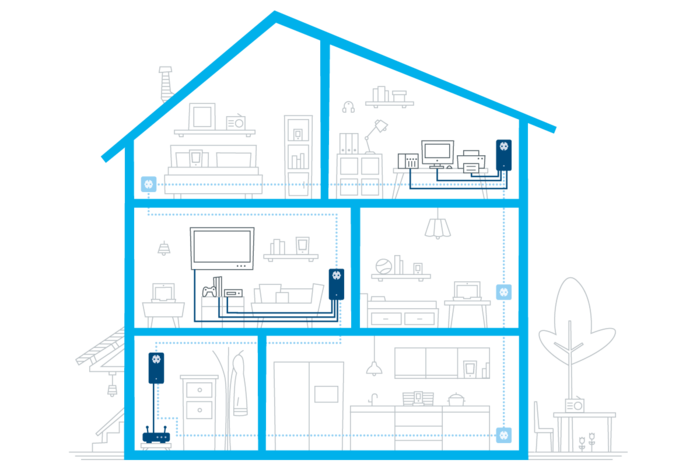
Credit: medium.com

Credit: www.reddit.com
Frequently Asked Questions
What Is The Main Difference Between Mesh Wifi And Powerline Adapters?
Mesh Wifi uses multiple nodes to create a seamless network. Powerline Adapters send internet through electrical wiring. Mesh provides better coverage and smoother connectivity in multi-story homes. Powerline Adapters are simpler but may face interference from wiring quality.
Which Is Better For Multi-story Homes, Mesh Or Powerline?
Mesh Wifi is usually better for multi-story homes due to wider coverage and consistent speeds. Powerline Adapters can struggle with older or complex wiring, causing slower performance. Mesh systems offer more reliable connections across multiple floors.
Are Powerline Adapters Affected By Home Wiring Quality?
Yes, Powerline Adapters depend heavily on the home’s electrical wiring quality. Old or noisy wiring can reduce speed and cause connection drops. Newer or well-maintained wiring improves performance but still may not match Mesh Wifi consistency.
Can Mesh Wifi Improve Slow Internet On Upper Floors?
Yes, Mesh Wifi extends strong signals to upper floors using multiple nodes. It eliminates dead zones and provides seamless roaming. This ensures faster and more reliable internet access across all stories of the home.
Conclusion
Choosing between mesh WiFi and powerline adapters depends on your home’s layout. Mesh WiFi works well for large spaces with many floors. It gives strong, steady signals everywhere. Powerline adapters use your home’s wiring to carry internet. They suit homes with thick walls or less WiFi coverage.
Both options improve internet but in different ways. Think about your budget and internet needs first. Either way, your multi-story home can get better WiFi. Simple steps can make your connection faster and more reliable.