Are you tired of losing Wi-Fi signal the moment you step into your garage or basement? You’re not alone.
Many people struggle with weak or spotty connections in these tricky areas. But can mesh Wi-Fi really cover your garage and basement effectively? If you’ve ever wondered whether this solution can keep you connected everywhere in your home, this article will clear up the mystery.
By the end, you’ll know exactly how to boost your Wi-Fi where you need it most—no more dead zones, no more frustration. Keep reading to discover how to make your entire home truly connected.

Credit: www.reddit.com
Mesh Wifi Basics
Mesh wifi helps spread internet signals over a large area. It uses several devices called nodes. These nodes work together to give strong wifi everywhere.
Many people wonder if mesh wifi can cover places like garages and basements. Understanding how mesh wifi works can answer this question.
How Mesh Wifi Works
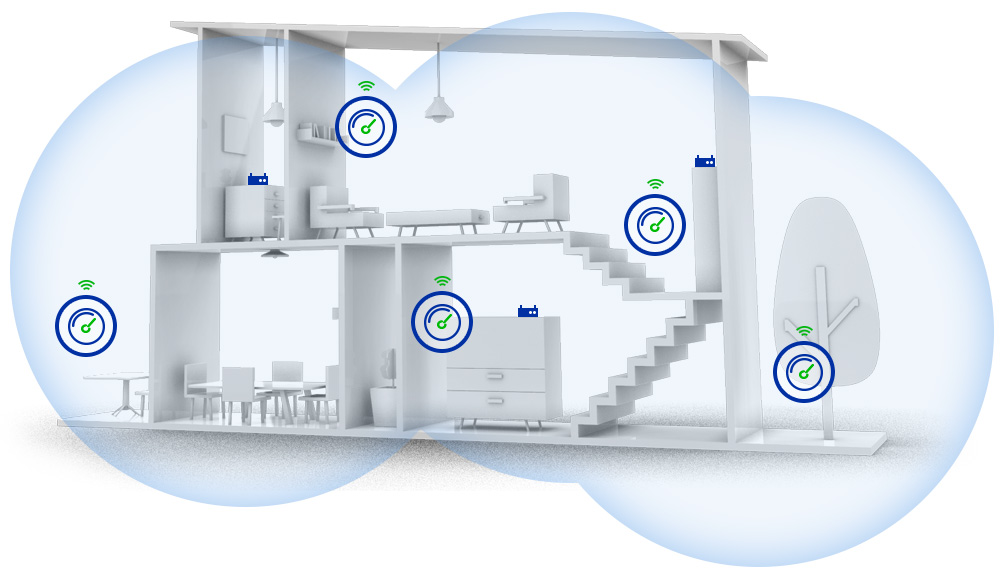
Mesh wifi uses multiple nodes that connect wirelessly or by cable. Each node sends and receives data to create a single network. This setup helps cover dead spots in a house.
- Main node connects to the internet modem.
- Other nodes spread signals to hard-to-reach areas.
- Nodes communicate with each other to keep connection strong.
- Devices switch automatically to the nearest node.
Benefits Over Traditional Routers
Mesh wifi gives better coverage than traditional routers. It is easier to expand and reduces weak signal areas. This is helpful for garages and basements that usually have poor wifi.
| Feature | Mesh Wifi | Traditional Router |
| Coverage Area | Large, multi-node | Limited, single device |
| Signal Strength | Consistent across home | Weak at edges |
| Setup | Simple and expandable | Fixed and limited |
| Device Switching | Automatic to best node | Manual or no switching |
Challenges In Garages And Basements
Garages and basements often have weak WiFi signals. Many factors can block or reduce the mesh WiFi coverage in these areas.
Understanding common obstacles helps improve your network in these spaces.
Common Signal Obstacles
Many objects and building features block WiFi signals. Thick walls and metal items are usual culprits. These obstacles reduce the signal strength.
- Concrete and brick walls stop signals
- Metal doors and shelves reflect WiFi waves
- Large appliances create dead zones
- Distance from the router weakens the signal
- Electrical interference from devices
Material Interference Effects
Different materials affect WiFi signals in specific ways. Some materials absorb signals, while others reflect or block them completely.
| Material | Effect on WiFi |
| Concrete | Absorbs and weakens signals |
| Metal | Reflects and blocks signals |
| Wood | Weakens signals slightly |
| Glass | Allows signals but may reduce strength |
| Water | Absorbs signals strongly |
Choosing The Right Mesh System
Mesh wifi systems can help cover large or tricky areas like garages and basements. Choosing the right system matters to get good signal strength and speed.
Look at your space and devices before buying a mesh system. This guide helps you pick the best one for your home.
Coverage Area Considerations
Garages and basements often have thick walls or metal that block wifi signals. You need a mesh system with enough range to reach these spots.
- Measure the total square feet of the areas you want to cover.
- Check if your walls or floors have materials like concrete or metal.
- Choose mesh nodes that can handle the distance and obstacles.
- Place nodes in open areas for better signal spread.
Device Compatibility
Make sure your mesh system works well with all your devices. Different devices use different wifi standards and frequencies.
| Device Type | Recommended Wifi Band | Notes |
| Smartphones | 2.4 GHz and 5 GHz | Supports most mesh systems |
| Smart TVs | 5 GHz | Better for video streaming |
| Security Cameras | 2.4 GHz | Longer range, lower speed |
| Laptops | Dual-band | Use both bands for speed and range |
Credit: caspianprimesolutions.com
Optimizing Mesh Placement
Mesh WiFi systems help extend internet coverage. They are useful for garages and basements. Proper placement of nodes is key for strong signals.
Placing nodes in strategic spots can improve connectivity. This ensures all areas have reliable internet access.
Ideal Node Locations
Placing nodes in the right spots is important. Nodes should be in open areas for better signal spread.
Avoid placing nodes in corners or behind large objects. This can block signals and reduce effectiveness.
- Place nodes near doorways for wider reach
- Keep nodes away from thick walls
- Position nodes at eye level for best performance
Avoiding Signal Blockers
Signal blockers can weaken your WiFi. Identifying these is crucial for maintaining strong connections.
Metal objects and appliances can interfere with WiFi. Avoid placing nodes near these items.
- Keep nodes away from microwaves and fridges
- Avoid placing nodes near metal shelves
- Minimize obstacles between nodes and devices
Signal Boost Techniques
Mesh WiFi systems often struggle to cover garages and basements. These areas can have thick walls or metal that block signals. Using signal boost techniques helps improve coverage in these hard-to-reach places.
This guide explains three common methods to boost WiFi signals: using extenders, powerline adapters, and antenna upgrades. Each can help expand your network range effectively.
Using Wifi Extenders
WiFi extenders receive your existing signal and rebroadcast it. Place them halfway between your router and the garage or basement. This helps fill dead zones with better WiFi coverage.
- Choose extenders compatible with your router
- Place extenders in open areas for best reception
- Avoid walls or metal objects near extenders
- Check signal strength after setup to adjust placement
Powerline Adapters
Powerline adapters use your home’s electrical wiring to extend the network. Plug one adapter near your router and another in the garage or basement. They create a wired connection without running new cables.
| Feature | Benefit |
| No new wiring needed | Easy setup using existing power lines |
| Stable connection | Less signal loss compared to wireless extenders |
| Works through walls | Good for garages and basements with barriers |
Antenna Upgrades
Upgrading your router’s antennas can boost signal range and strength. High-gain antennas focus signals in specific directions. This helps target the garage or basement more effectively.
- Choose antennas with higher gain values
- Point antennas toward the weak signal area
- Replace old or damaged antennas for better performance
Testing And Troubleshooting
Ensuring your mesh WiFi covers your garage and basement can be tricky. Signal strength varies in different areas.
Testing and troubleshooting help improve your WiFi performance. Learn how to manage connectivity issues effectively.
Measuring Signal Strength
Signal strength is important for consistent WiFi coverage. You can measure it using your device’s WiFi settings.
- Check the WiFi signal icon on your device.
- Use a WiFi analyzer app for detailed measurements.
- Walk around your garage and basement to test different spots.
Fixing Connectivity Issues
If you face connectivity issues, identify the problem areas. Moving your mesh WiFi units can help improve coverage.
| Problem | Solution |
| Weak signal in garage | Move a node closer to the garage |
| Basement disconnection | Place a node at the basement entrance |
| Interference from devices | Reduce nearby electronic device usage |
These steps help in maintaining strong WiFi coverage. Regular testing ensures your mesh WiFi is effective.
Additional Tips For Reliability
Mesh WiFi can cover garages and basements well. To keep your network strong, follow some simple tips. These tips help avoid weak signals and interruptions.
Good reliability makes sure you have fast internet in all parts of your home. This guide covers firmware updates and security practices.
Regular Firmware Updates
Update your mesh WiFi system’s firmware often. Updates fix bugs and improve performance. They also add new features that help your network run better.
Check the app or website of your mesh system for updates. Set your system to update automatically if possible. This keeps your network stable and safe.
- Fix bugs that cause slow speeds
- Improve signal coverage and strength
- Protect from security risks
- Add new tools for better control
Network Security Practices
Secure your mesh WiFi to stop intruders. Use strong passwords with numbers and letters. Avoid easy or common passwords.
Turn on your router’s firewall and WPA3 encryption if available. This keeps your data safe. Also, change default usernames and passwords on your devices.
- Use complex passwords
- Enable firewall and encryption
- Update login details regularly
- Turn off guest networks when not needed

Credit: www.reddit.com
Frequently Asked Questions
Can Mesh Wifi Improve Garage Internet Coverage?
Yes, mesh WiFi can improve garage coverage by placing a node nearby. It extends the signal, reducing dead zones and ensuring stable connectivity in the garage area.
Will Mesh Wifi Work In The Basement?
Mesh WiFi works well in basements if nodes are properly placed. Signal strength depends on walls and interference, so strategic positioning of nodes is essential for good coverage.
How Many Mesh Nodes Cover Garage And Basement?
Typically, two to three mesh nodes cover garage and basement effectively. One near the main router and others placed in or near these areas ensure strong signal reach.
Does Building Material Affect Mesh Wifi In Garage?
Yes, materials like concrete and metal block WiFi signals. Mesh systems help by adding nodes to bypass these obstructions, improving coverage in garages with dense building materials.
Conclusion
Mesh WiFi can improve coverage in garages and basements. Walls and floors may weaken signals. Placing nodes closer helps solve this problem. Devices connect smoothly with good placement. Choose a system that fits your space size. Simple setup lets you enjoy strong WiFi everywhere.
Enjoy internet in every corner of your home.