Are you tired of slow internet and dead zones in your large house? You’re not alone.
Setting up the best mesh WiFi system can transform your home internet experience, giving you strong, reliable coverage in every corner. But with so many options and setups, how do you find what works best for your space? You’ll discover simple, effective tips to create the perfect mesh WiFi setup tailored to your home.
Keep reading to unlock the secrets to seamless internet that keeps up with all your devices—no matter where you are in your house.
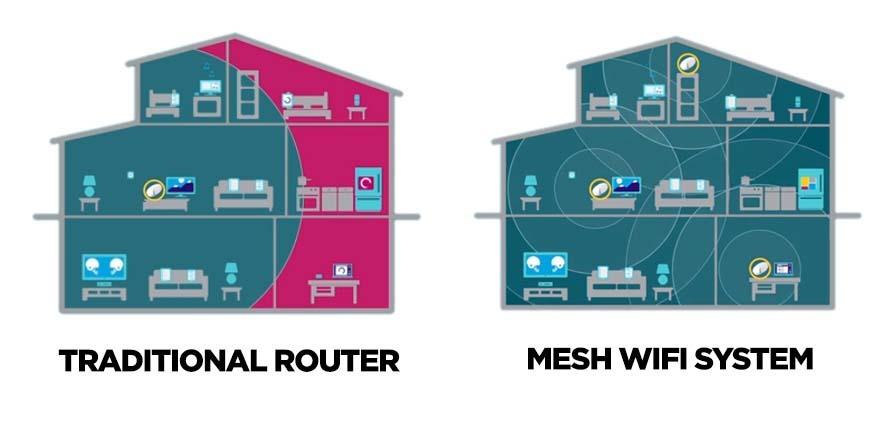
Credit: kb.pineapple.net.au
Benefits Of Mesh Wifi
Mesh wifi systems improve internet access in large houses. They use multiple devices to spread signal evenly.
This setup helps avoid dead zones and keeps your connection strong throughout the home.
Seamless Coverage
Mesh wifi creates a single network that covers every corner of your house. You move freely without losing connection.
- Eliminates wifi dead spots
- Supports many devices at once
- Works well in multi-story homes
- Offers smooth streaming and browsing
Easy Scalability
You can add more nodes to the mesh network anytime. This allows easy expansion as your needs grow.
| Number of Nodes | Coverage Area (Square Feet) |
|---|---|
| 1 | Up to 1500 |
| 2 | Up to 3000 |
| 3 | Up to 4500 |
| 4+ | More than 4500 |
Improved Reliability
Mesh systems use multiple devices to keep the network stable. If one node fails, others keep your wifi running.
This setup reduces interruptions and keeps your internet connection steady throughout the day.

Credit: dongknows.com
Key Factors For Large Houses
Setting up mesh WiFi in a large house needs careful planning. You must think about space, devices, and internet speed. These factors affect your WiFi’s strength and coverage.
Understanding each key factor helps create the best WiFi setup. This guide covers house size and layout, number of devices, and internet speed needs.
House Size And Layout
Large houses have many rooms and thick walls. This can block WiFi signals and cause dead spots. You need enough mesh nodes to cover every corner.
- Place nodes on different floors for full coverage
- Keep nodes in open spaces, not inside cabinets
- Use wired backhaul if possible for better speed
- Avoid placing nodes near metal objects or microwaves
Number Of Devices
More devices need more bandwidth and better network management. Mesh WiFi systems can handle many devices but check limits before buying.
| Device Type | Average Usage | Recommended Mesh Nodes |
|---|---|---|
| Smartphones and Tablets | Low to Medium | 2 to 3 |
| Smart TVs and Streaming Devices | Medium to High | 3 to 4 |
| Smart Home Devices | Low | 2 |
| Gaming Consoles and PCs | High | 4 or more |
Internet Speed Requirements
Your internet plan speed affects how well your mesh WiFi performs. Faster plans need mesh systems that support high speeds without slowing down.
Here are tips to match your internet speed with mesh WiFi:
- Check your internet plan speed before setup
- Choose mesh WiFi with speeds that meet or exceed your plan
- Use Ethernet connections for main nodes to keep speed stable
- Update mesh system firmware for best performance
Choosing The Right Mesh System
Setting up mesh WiFi in a large house needs careful planning. The right system helps cover every room with strong internet.
Choosing a mesh system depends on many factors. This guide focuses on performance, features, and budget.
Performance And Range
Look for mesh systems that offer wide coverage and fast speeds. Larger houses need more nodes for best results.
- Check the maximum range of each node
- Choose systems with dual or tri-band radios
- Pick devices with strong antennas for better signal
- Consider systems that support fast WiFi standards like WiFi 6
Compatibility And Features
Make sure the mesh system works with your devices and home setup. Extra features can add value.
| Feature | Benefit |
| App control | Easy setup and management |
| Parental controls | Limit kids’ internet access |
| Guest network | Secure internet for visitors |
| Device prioritization | Better speed for important devices |
Budget Considerations
Mesh systems come at many price points. Decide how much you want to spend before buying.
- Basic systems cost less but may cover less area
- Mid-range models offer good balance of price and features
- High-end systems provide the best speed and coverage
- Look for sales or bundles to save money
Optimal Node Placement
Mesh WiFi systems are great for large houses. They use multiple nodes to provide strong coverage. Proper placement of these nodes is key for the best performance.
Placing nodes correctly ensures a stable and fast connection. This helps in eliminating dead zones and boosting internet speed throughout the house.
Centralized Positioning
Place a node in the center of your house. This allows the WiFi signal to spread evenly. It reduces the chances of weak connections in far corners.
Centralized positioning helps when you have a large open area. It makes sure that every room gets enough signal strength.
Avoiding Interference
Keep nodes away from electronic devices. Devices like microwaves and cordless phones can cause interference. This weakens the WiFi signal.
Avoid placing nodes near large metal objects. Metals can block WiFi signals. This leads to slower internet speeds.
- Place nodes away from walls and furniture
- Avoid placing nodes near windows
- Keep nodes away from electronic devices
Multi-story Strategies
For houses with multiple floors, place nodes on each level. This ensures even coverage across all floors. It helps in maintaining a strong signal in every room.
Align nodes vertically if possible. This helps in sharing the WiFi signal between floors more effectively. It reduces dead spots on upper levels.
| Floor | Node Placement |
| Ground Floor | Central location |
| First Floor | Above the ground floor node |
| Second Floor | Above the first floor node |
Wired Vs Wireless Backhaul
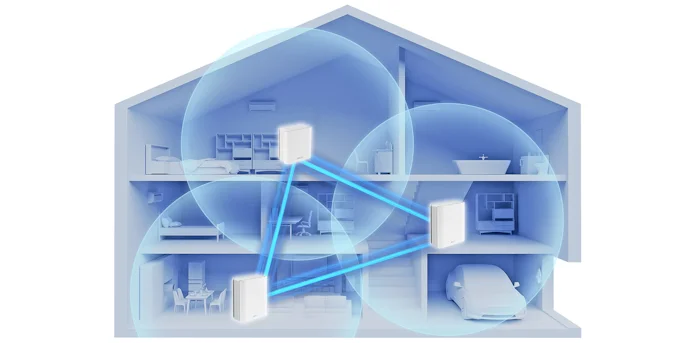
Mesh WiFi systems use backhaul to connect nodes. This link carries data between units. You can set it up wired or wireless.
Choosing the right backhaul affects speed and coverage. Large houses need strong connections for all devices.
Benefits Of Wired Connections
Wired backhaul uses Ethernet cables to link mesh nodes. This setup gives a stable and fast connection.
Wired connections reduce interference. They keep your network reliable even with many devices.
- Higher speed and lower latency
- Less signal interference
- Better performance for streaming and gaming
- Consistent connection quality
- Supports more devices at once
When To Use Wireless Backhaul
Wireless backhaul connects nodes through WiFi signals. It is easier to set up because no cables are needed.
Use wireless backhaul if running cables is hard or impossible. It works well in medium-sized homes with few walls.
- Homes where Ethernet wiring is unavailable
- Temporary or rental spaces
- Areas with fewer devices or lower data needs
- Places where flexibility is important
- When quick setup matters most
Credit: edgeup.asus.com
Configuring Your Mesh Network
A mesh WiFi network is ideal for large houses. It ensures strong and stable internet across all rooms.
Proper setup is crucial for optimal performance. Follow these steps to configure your mesh network efficiently.
Setting Up The Primary Router
The primary router is the main hub of your mesh network. Place it in a central location for the best coverage.
- Connect the primary router to your modem.
- Power on the router and wait for it to initialize.
- Access the router settings via a web browser using the provided IP address.
- Configure the network name (SSID) and password.
Adding And Syncing Nodes
Nodes expand the network coverage. They should be placed strategically to ensure seamless connectivity.
Use the following tips for node placement:
- Avoid placing nodes too far from the primary router.
- Keep nodes away from thick walls and metal objects.
- Ensure each node has a clear line of sight to the next.
Firmware Updates And Security
Regular firmware updates are vital. They enhance security and improve network performance.
| Action | Description |
| Check for updates | Access the router settings and check for available updates. |
| Install updates | Follow the instructions to install the latest firmware. |
| Change passwords | Update your WiFi password regularly for enhanced security. |
Troubleshooting Common Issues
Mesh WiFi helps cover large houses with a strong signal. Sometimes, problems still occur.
This guide explains how to fix common issues with mesh WiFi in big homes.
Signal Drops And Dead Zones
Signal drops happen when the WiFi signal weakens or stops in some areas. Dead zones are spots with no signal.
- Check node placement. Avoid walls and metal objects blocking signals.
- Place nodes evenly to cover all rooms and floors.
- Update your mesh system’s firmware to improve performance.
- Reduce interference from other electronics like microwaves and cordless phones.
- Use a WiFi analyzer app to find weak spots and adjust nodes.
Slow Speeds
Slow internet can happen if too many devices use WiFi at once or if nodes are far apart.
| Cause | Fix |
| Too many devices | Limit devices or upgrade your plan |
| Node distance too far | Move nodes closer together |
| Old firmware | Update mesh system software |
| Interference | Change WiFi channels in settings |
Device Connectivity Problems
Some devices may not connect well to mesh WiFi. This can cause slow or dropped connections.
- Restart your device and the mesh router nodes.
- Forget the WiFi network on your device and reconnect.
- Check if your device supports the WiFi frequency band (2.4 GHz or 5 GHz).
- Ensure the device’s software is up to date.
- Reset the mesh system if many devices have problems connecting.
Enhancing Performance
Setting up mesh WiFi in large houses needs careful attention. Good setup helps keep fast and steady internet everywhere.
This guide covers key ways to improve mesh WiFi performance. Focus on quality settings, channel use, and upkeep.
Using Qos Settings
Quality of Service (QoS) lets you control internet traffic. It helps prioritize important devices and apps. This stops slowdowns when many devices connect.
- Set high priority for work or school devices
- Limit bandwidth for less important gadgets
- Adjust settings based on peak usage times
- Use your router’s QoS controls to manage traffic
Channel Optimization
WiFi channels can get crowded with many networks nearby. Picking the best channel reduces interference and boosts speed.
| Channel Type | Best Use | Notes |
|---|---|---|
| 2.4 GHz Channels | Long range, low speed | Pick channels 1, 6, or 11 to avoid overlap |
| 5 GHz Channels | Higher speed, shorter range | Choose less crowded channels for best speed |
Regular Maintenance Tips
Keep your mesh WiFi system updated and clean. Regular care avoids problems and keeps connections strong.
- Restart your mesh nodes once a week
- Update firmware to fix bugs and improve features
- Check device placement for clear signal paths
- Remove or replace old equipment when needed
Frequently Asked Questions
What Is The Ideal Number Of Mesh Nodes For Large Houses?
The ideal number depends on house size and layout. Generally, 3 to 5 nodes cover large homes effectively. Place nodes strategically for optimal coverage and minimal signal overlap.
How To Position Mesh Wifi Nodes In A Big House?
Place nodes evenly across the house, avoiding thick walls and interference sources. Keep nodes within 30 feet for strong connection. Elevate nodes for better signal distribution.
Which Mesh Wifi System Suits Large Homes Best?
Look for systems with multiple nodes, strong range, and fast speeds. Brands like Netgear Orbi, Eero Pro, and Google Nest Wifi are top choices for large houses.
Can Mesh Wifi Improve Coverage In Multi-story Houses?
Yes, mesh wifi extends strong signals to all floors. Place nodes on each floor to avoid dead zones and maintain seamless internet access throughout the home.
Conclusion
Choosing the right mesh WiFi setup improves internet coverage in large homes. Place nodes where signals are weak or blocked. Use devices that support fast speeds and wide range. Test your network after installation to find weak spots. Adjust nodes for better connection and fewer drops.
A good mesh system helps all family members stay connected. Enjoy smooth browsing, streaming, and gaming anywhere in your house. Simple steps lead to strong and steady WiFi every day.