Imagine walking through your home without losing Wi-Fi signal in any room. Whether you’re streaming your favorite show, controlling smart devices, or working from your home office, slow or spotty internet can be frustrating.
That’s where mesh WiFi comes in. It’s designed to cover every corner of your multi-room smart home with strong, reliable internet. If you want seamless connectivity and a smarter home experience, keep reading. You’re about to discover how mesh WiFi can transform your home network for good.
Why Mesh Wifi Matters
Mesh Wifi is essential for modern homes. It ensures connectivity across all rooms.
Traditional routers often struggle with coverage, leading to dead zones. Mesh Wifi solves this problem.
Limitations Of Traditional Wifi
Traditional Wifi routers have limited range. This creates weak signals in larger homes.
- Signal drops in rooms far from the router
- Interference from walls and floors
- Difficulty in handling multiple devices
Benefits For Smart Homes
Mesh Wifi enhances the smart home experience. It provides seamless connectivity for all devices.
- Consistent connectivity for smart devices
- Better coverage in multi-level homes
- Easy network management through apps

Credit: www.amazon.ca
Key Features Of Mesh Systems
Mesh wifi systems help you connect many rooms in your home. They use multiple devices to spread wifi evenly.
These systems work well with smart home devices. They make sure your internet is strong everywhere.
Seamless Coverage
Mesh wifi covers your whole home without dead spots. Each unit talks to the others to keep the signal strong.
You can move around without losing connection. This is perfect for large houses or multi-story homes.
Easy Scalability
You can add more mesh units to cover bigger areas. The system grows with your needs without extra wiring.
- Add units one by one as needed
- Expand coverage to new rooms easily
- No need to replace the whole system
Smart Device Integration
Mesh systems work well with smart home devices like lights and cameras. They keep all devices connected smoothly.
This integration allows your smart devices to work without wifi interruptions. It supports many devices at once.
Choosing The Right Mesh Wifi
Mesh wifi helps cover your whole home with a strong signal. It connects many devices easily. Choosing the right system keeps your smart home running smoothly.
Think about your home size, smart devices, and internet speed. These factors guide your choice. Let’s look at each one closely.
Assessing Home Size And Layout
Large homes or houses with many walls need more mesh nodes. Open floor plans may need fewer nodes. Check your home’s shape before buying.
- Small apartments may need 1 or 2 nodes
- Medium homes often require 3 nodes
- Large homes or multi-story houses can need 4 or more nodes
- Thick walls or metal structures can reduce wifi signals
- Place nodes evenly for best coverage
Compatibility With Smart Devices
Your mesh system must work well with your smart home gadgets. Some devices need specific wifi bands or settings. Check if the mesh supports them all.
| Device Type | Wifi Requirement | Notes |
| Smart Lights | 2.4 GHz band | Common for most brands |
| Security Cameras | 5 GHz band | Needs stable, fast connection |
| Voice Assistants | Dual-band support | Better responsiveness |
| Smart Thermostats | 2.4 GHz band | Usually low bandwidth |
Speed And Bandwidth Needs
Think about how many devices use the internet at once. Streaming videos and gaming need more speed. Your mesh system should handle your peak use.
Here are tips to match speed and bandwidth needs:
- Check your internet plan speed from your provider.
- Choose a mesh system that supports at least your plan’s speed.
- Look for systems with Quality of Service (QoS) to prioritize devices.
- Remember, more devices need higher total bandwidth.
- Upgrade mesh nodes if speed drops in some rooms.
Top Mesh Wifi Brands
Mesh Wifi systems are ideal for multi-room smart homes. They offer seamless internet coverage throughout your space.
Many top brands provide options that fit different needs and budgets. Here, we compare popular models and explore budget versus premium options.
Popular Models Compared
Several brands stand out in the mesh wifi market. They offer reliable connectivity and smart features.
- Netgear Orbi: Known for its high performance and wide coverage.
- Google Nest Wifi: Offers easy setup and integrates with Google Assistant.
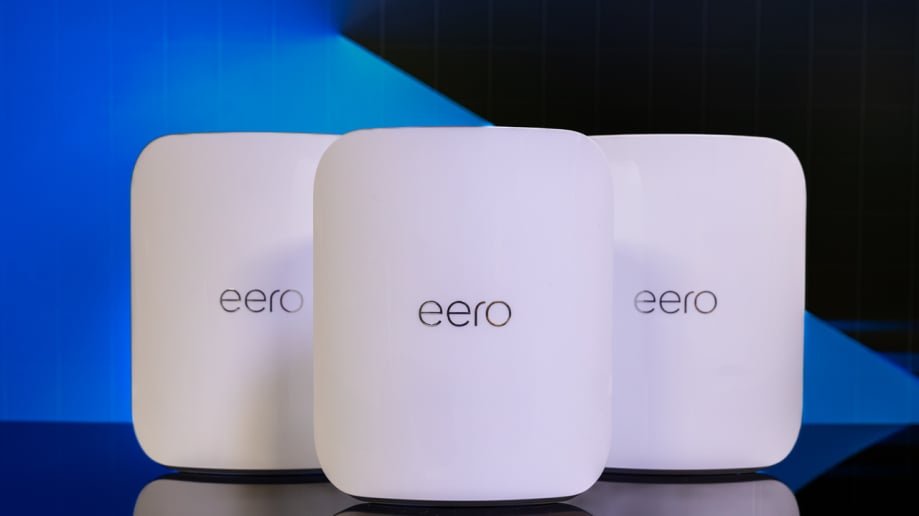
- Amazon Eero: Provides a user-friendly app and consistent signal strength.
Budget Vs Premium Options
Mesh wifi systems vary in price. Budget models offer basic features, while premium options come with advanced capabilities.
| Model | Price Range | Features |
| TP-Link Deco M5 | Budget | Basic coverage, parental controls |
| Netgear Orbi AX6000 | Premium | High-speed, large coverage area |
| Google Nest Wifi | Mid-range | Smart home integration, easy setup |
Choosing the right mesh wifi depends on your home’s size and your tech needs. Consider what features matter most for your smart home.
Setup Tips For Multi-room Coverage
Mesh WiFi systems help cover every room in your smart home. Proper setup ensures strong signals everywhere.
Follow these tips to place routers, configure nodes, and fix common problems.
Optimal Router Placement
Place your main router near the center of your home for even signal spread. Keep it off the floor and away from walls and metal objects.
- Avoid hiding the router in cabinets or behind furniture.
- Place it high, like on a shelf or table.
- Keep it away from microwaves and cordless phones.
- Ensure it is in an open space for better coverage.
Configuring Nodes
Nodes extend your mesh network to cover more rooms. Position them where the signal from the main router is still strong.
| Node Location | Recommended Distance | Tips |
| Living Room | 20-30 feet from router | Place on open shelf |
| Upstairs Hallway | Near stairwell | Avoid thick walls |
| Home Office | Within direct line of sight | Keep away from electronics |
Troubleshooting Common Issues
If your mesh network has weak spots, try rebooting all devices first. Check for firmware updates on your router and nodes.
- Restart router and nodes to refresh connections.
- Move nodes closer if signal is weak.
- Check for interference from other wireless devices.
- Reset network settings and set up again if needed.

Credit: www.pcmag.com
Enhancing Smart Home Performance
Mesh WiFi systems help improve internet coverage in every room. They make smart home devices work better and faster.
With strong WiFi, you can control lights, cameras, and speakers without delays or connection drops.
Prioritizing Devices
Not all devices need the same internet speed. You can set priority for important devices to get faster connections.
Giving priority to security cameras or smart locks keeps your home safe and responsive at all times.
- Assign higher priority to security systems
- Limit bandwidth for less critical devices
- Adjust priorities based on usage time
Security Best Practices
Strong security protects your smart home from hackers. Mesh WiFi systems offer built-in protection features.
Use strong passwords and enable network encryption to keep your data safe. Regularly check for unknown devices.
- Set unique, strong WiFi passwords
- Enable WPA3 encryption if available
- Turn off guest networks when not needed
- Monitor connected devices regularly
Firmware Updates
Keep your mesh WiFi system updated. Firmware updates fix bugs and improve security features.
Check for updates often. Some systems update automatically, but manual checks can help too.
- Set automatic update if possible
- Check update notifications regularly
- Restart devices after updates for best results
Future Trends In Mesh Wifi
Mesh Wifi systems are changing how we connect devices in our homes. They help cover every room with strong internet signals.
New technology will make these systems faster, smarter, and easier to use in multi-room smart homes.
Wi-fi 6 And Beyond
Wi-Fi 6 offers faster speeds and better performance for many devices at once. It helps smart homes run smoothly without slowdowns.
Future versions like Wi-Fi 6E and Wi-Fi 7 will add more channels and less interference. This means even faster and more reliable connections.
- Wi-Fi 6 supports more devices simultaneously
- Wi-Fi 6E uses new frequency bands for less traffic
- Wi-Fi 7 promises higher speeds and lower delays
Ai-driven Network Management
Artificial intelligence (AI) helps manage mesh networks by adjusting settings automatically. It keeps the network strong without user effort.
AI can detect weak signals and move devices to better channels. It also predicts problems and fixes them before they cause issues.
- Automatic channel selection for less interference
- Smart device prioritization to improve performance
- Real-time problem detection and fixing

Credit: www.amazon.ca
Frequently Asked Questions
What Is Mesh Wifi And How Does It Work?
Mesh WiFi uses multiple devices to create a unified network. It eliminates dead zones by distributing signals evenly across rooms. This system improves connectivity and coverage in multi-room smart homes, ensuring all devices stay connected seamlessly.
Why Choose Mesh Wifi For A Smart Home?
Mesh WiFi offers consistent, reliable internet throughout your home. It supports multiple smart devices without slowing down. This system adapts to your home’s layout, providing better coverage than traditional routers, making it ideal for smart home automation.
How Does Mesh Wifi Improve Smart Home Device Performance?
Mesh WiFi reduces interference and signal dropouts. It ensures stable connections for smart devices in every room. This leads to faster response times and uninterrupted control of smart home features like lighting and security.
Can Mesh Wifi Handle Many Smart Home Devices?
Yes, mesh WiFi can support numerous devices simultaneously. It balances network traffic efficiently to prevent congestion. This capability makes it perfect for homes with multiple smart gadgets and high internet usage.
Conclusion
Mesh WiFi systems help cover every room with strong internet. They reduce dead zones and keep devices connected smoothly. Easy setup and flexible placement make them ideal for smart homes. Enjoy stable streaming, gaming, and video calls anywhere inside. Choose a mesh WiFi that fits your home size and budget.
A reliable network supports all your smart devices well. Make your home smarter with better WiFi coverage today.


