Are you tired of slow internet and dead zones in your home? You might be wondering if upgrading to Wifi 6 mesh is really worth it compared to your current Wifi 5 setup.
The difference isn’t just in the numbers—it’s about how smoothly your devices connect, how fast your streaming feels, and how reliable your online experience becomes. You’ll discover why Wifi 6 mesh could be the game-changer your home network needs. Keep reading to find out if it’s time to make the switch and enjoy faster, stronger, and smarter WiFi everywhere you go.

Credit: www.reddit.com
Wifi 6 Vs Wifi 5
Wifi 6 and Wifi 5 are two common wireless standards used today. They both help devices connect to the internet without wires.
This article explains the main differences between Wifi 6 and Wifi 5. You will learn how the new technology improves your network.
Key Differences
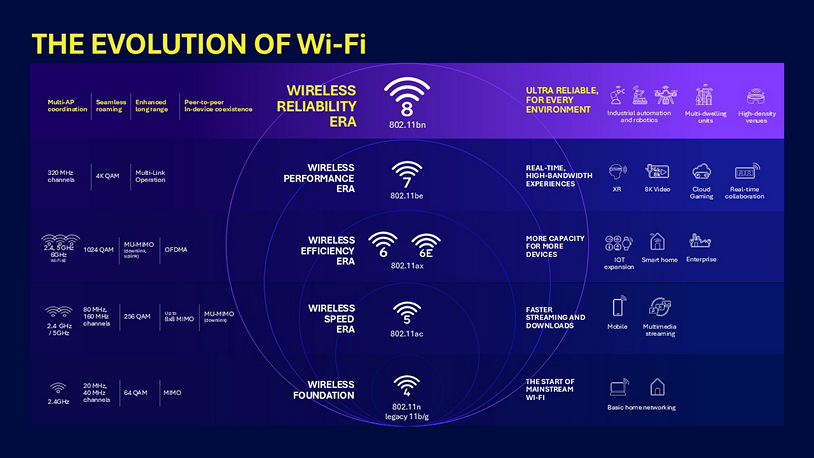
Wifi 6 offers faster speeds and better connection for many devices. Wifi 5 is older and slower in busy places.
| Feature | Wifi 6 | Wifi 5 |
| Speed | Up to 9.6 Gbps | Up to 3.5 Gbps |
| Device Support | More devices at once | Fewer devices |
| Range | Improved range and coverage | Standard range |
| Latency | Lower latency | Higher latency |
Technological Advancements
Wifi 6 uses new technology to make wireless networks faster and more reliable. It helps reduce delays and interference.
- OFDMA allows many devices to send data at the same time.
- MU-MIMO improves data flow to multiple devices.
- Target Wake Time saves battery on smartphones and laptops.
- 1024-QAM boosts the data rate for faster speeds.
Wifi 5 lacks these advanced features. It works well for simple home use but struggles in busy networks.
Mesh Network Basics
A mesh network uses multiple devices to spread Wi-Fi across your home.
This system helps reduce dead zones and keeps your connection strong.
How Mesh Works
Mesh networks have several nodes that communicate with each other.
One node connects to the modem, and others spread the signal around.
- Nodes talk to each other automatically.
- The network picks the best path for your data.
- Devices switch smoothly between nodes as you move.
Benefits Over Traditional Routers
Mesh networks offer better coverage than single routers.
| Feature | Mesh Network | Traditional Router |
| Coverage | Wide, covers whole home | Limited to one area |
| Signal Strength | Strong and steady | Weak in far rooms |
| Setup | Easy with multiple nodes | Simple but less flexible |
| Device Roaming | Seamless switching | Manual reconnect needed |
Speed Comparison
WiFi 6 mesh systems offer faster speeds than WiFi 5 mesh networks. This difference impacts how quickly devices connect and transfer data. Understanding speed helps you choose the right system.
This comparison looks at theoretical speeds and real-world performance to give a clear view of what each technology delivers.
Max Theoretical Speeds
WiFi 6 supports higher maximum speeds than WiFi 5. It uses new technology to send more data at once.
| Technology | Max Speed (per device) | Frequency Bands |
|---|---|---|
| WiFi 5 Mesh | Up to 3.5 Gbps | 2.4 GHz and 5 GHz |
| WiFi 6 Mesh | Up to 9.6 Gbps | 2.4 GHz, 5 GHz, and 6 GHz (WiFi 6E) |
Real-world Performance
Real speeds depend on many factors. These include distance, interference, and the number of devices connected.
- WiFi 6 offers better speed in crowded spaces.
- Mesh networks extend coverage but may reduce speed slightly.
- WiFi 5 performs well in small areas with few devices.
- WiFi 6 supports more devices at once without slowing down.
Coverage And Range
WiFi 6 mesh networks offer better coverage and range than WiFi 5. They use newer technology to reach devices farther away.
This means fewer weak spots and more consistent internet in large homes or offices.
Signal Strength
WiFi 6 mesh provides stronger signals compared to WiFi 5. It handles more devices without losing speed.
Stronger signals help keep connections stable across bigger areas.
- Uses improved antennas for better reach
- Supports higher data rates for fast speeds
- Reduces interference with smarter channels
Handling Dead Zones
WiFi 6 mesh is better at fixing dead zones. It sends signals through multiple paths to cover hard spots.
This mesh system fills gaps that WiFi 5 might miss, especially in complex layouts.
- More nodes spread the signal evenly
- Automatic path selection finds the best route
- Improves connection in basements and corners
Device Compatibility
Device compatibility is important when choosing between WiFi 6 mesh and WiFi 5 systems. It affects how well your devices connect and perform.
Understanding which devices work best with each system helps you make the right choice for your home network.
Supported Devices
WiFi 6 mesh supports the newest devices that have WiFi 6 capability. These devices use advanced features for faster speeds and better performance.
WiFi 5 works well with older devices that do not support WiFi 6. It still delivers solid performance for many common gadgets.
- WiFi 6 mesh supports new smartphones, laptops, and tablets with WiFi 6
- WiFi 5 supports older devices like earlier phones and laptops
- Newer smart home devices often use WiFi 6 for better efficiency
Backward Compatibility
WiFi 6 mesh is backward compatible with devices that use older WiFi standards. This means it can connect to WiFi 5 and even WiFi 4 devices.
WiFi 5 systems do not support WiFi 6 devices fully. This can limit the speed and features those devices can use on a WiFi 5 network.
- WiFi 6 mesh works with WiFi 6, 5, and older devices
- WiFi 5 works mainly with WiFi 5 and older devices
- Using a WiFi 6 mesh lets all devices connect on one network
Credit: www.tomsguide.com
Network Capacity
Wi-Fi 6 mesh systems offer better network capacity than Wi-Fi 5. This improvement helps in managing more devices at the same time.
Wi-Fi 6 uses advanced technology to increase data flow. This technology supports more devices without slowing down the network.
Handling Multiple Devices
Wi-Fi 6 mesh handles multiple devices more efficiently. It divides bandwidth smartly among connected devices.
Older Wi-Fi 5 systems struggle with many devices. Wi-Fi 6 uses OFDMA to support more devices without lag.
- Wi-Fi 6 supports more devices than Wi-Fi 5
- OFDMA helps in dividing bandwidth efficiently
- Less congestion with more users
Impact On Latency
Wi-Fi 6 reduces latency compared to Wi-Fi 5. Lower latency means faster response times for online activities.
Gaming, video calls, and streaming work better with less delay. Wi-Fi 6 mesh networks offer smoother experiences.
| Wi-Fi 5 | Higher Latency |
| Wi-Fi 6 | Lower Latency |
Security Features
Wifi 6 Mesh systems offer better security features than Wifi 5. These improvements help keep your data safe.
Understanding the security features in Wifi 6 can help you make informed decisions. Let’s explore some key aspects.
Encryption Standards
Encryption keeps your data safe from unauthorized access. Wifi 6 uses advanced encryption standards.
Wifi 6 often employs WPA3 encryption. This is stronger than the WPA2 used by Wifi 5.
- WPA3 offers better protection against brute force attacks
- It simplifies the process of connecting devices securely
Enhanced Protections In Wifi 6
Wifi 6 includes features that enhance overall security. These features protect against various threats.
One such feature is the improved network capacity. This helps manage multiple connections securely.
- Improved capacity reduces the risk of network congestion
- More devices can connect securely at the same time
Installation And Setup
Setting up a WiFi 6 mesh system is a key step to improving your home network. This process differs from installing a WiFi 5 mesh system in some ways.
Understanding the ease of setup and management tools can help you choose the right system for your needs.
Ease Of Setup
WiFi 6 mesh systems often come with better hardware and clearer instructions. The setup process is usually simple for most users.
- WiFi 6 devices may auto-detect the best placement for nodes.
- Some systems use automatic channel selection to reduce interference.
- WiFi 5 mesh systems can require more manual adjustments.
- Both types support plug-and-play installation steps.
App And Management Tools
Most modern mesh systems include apps for easy management. These apps help monitor network status and control settings.
| Feature | WiFi 6 Mesh | WiFi 5 Mesh |
| Mobile App | Available with detailed controls | Available but less detailed |
| Network Monitoring | Real-time statistics | Basic status updates |
| Firmware Updates | Automatic and scheduled | Manual or automatic |
| Device Prioritization | Advanced options | Basic options |
Cost Considerations
Choosing between WiFi 6 mesh and WiFi 5 mesh depends on budget. The cost can affect your decision greatly.
Understanding the price and value helps you pick the best option for your needs.
Price Differences
WiFi 6 mesh systems usually cost more than WiFi 5 ones. This is because WiFi 6 is newer technology.
WiFi 5 mesh kits are cheaper but may lack some advanced features found in WiFi 6.
- WiFi 6 mesh starts at higher prices than WiFi 5 mesh
- WiFi 6 devices use newer chips, raising costs
- WiFi 5 mesh kits are widely available and often discounted
Value For Money
WiFi 6 mesh offers faster speeds and better coverage in busy homes. This can make it worth the price.
WiFi 5 mesh may be enough for small homes or fewer devices, giving good value at a lower cost.
- WiFi 6 handles many devices better, improving network quality
- WiFi 5 suits simpler setups with fewer devices
- Consider your home size and device count before buying

Credit: www.reddit.com
Use Case Scenarios
Wifi 6 mesh and Wifi 5 offer different features for home networks. Choosing the right one depends on your needs.
This guide explains when Wifi 6 mesh is better than Wifi 5 based on common use cases.
Best For Streaming And Gaming
Wifi 6 mesh provides faster speeds and lower lag than Wifi 5. This helps streaming videos without buffering.
Online games need quick data transfer. Wifi 6 mesh reduces delays for smoother gameplay.
- Supports multiple devices streaming 4K videos
- Reduces game lag during online play
- Improves connection stability in crowded networks
Ideal For Large Homes
Wifi 6 mesh covers large areas better than Wifi 5. It uses multiple nodes to spread the signal evenly.
Large homes with many rooms get consistent internet on every floor with Wifi 6 mesh.
- Extends wifi range to all corners of the house
- Handles many connected devices without speed drops
- Ensures strong signals through walls and floors
Frequently Asked Questions
What Are The Main Differences Between Wifi 6 And Wifi 5?
Wifi 6 offers faster speeds, better efficiency, and improved capacity over Wifi 5. It handles multiple devices more effectively. Wifi 6 also reduces latency and boosts battery life for connected devices, making it ideal for modern smart homes.
Does Wifi 6 Mesh Improve Overall Network Coverage?
Yes, Wifi 6 mesh systems enhance network coverage by using multiple nodes. These nodes communicate efficiently, reducing dead zones and providing stable connections throughout your home or office, ensuring better performance than Wifi 5 mesh systems.
Is Wifi 6 Mesh Worth Upgrading From Wifi 5?
Upgrading to Wifi 6 mesh is worthwhile if you have many devices or need faster speeds. It supports more simultaneous connections and offers future-proof technology, making your network more reliable and efficient compared to Wifi 5.
How Does Wifi 6 Handle Multiple Devices Better Than Wifi 5?
Wifi 6 uses technologies like OFDMA and MU-MIMO to manage multiple devices simultaneously. This reduces congestion and improves performance, unlike Wifi 5, which struggles with many connected devices at once.
Conclusion
Wifi 6 mesh offers faster speeds and better coverage than Wifi 5. It handles more devices at once without slowing down. This makes it ideal for busy homes and offices. Wifi 6 also improves battery life for connected gadgets. While Wifi 5 works fine for basic needs, Wifi 6 mesh suits modern demands better.
Choosing Wifi 6 means a smoother, more reliable internet experience. In short, Wifi 6 mesh stands out for performance and stability. It’s a smart upgrade for anyone needing stronger Wi-Fi.