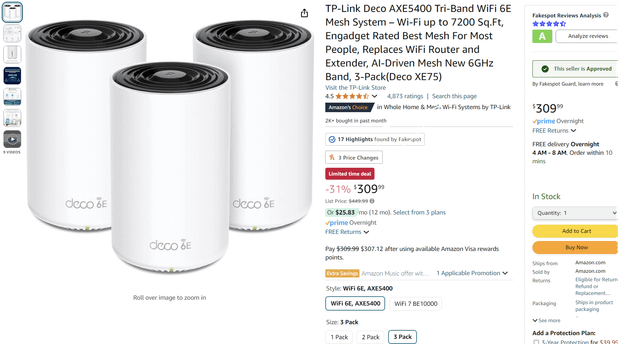
Are you struggling to choose the best WiFi for your home or office? With Wifi 6, Wifi 6E, and the new Wifi 7 mesh systems all promising faster speeds and better coverage, it’s easy to feel overwhelmed.
Which one will truly boost your internet experience? Which offers the best value for your money? You’ll discover the key differences, benefits, and real-world performance of each. By the end, you’ll know exactly which WiFi technology fits your needs and keeps your devices running smoothly—no more slow connections or dead zones.
Keep reading to make the smartest choice for your network.
Wifi 6 Basics
WiFi 6 is the latest wireless standard for internet connections. It improves speed and reduces delays in busy networks.
This technology helps many devices work better together on the same network without slowing down.
Key Features
WiFi 6 has special features to make wireless internet faster and more reliable. It supports more devices at once.
It uses new technology to send data more efficiently and reduce interference from other networks.
- Orthogonal Frequency Division Multiple Access (OFDMA) allows many devices to share channels.
- Target Wake Time (TWT) helps save battery life on devices by scheduling data transmission.
- 1024-QAM increases data rates for faster internet speeds.
- Improved security with WPA3 encryption.
Performance Metrics
WiFi 6 offers better speed and lower latency compared to older WiFi versions. It works well in crowded places.
The technology can reach speeds up to 9.6 Gbps under ideal conditions, which is much higher than WiFi 5.
| Metric | WiFi 6 |
|---|---|
| Maximum Speed | Up to 9.6 Gbps |
| Latency | Reduced by OFDMA and MU-MIMO |
| Device Support | More devices with less slowdown |
| Range | Similar to WiFi 5 but more stable |
Advancements In Wifi 6e
WiFi 6E adds a new frequency band to the existing WiFi 6 technology. This new band helps reduce interference and improve wireless connections. It opens up more space for devices to communicate faster.
This new technology is important for homes and offices with many devices. It supports better internet speed and more reliable connections.
6 Ghz Band Benefits
The 6 GHz band is the main feature that sets WiFi 6E apart. It offers a clean space for wireless signals. This means fewer interruptions and better performance for devices.
- More channels for data transmission
- Less crowded airwaves than 2.4 GHz and 5 GHz bands
- Lower latency for smoother streaming and gaming
- Supports new devices that use the 6 GHz band
Improved Capacity And Speed
WiFi 6E can handle more devices at once without slowing down. It uses wider channels that allow faster data transfer. This means better speed for tasks like video calls and downloads.
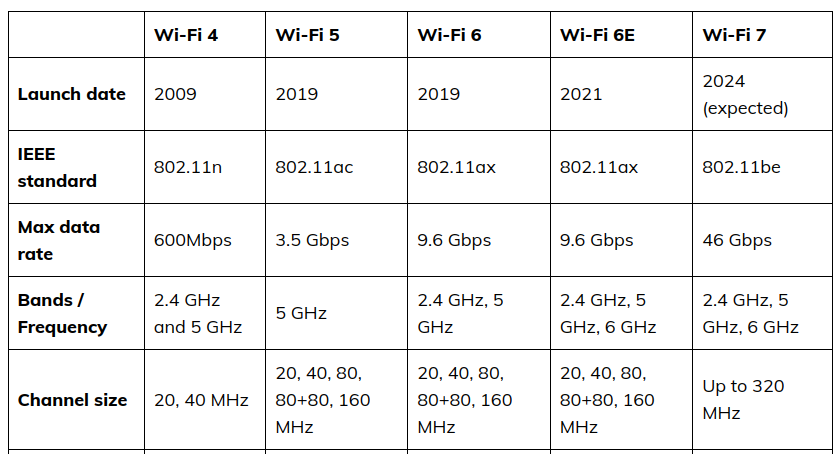
| Feature | WiFi 6 | WiFi 6E | WiFi 7 |
| Frequency Bands | 2.4 GHz, 5 GHz | 2.4 GHz, 5 GHz, 6 GHz | 2.4 GHz, 5 GHz, 6 GHz, and more |
| Maximum Channel Width | 160 MHz | 160 MHz | 320 MHz |
| Maximum Speed | Up to 9.6 Gbps | Up to 9.6 Gbps | Up to 30 Gbps (estimated) |
| Device Capacity | High | Higher | Highest |
Introducing Wifi 7
WiFi 7 is the newest wireless standard after WiFi 6 and 6E. It aims to provide faster internet and better connection for many devices.
This new technology will improve how mesh networks work in homes and offices. It helps devices talk to each other more smoothly.
Next-gen Technology
WiFi 7 uses advanced tech like Multi-Link Operation. It lets devices use several channels at once. This reduces delays and interference.
It also supports wider channels, up to 320 MHz. This is double what WiFi 6E offers. The wider channels mean more data can move faster.
- Multi-Link Operation connects multiple bands simultaneously
- 320 MHz channels carry more data
- Better handling of many devices at once
- Improved efficiency in crowded areas
Expected Speed And Latency
WiFi 7 aims for speeds up to 46 Gbps. This is about three times faster than WiFi 6E. Faster speed means quick downloads and smooth streaming.
Latency, or delay time, will be very low. This helps with online gaming and video calls. Mesh networks will share these benefits across devices.
| WiFi Standard | Max Speed | Latency |
|---|---|---|
| WiFi 6 | 9.6 Gbps | Low |
| WiFi 6E | 9.6 Gbps | Lower |
| WiFi 7 | Up to 46 Gbps | Very Low |
Credit: medium.com
Mesh Network Essentials
Mesh networks use several devices to spread WiFi across a large area. They help avoid dead spots and improve signal strength.
Comparing Wifi 6, Wifi 6E, and Wifi 7 in mesh setups shows how each impacts speed, range, and device support.
How Mesh Works
A mesh network uses multiple nodes that connect wirelessly to share internet. These nodes work together to cover your whole home or office.
Each node communicates with others, passing data along the best path. This keeps the connection strong even if one node is far from the router.
- Nodes connect to each other and the main router
- Data finds the fastest path through the mesh
- Network can self-heal if a node fails
- Devices switch to the closest node automatically
Benefits For Home And Office
Mesh networks give better WiFi coverage in homes and offices. They reduce dead spots and keep speeds steady.
Using Wifi 6, 6E, or 7 in mesh setups improves performance. Wifi 6E adds extra channels, and Wifi 7 offers faster speeds and lower delay.
- Wide coverage with fewer dead zones
- Strong connections for many devices
- Easy to expand by adding nodes
- Better speed and lower delay with newer WiFi versions
- Works well for streaming, video calls, and online work
Comparing Speed And Range
WiFi 6, WiFi 6E, and WiFi 7 are the latest wireless technologies. They all improve speed and range in different ways.
This comparison looks at speed tests and coverage differences for each type. It helps you understand which fits your needs.
Wifi 6 Vs 6e Speed Tests
WiFi 6 and WiFi 6E offer fast speeds but use different frequency bands. WiFi 6 works on 2.4 GHz and 5 GHz bands.
WiFi 6E adds a new 6 GHz band, which gives less interference and higher speeds in crowded areas.
- WiFi 6 speeds reach up to 9.6 Gbps in ideal conditions.
- WiFi 6E also reaches 9.6 Gbps but with less network traffic.
- 6 GHz band in WiFi 6E allows faster data transfer in busy spaces.
Wifi 7 Speed Potential
WiFi 7 is the newest standard with even higher speed potential. It supports wider channels and better signal processing.
This means WiFi 7 can reach speeds up to 46 Gbps under perfect conditions, much faster than WiFi 6 and 6E.
- Supports up to 320 MHz channel width for faster data.
- Uses Multi-Link Operation (MLO) to combine bands for speed.
- Improves latency and reliability for smoother connections.
Range And Coverage Differences
Range depends on frequency bands. Lower frequencies travel farther but have slower speeds. Higher frequencies have better speed but shorter range.
WiFi 6 uses 2.4 GHz and 5 GHz bands for good coverage and speed. WiFi 6E adds 6 GHz, which has shorter range but less interference.
WiFi 7 uses all three bands like 6E but improves range with better technology. Mesh systems with WiFi 7 can cover larger areas with strong signals.
| WiFi Version | Frequency Bands | Range | Speed |
|---|---|---|---|
| WiFi 6 | 2.4 GHz, 5 GHz | Good range, moderate speed | Up to 9.6 Gbps |
| WiFi 6E | 2.4 GHz, 5 GHz, 6 GHz | Shorter range on 6 GHz | Up to 9.6 Gbps (less congestion) |
| WiFi 7 | 2.4 GHz, 5 GHz, 6 GHz | Improved range with tech | Up to 46 Gbps |

Credit: www.reddit.com
Device Compatibility
Choosing the right mesh WiFi system depends on your devices. Different WiFi standards work with different devices. Let’s look at device compatibility for WiFi 6, WiFi 6E, and WiFi 7.
Understanding which devices support these standards helps in making a good choice. Some devices may not work with newer WiFi types.
Supported Devices For Wifi 6
WiFi 6 is widely supported by many devices. Most new smartphones, laptops, and tablets have WiFi 6 chips. This makes WiFi 6 mesh systems popular for homes.
Many smart home devices and gaming consoles also work with WiFi 6. Older devices may connect but won’t get full benefits.
- New smartphones like iPhone 11 and newer
- Laptops with Intel 10th Gen processors and later
- Tablets from recent years
- Smart TVs and streaming devices
- Gaming consoles like Xbox Series X and PlayStation 5
Wifi 6e Device Landscape
WiFi 6E adds support for the 6 GHz band. Only newer devices made in 2021 or later support WiFi 6E. This limits compatibility for now.
WiFi 6E devices get faster speeds and less interference. Older WiFi 6 devices will not use the 6 GHz band but still work on other bands.
- Recent flagship phones like Samsung Galaxy S21 and newer
- High-end laptops with new WiFi 6E adapters
- Some gaming routers and adapters
- Few smart home devices so far
Wifi 7 Device Availability
WiFi 7 is the newest standard and is just starting to appear. Very few devices support WiFi 7 today. Most are prototypes or early models.
Expect WiFi 7 support to grow in the next few years. It will work with the same bands as WiFi 6E and add new features for better speed.
- Early WiFi 7 routers from select brands
- Limited laptops with WiFi 7 chips available soon
- Few smartphones expected in 2024 or later
- Not yet common in smart home devices or consoles
Network Congestion And Interference
Understanding how Wi-Fi 6, Wi-Fi 6E, and Wi-Fi 7 handle crowded networks is crucial. This helps in choosing the right technology for your needs.
Network congestion and interference can slow down internet speeds. It’s important to know how different Wi-Fi technologies manage these issues.
Handling Crowded Networks
Wi-Fi 6, Wi-Fi 6E, and Wi-Fi 7 offer solutions for crowded spaces. Each has unique features to improve performance.
- Wi-Fi 6 uses OFDMA to split channels for better efficiency.
- Wi-Fi 6E adds new channels in the 6 GHz band, reducing congestion.
- Wi-Fi 7 aims for faster speeds and lower latency.
Impact Of Frequency Bands
Different frequency bands affect how Wi-Fi handles interference. Higher bands can offer more bandwidth but may have shorter range.
| Wi-Fi Version | Frequency Bands |
| Wi-Fi 6 | 2.4 GHz, 5 GHz |
| Wi-Fi 6E | 2.4 GHz, 5 GHz, 6 GHz |
| Wi-Fi 7 | 2.4 GHz, 5 GHz, 6 GHz |
Choosing the right frequency band can help reduce interference in your network. It’s a key factor for achieving better performance.
Setup And Cost Factors
Understanding the differences between Wifi 6, Wifi 6E, and Wifi 7 mesh systems is important. This helps in choosing the right setup for your home or business.
We will look at installation complexity and price comparison. This makes it easier to decide which system suits your needs best.
Installation Complexity
Installing a mesh network can be simple or complex. This depends on the technology and your home layout.
Wifi 6 is straightforward to set up. Most devices are compatible and have user-friendly apps.
Wifi 6E adds complexity. It uses the 6 GHz band, so placement of nodes is important for coverage.
Wifi 7 is the most complex. It is new and may require professional installation for optimal performance.
- Wifi 6: Easy setup, user-friendly apps
- Wifi 6E: Medium complexity, careful node placement
- Wifi 7: High complexity, may need professional help
Price Comparison
Cost is a major factor when choosing a mesh network. Prices vary based on technology and brand.
Wifi 6 is the most affordable. It offers good performance for a reasonable price.
Wifi 6E is more expensive. It offers better speed and less congestion.
Wifi 7 is the most costly. It offers cutting-edge features and highest performance.
| Wifi 6 | Low cost |
| Wifi 6E | Medium cost |
| Wifi 7 | High cost |
Best Use Cases For Each Wifi Type
Choosing the right WiFi type helps improve your internet experience. Each WiFi standard suits different needs and places.
This guide explains where WiFi 6, WiFi 6E, and WiFi 7 work best. It helps you pick the right option for your home or office.
Ideal Environments For Wifi 6
WiFi 6 is great for crowded places and homes with many devices. It handles multiple connections without slowing down.
- Large homes with many smart devices
- Offices with many users and video calls
- Public spaces like cafes or libraries
- Places with older WiFi devices needing better speed
When To Choose Wifi 6e
WiFi 6E adds a new band for less interference and faster speed. It fits places needing high performance and low delay.
| Use Case | Why WiFi 6E Fits |
|---|---|
| High-density apartments | Less crowded channels reduce signal clash |
| Smart homes with many 4K/8K streams | Extra bandwidth handles heavy traffic |
| Offices with VR or AR applications | Low latency improves experience |
| New devices supporting 6E | Access to the 6 GHz band for better speed |
Wifi 7 For Future-proofing
WiFi 7 is the newest standard with faster speeds and lower delay. It suits users wanting top performance now and later.
Consider WiFi 7 if you need:
- Extremely fast downloads and uploads
- Seamless cloud gaming or 8K streaming
- Support for many devices at once
- Long-term use without upgrading soon
Credit: ezeefiber.com
Frequently Asked Questions
What Are The Key Differences Between Wifi 6, 6e, And 7?
Wifi 6E extends Wifi 6 by adding 6 GHz band support for less congestion. Wifi 7 promises faster speeds, lower latency, and better multi-device handling than both.
Is Wifi 7 Compatible With Existing Wifi 6 And 6e Devices?
No, Wifi 7 requires new hardware. It is not backward compatible with Wifi 6 or 6E devices, so upgrades are necessary.
How Does Wifi 6e Improve Mesh Network Performance?
Wifi 6E adds the 6 GHz band, offering more channels and reduced interference. This enhances speed and reliability in Wifi mesh networks.
Should I Upgrade To Wifi 7 Mesh Now Or Wait?
Wait if your current Wifi meets your needs. Wifi 7 mesh offers future-proofing but is not widely available yet.
Conclusion
Choosing between Wifi 6, Wifi 6E, and Wifi 7 mesh depends on your needs. Wifi 6 works well for most homes and devices. Wifi 6E adds extra bands for less crowding and faster speeds. Wifi 7 promises even higher speeds and better performance but is still new.
Consider your budget, device types, and internet use. A mesh system helps cover large areas with strong signals. Think about future-proofing your network for coming years. Each option offers benefits for different users and setups. Pick the one that fits your home and tech best.


