Are you wondering if your new WiFi 7 mesh router really needs an Ethernet backhaul to perform at its best? You might have heard that wired connections boost speed and reliability, but is it a must-have or just an extra option?
Understanding this can make a big difference in how smooth and fast your home network feels every day. Keep reading to discover whether investing in Ethernet backhaul for your WiFi 7 mesh setup is worth it—and how it can impact your internet experience in ways you might not expect.
Wifi 7 Mesh Routers Basics
Wifi 7 is the latest wireless technology for faster internet. Mesh routers use multiple devices to cover a large area.
These routers help reduce dead spots and keep your connection strong throughout your home.
Key Features Of Wifi 7
Wifi 7 offers faster speeds and better connections than older versions. It can handle many devices at once without slowing down.
It uses new technology to reduce delays and improve the quality of video calls and gaming.
- Speeds up to 30 Gbps
- Supports many devices at the same time
- Lower delay for smooth streaming
- Better signal reliability
- Improved security features
How Mesh Routers Work
Mesh routers use several units to create one big Wi-Fi network. Each unit talks to others to share the internet signal.
This system helps cover large homes or offices where one router can’t reach all areas.
- One main router connects to the internet
- Other units spread the signal around
- Devices connect to the nearest unit
- Mesh units communicate to keep the network fast

Credit: www.amazon.ca
Ethernet Backhaul Explained
Ethernet backhaul is a wired connection between mesh routers. It uses Ethernet cables to link the devices.
This method helps mesh networks share data faster and more reliably than wireless links.
Role In Mesh Networks
Ethernet backhaul connects mesh nodes with cables instead of Wi-Fi. It creates a stable path for data to travel.
The wired link reduces interference and delays that happen with wireless signals. This keeps your network strong.
Benefits Over Wireless Backhaul
Ethernet backhaul offers faster speeds and better reliability than wireless backhaul. It avoids signal loss and congestion.
- More stable connection with less interference
- Higher data transfer rates
- Improved network performance in busy areas
- Less chance of connection drops
Wifi 7 And Ethernet Backhaul
Wifi 7 is the newest wireless technology for fast internet. It aims to give quicker speeds and better connections.
Ethernet backhaul means using wired cables to link mesh routers. This helps share data without wireless interference.
Compatibility Considerations
Not all Wifi 7 mesh routers support Ethernet backhaul. Check if your router models have Ethernet ports for backhaul use.
Some routers need special settings to enable Ethernet backhaul. Make sure your router firmware is updated for best results.
- Verify Ethernet port availability on all mesh units
- Confirm router firmware supports wired backhaul
- Check if cables and connectors meet speed requirements
Performance Impact
Ethernet backhaul offers more stable and faster data transfer than wireless links. It reduces interference and signal loss.
Using wired backhaul can improve overall network speed and lower latency in Wifi 7 mesh systems.
- Reduces congestion on wireless channels
- Supports higher data rates consistently
- Improves coverage in large or dense areas
When To Use Ethernet Backhaul
Ethernet backhaul connects mesh routers with cables. This helps improve speed and stability. Using Ethernet cables reduces wireless interference and congestion.
Not every home needs Ethernet backhaul. Some setups work well with wireless links alone. It depends on your home’s size and how you use your devices.
Home Size And Layout
Large homes or those with thick walls often face WiFi signal loss. Ethernet backhaul can connect distant mesh nodes directly. This keeps the network fast and reliable throughout the house.
- Homes over 2,500 square feet
- Buildings with many floors
- Houses with concrete or brick walls
- Layouts with many rooms and long hallways
Device Density And Usage
Homes with many devices using WiFi at once can slow the network. Ethernet backhaul helps by freeing wireless channels for device communication. This keeps speeds steady when many devices connect.
| Device Type | Recommended Backhaul |
| Streaming 4K video | Ethernet |
| Online gaming | Ethernet |
| Smart home devices | Wireless or Ethernet |
| Web browsing | Wireless |
Alternatives To Ethernet Backhaul
Wifi 7 mesh routers often use Ethernet backhaul to connect nodes. This gives a fast and reliable connection between them. Some users want other options that do not need cables.
There are good alternatives to Ethernet backhaul. These options can help you set up a mesh network without running wires through your home.
Wireless Backhaul Advances
Wireless backhaul uses radio signals to link mesh nodes. Wifi 7 improves this with faster speeds and less delay. This makes the connection nearly as strong as wired links.
New tech in Wifi 7 helps keep strong signals between nodes. It uses multiple frequency bands and smarter signal control. This reduces interference and keeps data moving smoothly.
- Multiple bands for better signal spread
- Improved beamforming to focus signals
- Automatic channel selection to avoid noise
- Higher data rates for faster backhaul
Powerline Adapters
Powerline adapters send network data through home electrical wiring. You plug one adapter near your router and another near the mesh node. They connect without extra cables.
Powerline adapters work well if your home wiring is good. They can offer steady speeds and help avoid wireless interference. They are easy to set up and move if needed.
- Use existing electrical wiring
- Simple plug-and-play installation
- Good for homes where Wi-Fi signals are weak
- Speeds vary based on wiring quality

Credit: www.reddit.com
Setting Up Ethernet Backhaul
Ethernet backhaul makes your WiFi 7 mesh system more reliable. It reduces interference and boosts speed.
This setup requires some equipment and steps. Follow this guide for a smooth installation.
Required Equipment
Gather these items before starting your setup. These are essential for a successful Ethernet backhaul.
- WiFi 7 mesh router system
- Ethernet cables
- Network switch (if needed)
- Power outlets near each router
Step-by-step Installation Tips
Follow these steps to connect your routers with Ethernet backhaul. This enhances your network performance.
- Place routers in optimal locations.
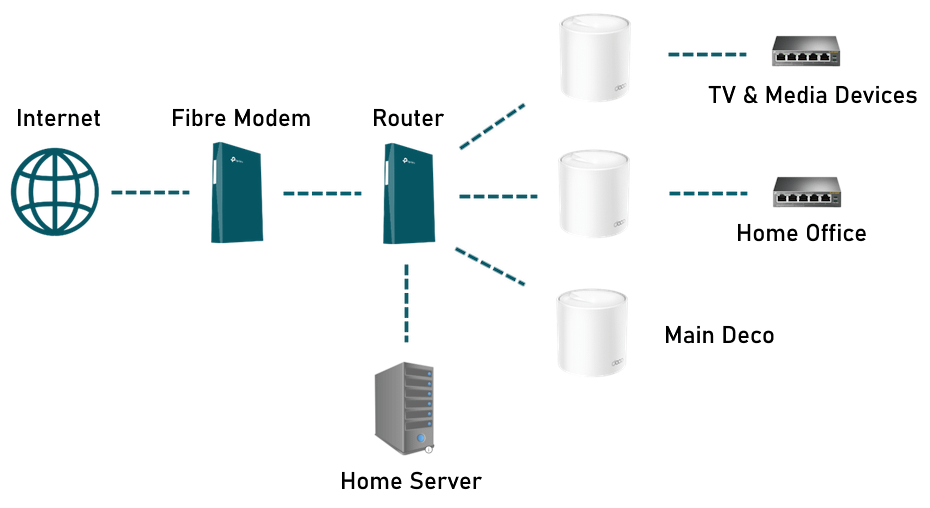
- Connect each router to the main router using Ethernet cables.
- If using a network switch, connect it to the main router.
- Ensure all routers are powered and turned on.
- Configure settings through the router app or web interface.
Troubleshooting Common Issues
Wifi 7 mesh routers are the latest in wireless technology. They offer fast and reliable connections. Sometimes, users face issues with connectivity and performance.
Ethernet backhaul can solve many of these problems. It uses cables to connect mesh nodes, improving stability.
Connectivity Problems
Connectivity problems occur when mesh nodes lose connection. This can happen for several reasons.
Check if your nodes are too far apart. Physical barriers like walls can block signals. Ensure firmware is up to date for all devices.
- Move nodes closer together
- Reduce interference from other devices
- Update router firmware regularly
Performance Drops
Performance drops can slow down your internet speed. This may happen during peak usage times.
Use Ethernet backhaul for better performance. It decreases the load on wireless connections. Also, limit the number of devices connected at once.
| Tip | Action |
| Use Ethernet | Connect nodes with cables |
| Limit Devices | Disconnect unnecessary devices |

Credit: www.reddit.com
Frequently Asked Questions
Do Wifi 7 Mesh Routers Require Ethernet Backhaul?
Wifi 7 mesh routers do not necessarily require Ethernet backhaul. They can use wireless backhaul efficiently. However, Ethernet backhaul offers more stable and faster connections, especially in crowded networks or large homes.
What Are The Benefits Of Ethernet Backhaul In Wifi 7?
Ethernet backhaul provides consistent speed and low latency. It reduces wireless interference and improves overall network stability. This is ideal for gaming, streaming, and smart home devices requiring reliable connections.
Can Wifi 7 Perform Well Without Ethernet Backhaul?
Yes, Wifi 7 can perform well without Ethernet backhaul. It uses advanced wireless technology to maintain high speeds. But performance may vary depending on distance, obstacles, and network congestion.
Is Ethernet Backhaul Necessary For Large Homes Using Wifi 7?
Ethernet backhaul is highly recommended for large homes. It ensures strong signals throughout all rooms. This minimizes dead zones and supports multiple devices simultaneously without speed drops.
Conclusion
Wifi 7 mesh routers can work well without ethernet backhaul. Wireless connections offer easy setup and less cable clutter. But ethernet backhaul provides more stable and faster links. It helps avoid signal drops in busy or large homes. Choosing depends on your space and internet needs.
Consider how many devices connect and your speed demands. Both options have clear benefits to improve your network. Choose what fits your home and budget best. This way, your Wifi 7 mesh will deliver solid performance.


