Are you tired of slow internet and dead zones in your home? Choosing the right WiFi setup can make a huge difference in how you connect every device.
You might be wondering if Google Nest Wifi is better than your traditional router. This comparison will help you understand which option fits your needs best. Keep reading to discover how each one works, what makes them stand out, and which could boost your internet experience right now.
Your perfect WiFi solution is just a few minutes away.
Credit: www.androidpolice.com
Google Nest Wifi Features
Google Nest Wifi is a modern mesh network system. It offers several features different from traditional routers.
This article explains its design, setup, coverage, speed, and smart home integration.
Design And Build
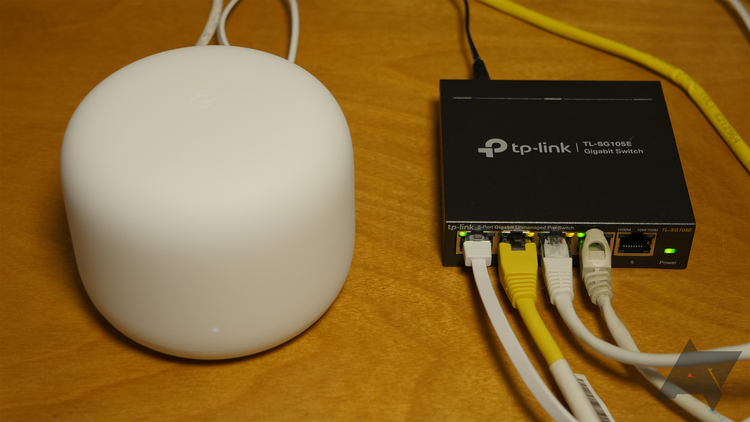
Google Nest Wifi has a sleek, round shape with soft edges. It fits well in most home environments. The device is smaller than many traditional routers.
It uses LED lights that are gentle on the eyes. The build feels solid and durable.
Setup Process
Setting up Nest Wifi is simple and fast. You use the Google Home app to guide you step-by-step. The app helps connect all devices to the network.
- Download Google Home app
- Plug in the Nest Wifi router
- Follow app instructions for connection
- Add extra points if needed
- Check network status in app
Coverage And Range
The Nest Wifi system covers larger areas than most traditional routers. You can add mesh points to extend coverage. This helps eliminate dead spots in your home.
| Device | Coverage Area |
| Single Nest Wifi Router | Up to 2200 sq ft |
| Nest Wifi Router + Point | Up to 4400 sq ft |
| Traditional Router | Varies, often less than 2000 sq ft |
Speed And Performance
Nest Wifi offers strong Wi-Fi speeds suitable for most home needs. It supports multiple devices streaming and gaming at the same time. It uses advanced technology to reduce interference.
Traditional routers may have slower speeds in bigger homes or with many devices connected.
Smart Home Integration
Nest Wifi works well with Google Assistant and other smart home devices. You can control your network using voice commands. The system also allows easy device prioritization and parental controls via the app.
Features include:
- Voice control with Google Assistant
- Easy device management
- Parental controls for internet use
- Automatic software updates
Traditional Router Features
Traditional routers have been the main choice for home and office networks. They connect devices to the internet using wired or wireless signals.
This section explores key features of traditional routers. It covers design, setup, coverage, speed, and customization.
Design And Build
Traditional routers often have a boxy shape with multiple antennas. They are usually made of plastic and come in black or white colors.
Many models include several Ethernet ports on the back for wired connections. Some routers also have USB ports for sharing files or printers.
Setup Process
Setting up a traditional router involves connecting it to a modem and powering it on. Users then access a web interface to configure settings.
- Connect router to modem and power source.
- Open a web browser and enter the router’s IP address.
- Log in using default username and password.
- Set up Wi-Fi network name and password.
- Save settings and restart router if needed.
Coverage And Range
Traditional routers cover a single area well but may struggle in large or multi-story buildings. Walls and furniture can reduce signal strength.
Users often add range extenders or additional access points to improve coverage.
Speed And Performance
| Feature | Description |
| Wi-Fi Standards | Supports 802.11n, 802.11ac, or 802.11ax |
| Speed | Varies from 300 Mbps to 1 Gbps or more |
| Number of Bands | Single-band or dual-band options |
| Processor | Usually basic CPUs for routing tasks |
Performance depends on the model and environment. High-end routers offer faster speeds and better handling of many devices.
Customization Options
Traditional routers provide many ways to customize networks. Users can change Wi-Fi names, passwords, and security types.
- Set up guest networks
- Configure parental controls
- Adjust firewall and security settings
- Manage device access and bandwidth limits
- Update firmware manually
Performance Comparison
This article compares Google Nest Wifi and traditional routers. We focus on how they perform in different areas.
Understanding their strengths helps you pick the right device for your home or office network.
Speed Tests
Speed tests show how fast each device can send and receive data. Google Nest Wifi uses mesh technology.
This mesh system often offers more consistent speeds across large areas than traditional routers.
- Traditional routers may have higher peak speeds near the device
- Nest Wifi provides stable speeds in every room with multiple units
- Speeds depend on your internet plan and device placement
Signal Strength
Signal strength affects how far your Wi-Fi reaches. Nest Wifi uses multiple points to cover more area.
Traditional routers send signals from one point, which can cause weak spots in bigger spaces.
- Nest Wifi offers better coverage in larger homes
- Traditional routers work well in small to medium spaces
- Walls and furniture reduce signal strength for both types
Device Capacity
Device capacity means how many gadgets can connect without slowing down. Nest Wifi supports many devices well.
Traditional routers have limits and may slow down if too many devices connect at once.
- Nest Wifi can handle 100+ devices smoothly
- Traditional routers vary, often support fewer devices
- More connected devices need stronger hardware
Latency And Reliability
Latency is the delay before data starts to transfer. Lower latency means faster response times.
Nest Wifi usually has low latency due to mesh routing. Traditional routers can have higher latency if far from devices.
- Nest Wifi offers steady connections with fewer drops
- Traditional routers may lose connection in some areas
- Both need good placement for best reliability
User Experience
Choosing between Google Nest Wifi and a traditional router affects how easy your internet feels. User experience depends on setup, controls, and managing the network.
Let’s look at how these devices differ in ease of use, mobile app controls, troubleshooting, and parental controls.
Ease Of Use
Google Nest Wifi offers a simple plug-and-play setup. It guides you step-by-step using the app. Traditional routers often need manual setup via a web interface.
- Nest Wifi requires fewer cables and devices.
- Traditional routers can need complex settings changes.
- Nest Wifi’s mesh system covers large areas smoothly.
- Some traditional routers need extra devices for full coverage.
Mobile App And Controls
The Nest Wifi app lets users control the network easily from a phone. It shows connected devices and usage. Traditional routers may use older apps or require computer access.
| Feature | Google Nest Wifi | Traditional Router |
| App Interface | Modern and intuitive | Basic or outdated |
| Device Management | Easy device view and control | Limited or complex |
| Settings Access | Mobile and quick | Often desktop only |
Troubleshooting
Nest Wifi app helps diagnose common issues and offers simple fixes. Traditional routers may require more technical knowledge to find and solve problems.
- Nest Wifi suggests restarts or checks connection strength.
- Traditional routers often need manual resets.
- Nest Wifi updates software automatically.
- Traditional routers may need user-initiated updates.
Parental Controls
Both systems offer parental controls but differ in ease and features. Nest Wifi integrates controls in its app for easy use. Traditional routers can have complex settings.
| Control Type | Google Nest Wifi | Traditional Router |
|---|---|---|
| Pause Internet | One tap per device or group | Requires multiple steps |
| Filter Content | Simple filtering options | Varies by model, often complex |
| Usage Scheduling | Easy schedules in app | Manual and less visual |
Price And Value
Choosing between Google Nest Wifi and a traditional router depends on price and value. Both offer internet access but differ in features and cost.
Understanding the cost and benefits helps to pick the right device for your home or office.
Cost Breakdown
Google Nest Wifi usually costs more upfront than a traditional router. It includes multiple devices for wider coverage.
Traditional routers are cheaper but may need extra equipment for large areas.
- Google Nest Wifi: Higher initial cost, mesh system included
- Traditional Router: Lower cost, may need range extenders
Long-term Investment
Google Nest Wifi offers good long-term value with strong signals in big homes. It reduces dead zones and improves speed.
Traditional routers may need upgrades or add-ons over time. This can increase costs and cause slowdowns.
- Nest Wifi covers more area with one purchase
- Traditional routers may require extra devices later
- Long-term costs vary based on home size and needs
Warranty And Support
Google Nest Wifi comes with a standard manufacturer warranty and customer support from Google. This covers defects and technical help.
Traditional routers have varied warranties based on brand and model. Support quality can differ widely.
- Nest Wifi: Consistent warranty and Google support
- Traditional routers: Warranty varies by brand
- Check support options before buying

Credit: www.androidpolice.com
Best Use Cases
Choosing between Google Nest Wifi and a traditional router can be challenging. Different environments benefit from different technologies.
Understanding your specific needs will help in making the right decision. Let’s explore the best use cases for each option.
Small Homes And Apartments
In small homes and apartments, space is limited. A single router often suffices.
- Google Nest Wifi offers seamless connectivity.
- Traditional routers can be cost-effective.
- Compact spaces benefit from fewer devices.
Large Homes And Offices
Large homes and offices need extensive coverage. Multiple devices and walls can weaken the signal.
| Feature | Google Nest Wifi | Traditional Router |
| Coverage | Extensive with mesh system | Limited to single unit range |
| Scalability | Easy to add more points | Requires additional routers |
| Management | App-based control | Web interface |
Smart Home Enthusiasts
Smart home enthusiasts need robust connections. Many smart devices require constant internet access.
Budget-conscious Users
For budget-conscious users, the cost is a priority. Balancing performance and price is crucial.
Traditional routers often provide basic functionality at a lower price. Google Nest Wifi may have a higher initial cost but offers advanced features.
Credit: www.engadget.com
Frequently Asked Questions
What Are The Main Differences Between Nest Wifi And Traditional Routers?
Nest Wifi offers mesh networking for broader coverage. Traditional routers rely on a single device. Nest Wifi is user-friendly with smart controls. Traditional routers often need manual setup and lack mesh features.
How Does Nest Wifi Improve Home Internet Coverage?
Nest Wifi uses multiple units to create mesh networks. This eliminates Wi-Fi dead zones in large or multi-story homes. Traditional routers may struggle with consistent coverage in bigger spaces.
Is Nest Wifi Better For Smart Home Integration?
Yes, Nest Wifi integrates seamlessly with Google Home devices. It supports voice control and smart home management. Traditional routers usually lack direct smart home features.
Can Traditional Routers Match Nest Wifi’s Performance?
Traditional routers can be powerful but often lack mesh networking. They may face coverage limits in large homes. Nest Wifi combines performance with easy expansion and management.
Conclusion
Choosing between Google Nest Wifi and a traditional router depends on your needs. Nest Wifi offers easy setup and wider coverage. Traditional routers may provide more control and sometimes faster speeds. Think about your home size, budget, and tech comfort.
Both options have strengths for different users. The right choice will improve your internet experience at home. Simple, reliable Wi-Fi matters most for daily use. Consider what fits your lifestyle best before deciding.