Are you frustrated with slow WiFi in some rooms of your large home, even though you have blazing fast fiber internet? You’re not alone.
Many people wonder if mesh WiFi systems can truly handle fiber internet speeds across every corner of a big house. Imagine having strong, reliable internet no matter where you are—no dead zones, no buffering, just smooth streaming and quick downloads.
You’ll discover how mesh WiFi works with fiber internet and whether it’s the right solution to keep your entire home connected effortlessly. Keep reading to find out how to unlock the full power of your fiber connection with the right WiFi setup.
Benefits Of Mesh Wifi For Large Homes
Mesh wifi systems work well with fiber internet in big houses. They help spread the internet signal evenly.
This setup makes sure every room gets a strong connection without losing speed.
Seamless Coverage Across Multiple Rooms
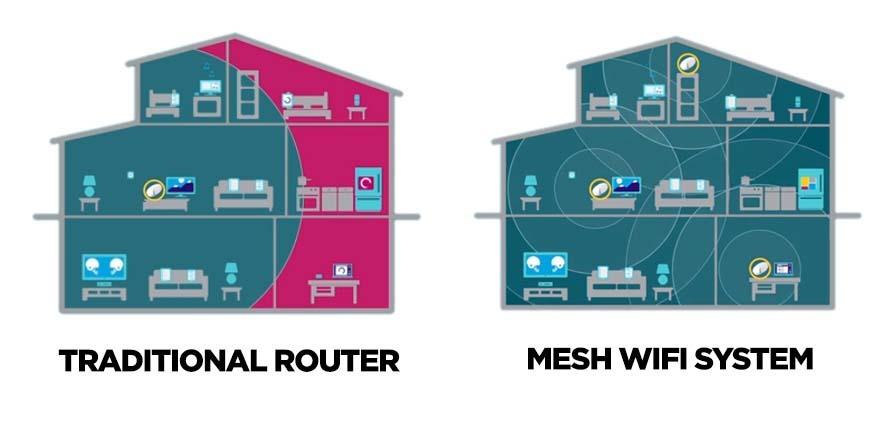
Mesh wifi covers every corner of your home. It links several devices to create one large network. This means your phone or laptop stays connected as you move.
Eliminating Dead Zones
Dead zones cause slow or no internet in some areas. Mesh wifi fixes this by placing nodes in weak spots. These nodes send strong signals to hard-to-reach rooms.
- No more dropped calls in the basement
- Better streaming in bedrooms
- Strong wifi in the garage or garden
Easy Network Expansion
You can add more nodes to your mesh wifi anytime. This helps as your home or internet needs grow. Setting up new nodes is simple and fast.
| Benefit | Details |
| Quick Setup | Nodes connect automatically without complex steps |
| Flexible Placement | Move nodes anywhere for best signal |
| Scalable | Add as many nodes as needed for large areas |

Credit: www.reddit.com
Fiber Internet And Its Advantages
Fiber internet uses thin glass fibers to send data as light signals. It offers fast and reliable internet for large homes.
This type of connection supports many devices at once without slowing down. It is great for streaming, gaming, and working from home.
High-speed Connectivity
Fiber internet delivers much higher speeds than other connections. It can reach gigabit speeds, which means quick downloads and uploads.
- Download movies and files in seconds
- Upload large videos without delay
- Support many users at once without lag
Low Latency Performance
Fiber internet has very low latency. This means data travels fast between your device and the internet.
| Activity | Typical Latency (ms) |
| Fiber Internet | 1-5 |
| DSL | 20-50 |
| Cable | 15-30 |
Reliable And Stable Connection
Fiber cables resist interference from weather and electrical noise. This keeps your connection steady and reliable.
Advantages of fiber internet over other types:
- Less signal loss over long distances
- Not affected by storms or radio signals
- Better for smart homes with many devices
Compatibility Of Mesh Wifi With Fiber Internet
Mesh wifi systems can work well with fiber internet in large homes. They help spread the fast fiber connection evenly across all rooms. This setup improves coverage and reduces dead zones.
Understanding how mesh systems connect and work with fiber internet is important. This ensures the best performance and easy setup for your home network.
How Mesh Systems Connect To Fiber Modems
Mesh wifi systems connect directly to the fiber modem or router. The main mesh unit links to the modem using an Ethernet cable. Other mesh nodes communicate wirelessly to extend coverage.
This connection method lets the mesh system use the high-speed fiber internet without losing quality. It also allows seamless roaming between mesh nodes in large homes.
Supported Fiber Providers And Equipment
Most mesh wifi systems support popular fiber internet providers and their equipment. They work with standard fiber modems and routers that have Ethernet ports.
- AT&T Fiber
- Verizon Fios
- Google Fiber
- CenturyLink Fiber
- Local and regional fiber providers
Ensure your fiber modem supports bridge mode or can pass the public IP to the mesh router for the best performance.
Network Setup Requirements
| Requirement | Description |
| Ethernet Connection | Main mesh unit connects to fiber modem via Ethernet cable |
| Bridge Mode | Fiber modem set to bridge mode to avoid double NAT issues |
| Power Sources | Each mesh node needs a nearby power outlet |
| Placement | Nodes placed to cover large home areas evenly |
| Firmware Updates | Keep mesh system software updated for compatibility |
Optimizing Mesh Wifi For Large Fiber-connected Homes
Fiber internet offers fast speeds that can support many devices in large homes. Mesh wifi systems help spread this speed evenly across big spaces. To get the best results, you must place nodes well and choose the right system.
This guide covers key points to optimize mesh wifi for large homes using fiber internet. Each section explains a step to improve coverage, speed, and stability.
Ideal Placement Of Mesh Nodes
Place mesh nodes where the wifi signal can travel easily. Avoid walls, metal objects, and thick floors. Keep nodes in open spaces for better range.
- Put the main node near the fiber modem.
- Place other nodes in central spots of large rooms.
- Keep nodes away from microwaves and cordless phones.
- Use a node on each floor if your home has multiple stories.
Choosing The Right Mesh System
Pick a mesh system that supports your fiber internet speed. Look for systems with enough nodes for your home size. Some systems offer features like guest networks and parental controls.
| Feature | Why It Matters |
| Speed Support | Matches your fiber plan for top performance |
| Number of Nodes | Covers all rooms and floors |
| Security Features | Protects your network and devices |
| Easy Setup | Saves time and avoids technical problems |
Configuring Network Settings For Speed And Stability
Adjust settings to keep your wifi fast and steady. Use the right channel and band for your devices. Set up automatic updates to keep security strong.
- Choose 5 GHz band for faster speeds near the node.
- Use 2.4 GHz band for longer range in distant areas.
- Enable Quality of Service (QoS) to prioritize important traffic.
- Update firmware regularly to fix bugs and improve performance.
- Set up a strong password to stop unauthorized access.
Common Challenges And Solutions
Mesh WiFi systems can help cover large homes with fiber internet. Yet, some challenges may affect performance. Understanding these issues helps improve your network.
Here, we look at common problems and offer simple solutions for better WiFi coverage and speed.
Interference From Physical Barriers
Walls, floors, and furniture can block WiFi signals. Thick concrete or metal reduce signal strength. This causes slow speeds and dropouts.
- Place mesh nodes in open areas, not behind thick walls.
- Avoid metal objects near the mesh devices.
- Use higher mesh node density in homes with many rooms.
- Try to keep nodes on the same floor for better line-of-sight.
Bandwidth Management
Fiber internet offers high speeds but many devices can slow your network. Bandwidth must be shared fairly among devices.
| Device Type | Typical Usage | Bandwidth Needs |
| Streaming TV | Watching HD videos | 5-10 Mbps |
| Video Calls | Online meetings | 1-4 Mbps |
| Online Gaming | Playing games online | 3-6 Mbps |
| Smartphones | Browsing and apps | 1-3 Mbps |
| Smart Home | Connected devices | Low to moderate |
Use your mesh system’s settings to prioritize devices or limit bandwidth on some devices. This keeps important tasks smooth.
Troubleshooting Connectivity Issues
Sometimes WiFi may stop working well. Simple checks can fix many problems fast.
- Restart your mesh router and nodes regularly.
- Check if firmware updates are available and install them.
- Run speed tests near different nodes to find weak spots.
- Move nodes closer if signal is weak in some rooms.
- Remove old or unused devices from the network.

Credit: www.reddit.com
Advanced Features To Enhance Performance
Mesh WiFi systems can work well with fiber internet in large homes. They offer advanced features that help improve performance and connectivity.
These features ensure a stable and secure network for all users. Let’s explore some of these features.
Parental Controls And Security
Parental controls keep children safe on the internet. They allow parents to block inappropriate websites.
Security features protect your network from threats. They include firewalls and antivirus tools.
- Block specific websites or content
- Limit screen time for devices
- Monitor online activities
- Protect against malware and viruses
Guest Networks
Guest networks provide separate access for visitors. They keep your main network private and secure.
These networks are easy to set up and manage. They ensure guests have internet access without sharing your main password.
- Create a unique password for guests
- Limit guest network speed for fairness
- Turn off guest access when not needed
Integration With Smart Home Devices
Mesh WiFi systems work well with smart home devices. They offer seamless connectivity for all your smart gadgets.
This integration makes it easier to control smart lights, thermostats, and more. It enhances your home’s technology experience.
| Device | Compatibility |
| Smart Lights | Yes |
| Smart Thermostat | Yes |
| Smart Door Lock | Yes |
Cost Considerations And Value
Mesh WiFi systems can work with fiber internet in large homes. They offer seamless connectivity throughout the house. Understanding the cost and value is important before making a decision.
Mesh WiFi systems vary in price. They provide good coverage and improve internet speed in larger spaces. Here, we will look at the cost and value aspects.
Comparing Mesh Wifi Systems
Different mesh systems have different prices. Some systems are affordable, while others are more expensive but offer additional features. It is important to compare various systems.
- Basic systems cost less but cover smaller areas.
- Advanced systems cover larger areas and support more devices.
- Consider features like parental controls and security.
Installation Expenses
Installing mesh WiFi can involve some costs. Professional installation might be needed for optimal setup. This ensures the best coverage and performance in large homes.
- DIY installation can save money but may not be optimal.
- Professional installation ensures proper placement of nodes.
- Some systems offer easy setup with mobile apps.
Long-term Benefits
Mesh WiFi systems offer long-term benefits. They provide consistent internet coverage throughout the home. This can improve online activities and reduce dead zones.
Investing in a good mesh system can enhance your internet experience. It is a valuable addition to homes with fiber internet. Consider the long-term advantages when evaluating the cost.
Credit: kb.pineapple.net.au
Frequently Asked Questions
Can Mesh Wifi Improve Fiber Internet In Large Homes?
Yes, mesh WiFi enhances fiber internet by extending coverage and eliminating dead zones in large homes. It ensures consistent speeds across all rooms.
Is Mesh Wifi Compatible With Fiber Internet Connections?
Mesh WiFi systems work seamlessly with fiber internet. They connect to the fiber modem to distribute fast, reliable WiFi throughout your home.
How Many Mesh Nodes Are Needed For Large Homes?
Typically, 3 to 5 mesh nodes cover large homes effectively. The exact number depends on home size, layout, and building materials.
Does Mesh Wifi Reduce Fiber Internet Speed?
No, mesh WiFi maintains fiber internet speeds. It optimizes signal strength and reduces interference, ensuring smooth streaming and gaming.
Conclusion
Mesh WiFi works well with fiber internet in large homes. It spreads the signal evenly to all rooms. No more weak spots or slow connections. You get fast internet everywhere you need it. Setting up mesh WiFi is simple and effective.
It helps your fiber internet show its full speed. Enjoy smooth streaming, gaming, and browsing without interruptions. A strong WiFi network makes life easier at home. Mesh WiFi and fiber internet form a perfect pair for big houses.