Are you tired of slow WiFi and dead zones in your apartment? You might be wondering if mesh WiFi can work with your cable internet to fix these problems.
The good news is, mesh WiFi systems are designed to boost your connection and cover every corner of your home. But how well do they actually perform with cable internet in an apartment setting? Keep reading to find out how you can get faster, more reliable internet without the hassle.
Your perfect home network could be just a few steps away.
Credit: caspianprimesolutions.com
How Mesh Wifi Works
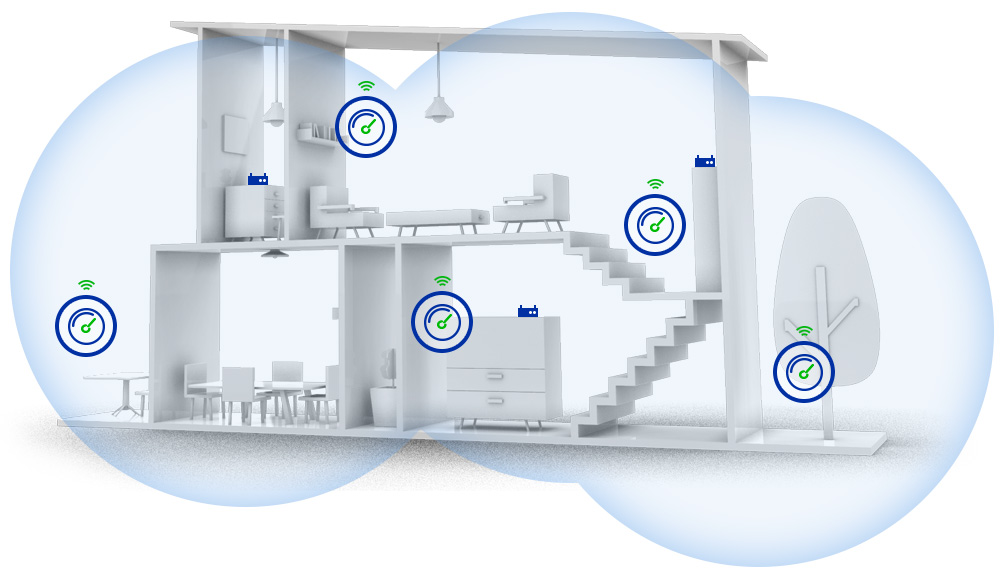
Mesh wifi creates a wireless network that covers your whole apartment. It uses multiple devices called nodes to spread the signal evenly.
This system helps solve common wifi problems like weak signals or dead zones inside buildings.
Basic Mesh Network Setup
A mesh network starts with a main node connected to your cable internet modem. Other nodes connect wirelessly to this main node to extend coverage.
- Place the main node near your cable modem for best connection.
- Set additional nodes in different rooms or floors.
- Nodes communicate with each other to share internet access.
- The network automatically finds the best path for data.
- You control the system from an app or web portal.
Benefits Over Traditional Routers
Mesh wifi has several advantages compared to single traditional routers, especially in apartments with cable internet.
| Feature | Mesh Wifi | Traditional Router |
|---|---|---|
| Coverage | Wide, covers multiple rooms easily | Limited, signal weak in distant rooms |
| Signal Strength | Strong and consistent | Signal drops with distance |
| Setup | Simple, uses multiple nodes | Single device setup |
| Network Management | App control with easy monitoring | Basic router interface |
| Handling Multiple Devices | Better at managing many devices | Can get slow with many devices |
Cable Internet In Apartments
Cable internet is common in many apartments. It offers fast and reliable connection for daily use.
Understanding how cable internet works in apartments helps you choose the right setup.
Typical Cable Internet Setup
Most apartments get cable internet through a coaxial cable line. The cable company connects this line to a modem inside your unit.
- The modem receives the internet signal from the cable provider.
- A router or mesh wifi system spreads the signal around your apartment.
- Devices like phones and laptops connect wirelessly to the wifi network.
- Wired connections can also be used for stable speeds.
Common Challenges In Apartments
Apartments have unique issues that can affect cable internet and mesh wifi performance.
| Challenge | Description | Impact |
| Thick Walls | Concrete and metal walls block wifi signals. | Weak or spotty wifi in some rooms. |
| Shared Lines | Multiple units use the same cable line. | Slower speeds during peak hours. |
| Limited Space | Small apartment size limits router placement. | Poor wifi coverage and dead zones. |
| Interference | Signals from other electronics cause interference. | Unstable or slow internet connection. |
Compatibility Of Mesh Wifi With Cable Internet
Mesh wifi systems can work well with cable internet in apartments. They help spread the internet signal evenly in your home. This setup improves wifi coverage and reduces dead zones.
Most mesh wifi devices are made to connect easily with cable internet. You just need to connect the mesh system to your cable modem. This allows your devices to get a strong and stable internet signal.
Connecting Mesh Systems To Cable Modems
To use mesh wifi with cable internet, connect the main mesh unit to the cable modem. Use an Ethernet cable to link the two devices. This connection lets the mesh system share internet through its nodes.
After connecting, place other mesh nodes around your apartment. These nodes extend the wifi signal to hard-to-reach areas. Make sure the nodes are not too far from the main unit to keep a strong connection.
- Connect main mesh unit to cable modem with Ethernet cable
- Place additional mesh nodes in different rooms
- Keep nodes within good range for strong signals
- Follow mesh system setup instructions for best results
Potential Limitations And Workarounds
Mesh wifi may face limits in large or thick-walled apartments. Walls and floors can block wifi signals. This may cause slower speeds or weak connections in some rooms.
You can fix this by adding more mesh nodes. Place them where the wifi signal is weak. Also, avoid placing nodes near metal objects or microwaves. These can interfere with wifi signals.
- Add extra mesh nodes to cover large areas
- Place nodes in open spaces, away from walls and metal
- Use Ethernet backhaul if possible for stable links
- Check for firmware updates to improve mesh performance

Credit: www.youtube.com
Optimizing Mesh Wifi Performance
Mesh wifi systems can improve internet speed and coverage. They work well with cable internet in apartments.
To get the best results, you need to place nodes carefully and reduce interference inside your home.
Best Placement For Nodes
Place mesh nodes where the wifi signal can spread evenly. Avoid putting them in corners or behind large furniture.
- Put the main node near the cable modem.
- Place additional nodes in open areas on each floor.
- Keep nodes away from thick walls and metal objects.
- Try to keep nodes in direct line of sight if possible.
- Do not place nodes on the floor or inside cabinets.
Managing Interference In Apartments
Apartment buildings have many devices that cause wifi interference. Managing this interference helps maintain strong signals.
| Source of Interference | How to Reduce It |
| Microwaves | Keep mesh nodes away from kitchen areas |
| Bluetooth Devices | Use 5 GHz wifi band to avoid overlap |
| Neighboring Wifi Networks | Change wifi channel to a less crowded one |
| Thick Walls | Place nodes closer or use wired backhaul if possible |
| Wireless Phones | Keep nodes away from cordless phone bases |
Installation Tips For Apartments
Setting up mesh WiFi in an apartment can be tricky. Walls and floors can block the signal.
This guide helps you install mesh WiFi with cable internet in apartments. It covers common challenges and solutions.
Dealing With Building Materials
Apartment walls often contain metal, concrete, or bricks. These materials reduce WiFi signal strength.
- Place mesh nodes in open spaces away from thick walls.
- Avoid hiding nodes inside cabinets or behind furniture.
- Use higher nodes placement, such as on shelves or walls.
- Keep nodes away from metal objects and appliances.
- Test signal strength in different rooms before final placement.
Using Ethernet Backhaul
Ethernet backhaul connects mesh nodes with cables. This improves speed and reduces interference.
| Benefit | Description |
| Stable connection | Wired links avoid WiFi interference from walls. |
| Better speed | Ethernet provides faster data transfer than wireless links. |
| More node placement options | Nodes do not depend on wireless range limits. |
| Reduced signal loss | Cables maintain strong connection between nodes. |
Popular Mesh Wifi Systems For Cable Internet
Mesh Wifi systems work well with cable internet in apartments. They provide strong and stable connections throughout your home. Many top brands offer reliable models for seamless internet coverage.
These systems are perfect for apartments with multiple rooms. They help eliminate dead zones and enhance streaming and gaming experiences.
Top Brands And Models
Several brands offer excellent mesh Wifi systems for cable internet. They vary in price and features, catering to different needs and budgets.
- Netgear Orbi: Known for its fast speeds and wide coverage.
- Google Nest Wifi: Offers easy setup and user-friendly controls.
- Eero Pro 6: Provides strong performance with a sleek design.
Features To Look For
When choosing a mesh Wifi system, consider important features. These features enhance performance and user experience.
- Coverage Area: Ensure it covers your entire apartment.
- Speed: Look for systems that support high-speed internet.
- Easy Setup: Choose a model with a simple installation process.
- Security Features: Opt for systems with robust security options.
Troubleshooting Common Issues
Mesh WiFi can work well with cable internet in apartments. Sometimes, users face issues that need troubleshooting. Let’s explore common problems and solutions.
Understanding these issues can improve your internet experience. Here, we focus on slow speeds, connectivity drops, and keeping firmware updated.
Slow Speeds And Connectivity Drops
Slow speeds and drops are frustrating. They can disrupt your online activities. Many factors affect this, like interference and router placement.
Ensure your mesh nodes are placed properly. Avoid obstacles like walls and furniture. Check for electronic devices that may cause interference.
- Place nodes in open areas
- Avoid placing near microwaves or cordless phones
- Reduce the distance between nodes
Firmware Updates And Support
Firmware updates keep your mesh system running smoothly. Manufacturers release updates to fix bugs and improve performance.
Regularly check for updates through the app or website. If issues persist, contact support for assistance. They can provide solutions and guidance.
- Check for updates monthly
- Use the manufacturer’s app for easy updates
- Contact support for persistent issues

Credit: www.cnet.com
Frequently Asked Questions
Can Mesh Wifi Improve Cable Internet In Apartments?
Yes, mesh WiFi can enhance cable internet in apartments. It boosts coverage and reduces dead zones for better connectivity.
Is Mesh Wifi Compatible With Cable Internet Modems?
Mesh WiFi systems work well with cable modems. They connect directly to the modem via Ethernet for seamless internet distribution.
How Many Mesh Nodes Are Ideal For Apartments?
Typically, 2-3 mesh nodes suit most apartments. This ensures strong, consistent WiFi throughout multiple rooms and floors.
Does Cable Internet Speed Affect Mesh Wifi Performance?
Yes, cable internet speed sets the maximum mesh WiFi speed. Faster cable plans improve overall wireless network performance.
Conclusion
Mesh WiFi works well with cable internet in apartments. It helps spread strong signals to all rooms. Walls and floors can block signals, but mesh systems reduce this problem. Setting up mesh WiFi is simple and fits apartment living. It keeps your internet fast and stable everywhere.
Choose a system that matches your internet speed. This way, you enjoy smooth browsing and streaming. Mesh WiFi and cable internet make a good team for home use. You get better coverage without extra wires or devices.