Are you tired of Alexa missing your voice commands because of weak WiFi? Your smart home deserves a strong and steady connection, but you don’t have to spend a fortune to get it.
Imagine seamless control over your devices, no matter where you are in your home. You’ll discover budget-friendly mesh WiFi options that work perfectly with Alexa devices. Keep reading to find out how to boost your smart home experience without breaking the bank.
Why Choose Mesh Wifi For Alexa
Mesh Wifi systems create a strong network across your home. This helps Alexa devices stay connected without drops or delays.
Choosing mesh Wifi means better performance for all your smart devices. It makes your Alexa experience smoother and more reliable.
Improved Coverage
Mesh Wifi covers every corner of your home. This stops Alexa from losing signal in far rooms or basements.
- Eliminates dead zones
- Works well in large houses
- Supports multiple floors easily
Seamless Device Connection
Mesh networks connect Alexa devices and other gadgets smoothly. They switch between nodes without breaking connection.
| Feature | Benefit |
| Automatic Node Switching | Keeps Alexa online during movement |
| Single Network Name | No need to reconnect devices |
| Multiple Device Support | Handles many Alexa units at once |
Enhanced Voice Command Response
Mesh Wifi reduces delay when you speak to Alexa. This helps her respond faster and understand commands better.
Benefits of fast response times:
- Quick answers to questions
- Instant control of smart home devices
- Smoother music and media playback

Credit: www.amazon.ca
Top Budget Mesh Wifi Options
Mesh Wifi systems help cover your home with strong internet. They work well with Alexa devices for easy control.
Finding budget-friendly mesh Wifi can save money and still give good speeds. Here are some options to think about.
Affordable Brands To Consider
Some brands offer budget mesh Wifi that works well. They balance cost and good features for Alexa use.
- TP-Link Deco series – Known for easy setup and coverage
- Google Nest Wifi – Simple design and Alexa compatible
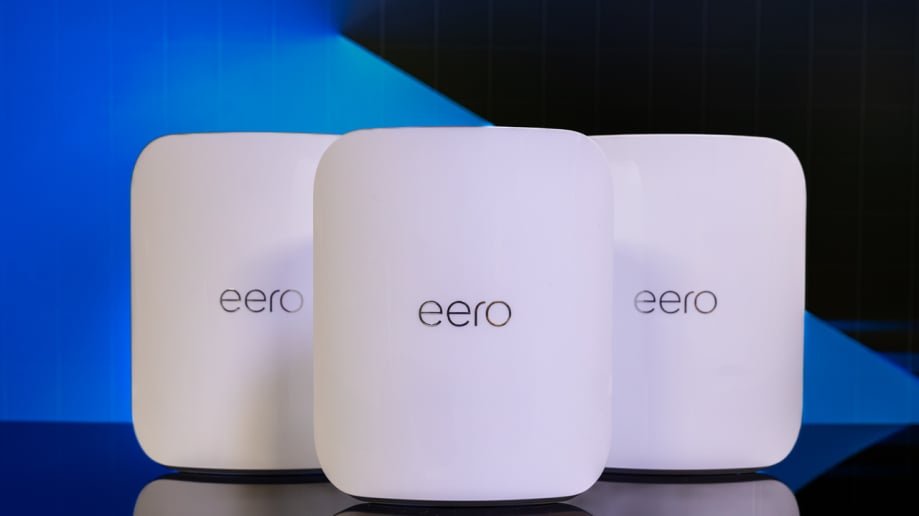
- Amazon eero – Made by Amazon, works well with Alexa
- Netgear Orbi – Offers good speed on a budget
Key Features For Alexa Compatibility
Alexa works best with mesh Wifi that supports voice commands and smart home integration.
Look for these features to make Alexa control easier:
- Easy Alexa setup through the Wifi app
- Supports voice commands for network control
- Works with Alexa routines and skills
- Stable connection for smart home devices
Price Vs Performance
Budget mesh Wifi offers good value if you check speed, coverage, and ease of use.
Compare prices and features to get the best fit for your Alexa devices.
| Brand | Price Range | Speed | Alexa Support |
|---|---|---|---|
| TP-Link Deco | $100 – $200 | Up to 1200 Mbps | Good |
| Google Nest Wifi | $150 – $250 | Up to 2200 Mbps | Very Good |
| Amazon eero | $100 – $200 | Up to 1300 Mbps | Excellent |
| Netgear Orbi | $180 – $300 | Up to 1750 Mbps | Good |
Setting Up Mesh Wifi With Alexa
Using mesh wifi can improve your Alexa devices‘ connection. It helps cover your home with strong wifi signals.
This guide shows how to set up mesh wifi for Alexa devices. You will also learn to optimize and fix common issues.
Step-by-step Installation Guide
Follow these steps to install your mesh wifi with Alexa devices easily.
- Unbox and place the main mesh router near your modem.
- Connect the router to the modem with an Ethernet cable.
- Power on the router and wait for the lights to stabilize.
- Place additional mesh nodes around your home for better coverage.
- Download the mesh wifi app on your phone and create an account.
- Follow the app instructions to add and configure each mesh node.
- Connect your Alexa devices to the new mesh wifi network.
Optimizing Network For Alexa Devices
To improve Alexa device performance, adjust your wifi settings and placement.
| Tip | Action |
| Router Placement | Place routers in open spaces, away from walls. |
| Network Name | Use a simple SSID for easy Alexa connection. |
| Frequency Band | Connect Alexa to 2.4 GHz band for wider coverage. |
| Firmware Updates | Keep mesh router firmware up to date. |
| Device Grouping | Group Alexa devices in the app for better control. |
Troubleshooting Common Issues
If Alexa devices have trouble connecting, try these fixes.
- Restart your mesh router and Alexa device.
- Check if the mesh network password is correct on Alexa.
- Move Alexa closer to a mesh node to improve signal.
- Reset Alexa’s network settings and reconnect to wifi.
- Ensure mesh nodes are linked and show green lights.

Credit: www.youtube.com
Maximizing Connectivity And Speed
Budget mesh WiFi systems help improve internet coverage in your home. They work well with Alexa devices for smooth communication.
Good setup of mesh WiFi can increase speed and reduce connection drops. This guide covers key tips to get the best performance.
Placement Tips For Mesh Nodes
Place mesh nodes evenly across your home to avoid dead zones. Keep nodes away from thick walls and metal objects that block signals.
Put nodes in open areas and higher spots like shelves. Avoid placing them near microwaves or cordless phones that cause interference.
- Space nodes about 30 feet apart indoors
- Keep nodes visible to each other for strong links
- Use a central node near your main Alexa device
- Avoid placing nodes in closets or behind furniture
Managing Network Traffic
Limit the number of devices using your WiFi at the same time. Prioritize traffic for Alexa devices to keep them responsive.
Use your router’s Quality of Service (QoS) settings to give priority to voice commands and smart home controls. This reduces lag and improves speed.
- Set QoS for Alexa and smart devices
- Disconnect unused devices from the network
- Monitor bandwidth use regularly
- Use guest networks for visitors
Firmware Updates And Maintenance
Keep your mesh WiFi system updated with the latest firmware. Updates fix bugs and improve performance and security.
Check for updates regularly through your router’s app or website. Restart your mesh nodes occasionally to clear temporary issues.
- Enable automatic firmware updates if available
- Restart mesh nodes once a week
- Check manufacturer’s site for update news
- Keep router firmware current for best speed
Comparing Mesh Wifi To Traditional Routers
Mesh Wifi and traditional routers both provide internet access at home. Each has different strengths and weaknesses.
This article looks at cost, reliability, and scalability to help you understand the differences.
Cost Benefits
Traditional routers usually cost less upfront than mesh Wifi systems. A single router can cover a small home well.
Mesh Wifi systems cost more but can cover larger areas without extra devices.
| Type | Initial Cost | Coverage Area |
| Traditional Router | Low | Small to Medium |
| Mesh Wifi | High | Medium to Large |
Reliability In Smart Home Environments
Mesh Wifi provides steady connections by using multiple nodes. This helps if one node fails or gets weak.
- Better signal strength in every room
- Fewer dead spots in the house
- Automatic switching between nodes
- Works well with many smart devices
Traditional routers can lose signal far from the device and may struggle with many smart devices.
Scalability For Multiple Devices
Mesh Wifi systems easily add more nodes to support many devices. This suits busy homes with many users.
Traditional routers have limits on how many devices connect well. Adding extenders can be tricky and slow.
- Mesh Wifi grows by adding nodes
- Each node shares the load
- Traditional routers need extenders to expand
- Extenders may cause slower speeds

Credit: www.pcmag.com
Frequently Asked Questions
What Is The Best Budget Mesh Wifi For Alexa Devices?
The best budget mesh WiFi for Alexa offers strong coverage and seamless connectivity. Look for models with easy Alexa integration and reliable speeds. Popular options include TP-Link Deco and Google Nest Wifi.
How Does Mesh Wifi Improve Alexa Device Performance?
Mesh WiFi extends WiFi coverage and reduces dead zones. This ensures Alexa devices stay connected with minimal lag. It boosts voice command responsiveness and streaming quality.
Can Budget Mesh Wifi Support Multiple Alexa Devices?
Yes, budget mesh WiFi systems can support multiple Alexa devices. They manage network traffic efficiently, preventing slowdowns. This maintains smooth performance even with several connected devices.
Is Setup Easy For Budget Mesh Wifi With Alexa?
Most budget mesh WiFi systems offer simple, guided setup apps. They often include Alexa integration steps. This makes it quick and user-friendly for all skill levels.
Conclusion
A budget mesh WiFi system works well with Alexa devices. It helps keep your connection strong in every room. You can enjoy clear voice commands without delay. Setting up these systems is simple and fast. They fit most homes and budgets easily.
A good mesh WiFi makes smart living smoother. Choose one that matches your needs and space. Reliable WiFi means better control of your Alexa devices. Save money and still get good performance. Enjoy smart home convenience without extra cost.


