Are you tired of slow internet when too many devices are connected? You might be wondering, how many devices can a tri band router actually handle?
Understanding this can change the way you experience Wi-Fi at home or in your office. Imagine a smooth, fast connection no matter how many gadgets you use. You’ll discover exactly how a tri band router works and how many devices it can support without slowing down.
Keep reading to unlock the secrets to better Wi-Fi and stop struggling with buffering and dropped signals.
Credit: blog.jazzcybershield.com
Tri Band Router Basics
Understanding the basics of a tri band router is key before deciding how many devices you can connect to it. These routers are designed to handle multiple devices more efficiently than standard routers, making them ideal for busy homes or offices. Let’s break down what makes a tri band router different and how its technology works to manage your network traffic.
What Is A Tri Band Router
A tri band router broadcasts three separate Wi-Fi signals: one 2.4 GHz band and two 5 GHz bands. This setup allows more devices to connect without slowing down the network. Unlike dual band routers that offer two bands, tri band routers provide an extra 5 GHz band to reduce congestion.
Think of it like having three lanes on a highway instead of two. More lanes mean less traffic jams. So, if you have many devices like smartphones, laptops, smart TVs, and gaming consoles, a tri band router helps keep everyone online smoothly.
How Tri Band Technology Works
Tri band routers manage network traffic by distributing devices across the three frequency bands. Devices that need more speed or have higher data demands are placed on the 5 GHz bands. Meanwhile, simpler devices or those farther from the router use the 2.4 GHz band for longer range but slower speeds.
This technology reduces interference and bottlenecks. For example, streaming a 4K video on one 5 GHz band won’t affect your online gaming experience on the other 5 GHz band. It’s like having dedicated lanes for different types of traffic to keep everything moving fast.
Have you noticed your internet slowing down when multiple devices are active? Tri band routers can help you avoid that frustration by smartly balancing the load across bands.
Device Capacity Factors
Understanding how many devices a tri band router can support depends on several key factors. These factors influence how well your network performs as more devices connect. Knowing them helps in choosing the right router for your needs.
Bandwidth Allocation
Bandwidth is the amount of data your router can send and receive at once. Tri band routers divide bandwidth among connected devices. If many devices use high data at the same time, speeds may slow down. Proper allocation keeps connections smooth and stable.
Frequency Bands Explained
Tri band routers have three separate frequency bands. Usually, there is one 2.4 GHz band and two 5 GHz bands. The 2.4 GHz band covers longer distances but is slower. The 5 GHz bands offer faster speeds but cover shorter ranges. Devices spread across these bands reduce congestion and improve performance.
Router Hardware Limitations
Each router has hardware limits that affect device capacity. The processor and memory inside the router control how many connections it can manage. High-end hardware supports more devices without lag. Older or cheaper routers may struggle with many simultaneous connections.
Typical Device Limits
Tri band routers offer multiple frequency bands to handle more connections. Each band can support several devices simultaneously. Typical device limits depend on the router’s design and the network environment. Understanding these limits helps manage your home or office network better. Here are key factors affecting how many devices connect smoothly.
Average Number Of Devices Supported
Most tri band routers support between 30 to 50 devices. This number varies by brand and model. Higher-end routers may handle up to 60 or more. This range includes phones, laptops, smart home gadgets, and other Wi-Fi devices. The router splits devices across three bands to reduce congestion.
Impact Of Device Types
Not all devices use the same bandwidth. Streaming devices and gaming consoles use more data. Smart sensors or simple gadgets use less. More high-demand devices reduce total supported connections. Low-data devices allow more to connect without slowing speed. Balancing device types improves network performance.
Effect Of Usage Patterns
Heavy internet use affects how many devices work well together. Browsing and email use less bandwidth than video calls or downloads. When many devices use high data simultaneously, the network slows down. Light or intermittent use allows more devices on the network. Managing usage helps maintain smooth connections for all devices.

Credit: www.expressvpn.com
Maximizing Device Connections
Maximizing the number of devices connected to a tri-band router enhances your home or office network’s efficiency. Tri-band routers offer three separate bands, allowing more devices to connect without slowing down the network. Using the full potential of these bands requires smart management and settings.
Proper configuration helps maintain fast speeds and reliable connections for every device. Managing traffic and organizing devices ensures smooth performance, even with many gadgets online.
Optimizing Router Settings
Adjust the router’s channel settings to reduce interference. Choose the least crowded channels for each band. Enable the latest Wi-Fi standards, like Wi-Fi 6, if your router supports them. Set strong passwords to keep your network secure and avoid unauthorized access. Regularly update the router’s firmware for better stability and new features.
Using Quality Of Service (qos)
QoS prioritizes traffic for important devices or applications. Assign higher priority to video calls, gaming, or work-related apps. Limit bandwidth for less critical devices to prevent slowdowns. This ensures essential tasks get enough speed, even during heavy network use. Most tri-band routers include easy-to-use QoS controls in their settings.
Network Segmentation Strategies
Divide your network into segments for better control and security. Use separate bands for different device groups, such as work and entertainment. Set up guest networks to isolate visitors’ devices from your main network. This reduces congestion and protects sensitive information. Segmentation helps balance the load and improves overall network performance.
Performance And Stability
Performance and stability are crucial factors when using a tri-band router with multiple devices. These routers are designed to handle more connections by splitting traffic across three separate bands. However, the real-world experience often depends on how well the router manages those devices and maintains a steady connection.
Common Connectivity Issues
Even with tri-band routers, you might face connectivity hiccups like dropped signals or slow speeds. This often happens when too many devices connect simultaneously, overwhelming the router’s capacity. Interference from other wireless networks or physical obstacles like walls can also reduce signal strength.
Have you noticed your video calls getting choppy when several devices are online? That’s a sign of congestion on one of the bands. Understanding these common issues can help you pinpoint the source and improve your network’s reliability.
Maintaining Speed With Multiple Devices
Tri-band routers separate devices across three bands, which helps keep speeds stable. You can assign high-demand gadgets like gaming consoles or streaming devices to the 5 GHz bands, while less intensive devices like smart home sensors use the 2.4 GHz band.
Prioritizing bandwidth for certain devices can make a big difference. Many routers offer Quality of Service (QoS) settings that allow you to control which devices get more speed. Have you tried adjusting these settings to keep your work laptop running smoothly during busy hours?
Troubleshooting Tips
- Restart your router regularly to clear temporary glitches.
- Update your router’s firmware to fix bugs and improve performance.
- Place your router in a central location free from obstructions.
- Limit the number of active devices if you notice persistent slowdowns.
- Use apps or router interfaces to monitor which devices consume the most bandwidth.
Have you ever found a forgotten device hogging your bandwidth? Checking connected devices can reveal surprising culprits. Taking these steps can restore stability and keep your tri-band router running at peak performance.
Comparing Tri Band With Other Routers
Choosing the right router can dramatically affect how many devices connect smoothly in your home or office. Comparing tri band routers with other types helps you understand their strengths and limitations. This way, you can decide which router fits your needs based on device capacity and network performance.
Dual Band Vs Tri Band
Dual band routers offer two frequency bands: 2.4 GHz and 5 GHz. They work well for most households with moderate device use. However, as more devices connect, these two bands can become crowded, causing slower speeds and interference.
Tri band routers add an extra 5 GHz band, giving you three separate channels. This extra band helps spread out your devices, reducing congestion and improving overall speed. If you stream 4K videos, play online games, or have many smart devices, tri band routers keep your connections stable.
Think about how many devices you use simultaneously. Is your current router struggling to keep up? A tri band router might be the upgrade you need to avoid frustrating slowdowns.
Mesh Networks And Device Support
Mesh networks use multiple nodes to create a seamless Wi-Fi blanket over large areas. They often support both dual and tri band configurations. The advantage? You get better coverage and can connect more devices without losing signal strength.
Tri band mesh systems use the extra 5 GHz band as a dedicated backhaul channel between nodes. This means your devices get faster speeds because the nodes talk to each other without clogging the network. In contrast, dual band mesh systems share the same bands for devices and node communication, which can lower performance when many devices are connected.
If your home is large or has many walls, a tri band mesh network can keep your devices online and fast everywhere. Have you noticed dead zones in your Wi-Fi? Mesh routers, especially tri band ones, might solve that problem effectively.
Future Trends
As we stand on the brink of a digital revolution, tri-band routers are becoming increasingly essential in our interconnected lives. With more devices being introduced every year, understanding future trends in router technology can help you stay ahead of the curve. Let’s dive into what the future holds for tri-band routers and how they might shape your internet experience.
Advancements In Router Technology
Technology in routers is advancing at an unprecedented pace. Newer tri-band routers are being designed with advanced features like improved bandwidth allocation and enhanced security protocols. Imagine a router that not only connects your devices but also optimizes their performance by learning your usage patterns.
Manufacturers are also integrating AI-driven technology to predict and manage your network traffic more efficiently. These smart routers can prioritize bandwidth for streaming or gaming, ensuring a seamless experience. Have you ever wondered if your router could do more than just provide internet? The future is already here.
Increasing Device Demand
The number of smart devices in our homes is skyrocketing. From smart TVs to connected refrigerators, each device demands its share of the network pie. Tri-band routers are stepping up to this challenge by offering multiple frequency bands to accommodate this demand.
Have you ever found your internet slowing down when too many devices are connected? Future tri-band routers aim to eliminate this issue by intelligently distributing connections across their bands. As we continue to add more smart devices to our homes, how many will your router be able to handle seamlessly? The answer lies in the evolving technology of tri-band routers.

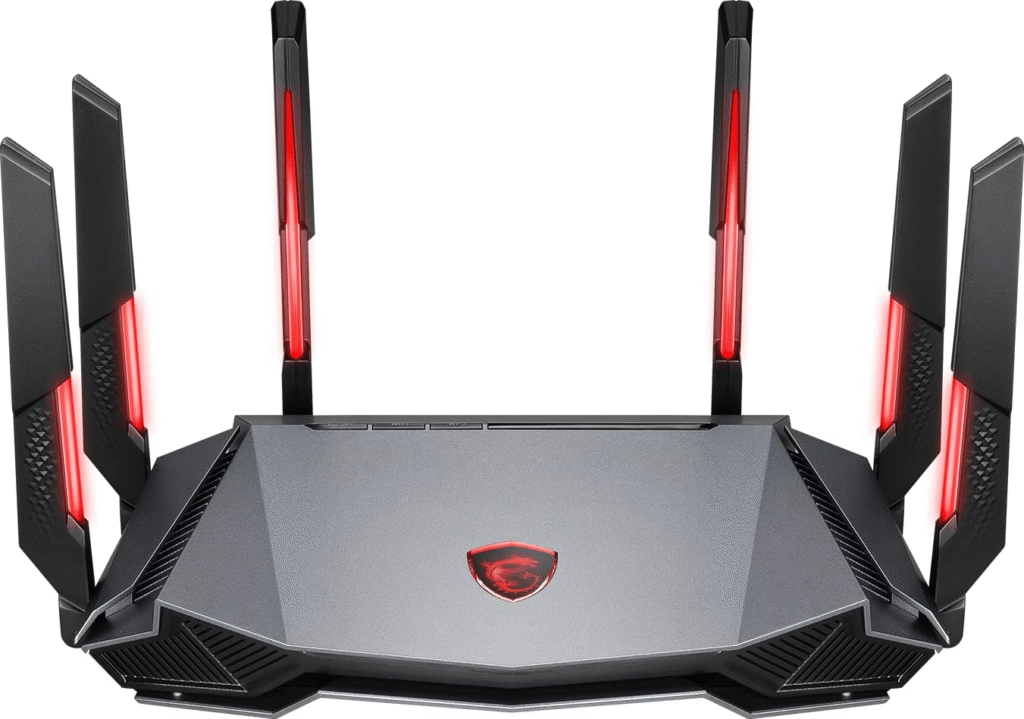
Credit: www.amazon.com
Frequently Asked Questions
How Many Devices Can A Tri Band Router Support?
A tri band router can support over 30 devices simultaneously. It manages traffic efficiently across three bands, reducing congestion. Device capacity depends on router quality and network usage. Higher-end models support even more devices without speed loss.
Does Tri Band Improve Device Connection Stability?
Yes, tri band routers improve stability by spreading devices across three frequency bands. This reduces interference and congestion. Each band handles fewer devices, leading to consistent speeds and fewer dropouts. Stability benefits are noticeable in busy households or offices.
Can Tri Band Routers Handle Multiple Streaming Devices?
Tri band routers excel at supporting multiple streaming devices simultaneously. They allocate bandwidth efficiently across bands, preventing buffering. This makes them ideal for HD or 4K streaming in busy networks. Users enjoy smooth playback even with many connected devices.
Is Tri Band Better Than Dual Band For Many Devices?
Tri band routers outperform dual band routers in handling many devices. The extra band reduces traffic bottlenecks and interference. This results in faster speeds and better performance under heavy loads. For many devices, tri band is a superior choice.
Conclusion
A tri-band router can support many devices at once. Each band handles its own group of devices. This helps keep your internet fast and steady. Usually, you can connect 30 to 50 devices comfortably. The exact number depends on your router and device types.
Choosing the right router helps avoid slow connections. Good Wi-Fi means better streaming, gaming, and browsing. Think about how many devices you use daily. That way, you pick a router that fits your needs well.