Are you wondering if you can use a gaming router with your current internet service provider (ISP)? You’re not alone.
Many gamers want to boost their online experience but aren’t sure if their existing internet setup will support a gaming router. The good news is, the right gaming router can give you faster speeds, lower lag, and smoother gameplay. But before you make the switch, there are a few important things you need to know.
Keep reading to find out how to make the most of your gaming router with your current ISP and take your gaming to the next level.
Benefits Of A Gaming Router
Choosing a gaming router can significantly change how you experience online games. These routers are designed to handle the unique demands of gaming traffic, which means you get more than just a faster internet connection. They offer specific benefits that can enhance your gameplay and overall network experience.
Improved Speed And Performance
Gaming routers prioritize gaming data, so your connection speeds for games are faster and more consistent. Unlike regular routers, they manage bandwidth efficiently, preventing slowdowns when multiple devices are connected.
This means you can stream, download, and play games simultaneously without interruptions. If you’ve ever noticed your game lagging while someone else is streaming video, a gaming router can help fix that.
Reduced Latency And Lag
Latency is the delay before your actions register in the game. Gaming routers reduce this by optimizing how data packets travel between your device and the game server.
Lower latency means your moves happen in real-time, giving you an edge in fast-paced games. Have you ever lost a match because your screen froze for a second? A gaming router helps prevent that frustrating lag.
Enhanced Network Stability
When your network is stable, your connection doesn’t drop unexpectedly during critical moments. Gaming routers use advanced technology to maintain a steady signal even when many devices are online.
This stability is crucial during long gaming sessions or online tournaments where every second counts. You’ll notice fewer disconnects and smoother gameplay overall, making your gaming experience more reliable.

Credit: www.reddit.com
Compatibility With Isps
Choosing the right gaming router is crucial for seamless online gaming. Compatibility with your Internet Service Provider (ISP) plays a vital role. Before making a purchase, understanding how gaming routers work with ISPs is essential. This ensures a smooth gaming experience without connectivity issues.
Types Of Internet Connections
Different ISPs offer varied types of internet connections. These include DSL, cable, fiber, and satellite. Each type has its own compatibility requirements. DSL and cable connections are common in many homes. They work well with most gaming routers. Fiber offers high-speed internet, ideal for gaming. Satellite, while available, may not always provide the best gaming experience.
Router Compatibility Checks
Ensure the gaming router supports your ISP’s connection type. Check the specifications on the router’s box or website. Look for compatibility with DSL, cable, or fiber. Some routers are universal, supporting multiple connection types. Testing the router with your current ISP can confirm compatibility. Many manufacturers provide online tools or customer support for assistance.
Isp Restrictions And Policies
ISPs might have restrictions on using third-party routers. Some require you to use their own equipment. This can affect your gaming router choice. Check your ISP’s policy before purchasing. Contacting customer service can provide clarity on any restrictions. Knowing these details prevents future issues with your gaming setup.
Setting Up Your Gaming Router
Setting up your gaming router properly is key to getting the best performance from your internet connection. It’s not just about plugging it in; you need to ensure it communicates well with your ISP modem and is configured to prioritize gaming traffic. Let’s break down how you can get your gaming router ready to deliver smooth, lag-free gameplay.
Connecting To Your Isp Modem
Start by turning off your ISP modem and unplugging its power. Connect the gaming router’s WAN port to the modem using an Ethernet cable. Then, power on the modem first and wait a couple of minutes for it to fully boot up before turning on your router.
This sequence helps your router obtain the correct IP address from your ISP. If your modem has a built-in router, consider putting it in bridge mode to avoid conflicts. Have you checked if your ISP modem supports bridge mode? This can drastically reduce connection issues.
Configuring Router Settings
Access your router’s admin panel by typing its IP address into a web browser. The default IP, username, and password are usually on the router label or in the manual. Once logged in, update the firmware if prompted—this fixes bugs and improves stability.
Set up your Wi-Fi name (SSID) and strong password next. It’s best to use WPA3 encryption if your router supports it for better security. Don’t forget to disable remote management unless you really need it, reducing vulnerabilities.
Optimizing For Gaming
Look for Quality of Service (QoS) settings in your router’s admin panel. QoS lets you prioritize gaming devices and traffic over others, cutting down lag during critical moments. Assign your gaming console or PC higher priority to see an immediate difference in responsiveness.
Consider enabling features like UPnP or port forwarding if your games require open ports to improve connectivity. Also, placing your router in a central location can boost signal strength and reduce interference. Are you ready to tweak these settings and feel the impact on your gaming sessions?
Troubleshooting Common Issues
Using a gaming router with your current ISP can boost your online experience, but sometimes issues pop up that disrupt your gameplay. Knowing how to troubleshoot these common problems can save you time and frustration. Let’s look at practical ways to handle connection drops, slow speeds, and firmware update challenges.
Connection Drops
Connection drops can be maddening, especially during intense gaming sessions. First, check if your router placement is optimal—avoid obstacles and interference from other electronics. If drops persist, try rebooting both your modem and router to refresh the connection.
Sometimes, your ISP might be the culprit due to maintenance or outages. Use online tools or contact your provider to confirm. Also, check your router’s settings for any aggressive timeout configurations that might cause disconnections.
Slow Speeds Despite Gaming Router
Having a gaming router doesn’t guarantee fast speeds if other factors are at play. Are multiple devices heavily using your network? Streaming or downloads can hog bandwidth and slow your game.
Another common issue is outdated cables or poor ISP service plans that don’t match your router’s capability. Consider testing your speed with a direct connection to isolate the problem and review your data plan to ensure it supports your gaming needs.
Firmware Updates
Firmware updates are crucial for maintaining your router’s performance and security. Skipping updates can leave you vulnerable to bugs and connection issues. Check the router manufacturer’s website regularly or enable automatic updates if available.
After an update, some settings might reset to default, affecting your network. Always back up your current configuration before updating, so you can quickly restore preferred settings if needed. Have you checked your router’s firmware lately?
Alternatives To Gaming Routers
Gaming routers offer special features but are not the only solution for better gaming. Many alternatives can improve your gaming experience without changing your current router. These options often work well with your existing internet service provider (ISP) and can boost your network performance.
Using Quality Of Service (qos) Features
Quality of Service (QoS) helps manage your internet traffic. It lets you prioritize gaming data over other types like downloads or streaming. Many standard routers have QoS settings that can be adjusted in the router’s control panel. Setting up QoS can reduce lag and keep your gaming connection stable.
Mesh Wi-fi Systems
Mesh Wi-Fi systems use multiple devices to cover your whole home with strong Wi-Fi signals. This can reduce dead zones that cause slow connections. Mesh networks work well with your existing ISP and router. They create a seamless connection that supports smooth gaming in any room.
Wired Connections For Gaming
Using a wired connection is one of the simplest ways to improve gaming speed. Ethernet cables connect your gaming device directly to the router, avoiding Wi-Fi interference. This connection is faster and more stable than wireless, reducing lag and disconnects. A wired setup works with any ISP and router.
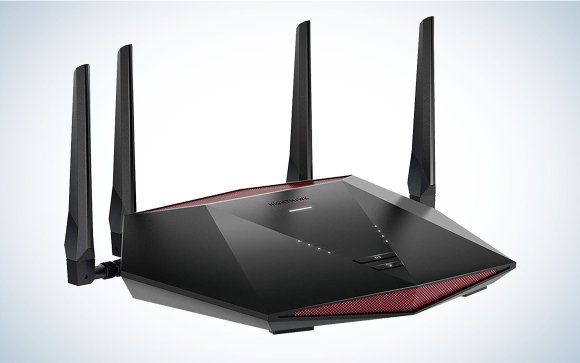
Credit: www.popsci.com
Cost Vs. Benefit Analysis
Deciding whether to invest in a gaming router when you already have an Internet Service Provider (ISP) can be tricky. The main question is: does the extra cost really pay off in improved gaming performance and overall network reliability? A clear cost vs. benefit analysis helps you weigh your options carefully.
Is It Worth Upgrading?
Gaming routers often come with a higher price tag than standard routers. But their specialized features—like prioritizing gaming traffic and reducing lag—can make a noticeable difference.
Ask yourself: Do you experience frequent lag spikes or connection drops during important gaming sessions? If yes, an upgrade might save you frustration and improve your gameplay.
However, if your current ISP router meets your speed and stability needs, spending extra may not offer much value.
Long-term Advantages
Think beyond immediate gaming gains. A gaming router can handle multiple devices better, giving your entire household smoother streaming and browsing experiences.
Many gaming routers receive regular firmware updates, improving security and performance over time. This extends the device’s usefulness and protects your network.
Consider how often you upgrade your networking gear. Investing now could mean fewer replacements and better support for future internet speeds.
Budget-friendly Options
Not all gaming routers break the bank. Some models offer core gaming features without the premium price.
- Look for routers with Quality of Service (QoS) settings to prioritize gaming packets.
- Check for dual-band support to reduce Wi-Fi interference.
- Read reviews focusing on real-world gaming performance rather than just specs.
Also, explore deals from your ISP—sometimes they offer compatible routers designed for gaming at discounted rates.
Credit: www.pcgamer.com
Frequently Asked Questions
Can I Use Any Gaming Router With My Isp?
Yes, most gaming routers work with any ISP. Just ensure the router supports your ISP’s connection type, like fiber, DSL, or cable. Compatibility is usually not an issue, but checking the router’s specifications helps avoid connection problems.
Will A Gaming Router Improve My Isp Speed?
A gaming router optimizes network traffic but does not increase your ISP speed. It reduces lag and prioritizes gaming data for smoother gameplay. Your internet speed depends mainly on your ISP plan, not the router.
Do I Need Special Settings For Gaming Routers?
Most gaming routers come with default settings optimized for gaming. However, you can manually enable QoS and port forwarding for better performance. These settings help prioritize gaming traffic and improve connection stability.
Can I Keep My Current Modem With A Gaming Router?
Yes, you can keep your current modem. Connect the gaming router to your modem via Ethernet. The router will handle your home network and improve gaming performance without replacing the modem.
Conclusion
Using a gaming router with your current ISP can improve your online play. It helps reduce lag and gives better connection stability. Make sure your ISP supports the speeds your router offers. Also, check if your modem works well with the new router.
This small upgrade can lead to a smoother gaming experience. You don’t need to change your ISP to enjoy better gaming. Choose the right router and settings for your needs. Playing without interruptions feels much better. Simple steps can make a big difference.