Are you tired of weak Wi-Fi signals when you’re on the go? Maybe you’ve heard about travel routers but aren’t sure if they can do more than just share your connection.
What if you could use your travel router as an access point to boost your home or office network? Understanding how travel routers work and whether they can serve as access points could change the way you connect to the internet.
Keep reading to discover how this simple device might solve your Wi-Fi problems and save you money.
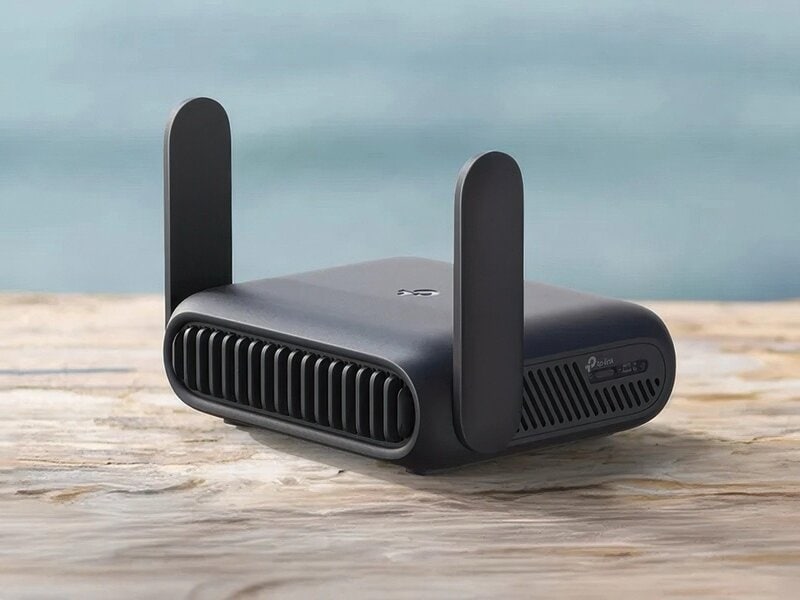
Credit: www.trendhunter.com
Travel Routers Basics
Understanding travel routers is essential before using them as access points. Travel routers are small, portable devices designed to share internet connections. They help travelers stay connected in hotels, airports, and cafes.
These devices offer convenience by creating a personal Wi-Fi network from a wired or wireless source. They are easy to carry and set up, making them popular for frequent travelers.
What Is A Travel Router
A travel router is a compact device that creates a Wi-Fi hotspot. It connects to the internet via Ethernet or another Wi-Fi network. This allows multiple devices to share one internet connection.
Travel routers often come with a built-in battery or can run on USB power. They provide a secure, private network, which is safer than public Wi-Fi. Many models support different modes such as router, repeater, or bridge.
Key Features Of Travel Routers
- Compact and lightweight design for easy portability
- Multiple connection modes like router, repeater, and access point
- Support for both wired and wireless internet sources
- Simple setup with user-friendly interfaces
- Security features including WPA/WPA2 encryption
- Battery-powered or USB-powered options
- Ability to connect several devices at once

Credit: mashable.com
Access Points Explained
Access points are essential devices in any wireless network. They help extend Wi-Fi coverage and improve connection quality. Understanding access points clarifies their role in using travel routers as access points.
Role Of Access Points
Access points connect wireless devices to a wired network. They act as a bridge between devices and the main router. This setup allows many devices to share the internet connection smoothly. Access points improve network reach in large homes or offices. They reduce dead zones and maintain strong Wi-Fi signals.
How Access Points Work
An access point connects to a router using an Ethernet cable. It then broadcasts Wi-Fi signals to nearby devices. Devices connect to the access point instead of the main router. This setup balances network traffic and reduces congestion. The access point manages data flow and ensures stable connections. Users often see the same Wi-Fi network name across access points for easy switching.
Using Travel Routers As Access Points
Travel routers offer more than just portable Wi-Fi on the go. They can also serve as access points, expanding your network’s reach in homes or offices. Using a travel router as an access point helps connect multiple devices wirelessly through a wired internet source. This setup improves network stability and coverage without buying new hardware.
Compatibility Factors
Not all travel routers support access point mode. Check the router’s manual or website for this feature. The router must have an Ethernet port to connect to your main modem or router. Firmware should allow switching between router and access point modes. Some brands offer dedicated access point firmware, enhancing performance. Compatibility with your internet service and devices matters for smooth operation.
Setup Steps
- Connect the travel router’s WAN or LAN port to your modem or main router using an Ethernet cable.
- Access the travel router’s settings page via a web browser on a connected device.
- Find the network mode option and select “Access Point” mode.
- Disable the DHCP server on the travel router to avoid IP conflicts.
- Set the SSID and password to match your main network or create a new one.
- Save settings and restart the travel router to apply changes.
- Test by connecting a device to the travel router’s Wi-Fi or Ethernet port.
Common Challenges
IP address conflicts often cause connection problems. Disabling DHCP on the travel router usually fixes this. Signal overlap can reduce Wi-Fi speed if the access point uses the same channel as the main router. Adjusting channel settings helps avoid interference. Some travel routers have limited range and speed compared to full-size access points. Power supply issues may occur if the router relies on USB power alone. Regular firmware updates can improve stability and security.

Credit: www.eiotclub.com
Benefits Of Travel Routers As Access Points
Travel routers offer more than just internet access. They can also serve as access points. This dual function provides several advantages for travelers and tech enthusiasts. Let’s explore the benefits of using travel routers as access points.
Portability Advantage
Travel routers are compact and lightweight. They fit easily in bags or pockets. This makes them ideal for mobile use. Whether in a hotel or a café, they offer quick setup. You can enjoy seamless internet access anywhere. Their portability ensures you stay connected on the go.
Cost-effectiveness
Travel routers are affordable. They provide great value for their price. You don’t need to invest in expensive equipment. As access points, they save money and space. This makes them a smart choice for budget-conscious users. Quality and affordability go hand in hand with travel routers.
Flexibility In Network Setup
Travel routers offer versatile network options. They support various connection types. You can bridge networks or extend existing ones. This flexibility suits different needs and environments. Setting up a network becomes straightforward and adaptable. Travel routers simplify network management, making them a practical choice.
Limitations To Consider
Using travel routers as access points can be tempting because of their portability and ease of setup. However, it’s important to understand the limitations that come with this choice. These constraints might affect your network’s performance, security, and the features you can use.
Performance Constraints
Travel routers usually have less powerful hardware compared to dedicated access points. This means they may struggle to handle many devices or high data traffic effectively.
You might notice slower internet speeds or intermittent drops when multiple users connect. If your home or office demands strong, consistent Wi-Fi, this can become frustrating.
Think about how often you experience lag or buffering on your current network. Would a travel router meet your daily usage needs, or would it create bottlenecks?
Security Concerns
Travel routers often lack advanced security features found in standard access points or routers. They might not support the latest encryption standards or have robust firewall settings.
This can leave your network vulnerable to unauthorized access, especially if you use the router in public or semi-public spaces. You need to be cautious about what data passes through these devices.
Ask yourself if you are comfortable managing security updates manually or if you need automated protection that more advanced devices provide.
Feature Limitations
Travel routers tend to have a simplified feature set. They might not support guest networks, advanced parental controls, or seamless roaming between multiple access points.
This can limit your ability to customize your network or provide a smooth user experience across different areas of your home or office. Some models also lack Ethernet ports, restricting wired connections.
Consider whether you require these features for your setup. Would the lack of them impact your daily connectivity or device management?
Best Travel Routers For Access Point Use
Choosing the best travel router to use as an access point can transform your home or office network. A reliable travel router not only boosts your Wi-Fi coverage but also offers seamless connectivity for multiple devices. Knowing which models excel in access point mode helps you make smart choices that fit your specific needs.
Top Models Reviewed
Several travel routers stand out for their performance as access points. The TP-Link TL-WR902ACoffers dual-band support and easy setup, making it a favorite among frequent travelers and remote workers. It delivers solid speeds and a compact design that fits in your pocket.
The GL.iNet GL-AR750Sis another excellent option. It supports OpenWRT firmware, giving you more control over your network settings. This router shines in environments requiring advanced features like VPN or guest networks.
The Netgear Nighthawk M1is a powerhouse with LTE support, perfect if you need mobile internet alongside your access point functionality. Its robust hardware ensures stable connections even with multiple users.
What To Look For
- Compatibility:Ensure the router supports access point mode and works with your existing network setup.
- Dual-Band Capability:Look for routers that offer both 2.4GHz and 5GHz bands for better speed and less interference.
- Port Options:A travel router with multiple Ethernet ports lets you connect wired devices easily.
- Ease of Setup:Choose models with straightforward interfaces or mobile apps for quick configuration.
- Power Source:Consider battery life or USB power options if you plan to use the router in places without easy access to outlets.
Have you experienced frustrating dead zones in your home Wi-Fi? Picking the right travel router as an access point could be your solution. Think about the devices you use daily and the locations where you want better coverage. This helps narrow down the features you actually need.
Alternative Solutions
Travel routers can sometimes serve as access points, but they might not always meet all needs. Alternative solutions offer more reliable and scalable options for better Wi-Fi coverage. These solutions provide stronger signals and more features for home or office networks.
Dedicated Access Points
Dedicated access points are designed to extend Wi-Fi coverage efficiently. They connect directly to a router via Ethernet, creating a strong and stable wireless signal. These devices handle more users and offer better speeds than travel routers.
They often include features like guest networks and better security settings. Setting up a dedicated access point is usually simple and user-friendly. This option is ideal for larger homes or offices needing consistent Wi-Fi coverage.
Mesh Wi-fi Systems
Mesh Wi-Fi systems consist of multiple devices spread across different rooms. They work together to create a seamless network with strong signals everywhere. Mesh systems automatically route your connection to the nearest device, reducing dead zones.
These systems are easy to expand by adding more nodes. Mesh Wi-Fi is perfect for homes with many floors or thick walls. It offers a smooth internet experience without switching networks manually.
Frequently Asked Questions
Can Travel Routers Function As Access Points?
Yes, many travel routers can be configured as access points. They extend your existing wired network by providing Wi-Fi access. This setup enhances wireless coverage without needing a separate access point device.
How To Set Up A Travel Router As An Access Point?
Connect the travel router to your main router via Ethernet. Disable its DHCP server to avoid IP conflicts. Configure it to access point mode, then set your Wi-Fi SSID and password.
Are Travel Routers Reliable For Home Access Points?
Travel routers are generally reliable for light use as access points. However, they may lack advanced features and range compared to dedicated access points. For heavy or large-area use, specialized devices are better.
Can Travel Routers Improve Hotel Wi-fi As Access Points?
Yes, travel routers can boost hotel Wi-Fi by creating a private network. They connect to the hotel’s wired or wireless network and provide a secure, improved Wi-Fi signal for your devices.
Conclusion
Travel routers can work as access points in many cases. They help extend Wi-Fi signals in small spaces. Setup is usually simple and quick. Performance depends on the model and environment. Not all travel routers support this feature well. Check the device’s specifications before buying.
Using one can improve internet access on trips. It offers flexibility for both travel and home use. Choose a travel router that fits your needs best. This way, you get better Wi-Fi wherever you go.