Are you tired of lag ruining your gaming sessions? You might be wondering if investing in a gaming router can actually improve your console gaming experience.
After all, faster speeds and better connections sound great, but do gaming routers really make a difference? You’ll discover how the right router can reduce delays, boost your online performance, and give you the edge you’ve been looking for. Keep reading to find out if upgrading your setup is worth it—and how it can change the way you play.
Gaming Routers Vs Standard Routers
Choosing between a gaming router and a standard router can impact your console gaming experience more than you might expect. While both types of routers deliver internet connectivity, they differ in features and performance that can affect lag, speed, and stability during gameplay. Understanding these differences helps you decide if investing in a gaming router is worth it for your setup.
Key Features Of Gaming Routers
Gaming routers come with specialized features aimed at reducing lag and improving connection quality. These include:
- Quality of Service (QoS):Prioritizes gaming traffic over other data, ensuring smoother gameplay even when multiple devices are online.
- Low latency optimization:Designed to lower ping times, which is crucial for fast-paced games.
- Advanced hardware:Faster processors and more RAM handle multiple connections better than standard routers.
- Customizable settings:Allows gamers to tweak network configurations specific to their needs.
Standard routers typically lack these gaming-focused enhancements, making them more general-purpose devices.
Performance Differences
Gaming routers often deliver more stable and faster connections during peak usage. In my personal experience, switching to a gaming router cut down my in-game lag spikes significantly during evenings when the household is busy online.
Standard routers might struggle to maintain consistent speeds when many devices compete for bandwidth. This can cause lag and packet loss, disrupting your gaming sessions.
However, if your internet plan has limited speed or your home network is small, the difference might be less noticeable. Ask yourself: do you often experience lag or connection drops during gaming?
Price Comparison
| Router Type | Typical Price Range | Value for Gaming |
|---|---|---|
| Standard Router | $30 – $100 | Basic internet use, less optimized for gaming |
| Gaming Router | $150 – $300+ | Enhanced features for reduced lag and better connection control |
Think about how much you’re willing to spend to potentially improve your gaming experience. Sometimes, a mid-range gaming router offers a good balance between price and performance.
Impact On Console Gaming
Gaming routers are designed to enhance your console gaming experience in ways standard routers often can’t match. Their impact goes beyond just faster speeds—they directly influence how smooth and responsive your gameplay feels. Let’s break down how these routers affect key aspects of console gaming.
Latency And Ping Improvements
Lower latency means your commands reach the game server faster, making your gameplay more responsive. Gaming routers prioritize gaming traffic, reducing delays that can ruin intense multiplayer matches.
Imagine playing a fast-paced shooter where every millisecond counts. With a gaming router, your ping often drops by 10-20ms, giving you an edge over opponents still stuck with generic routers.
Stable Connection Benefits
Nothing disrupts gaming like unexpected disconnects or lag spikes. Gaming routers use advanced technologies to keep your connection steady, even during peak home internet usage.
This stability means you can focus on your game without worrying about sudden freezes or drops. It’s especially useful during long gaming sessions or competitive play where consistency matters most.
Handling Multiple Devices
Your home network likely supports more than just your console. Gaming routers manage multiple devices smoothly, ensuring your gaming traffic gets priority over downloads, streams, or smart home gadgets.
This traffic management means your console won’t compete with your family’s Netflix binge or work-from-home video calls. You get the bandwidth you need when it counts.
Network Optimization For Gaming
Network optimization plays a key role in improving console gaming performance. It helps reduce lag and keeps your connection stable. Gaming routers offer features tailored to enhance your gaming experience by managing network traffic effectively. These features ensure your game data flows smoothly, avoiding interruptions during critical moments.
Quality Of Service (qos) Settings
QoS settings let you control how bandwidth is used on your network. They assign priority to certain types of traffic, such as gaming packets. By doing so, your router reduces delays and keeps your gameplay smooth. This setting can help prevent slowdowns caused by other devices using the internet.
Prioritizing Game Traffic
Gaming routers identify and prioritize game data over other internet traffic. This means downloads, streaming, or browsing won’t interfere with your gaming connection. Prioritizing game traffic lowers ping times and decreases lag spikes. It keeps your online matches responsive and fair.
Reducing Packet Loss
Packet loss happens when data fails to reach your console. It causes lag, freezes, or disconnections during gameplay. Gaming routers use advanced technology to reduce packet loss by managing data flow better. This ensures your game data arrives quickly and reliably, improving your overall gaming experience.
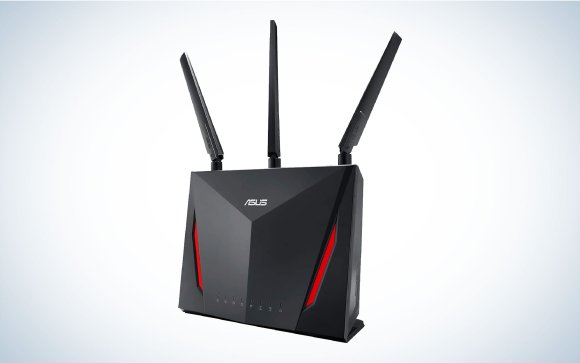
Credit: www.popsci.com
Choosing The Right Gaming Router
Choosing the right gaming router can improve your console gaming experience significantly. The right router reduces lag and keeps your connection stable. It also supports fast data transfer, which is crucial for multiplayer games. Picking a router involves considering several key factors to suit your gaming needs.
Compatibility With Consoles
Not all routers work well with every console. Check if the router supports your console’s networking standards. Most modern routers support PlayStation, Xbox, and Nintendo Switch. Some routers offer features like Quality of Service (QoS) that prioritize gaming traffic. This ensures your console gets the best bandwidth during gameplay.
Speed And Range Considerations
Speed matters a lot for online gaming. Choose a router that supports high-speed Wi-Fi standards like Wi-Fi 5 or Wi-Fi 6. These routers handle data faster and reduce delays. Range is also important if your console is far from the router. Look for routers with strong antennas or mesh system options for better coverage.
Budget-friendly Options
Gaming routers vary in price, but you don’t need to spend a lot. Many affordable routers offer good speed and decent range. Focus on routers with essential gaming features instead of high-end extras. Reading reviews and checking ratings can help find a good balance between price and performance.
Setup Tips For Best Performance
Getting the most out of your gaming router requires more than just plugging it in. Small adjustments in setup can lead to smoother gameplay and fewer frustrating lags. Let’s look at some practical tips that can boost your console gaming experience.
Placement And Signal Strength
Where you put your gaming router matters a lot. Place it in an open area, away from walls or metal objects that block signals. Elevate it off the floor, ideally on a shelf or desk, to improve coverage.
Think about your console’s location too. If it’s far from the router, the signal will weaken. You might feel slower speeds or connection drops during intense gaming moments. Have you noticed your connection improving just by moving the router a few feet?
Firmware Updates
Keeping your router’s firmware up to date can fix bugs and improve performance. Manufacturers often release updates that enhance security and stability. Check the router’s admin panel regularly or set it to update automatically.
Ignoring firmware updates can leave your network vulnerable or slow. I once skipped updates, and my gaming lagged more until I finally updated. Don’t let outdated software hold back your gaming potential.
Wired Vs Wireless Connections
Wired connections still hold the crown for stability and speed. Using an Ethernet cable directly from your router to console cuts down latency and packet loss. If you want consistent performance, wired is your best friend.
Wireless connections offer convenience but can suffer from interference and signal drops. If you must go wireless, use the 5GHz band instead of 2.4GHz for less congestion. Have you tried both setups to see which feels smoother during your gaming sessions?
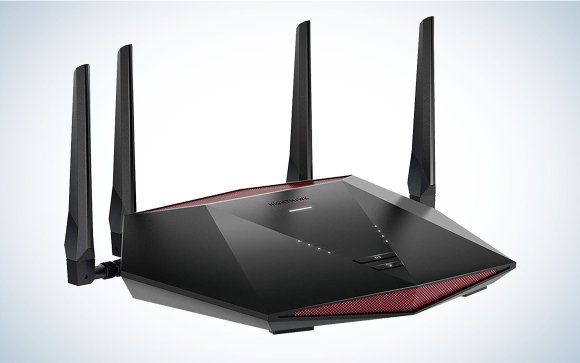
Credit: www.popsci.com
Common Issues And Fixes
Console gaming often faces network issues. These can disrupt your gaming experience. Understanding common problems helps you solve them faster. Here are some frequent issues and their solutions.
Interference Troubleshooting
Wireless interference can impact gaming. Devices like microwaves and cordless phones cause disruptions. Move your router away from such devices. Ensure it’s in an open space. This reduces interference and improves connectivity. Consider using a wired connection for stable performance.
Dealing With Network Congestion
Network congestion occurs during peak hours. Multiple devices using the internet can slow your connection. Limit the number of devices connected during gaming. Prioritize your console’s connection in router settings. This ensures better bandwidth allocation for gaming.
Reset And Reconfiguration
Sometimes, routers need a reset. This can solve many connection problems. Turn off your router and wait a few minutes. Then, turn it back on. If issues persist, consider reconfiguring your router. Update firmware for better performance. Follow the manufacturer’s guide for reconfiguration steps.

Credit: www.ign.com
Frequently Asked Questions
Do Gaming Routers Improve Console Gaming Speed?
Yes, gaming routers optimize bandwidth and reduce lag. They prioritize gaming traffic, ensuring faster and stable connections for consoles.
Can Gaming Routers Reduce Console Lag And Latency?
Absolutely. Gaming routers feature Quality of Service (QoS) that minimizes lag by prioritizing game data over other traffic.
Are Gaming Routers Worth It For Casual Console Gamers?
For casual gamers, benefits vary. If you face frequent lag or multiple devices, a gaming router enhances your experience.
How Do Gaming Routers Differ From Regular Routers?
Gaming routers have advanced features like QoS, better antennas, and faster processors. These improve gaming performance and connection stability.
Conclusion
Gaming routers can improve your console gaming experience. They often reduce lag and provide a stable connection. This helps you play without annoying interruptions. Still, not every gamer needs one. Regular routers work fine for many players. Consider your gaming style and internet speed first.
Choosing the right router depends on your needs. A good connection matters most for smooth gameplay. So, think about what works best for you.