Are you tired of slow internet and dead zones in your office? Setting up mesh WiFi for your business can solve those frustrating problems and keep your team connected without interruptions.
Imagine seamless coverage, faster speeds, and reliable connections everywhere in your workspace. In this guide, you’ll discover simple steps to set up mesh WiFi that fits your business needs perfectly. Keep reading to learn how to boost your network, improve productivity, and make sure your customers and employees stay happy.
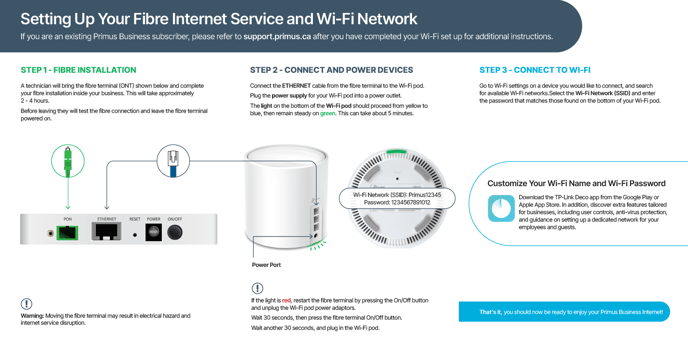
Credit: helpcentre.primus.ca
Choosing The Right Mesh Wifi System
Choosing the right mesh WiFi system is crucial for any business. It affects internet speed, coverage, and employee productivity. Picking a system that fits the business environment ensures smooth operations. Several factors come into play when selecting the ideal mesh network.
Assessing Business Needs
Start by understanding the size and layout of your office. Large spaces with many walls may need more nodes for full coverage. Consider the number of devices that will connect to the network. Think about the types of activities performed—video calls, file transfers, or simple browsing. These impact the bandwidth and speed requirements. Also, note any future growth plans to ensure scalability.
Comparing Popular Mesh Systems
Research top mesh WiFi brands known for reliability and support. Look at features such as easy setup, strong security, and app control. Check user reviews to see real-world performance feedback. Some systems offer guest networks and parental controls, useful for business settings. Compare coverage areas and maximum device support to match your needs.
Budget Considerations
Set a clear budget before choosing a system. Quality mesh WiFi systems come at various price points. Balance between cost and features to get the best value. Remember that cheaper options may lack important business features. Factor in potential costs for additional nodes or professional installation. Long-term reliability can save money on repairs and downtime.

Credit: www.youtube.com
Preparing Your Workspace
Preparing your workspace is a key step before setting up a mesh WiFi system for business. It helps ensure strong, reliable internet in every corner. Taking time to organize this part will save headaches later and improve your network’s performance.
Focus on understanding your office layout and current setup. This knowledge guides where to place mesh nodes and how to avoid problems. Clear planning makes installation smoother and keeps your business running without disruptions.
Mapping Out Coverage Areas
Start by sketching a simple map of your workspace. Mark all rooms, walls, and large furniture that might block signals. Identify where employees use WiFi most often. Include conference rooms, workstations, and common areas.
Note spaces with weak signals or dead zones. These spots need special attention during setup. This map helps decide how many mesh nodes are necessary and where they should go.
Checking Existing Network Infrastructure
Examine your current network setup. Find your main router location and any existing access points. Check if Ethernet ports are available in key areas for connecting mesh nodes.
Look at the internet speed and stability. This baseline shows if upgrades are required. Make sure your network devices are compatible with mesh systems to avoid extra costs.
Identifying Potential Interference
Spot sources of WiFi interference in your workspace. Common culprits include microwaves, cordless phones, and thick walls. Metal shelves and glass can also weaken signals.
Plan node placement to avoid these obstacles. Keep mesh devices away from electronics that emit radio waves. This step improves signal quality and reduces connection drops.
Setting Up The Main Router
Setting up the main router is the foundation of your mesh WiFi network. This device controls the entire system, so it needs to be configured carefully to ensure strong, consistent coverage for your business. Getting this right will save you time and frustration down the road.
Connecting To The Modem
Start by unplugging your modem and connecting the main router directly to it using an Ethernet cable. This connection is crucial because it acts as the gateway between your internet service and your mesh network.
Once connected, plug the modem back in and power on the router. Wait a few minutes for both devices to establish a stable connection. If your modem has multiple ports, choose the one labeled for connecting to routers or external devices to avoid conflicts.
Configuring Basic Settings
Access your router’s setup page through a web browser by typing in the IP address found in the router’s manual—usually something like 192.168.1.1. Use the default username and password, often listed on a sticker on the router, to log in.
Set a clear and memorable network name (SSID) that reflects your business. Avoid generic names like “Network” to prevent confusion with neighboring networks. Also, select a simple password that you can share securely with your team.
Check for firmware updates while you’re logged in. Updating the router’s software can improve performance and fix security holes. Don’t skip this step—it’s easy to overlook but essential for a smooth network experience.
Securing The Network
Security is non-negotiable in a business environment. Enable WPA3 encryption if your router supports it; if not, WPA2 is the next best option. This keeps your network safe from unauthorized access.
Change the default admin password to something strong and unique. Many routers come with generic credentials that hackers can easily guess. Also, disable remote management unless you absolutely need it.
Consider setting up a guest network to keep visitors off your main business network. This limits the risk of data breaches and keeps your critical devices isolated. Have you thought about who really needs access to your WiFi, and how you can control it effectively?
Adding And Positioning Satellite Nodes
Place satellite nodes where Wi-Fi signals weaken to extend coverage effectively. Ensure nodes are within range of the main router and avoid walls or large obstacles. Proper positioning helps maintain strong, stable connections throughout your business space.
Adding and positioning satellite nodes is crucial for mesh WiFi setup. These nodes extend coverage, ensuring seamless internet access across your business. Proper placement and connection can enhance speed and reliability.Optimal Placement Tips
Place nodes in open spaces for better signal reach. Avoid obstructions like walls and furniture. Nodes should be at a similar height, ideally above waist level. This promotes uniform coverage. Consider central locations to ensure even distribution of the WiFi signal.Connecting Nodes To The Main Router
Ensure each node is within range of the main router. Use the app provided by your mesh system for setup. Follow on-screen instructions to pair nodes with the main router. Check indicator lights to confirm successful connections.Testing Signal Strength
After setup, test signal strength in various areas. Use apps or built-in tools to measure WiFi speed. Identify weak spots where signal may drop. Adjust node positions if needed for optimal performance. Regular testing helps maintain strong, stable connections.Configuring Advanced Settings
Configuring advanced settings on your mesh WiFi system enhances performance and security. These settings help manage network traffic and protect sensitive business data. Proper configuration ensures a smooth experience for all users.
Setting Up Guest Networks
Guest networks keep visitors separate from your main business network. This limits access to important files and devices. Create a guest network with a unique name and password. Set bandwidth limits to prevent guest users from slowing down your business operations.
Enabling Quality Of Service (qos)
Quality of Service (QoS) prioritizes critical applications and devices. Assign higher priority to video calls, online meetings, and cloud services. Lower priority can go to less important activities like downloads. Adjust QoS settings in your mesh WiFi app or admin panel for better performance.
Implementing Network Security Measures
Strong security protects your business from cyber threats. Use WPA3 encryption for the best protection. Change default router passwords and update firmware regularly. Enable firewalls and set up automatic alerts for unusual activity. Consider using VPNs for remote workers to secure data transmission.
Monitoring And Maintaining The Network
Keeping your mesh WiFi network running smoothly means you need to watch it closely and take care of it regularly. A well-maintained network reduces downtime and keeps your business connected without interruptions. You don’t have to be a tech expert to handle this; with the right tools and routine, you can manage it effectively.
Using Network Management Apps
Network management apps are your best friends for monitoring a mesh WiFi setup. These apps let you see which devices are connected, check signal strength, and manage bandwidth priorities with ease.
Many apps send alerts if something goes wrong, so you can fix issues before they affect your business. Have you ever noticed slow internet but didn’t know why? These apps give you real-time data to pinpoint the problem quickly.
Regular Firmware Updates
Firmware updates are like health check-ups for your mesh WiFi devices. They improve security, fix bugs, and often boost performance. Skipping updates can leave your network vulnerable or cause unexpected glitches.
Set a schedule to check for updates or enable automatic updates if available. This simple step can save you from headaches later, especially when you’re managing multiple access points.
Troubleshooting Common Issues
Even the best networks run into problems sometimes. Common issues include weak signals, dropped connections, or devices not connecting at all.
Start troubleshooting by rebooting your mesh nodes or checking if any devices are causing traffic overload. If problems persist, consult your app’s diagnostic tools or manufacturer support.
What’s the most frequent WiFi issue you face at work? Knowing this helps you prepare fixes in advance.

Credit: www.reddit.com
Frequently Asked Questions
What Is Mesh Wifi And Why Use It For Business?
Mesh WiFi uses multiple nodes to cover large areas with strong signals. It ensures seamless connectivity and better performance for businesses, especially in large offices or buildings.
How To Choose The Right Mesh Wifi System?
Consider coverage area, number of users, speed requirements, and device compatibility. Choose a system that supports business needs and offers easy management features.
Can Mesh Wifi Improve Office Network Security?
Yes, mesh WiFi systems often include advanced security protocols like WPA3 and guest network options. They help protect sensitive business data and prevent unauthorized access.
How Do I Set Up Mesh Wifi For My Business?
Place nodes strategically to cover your office fully. Follow the manufacturer’s app for setup, connect all nodes to the main router, and customize network settings as needed.
Conclusion
Setting up mesh WiFi can improve your business network. It helps cover large spaces with strong signals. Follow simple steps to install and connect devices. Check each node’s placement for best coverage. Keep your network secure with strong passwords. Regularly update firmware to maintain performance.
A good mesh WiFi supports smooth work and happy customers. Start small, then expand as your needs grow. Reliable internet makes daily tasks easier. Your business deserves steady and fast WiFi.