Are you wondering if your gaming router can work without a modem? It’s a question many gamers ask when trying to simplify their setup or troubleshoot connection issues.
Understanding how these devices interact can save you time, money, and frustration. You’ll discover the role of a modem, why it matters, and whether your gaming router can stand alone. Keep reading to get clear answers and make the best choice for your gaming experience.
Gaming Router Basics
Understanding the basics of gaming routers is essential before deciding if they can function without a modem. Gaming routers are designed to improve your online gaming experience by optimizing network traffic and reducing lag. But what exactly sets them apart from regular routers, and how do they fit into your home network?
What Is A Gaming Router
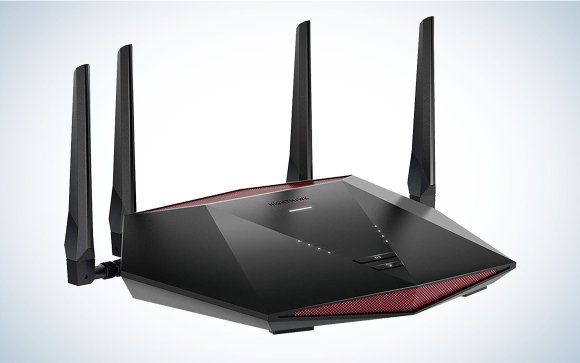
A gaming router is a specialized device that manages your internet traffic with a focus on gaming performance. Unlike standard routers, it prioritizes gaming data to reduce latency and packet loss. This means you get smoother gameplay and faster response times.
Think of it as a traffic controller that makes sure gaming packets take the fastest route through your network. These routers often come with software to customize settings based on your favorite games.
Key Features Of Gaming Routers
- Quality of Service (QoS):This feature lets you prioritize gaming traffic over other types of data, so downloads or streaming don’t slow your game.
- Low Latency:Gaming routers reduce lag by managing network congestion more effectively than regular routers.
- Multiple Antennas and Beamforming:These improve Wi-Fi signal strength and focus it on your gaming devices for better connection stability.
- High-Speed Ethernet Ports:Wired connections are essential for competitive gaming, and gaming routers often include multiple gigabit ports.
- Customizable Firmware:Advanced settings allow you to tweak your network for specific games or devices.
Have you noticed how your gaming experience changes when multiple devices use your network at once? A gaming router can help manage that load to keep your gameplay smooth. Knowing these features helps you understand why a gaming router alone might not be enough without the proper internet source.
Credit: www.popsci.com
Role Of A Modem
A modem is a device that connects your home network to the internet. It translates signals from your internet provider into data your devices can use. Without a modem, your router cannot access the internet on its own.
The modem acts as a bridge between the internet and your local network. It handles communication with your internet service provider (ISP). This makes it an essential part of any internet setup.
How Modems Connect To The Internet
Modems connect to the internet through different types of cables. These include coaxial, fiber optic, or phone lines. The type depends on your ISP and location.
Inside the modem, signals from these cables convert into digital data. This data travels to your router or device. The modem also manages the speed and stability of the connection.
Modem Vs Router Functions
Modems and routers have different jobs in your network. The modem links your network to the internet. The router connects devices within your home to each other and the modem.
Routers manage traffic between devices. They create local networks for Wi-Fi and wired connections. Modems do not handle local traffic or network security.
- Modem:Connects to ISP, converts signals, provides internet access.
- Router:Creates local network, directs data, manages Wi-Fi and devices.
Router Without Modem
Understanding how a router works without a modem can clear up a lot of confusion, especially if you’re setting up your gaming network. A router and a modem have distinct roles, and knowing what each device does helps you decide if you really need both. Let’s break down what happens when you try to use a router without a modem.
Can Routers Work Solo
Routers can operate without a modem, but their function changes. Without a modem, a router cannot connect to the internet on its own. Instead, it can only manage local networks, like connecting your devices to each other within your home.
If you have multiple devices, a standalone router can help them communicate and share files or stream content from one device to another. However, you won’t get online access unless the router is linked to a modem or another internet source.
Limitations Without A Modem
The biggest limitation is obvious: no internet connection. You can set up a gaming network, but you won’t be able to play online multiplayer games or download updates. This can be frustrating if you expect to use your gaming router as a standalone device for internet access.
Another issue is that routers rely on modems to translate signals from your internet provider. Without this translation, your router has no way to send or receive data from the internet. So, even if you have a high-end gaming router, it won’t boost your internet speed or stability without a modem.
Have you ever tried to play an online game only to realize your setup lacks a modem? It’s a common mistake that can cost hours of troubleshooting. Before investing in a gaming router, make sure your modem is ready to work with it, or your gaming experience will stay offline.

Credit: www.ign.com
Alternatives To Traditional Modems
Gaming routers need a modem to connect to the internet. Some routers have built-in modems, but most require an external one. Alternatives include using devices like gateway routers that combine modem and router functions.
When you think about connecting your gaming router, you usually picture a modem sitting next to it. But what if you could bypass that? There are indeed alternatives to traditional modems that can keep your gaming experience seamless and uninterrupted. Let’s dive into some practical solutions that can replace the bulky modem.Using Mobile Hotspots
Mobile hotspots are becoming increasingly popular as a reliable alternative to modems. You can use your smartphone or a dedicated hotspot device to share your mobile data connection with your gaming router. It’s an excellent option for those who are always on the go or living in areas where traditional broadband is unavailable. Imagine playing your favorite game while camping! Just ensure your data plan can handle the gaming bandwidth. If you’ve ever tried it, you know mobile hotspots can be surprisingly stable and fast, especially with a strong cellular signal.Direct Ethernet Connections
Direct ethernet connections present another effective solution. If your internet provider offers an Ethernet jack, you can plug your gaming router directly into it. This setup can provide a more stable connection compared to wireless options. In my own experience, directly connecting via Ethernet has significantly reduced latency during online matches. It’s like having a dedicated lane on the highway just for your gaming traffic. Consider checking with your ISP if this is a feasible option for you. Are you ready to experience a smoother gaming session?Setting Up Gaming Routers
Setting up a gaming router properly makes a big difference in your gaming experience. A good setup ensures fast, stable connections with less lag. Many gamers want to know if gaming routers can work without a modem. The answer depends on your internet source, but setting up the router is key either way.
Focus on clear steps to get the best from your router. Avoid common pitfalls that slow down your connection or cause interruptions. Let’s explore how to configure your gaming router for top performance and which mistakes to avoid.
Configuring For Optimal Performance
Start by connecting your router to the internet source. Use an Ethernet cable for the best speed and stability. Access the router’s settings through its IP address, usually found on the label or manual.
Change the default username and password to keep your network secure. Set up a strong Wi-Fi password using WPA3 or WPA2 encryption. Choose the best wireless channel to avoid interference from other devices nearby.
Enable Quality of Service (QoS) to prioritize gaming traffic. This reduces lag during gameplay by giving games bandwidth priority. Update your router firmware regularly to improve performance and fix bugs.
Common Setup Mistakes
- Using default passwords leaves your network vulnerable to attacks.
- Placing the router in a hidden spot weakens signal strength.
- Ignoring firmware updates can cause security and performance issues.
- Overlooking QoS settings may result in slow or laggy gaming.
- Connecting too many devices at once can overload your router.
- Not securing your Wi-Fi opens your network to unauthorized users.
Troubleshooting Connectivity
Troubleshooting connectivity issues can be frustrating, especially when you’re unsure if the problem lies with your gaming router or the modem. Understanding where the fault occurs helps you fix the issue faster and get back to your game. Let’s break down how to identify router problems and when to inspect your modem connections.
Identifying Router Issues
Start by checking if your gaming router is powered on and all cables are securely connected. Look for unusual indicator lights—blinking or no lights often signal trouble.
Try restarting your router. This simple step often clears temporary glitches affecting performance.
Next, connect a device directly to the router via Ethernet cable to rule out Wi-Fi problems. If the wired connection works fine, your issue may be with wireless settings or interference.
Have you checked if your router’s firmware is up to date? Outdated firmware can cause slow speeds and dropped connections.
When To Check Modem Connections
If your router seems fine but you still have no internet, the modem might be the culprit. Confirm the modem is powered on and all cables from the service provider’s line are tight.
Sometimes, the modem needs a restart to refresh its connection to your internet provider. Unplug it, wait 30 seconds, then plug it back in.
Notice if the modem’s status lights indicate a stable connection. Flickering or red lights often mean service interruptions or hardware issues.
Remember, your gaming router depends on the modem to access the internet. Without a stable modem connection, your router can’t perform its job, no matter how advanced it is.
Choosing The Right Equipment
Choosing the right equipment is crucial if you want a smooth gaming experience without interruptions. Your router and modem must work well together to provide stable and fast internet. Otherwise, you could face lag, disconnections, or slow speeds during important gameplay moments.
Selecting Compatible Routers And Modems
Not all routers can function without a modem, and not all modems support gaming routers efficiently. You need to check if your gaming router has built-in modem capabilities or if it requires an external modem to connect to your internet service provider (ISP).
Look for compatibility details in product specs or ask your ISP which devices work best with their service. Some routers support both DSL and cable modems, while others may only work with specific types. This can save you from buying equipment that doesn’t fit your network setup.
Ask yourself: Is your current modem compatible with the gaming router you want? If not, you might need to upgrade both devices simultaneously.
Budget Vs Performance Considerations
Deciding between budget and performance can be tricky. High-end gaming routers offer faster speeds, better range, and advanced features like Quality of Service (QoS) to prioritize gaming traffic. But they come at a higher price.
If you game casually, a mid-range router might be enough. It can still provide decent speeds and low latency without breaking the bank. Think about how much you spend on games and accessories—does investing more in your network make sense?
Here’s a quick comparison:
| Feature | Budget Router | High-Performance Gaming Router |
|---|---|---|
| Speed | Up to 300 Mbps | Up to 1 Gbps or more |
| Latency | Average | Optimized for low latency |
| Advanced Features | Basic | QoS, multiple antennas, customizable settings |
| Price | Affordable | Premium |
Think about your internet plan too. If your ISP speed is below what a high-end router offers, you might not see much difference. So, balance your equipment choice with your actual needs and budget.
Credit: www.avsforum.com
Frequently Asked Questions
Can Gaming Routers Function Without A Modem?
No, gaming routers cannot work without a modem. A modem connects your home network to the internet, while the router directs traffic within your network. Without a modem, your gaming router cannot access the internet or provide online gaming connectivity.
Why Do Gaming Routers Need A Modem?
Gaming routers need a modem to receive internet signals from your ISP. The modem converts these signals into data your router can distribute. Without a modem, the router cannot connect to the internet, making online gaming and other internet activities impossible.
Can I Connect A Gaming Router Directly To The Internet?
You cannot connect a gaming router directly to the internet without a modem. The modem establishes your internet connection, which the router then shares. Without a modem, the router lacks the necessary link to the internet service provider.
Will My Gaming Router Work With Fiber Internet Without A Modem?
Fiber internet usually requires an Optical Network Terminal (ONT) or modem to convert signals. Your gaming router connects to this device, not directly to the fiber line. So, even with fiber, a modem or ONT is needed for your router to work.
Conclusion
Gaming routers cannot work alone without a modem. The modem connects your home to the internet. The router shares this connection with your devices. Without a modem, the router has no internet signal to send. You can use a router to create a local network, but no internet games will work.
Always check your setup before buying equipment. This helps avoid confusion and wasted money. Understanding how modems and routers work keeps your gaming smooth and fun. Simple steps lead to better online play.