Are you tired of lag ruining your online games or video calls? You’ve probably heard about mesh WiFi systems and wondered if they can actually reduce your ping.
Lower ping means faster response times and smoother connections, which can make a huge difference in your internet experience. But does mesh WiFi really deliver on this promise? Keep reading to find out how mesh WiFi works and whether it can help you get the fast, reliable connection you need.
Credit: www.screenbeam.com
How Ping Affects Online Gaming
Ping plays a crucial role in online gaming. It measures the time data takes to travel between your device and the game server. Lower ping means faster response, giving you an edge in competitive games. Higher ping causes delays, affecting your game experience and performance.
What Ping Means
Ping is the delay between your actions and the game’s response. It is measured in milliseconds (ms). A ping of 20ms is excellent, while over 100ms can cause noticeable lag. Gamers aim for the lowest ping possible to ensure smooth gameplay.
Impact On Gameplay
High ping causes slow reactions in the game. Your character might move after you press a button. Opponents may appear before you see them. This delay can lead to missed shots or failed moves. Low ping means quick and accurate responses, improving your chances to win.
Common Ping Issues
- Network congestion causing delays.
- Long distance from the game server.
- Weak Wi-Fi signals or interference.
- Background apps using bandwidth.
- Old or faulty hardware.

Credit: dongknows.com
Mesh Wifi Basics
Understanding mesh WiFi basics helps explain its effect on ping. Mesh WiFi creates a network using multiple devices. These devices work together to spread WiFi signals evenly across your space. This system aims to reduce dead spots and improve connection quality.
How Mesh Networks Work
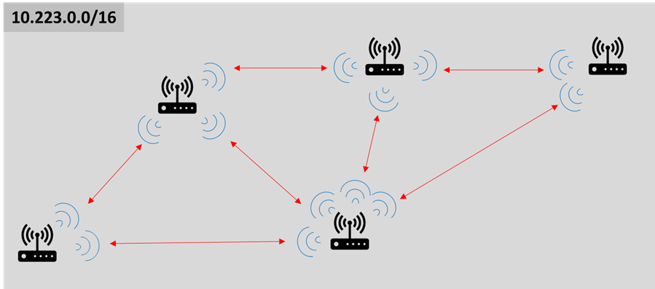
Mesh networks use several nodes to share internet access. Each node connects with others directly. This creates many paths for data to travel. If one path is slow or blocked, data finds another way. This flexible routing keeps the connection stable and fast.
Benefits Over Traditional Wifi
- Stronger coverage in large or multi-floor homes
- Fewer dead zones and weak signals
- Smoother connection when moving around
- Automatic path selection for best speed
- Easy to expand with more nodes
Traditional routers rely on a single device. This can cause weak spots far from the router. Mesh systems spread the signal evenly, improving overall network health.
Components Of A Mesh System
- Main Router:Connects directly to the internet source.
- Satellite Nodes:Placed around the area to extend coverage.
- Backhaul Connection:Links nodes together for data transfer.
- Control Software:Manages network settings and node communication.
Each part plays a role in keeping the network fast and stable. The main router handles the internet feed. Nodes spread the signal to reach all corners. Backhaul keeps communication smooth between nodes.
Mesh Wifi And Ping Reduction
Mesh Wifi systems are often praised for expanding coverage and boosting overall internet performance. But how do they actually affect your ping—the delay between sending and receiving data? Understanding the connection between mesh Wifi and ping reduction can help you decide if this setup fits your needs, especially for gaming, video calls, or any real-time online activity.
Latency Improvements
Latency, or ping, measures the time data takes to travel between your device and the internet. Mesh Wifi can reduce latency by creating multiple direct paths for data to reach your device faster.
Instead of relying on a single router, mesh nodes communicate with each other to find the quickest route. This means less waiting time for data packets, cutting down your ping.
Have you ever noticed a smoother online game session after moving closer to a mesh node? That’s latency improvement at work.
Signal Strength And Stability
Strong and stable signals are crucial for low ping. Mesh Wifi maintains consistent signal strength by placing nodes strategically around your home.
Unlike traditional routers that weaken signals over distance, mesh nodes extend coverage without losing speed. This stability reduces packet loss, which can cause spikes in ping.
Think about your usual Wi-Fi dead zones—mesh Wifi fills those gaps, ensuring your connection stays steady, reducing lag during critical moments.
Distance And Interference Factors
Distance from your internet source and obstacles like walls or electronic devices impact ping significantly. Mesh Wifi minimizes these issues by positioning nodes closer to your devices.
But it’s not just about distance; interference from microwaves, cordless phones, or neighboring networks can disrupt signals. Mesh systems adapt by switching channels or frequencies to avoid interference.
Have you checked how your ping changes when you move around your home? Mesh Wifi’s ability to handle distance and interference can make those differences less noticeable.
Credit: techlibrary.doodlelabs.com
Boosting Gaming Speed With Mesh Wifi
Mesh WiFi can lower ping by providing a stronger, more stable connection throughout your home. This reduces delays caused by weak signals or long distances to the router. Faster response times help improve your overall gaming experience.
Boosting gaming speed with mesh WiFi can transform your gaming experience by minimizing lag and providing a seamless connection. A high ping can be a gamer’s worst enemy, causing delays that disrupt gameplay. Mesh WiFi systems, with their multiple nodes, can be a game-changer, ensuring that your connection remains stable and quick no matter where you are in your home.Optimizing Node Placement
Strategic node placement is crucial for maximizing the performance of your mesh WiFi system. Place nodes in open areas where WiFi signals can travel freely, avoiding obstructions like walls or large furniture. Consider placing a node in the same room as your gaming setup to ensure the strongest possible connection.Prioritizing Gaming Traffic
Many mesh WiFi systems allow you to prioritize gaming traffic, ensuring that your games get the bandwidth they need. Dive into your system’s settings and look for a Quality of Service (QoS) feature. By prioritizing gaming devices, you can reduce ping and enhance your gaming performance even when other devices are connected to the network.Firmware And Software Updates
Regularly updating your mesh WiFi system’s firmware and software is essential for maintaining optimal performance. Updates often include security enhancements and performance improvements that can reduce latency. Set reminders or enable automatic updates to ensure your system is always running the latest version. Are you ready to optimize your gaming setup with mesh WiFi? Taking these steps can significantly reduce ping and make your gaming sessions smoother and more enjoyable.Enhancing Streaming Performance
Streaming your favorite shows or gaming online demands a stable and fast internet connection. Mesh WiFi systems can play a crucial role in enhancing your streaming performance by addressing common issues like buffering and inconsistent speeds. Let’s look at how mesh WiFi impacts your streaming experience and whether it truly helps reduce ping.
Reducing Buffering
Buffering can ruin any binge-watching session. Mesh WiFi spreads your internet signal evenly across your home, eliminating weak spots that cause interruptions.
When your device stays connected to the strongest node, it keeps the data flowing smoothly. I noticed fewer pauses when streaming 4K videos after switching to mesh WiFi, especially in rooms far from the main router.
Have you ever considered how much signal strength drops as you move around your house? Mesh networks help maintain a steady connection, reducing those frustrating loading circles.
Consistent Bandwidth Delivery
Streaming services require a steady amount of bandwidth to deliver crisp video and clear audio. Mesh systems balance the load by directing traffic efficiently between nodes.
This means your video streams won’t slow down just because someone else in your home starts a video call or downloads a file. Your bandwidth stays consistent, allowing for uninterrupted streaming quality.
Think about the last time your stream froze during a big game. Could a mesh network help avoid that by keeping speeds steady, even when multiple devices compete for data?
Multi-device Management
Homes today have many connected devices, from phones to smart TVs. Mesh WiFi handles multiple devices better than traditional routers by assigning each device to the best node available.
This management keeps your streaming device prioritized without sacrificing performance for other gadgets. I found that with mesh WiFi, my family could stream different shows simultaneously with minimal lag.
Does your current setup struggle when everyone streams at once? Mesh networks are designed to keep each device running smoothly, so your streaming isn’t affected by others.
Comparing Mesh Wifi To Other Solutions
Choosing the right network setup can impact your ping and overall internet speed. Comparing mesh WiFi to other solutions helps understand their strengths and weaknesses. Each option has unique features that affect latency and coverage.
Mesh Vs Extenders
WiFi extenders boost signal strength by repeating it. They create separate networks that devices must switch between. This can cause higher ping and slower speeds. Mesh WiFi uses multiple units working as one network. It offers seamless coverage and reduces delays. Mesh is better at handling many devices and large areas.
Mesh Vs Wired Connections
Wired connections use cables to link devices directly. This method usually has the lowest ping and fastest speeds. Mesh WiFi relies on wireless signals, which can face interference. Wired setups are best for gaming or work needing stable connections. Mesh provides flexibility and easier installation without cables.
Cost Vs Performance
Mesh systems cost more than extenders but deliver better performance. Wired connections need extra cables and setup time, adding to costs. Extenders are the cheapest but may lower network quality. Mesh balances price and speed, especially in bigger homes. Consider budget and network needs before choosing.
Tips For Choosing The Right Mesh System
Choosing the right mesh WiFi system is key to reducing ping and improving your overall internet experience. A good mesh setup can balance speed, coverage, and device compatibility, but not all systems are created equal. Understanding your unique needs will help you make the best decision.
Speed And Coverage Needs
Consider the size of your home and the number of devices that will connect to the network. If you have a large space or multiple floors, you’ll need a mesh system designed for wide coverage. Faster speeds matter most if you’re gaming or streaming high-quality video, so look for systems that support the latest WiFi standards like WiFi 6.
Ask yourself: Do you experience dead zones or slow spots in your home? A system with multiple nodes placed strategically can solve this issue effectively.
Compatibility With Devices
Your devices play a big role in choosing the right mesh system. Not all mesh routers work well with every device, especially older ones. Check if the mesh system supports the range of devices you use, including smartphones, laptops, gaming consoles, and smart home gadgets.
Think about future upgrades too. Will your new devices require faster speeds or better security? Opt for a system that can adapt to your evolving tech setup.
Budget Considerations
Mesh WiFi systems come at different price points, so determine what fits your budget without sacrificing essential features. Sometimes spending a bit more upfront saves money in the long run by avoiding frequent upgrades or poor performance.
Look for models offering good warranties and customer support, as these add value beyond just the hardware. Can you prioritize features like easy setup or parental controls without overspending? Balance what you want against what you need to avoid unnecessary costs.
Frequently Asked Questions
Does Mesh Wifi Improve Gaming Ping Times?
Yes, mesh WiFi can reduce ping by providing a stronger, more stable signal. This minimizes packet loss and latency, improving gaming performance in larger spaces with multiple devices.
How Does Mesh Wifi Compare To Traditional Routers For Ping?
Mesh WiFi offers better coverage and consistent speeds than traditional routers. This reduces dead zones and interference, leading to lower and more stable ping rates across your home.
Can Mesh Wifi Reduce Ping In Crowded Networks?
Yes, mesh systems manage traffic efficiently, reducing congestion. They prioritize gaming devices, which helps lower ping and maintain smooth connections even on busy networks.
Will Upgrading To Mesh Wifi Eliminate High Ping Issues?
Upgrading helps but doesn’t guarantee zero high ping. Factors like internet speed, server distance, and ISP quality also impact ping times significantly.
Conclusion
Mesh WiFi can help lower ping by improving signal strength. Strong signals mean less delay in data travel. It works best in large homes or places with many walls. But, your internet plan also affects ping speed. Mesh WiFi is not a magic fix for all lag problems.
Still, it often makes online gaming and streaming smoother. Choose a good mesh system and place nodes well. This way, you enjoy better connection and less waiting time. Small changes can make a big difference in your internet experience.