Are you tired of dead zones and slow internet in some parts of your home? You might be wondering, “How far can mesh WiFi really reach?”
Understanding this can change the way you connect to the internet and improve your online experience. You’ll discover how mesh WiFi works, what affects its range, and how to get the best coverage for your space. Keep reading to find out how to make your WiFi reach every corner of your home effortlessly.
Mesh Wifi Basics
Understanding mesh WiFi starts with knowing its basic structure and purpose. Unlike traditional routers that rely on a single device, mesh WiFi uses multiple units to blanket your entire space with a strong, consistent signal. This setup is especially useful if you’ve experienced dead zones or weak spots in your home or office.
What Is Mesh Wifi
Mesh WiFi is a network system designed to provide seamless internet coverage across a large area. Instead of connecting devices to one router, mesh systems use several nodes or points that communicate with each other. This creates a web of connections that helps eliminate weak signals and interruptions.
Think about the last time you moved from one room to another and noticed your WiFi drop or slow down. Mesh WiFi solves that by automatically switching your device to the strongest node without you having to do anything.
Components Of Mesh Systems
A typical mesh WiFi system consists of a few key parts:
- Main Router:Connects directly to your modem and acts as the central hub.
- Satellite Nodes:These are placed around your home to extend the signal. They communicate with the main router and each other.
- Backhaul Connection:This is the communication link between nodes, which can be wireless or wired.
You don’t need to be a tech expert to set this up. Most systems come with apps that guide you through placement and connection. Have you ever wondered why some WiFi signals just don’t reach certain rooms? Understanding these components can help you place the nodes where they matter most.
Factors Affecting Range
Understanding what affects the range of your mesh WiFi system is key to getting the best coverage in your home or office. Range isn’t just about how far the signal can travel; it’s about how well it can maintain strength and speed across different environments. Let’s look closely at the main factors that can either boost or limit your mesh WiFi’s reach.
Router Power And Antennas
The power of your router plays a huge role in how far your mesh WiFi signal can travel. Higher wattage routers generally push signals further, but that doesn’t always mean better coverage if the antennas aren’t up to par.
Antennas help direct the signal, so their design and placement matter a lot. External antennas often provide better range compared to internal ones. Have you noticed how some routers have adjustable antennas? Positioning these correctly can increase your coverage dramatically.
Interference Sources
Interference can come from many everyday devices like microwaves, cordless phones, and even baby monitors. These gadgets often operate on the same 2.4 GHz frequency band as your mesh WiFi, causing signal disruption.
Other WiFi networks nearby can also cause interference, especially in crowded apartment buildings. Changing your network channel or moving some devices can help reduce this noise. What devices in your home might be silently causing interference?
Building Materials
Walls and floors are more than just structural—they can block or weaken WiFi signals. Materials like concrete, brick, and metal are notorious for reducing signal strength drastically.
Even thick drywall or glass can cut down your mesh WiFi’s effective range. Knowing what your home or office is built from helps you plan where to place your mesh nodes. Are your walls quietly sabotaging your WiFi?
Environmental Obstacles
Beyond walls, furniture and large appliances can also obstruct WiFi signals. Items made from metal or filled with water, like aquariums or refrigerators, absorb signals and reduce range.
Moving mesh nodes away from bulky furniture and appliances can improve coverage. Sometimes, a small shift in placement can make a big difference. Have you tried repositioning your mesh units to avoid these obstacles?
Typical Range Limits
Understanding the typical range limits of mesh WiFi helps you plan your home or office network better. Knowing how far a single mesh node can reach and how multiple nodes work together to extend coverage prevents dead zones and weak signals. Let’s break down these limits so you can maximize your mesh WiFi’s performance.
Single Node Coverage
A single mesh WiFi node usually covers between 1,000 to 2,500 square feet, depending on the model and environment. Walls, furniture, and other obstacles can reduce this range significantly. For example, thick concrete walls might cut coverage by half or more.
Have you noticed your WiFi slows down when you move to another room? That’s often because the signal weakens past the single node’s effective range. Placing the node in a central, open spot can help, but it won’t solve all coverage problems alone.
Multiple Node Extension
Adding more nodes extends your network’s reach by creating a web of overlapping signals. Each new node can cover an additional 1,000 to 1,500 square feet, but the exact number depends on where you place them. Strategic placement is key—you want nodes close enough to communicate but spread far enough to cover different areas.
Think about your home layout. Do your walls block signals heavily? You might need more nodes than a simple floor plan suggests. Mesh systems also manage traffic efficiently, so your devices seamlessly switch to the strongest node as you move around.

Credit: www.reddit.com
Optimizing Mesh Coverage
Optimizing mesh coverage ensures that your home has a seamless WiFi experience. Proper setup extends your network reach and eliminates dead zones. Follow these tips to enhance your mesh WiFi system’s performance.
Ideal Node Placement
Position nodes in open spaces for better signal distribution. Avoid placing nodes near thick walls or metal objects. Keep nodes at a similar height for consistent coverage. Place them about two rooms apart for optimal reach.
Using Wired Backhaul
Connect nodes with Ethernet cables for a stable connection. Wired backhaul reduces signal interference. It ensures faster data transfer between nodes. Choose cables that match your network speed for best results.
Channel Selection Tips
Select the least crowded channel for better performance. Use a WiFi analyzer to find channels with less traffic. Change channels in your router settings for a clearer signal. Regularly check and adjust to maintain optimal coverage.
Comparing Mesh With Traditional Wifi
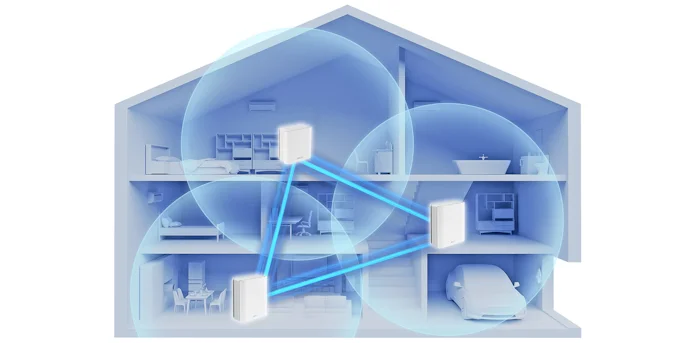
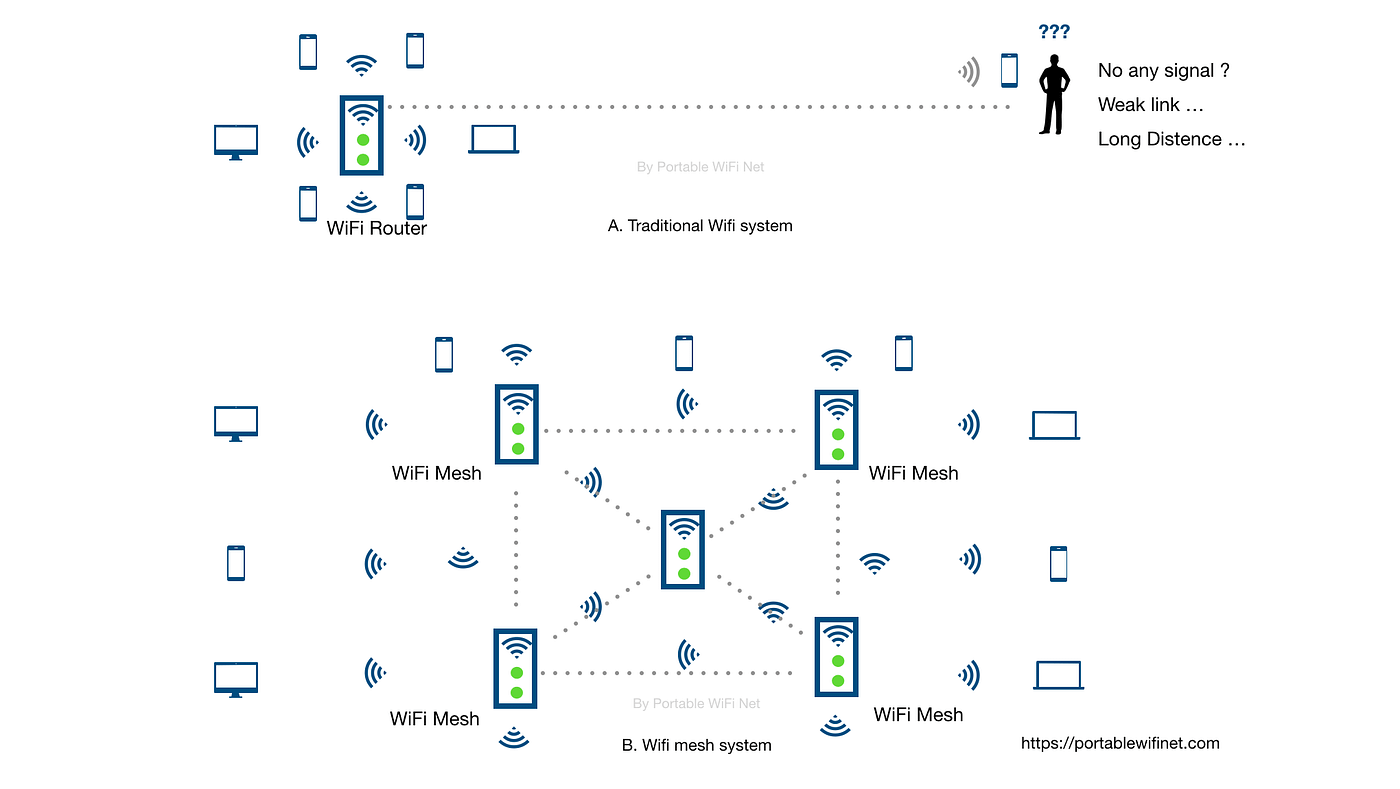
Mesh wifi and traditional wifi serve different needs in home networking. Traditional routers send signals from one point. This often leads to weak spots in larger homes or buildings. Mesh wifi uses multiple nodes placed around the area. Each node talks to the others, creating a seamless network. This design changes how far wifi can reach and perform.
Range Differences
Traditional wifi has a limited range from a single router. Walls and floors reduce signal strength. Coverage often drops off beyond 30-50 feet indoors. Mesh wifi expands range by using several nodes. Each node covers a smaller area, but together they cover more space. This creates a wider and more even wifi reach. Mesh systems adapt to obstacles by rerouting signals.
Performance In Large Spaces
Large homes or offices challenge traditional routers. The signal weakens in distant rooms or corners. This causes slow speeds and dropped connections. Mesh wifi suits large spaces well. Nodes placed in key spots maintain strong signals everywhere. Devices switch automatically to the closest node. This keeps internet fast and stable throughout the space.
Credit: edgeup.asus.com
Advanced Range Boosting Techniques
Boosting the range of your mesh WiFi system can make a huge difference in your home’s connectivity. Advanced techniques go beyond simply placing nodes around your space. They focus on optimizing signal strength and coverage to ensure you get seamless internet even in tricky spots.
External Antennas
Adding external antennas to your mesh system can significantly improve its reach. These antennas can be aimed toward areas with weak signals, helping your network cover more distance.
Many mesh routers support detachable antennas, allowing you to upgrade to high-gain versions. High-gain antennas focus the signal in specific directions rather than broadcasting it everywhere equally.
Think about your home layout—are there rooms or floors where the WiFi struggles? Positioning external antennas strategically can help you target those dead zones without buying extra nodes.
Range Extenders Vs Mesh Nodes
You might wonder if adding range extenders is a better option than expanding your mesh system with extra nodes. Range extenders rebroadcast your existing signal, but they often cut your bandwidth in half.
Mesh nodes, on the other hand, create a unified network with better management of traffic and minimal speed loss. This means you get smoother streaming and faster downloads across your entire home.
Consider the size and layout of your space. Range extenders can work well in small apartments, but for larger or multi-story homes, adding more mesh nodes usually offers a stronger, more reliable connection.
Common Range Issues And Fixes
Mesh WiFi systems can drastically improve your home network, but sometimes you face range issues that disrupt your connection. Understanding common problems and their fixes helps you get the most out of your setup without frustration. Let’s look at typical range challenges and practical ways to solve them.
Dead Zones
Dead zones are areas in your home where the WiFi signal disappears entirely. These spots often appear due to thick walls, metal objects, or electronic interference blocking the signal.
You can fix dead zones by:
- Repositioning mesh nodes closer to those weak areas.
- Adding an extra node if your home is large or has many obstacles.
- Removing or relocating items like microwaves or cordless phones that interfere with signals.
Have you checked whether your mesh nodes are placed in open spaces? Sometimes simply moving a node a few feet can clear up dead zones.
Signal Drops
Signal drops happen when your connection randomly weakens or cuts out. This can be frustrating during important tasks like video calls or streaming.
Common causes include:
- Network congestion from too many devices using the same channel.
- Distance between nodes being too far.
- Firmware or software glitches.
Try switching your mesh system to a less crowded WiFi channel or ensure nodes have a clear line of sight to each other. Also, reduce the number of active devices if possible to ease congestion.
Firmware Updates
Keeping your mesh system’s firmware up to date is often overlooked but crucial. Updates can fix bugs that cause range problems and improve overall performance.
Check your router’s app or admin page regularly for updates. Some systems allow automatic updates, which can save you time and keep your network running smoothly.
Have you noticed improvements in your WiFi after an update? If not, it might be time to reinstall the firmware or contact support for help.
Future Of Mesh Wifi Range
The future of mesh WiFi range looks promising as new technologies push the limits of how far and how well your network can reach. You might have experienced dead zones in your home or office, but advancements are closing those gaps. Understanding what’s coming helps you plan for a stronger, more reliable connection that fits your needs.
Wi-fi 6 And 6e Impact
Wi-Fi 6 and 6E bring faster speeds and better performance over longer distances. Unlike previous generations, they handle multiple devices more efficiently, which means your mesh system can cover more ground without losing quality.
Wi-Fi 6E uses the 6 GHz band, offering less crowded airspace. This gives your mesh network extra room to expand, reducing interference from other devices.
Think about your last video call dropping due to weak WiFi. With Wi-Fi 6 and 6E, that frustration can become a thing of the past because these technologies improve stability and reach.
Emerging Technologies
New tech like AI-driven network management adjusts your mesh system dynamically. This means your network can automatically boost signal strength where you need it most.
Other developments include smarter antennas and beamforming techniques that focus the WiFi signal directly to your devices. This targeted approach can extend the effective range significantly.
Could these innovations allow you to cover even large properties without extra hardware? The answer is leaning toward yes, making mesh WiFi more practical and cost-effective for many users.
Credit: medium.com
Frequently Asked Questions
How Far Can A Mesh Wifi System Cover?
A mesh WiFi system typically covers 4,500 to 6,000 square feet. Coverage depends on the number of nodes and home layout. Adding more nodes extends the signal range effectively across larger areas.
What Factors Affect Mesh Wifi Range?
Walls, floors, and interference from other electronics reduce mesh WiFi range. Materials like concrete and metal block signals more. Placement of nodes and network congestion also impact coverage quality and distance.
Can Mesh Wifi Reach Outdoor Areas?
Yes, mesh WiFi can extend to outdoor spaces if nodes are placed near windows or outdoors. Signal strength outdoors depends on obstacles and distance. Outdoor mesh nodes improve coverage in yards and patios.
How Many Nodes Do I Need For Full Coverage?
The number of nodes depends on your home’s size and layout. Generally, 2-3 nodes cover up to 5,000 square feet. Larger homes may require 4 or more nodes for seamless coverage.
Conclusion
Mesh WiFi can cover large areas with strong signals. Distance depends on walls, floors, and device placement. Adding more nodes helps extend the reach. Each home or office is different in size and shape. Choose the right number of units for your space.
Keep nodes in open spots for best results. Good placement avoids weak signals and dead zones. Mesh WiFi provides smooth internet without many drops. It fits well in big homes or multi-story buildings. Simple setup and flexible coverage make it useful for many users.