Have you ever wondered what happens to your mesh WiFi system during a power outage? Can your mesh WiFi keep working without power?
If you rely on seamless internet for work, streaming, or staying connected, this question matters more than you think. You’ll discover the truth about mesh WiFi and power, and learn what you can do to stay online even when the lights go out.
Keep reading to find out how to keep your connection strong when power isn’t.
How Mesh Wifi Systems Operate
Understanding how mesh WiFi systems operate helps you grasp why power is essential for their function. These networks rely on multiple devices working together to create a seamless internet connection across your home or office. Let’s break down what makes these systems tick and how power plays a crucial role in keeping them alive.
Core Components Of Mesh Networks
A mesh WiFi system consists of several key parts that work in harmony:
- Main Router:Connects to your modem and acts as the central hub.
- Mesh Nodes or Satellites:Spread throughout your space to extend coverage.
- Backhaul Communication:The wireless or wired link between nodes, ensuring data flows smoothly.
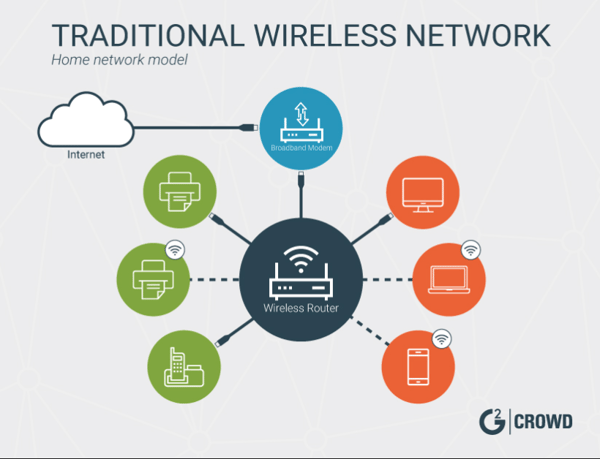
Each node communicates with others to create a single, unified network. This setup eliminates dead zones and allows your devices to switch seamlessly from one node to another without dropping the signal.
Role Of Power In Functionality
Every mesh node needs power to operate. Without electricity, these devices cannot transmit or receive data. Have you ever noticed that during a power outage, your internet connection disappears completely? That’s because the mesh nodes rely on power to keep your network alive.
Even if one node loses power, the mesh system’s coverage shrinks, and your devices may struggle to maintain a strong connection. This is why placing mesh nodes near power outlets is critical. Some advanced systems offer battery backup options, but these are usually short-term solutions.
Think about how your daily activities depend on a stable internet connection. How would losing power to your mesh network affect your work, entertainment, or smart home devices? Understanding this dependency helps you plan for uninterrupted connectivity.

Credit: www.reddit.com
Power Requirements For Mesh Wifi
Understanding the power requirements for mesh WiFi is essential if you want to keep your network running smoothly. Mesh devices need a constant power supply to function correctly and provide seamless internet coverage throughout your home or office.
Without power, these devices cannot communicate or extend your network. Have you ever wondered what happens to your mesh WiFi during a power outage or if you can run it without traditional power sources?
Power Sources For Mesh Devices
Most mesh WiFi devices rely on standard electrical outlets for power. They usually come with power adapters that plug into your wall sockets, providing a steady voltage to keep the system online.
Some advanced mesh systems offer Power over Ethernet (PoE), which means they receive power through the same Ethernet cable that carries data. This setup can simplify installations and reduce cable clutter.
- Standard power adapters plugged into electrical outlets
- Power over Ethernet (PoE) for combined data and power delivery
- Battery-powered mesh nodes (less common, usually for temporary setups)
If you’re thinking about running your mesh network in areas without easy access to power, battery-powered nodes might be an option, but they usually have limited uptime and require regular recharging.
Impact Of Power Outages On Mesh Networks
A sudden power outage will immediately knock out your mesh WiFi system. Since these devices depend on electricity to work, your entire network can go offline until power is restored.
Have you noticed how your internet suddenly stops working during storms or blackouts? That’s the power cut affecting your mesh devices.
To keep your mesh WiFi online during outages, consider options like:
- Uninterruptible Power Supplies (UPS) to provide backup power
- Battery backup systems integrated with your mesh nodes
- Using mesh devices that support PoE, connected to a UPS or power bank
Without backup power, your mesh network won’t work during outages, affecting everything from work calls to smart home controls. Do you have a plan to keep your network alive when the power goes out?
Battery-powered Mesh Devices
Battery-powered mesh devices offer an interesting solution for maintaining WiFi connectivity in places where traditional power sources are unavailable or unreliable. These devices run on rechargeable batteries, allowing your mesh network to continue functioning even during power outages or in remote locations. But how effective are these devices, and what should you know before relying on them?
Availability Of Battery-operated Nodes
Battery-operated mesh nodes are becoming more common as manufacturers respond to the demand for flexible networking solutions. Some well-known brands now offer mesh units that can run on batteries for several hours, making them ideal for camping trips, outdoor events, or emergency backup.
You can find these devices in different forms, such as portable routers or compact mesh satellites. Many include USB charging options, so you can power them with power banks or solar chargers. However, not every mesh system supports battery operation, so check compatibility before buying.
Limitations And Benefits
Battery-powered mesh devices give you freedom from power cables, but they also come with some trade-offs. Battery life is the biggest limitation—most devices last between 6 to 12 hours on a single charge, which might not be enough for extended outages.
On the plus side, these nodes keep your network alive when power is out, ensuring you stay connected for important tasks. They also allow for flexible placement since you aren’t tied to outlets. This can improve your WiFi coverage in hard-to-reach areas.
Would you consider adding battery-powered nodes to your mesh network for emergencies or travel? Think about how much uninterrupted connectivity matters to you during unexpected power cuts.
Credit: learn.g2.com
Alternatives During Power Loss
Mesh WiFi systems need power to work, so they stop during outages. Backup power options, like batteries or generators, can keep them running. Some devices offer limited offline functions but full connectivity requires electricity.
Power outages can be a nuisance, disrupting your internet connectivity and leaving you disconnected from the online world. But does a power cut mean the end of your WiFi experience? Not necessarily. With some strategic planning and the right tools, you can ensure that your mesh WiFi system remains operational even during a power loss. Let’s dive into some practical alternatives that can keep you connected when the lights go out.Using Backup Power Solutions
One straightforward way to keep your mesh WiFi running is by using backup power solutions. Have you considered a UPS (Uninterruptible Power Supply)? It’s an effective tool that provides temporary power to your devices during an outage. A UPS can power not only your mesh WiFi but also other essential electronics. By connecting your router and modem to a UPS, you ensure that your internet stays on even when the power is off. Investing in a portable power bank with AC output is another smart choice. These devices can charge and power your WiFi system for several hours. It’s a compact and versatile solution you can use during emergencies.Offline Connectivity Options
Even without power, there are ways to stay connected. Offline maps and downloaded content can be lifesavers. Have you downloaded your favorite shows or essential documents beforehand? Consider using mobile data as a backup plan. Most smartphones can act as a hotspot, providing internet access to your devices. It’s a simple yet effective way to keep your home network running. Another option is to set up a local network for file sharing. Devices like external hard drives or USB sticks can be used to access important files, even without internet access. This ensures you have everything you need at your fingertips. Planning ahead for power outages can save you from unnecessary stress. Have you explored these options to keep your digital life uninterrupted? By preparing now, you can make power loss a minor inconvenience rather than a major disruption.Future Innovations In Mesh Wifi Power Use
The future of mesh WiFi power use is promising and full of innovation. New technologies aim to reduce energy consumption and increase network reliability. These advances help make mesh networks more sustainable and practical for everyday use. Power efficiency will play a key role in how mesh WiFi systems evolve.
Energy-efficient Mesh Technologies
Energy-efficient mesh technologies are designed to use less power without losing performance. Smart sleep modes allow nodes to rest when traffic is low. Efficient chips and antennas reduce energy use while keeping strong signals. Software optimizations adjust power based on real-time needs. These features help save electricity and extend device life.
Solar-powered Mesh Networks
Solar-powered mesh networks use sunlight as a clean energy source. Solar panels charge batteries that power mesh nodes. This setup is ideal for outdoor or remote locations. It reduces dependence on electrical outlets and cuts operating costs. Solar mesh networks can keep working during power outages, offering reliable internet access.
Credit: techlibrary.doodlelabs.com
Frequently Asked Questions
Can Mesh Wifi Operate Without Electrical Power?
No, mesh WiFi systems require electrical power to function. Without power, the nodes cannot communicate or provide internet access.
What Happens If Mesh Wifi Loses Power Suddenly?
If power is lost, mesh nodes stop working, causing internet disconnection until power is restored.
Can Mesh Wifi Work On Battery Backup?
Some mesh systems support battery backups, enabling limited operation during power outages, but most rely on continuous power.
Is Mesh Wifi Dependent On Power Adapters?
Yes, mesh WiFi nodes use power adapters or PoE (Power over Ethernet) to receive electricity and operate properly.
Conclusion
Mesh WiFi systems need power to work properly. Without electricity, the devices cannot send or receive signals. This means no internet connection at all. Some setups have backup batteries, but they only last for a short time. So, always keep your mesh WiFi plugged in.
That way, your home stays connected without interruptions. Power is key for a smooth WiFi experience. Think of it as the heart of your network. No power, no signal. Simple as that.