Are you frustrated with slow internet or dead zones in your home? You might be wondering if mesh WiFi can solve these problems when you have fiber internet.
The good news is, mesh WiFi can work perfectly with fiber connections—but there are a few things you need to know to get the best results. Keep reading to find out how mesh WiFi can boost your fiber internet and give you fast, reliable coverage in every corner of your home.
Mesh Wifi Basics
Understanding the basics of mesh WiFi can help you decide if it fits well with your fiber internet setup. Mesh WiFi is designed to cover every corner of your home with a strong, reliable signal. It’s not just about having multiple routers; it’s about how they work together seamlessly to give you consistent internet access.
What Is Mesh Wifi
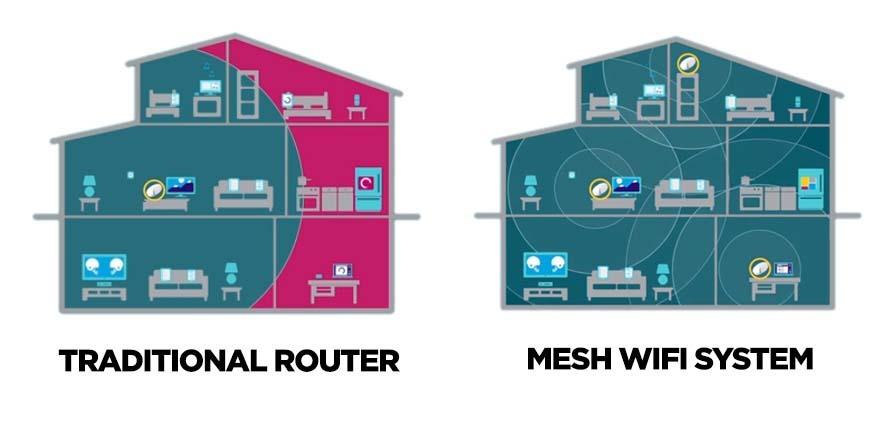
Mesh WiFi is a system made up of multiple devices called nodes. These nodes work together to create one large WiFi network. Unlike a single router, mesh WiFi spreads the signal evenly across your space, reducing dead zones.
Each node communicates with the others, so your device always connects to the strongest signal as you move around. If you’ve ever noticed your phone switching between weak and strong signals, mesh WiFi helps fix that by offering a smoother transition.
How Mesh Networks Operate
Mesh networks operate by creating a web of connections between nodes. Each node talks to the others, sharing data and routing internet traffic efficiently. This means if one node struggles, others pick up the slack without dropping your connection.
The system automatically manages traffic so your streaming, gaming, or work sessions don’t suffer. Think of it like a team where each member supports the others to keep the network fast and reliable. Does your current setup drop signals in certain rooms? Mesh WiFi can be a practical solution to that problem.
Fiber Internet Essentials
Fiber internet has become a popular choice for fast and reliable connections. Understanding its basics helps in knowing how it pairs with mesh WiFi systems. Fiber internet uses light signals to send data through thin glass cables. This method offers much higher speeds than traditional copper wires. It also supports more devices without slowing down.
Fiber internet provides a strong foundation for home networks. It delivers consistent performance, which is essential for streaming, gaming, and working online. Knowing the technology and its benefits explains why many choose fiber for their internet needs.
Fiber Technology Explained
Fiber internet uses fiber-optic cables made of glass strands. These cables carry data as pulses of light. Light travels quickly and with less loss over long distances. This allows fiber to send large amounts of data fast. Unlike copper cables, fiber is not affected by electrical interference. This keeps the signal stable and clear. Fiber technology supports speeds up to 1 Gbps or more.
Benefits Of Fiber Connections
- Faster internet speeds for downloads and uploads
- Low latency, which is good for gaming and video calls
- Reliable connection with less chance of outages
- Supports many devices at the same time without slowing
- Future-proof technology with high capacity for growth
Compatibility Of Mesh Wifi With Fiber
Mesh WiFi systems are often praised for their ability to extend wireless coverage seamlessly throughout your home. But how well do they work with fiber internet connections? Understanding the compatibility of mesh WiFi with fiber is essential if you want to get the most out of your ultra-fast fiber service.
Connecting Mesh To Fiber Modems
Fiber internet usually comes with a modem or an Optical Network Terminal (ONT) that converts the fiber signal into Ethernet. Your mesh WiFi system connects to this device just like it would with any other modem.
Simply plug the main mesh router into the fiber modem using an Ethernet cable. This setup lets your mesh system distribute the high-speed fiber internet wirelessly across your home.
Many users find that mesh WiFi enhances their experience by eliminating dead zones and maintaining strong speeds throughout their space. Have you ever noticed WiFi drops in certain rooms despite having fiber? Mesh systems can often fix that.
Potential Compatibility Issues
While mesh WiFi systems usually work well with fiber modems, some issues can arise. For instance, certain fiber providers use modems with built-in routers that may conflict with your mesh system’s router functionality.
This can cause double NAT problems, which might lead to slower speeds or difficulties with online gaming and video calls. To avoid this, you might need to set your fiber modem to bridge mode or disable its router features.
Another potential hiccup is firmware compatibility. Some mesh systems require updates to work smoothly with the latest fiber modem models.
Before purchasing a mesh WiFi, check if your provider’s modem supports external routers or mesh systems. Have you checked your modem’s settings recently? It could save you a lot of troubleshooting later.

Credit: forum.quartertothree.com
Speed Factors In Mesh And Fiber
Understanding the speed factors in Mesh and Fiber internet is crucial for optimizing your home network. Mesh WiFi systems and fiber internet are known for their high-speed capabilities, but how do they work together? Let’s dive into the factors that influence speed when these two technologies intersect.
How Fiber Speeds Affect Mesh Performance
Fiber internet is famous for delivering lightning-fast speeds, often exceeding what traditional broadband can offer. These speeds can significantly enhance the performance of your Mesh WiFi system. However, the maximum speed you can achieve with a Mesh setup still depends on several factors.
Consider the bandwidth capacity of your Mesh nodes. If your Mesh system is not designed to handle the high speeds provided by fiber, you won’t experience the full benefit. Thus, choosing a Mesh system that supports gigabit speeds is essential for maintaining those fiber speeds throughout your home.
Mesh Node Placement And Speed
Placement of your Mesh nodes is key to achieving optimal speed. Poor placement can lead to weak signals and slower speeds, regardless of how fast your fiber connection is. Think about the layout of your home and place nodes where they can effectively communicate with each other and your devices.
- Avoid placing nodes near thick walls or metal objects, as these can obstruct the signal.
- Consider placing nodes in central locations within each area of your home to ensure even coverage.
- Experiment with different placements to find the configuration that provides the best speed and coverage.
Have you ever noticed a dead zone in your house where WiFi just doesn’t reach? This is often due to poor node placement. By strategically placing your Mesh nodes, you can eliminate these dead zones and enjoy seamless internet access throughout your home.
Ultimately, the synergy between fiber internet and Mesh WiFi depends on understanding and optimizing these speed factors. Are you ready to unlock the full potential of your network?
Coverage And Range With Fiber And Mesh
Fiber internet offers fast, reliable speeds. But strong WiFi coverage is key to using those speeds well. Mesh WiFi systems help spread your internet signal across your home. This improves coverage and range. They work well with fiber connections to give a better wireless experience.
Expanding Coverage Using Mesh
Mesh WiFi uses multiple devices called nodes. These nodes talk to each other and share the internet signal. Place them in different rooms or floors. This spreads the signal evenly and covers dead zones. The system creates one big network. Devices switch to the strongest node automatically. This keeps your connection smooth and fast everywhere.
Obstacles That Impact Signal Strength
Walls, floors, and furniture block WiFi signals. Thick materials like concrete and metal cause more trouble. These obstacles reduce speed and range. Large homes or buildings with many rooms need more nodes. Electronic devices can also cause interference. Keep mesh nodes away from microwaves and cordless phones. Proper placement helps maintain strong signals throughout your space.
Credit: kb.pineapple.net.au
Optimizing Your Setup
Optimizing your mesh WiFi setup with fiber internet can significantly boost your network’s speed and reliability. The right configuration ensures you get the most out of your high-speed connection. Small adjustments during installation and regular software updates can make a noticeable difference in performance.
Best Practices For Installation
Place your mesh nodes in open areas, away from thick walls or large metal objects that block signals. A good rule is to keep each node within two rooms or 30 feet of each other to maintain strong connections.
Don’t hide your router or nodes inside cabinets or behind furniture. Visibility helps the signal travel better and reduces dead zones.
Consider your home’s layout—hallways, floors, and room shapes affect coverage. Testing different node placements can reveal surprising results. Have you noticed better speed just by moving a node a few feet?
Firmware And Software Updates
Keep your mesh system’s firmware up to date. Manufacturers often release updates that improve stability, security, and speed.
Enable automatic updates if your system supports it. This way, you won’t have to worry about missing important improvements.
Check your mesh app or router interface regularly for software updates. Some updates can even add new features or better compatibility with your fiber internet provider.
Troubleshooting Common Problems
Troubleshooting common problems with mesh WiFi and fiber internet can improve your network’s performance. Many users face issues like slow speeds or connection drops. These problems often have simple fixes. Understanding the cause helps solve them quickly.
Dealing With Slow Speeds
Slow speeds can happen due to several reasons. Check your mesh WiFi placement first. Routers too far apart reduce signal strength. Move nodes closer to improve coverage.
- Restart your mesh router and modem to refresh the connection.
- Check for firmware updates on your mesh system.
- Limit devices using heavy bandwidth at the same time.
- Run a speed test near the main router to compare results.
Fiber internet usually offers fast speeds. If speeds stay slow, contact your internet provider. There might be an issue on their end.
Resolving Connection Drops
Connection drops disrupt your online activities and cause frustration. Weak WiFi signals often cause drops. Try these steps to fix the problem:
- Place mesh nodes away from thick walls and metal objects.
- Check for interference from other electronics like microwaves or cordless phones.
- Ensure all mesh units are powered and connected properly.
- Reset the mesh system if the problem continues.
Sometimes, fiber modem settings can cause instability. Verify your modem’s firmware is current. Contact support if drops persist despite fixes.
Choosing The Right Mesh System
Choosing the right mesh WiFi system can make a huge difference in how well your fiber internet performs throughout your home. Not all mesh systems are built the same, especially when paired with the high speeds and low latency that fiber offers. You want a system that not only covers your space but also keeps up with your fast connection without bottlenecks.
Top Mesh Wifi Brands For Fiber
Some brands have earned a solid reputation for working seamlessly with fiber internet. These brands often offer the latest technology, ensuring you get the most out of your fiber connection.
- Netgear Orbi– Known for strong coverage and fast speeds, Orbi models often support gigabit speeds that match fiber’s potential.
- Google Nest Wifi– Easy to set up and manage, it works well for users who want consistent performance without complex settings.
- ASUS ZenWiFi– Offers advanced features like AiMesh, which can be great if you want to expand your network later on.
- Eero Pro 6– Supports Wi-Fi 6, which is ideal for handling multiple devices on a fast fiber connection.
Which brand fits your home depends on your priorities—whether it’s speed, coverage, or ease of use.
Features To Look For
Fiber internet is fast, but your mesh system must keep pace. Look for mesh systems that support the latest Wi-Fi standards like Wi-Fi 6 or Wi-Fi 6E. These standards improve speed, reduce congestion, and handle many devices smoothly.
- Gigabit Ethernet Ports– These allow you to connect wired devices directly for the best possible speeds, crucial if you have a gaming console or a desktop PC.
- Tri-band Support– Systems with three frequency bands dedicate one band for communication between mesh nodes, improving overall speed.
- Security Features– Look for built-in security like automatic updates and threat protection to keep your network safe.
- Easy Management– Mobile apps that let you monitor and control your network help keep things simple and efficient.
Have you noticed slow spots or buffering despite having fiber? The right mesh system with these features can eliminate those issues and make your connection feel truly limitless.

Credit: ziplyfiber.com
Frequently Asked Questions
Can Mesh Wifi Improve Fiber Internet Speed?
Yes, mesh WiFi can enhance fiber internet speed by providing better coverage. It reduces dead zones and maintains strong signals throughout your space, ensuring consistent high-speed connectivity for all devices.
Is Mesh Wifi Compatible With Fiber Internet Routers?
Mesh WiFi systems are compatible with most fiber internet routers. You connect the main mesh unit to your fiber modem/router, extending the network seamlessly without affecting your fiber connection’s performance.
Does Mesh Wifi Reduce Fiber Internet Latency?
Mesh WiFi can reduce latency by optimizing signal paths and minimizing interference. This results in smoother streaming, gaming, and video calls when using fiber internet, especially in larger homes or offices.
How To Set Up Mesh Wifi With Fiber Internet?
To set up mesh WiFi with fiber, connect the primary mesh node to your fiber modem via Ethernet. Then, place additional nodes around your space for optimal coverage and follow the mesh system’s app instructions.
Conclusion
Mesh WiFi works well with fiber internet for fast, stable connections. It spreads the strong fiber signal across your home easily. This setup reduces dead spots and keeps devices connected. You get smooth streaming, gaming, and browsing without interruptions. Setting up mesh with fiber is simple and fits most homes.
Choose a good mesh system that matches your fiber speed. Enjoy better WiFi coverage and reliability all around. Mesh WiFi and fiber make a great team for strong internet.