Are you tired of slow Wi-Fi spots in your home? You might be wondering if buying a mesh Wi-Fi system or a range extender is the better choice for you.
Both promise to boost your internet signal, but which one truly delivers the speed and coverage you need? Choosing the right option can make a huge difference in how you stream, work, and connect every day. Keep reading to discover which solution fits your home and lifestyle best—and say goodbye to frustrating Wi-Fi dead zones for good.
Credit: blog.eero.com
Mesh Wifi Vs Range Extender
Choosing between mesh WiFi and a range extender can be tricky if you’re trying to improve your home network. Both aim to solve the same problem: expanding your WiFi coverage. But they do it in very different ways, which affects performance, setup, and overall experience.
How Mesh Wifi Works
Mesh WiFi systems use multiple devices called nodes that work together as a single network. Each node communicates with the others, creating a seamless web of coverage across your home. This means your device automatically connects to the strongest node without any interruptions.
Imagine walking through your house without losing connection or dropping video calls. Mesh systems handle this smoothly because the nodes share information and balance the load. They often come with easy-to-use apps to help you manage and monitor your network.
How Range Extenders Work
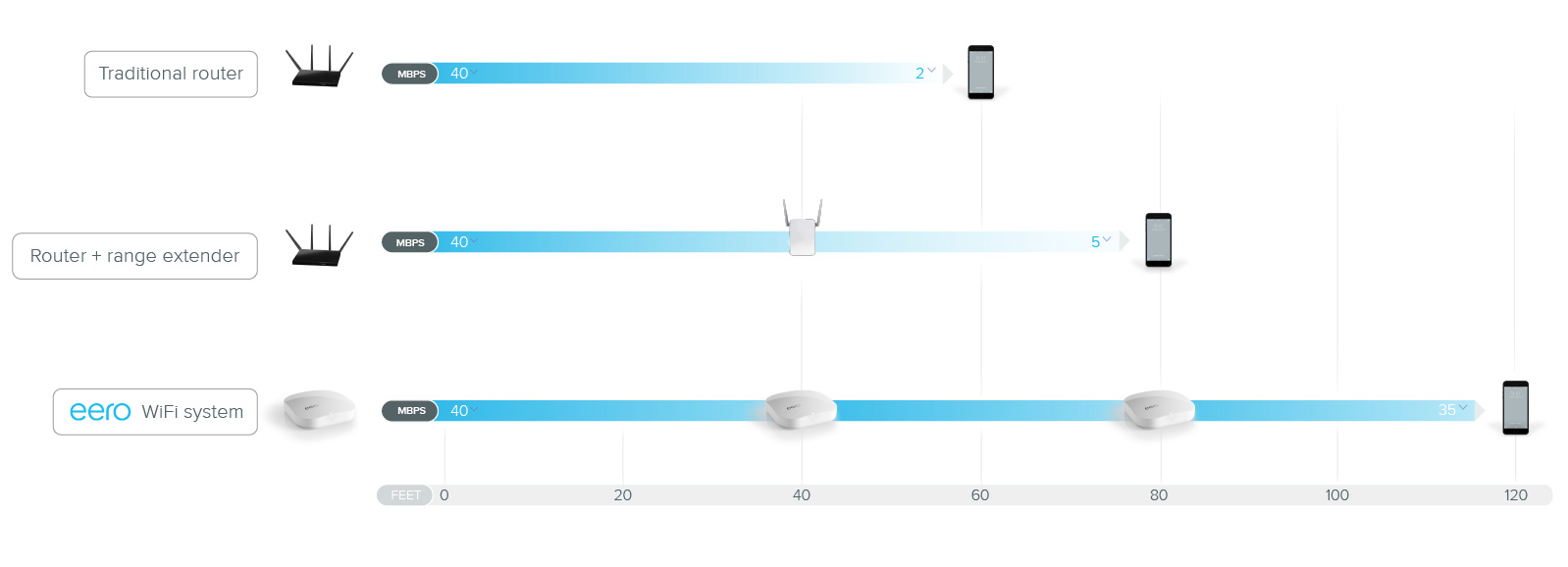
Range extenders take your existing WiFi signal and rebroadcast it to areas where the signal is weak. They act like a signal booster but create a separate network name, so your device might not switch smoothly when you move around. This can lead to dropped connections or slower speeds.
Setting up a range extender is usually simple and cost-effective. However, because it relies on repeating the original signal, it often cuts your bandwidth in half. This means slower internet speeds in the extended area compared to the main router.
Key Differences
| Feature | Mesh WiFi | Range Extender |
|---|---|---|
| Coverage | Wide, seamless coverage with multiple nodes | Limited to rebroadcasting existing signal |
| Speed | Maintains higher speeds with dedicated backhaul | Speeds often drop due to signal repeating |
| Network Name | Single network name for all nodes | Usually creates a separate network name |
| Setup | Simple with user-friendly apps, but higher cost | Easy and affordable, but less reliable |
| Best For | Large homes, multiple devices, seamless roaming | Small areas with minor coverage gaps |
Have you noticed your video calls dropping or buffering in certain rooms? If so, a mesh system might be worth the investment for smooth connectivity. But if you just want a quick fix for a small dead zone, a range extender could do the job without breaking the bank.
Performance Comparison
Choosing between mesh WiFi and range extenders often boils down to how well they perform in your home or office setup. Performance impacts everything from streaming your favorite shows to handling multiple devices during a busy workday. Let’s break down the key areas where these two solutions differ and see which one might fit your needs better.
Coverage Area
Mesh WiFi systems create a seamless network by using multiple nodes that communicate with each other. This setup usually covers larger areas without dead zones, making it ideal for bigger homes or spaces with tricky layouts.
Range extenders simply repeat the signal from your main router, which can cause some overlap but often leaves gaps in coverage. If your home is small or the dead zones are limited, a range extender might work, but larger spaces usually benefit more from mesh networks.
Speed And Reliability
Speed drops are common with range extenders because they receive and retransmit the signal on the same channel. This can halve your internet speed, especially if you’re far from the router.
Mesh systems maintain higher speeds by using dedicated backhaul channels between nodes. This means you can stream, game, or video call without constant buffering or lag.
Device Capacity
Think about how many devices you connect daily. Mesh networks handle multiple devices more efficiently thanks to their distributed architecture.
Range extenders tend to struggle when many devices connect simultaneously, causing slowdowns or dropped connections. If you have smart home gadgets, laptops, phones, and tablets all online, mesh might be the better choice.
Setup And Ease Of Use
Choosing between mesh WiFi and a range extender often boils down to how easy they are to set up and manage. Your time and frustration levels during installation can shape your whole experience. Let’s look closely at what you can expect from each option in terms of setup and ease of use.
Installation Process
Mesh WiFi systems usually come with clear, step-by-step instructions that guide you through placing nodes around your home. Most mesh kits include a mobile app that walks you through connecting each device, making the process smooth even if you’re not tech-savvy.
Range extenders tend to have a simpler initial setup—often just plugging into a power outlet and syncing with your router. But positioning can be tricky; you might spend time moving it around to find the sweet spot for a reliable signal. Have you ever spent an afternoon just trying to find the right spot for your extender?
User Interface And Management
Mesh WiFi systems often provide user-friendly apps that let you monitor your network, set parental controls, and prioritize devices with just a few taps. These apps give you a clear overview of your entire network, making management easy.
In contrast, many range extenders offer limited management tools, sometimes only accessible through a basic web interface. This can make changing settings or checking device connections less intuitive. Would you prefer a system that gives you full control at your fingertips?
Troubleshooting
With mesh WiFi, troubleshooting is often simplified through app notifications and guided fixes. If a node goes offline, the app usually alerts you and suggests steps to restore connection quickly.
Range extenders can be less forgiving. Signal drops might require manual resets or repositioning, which can be frustrating without clear guidance. Have you noticed how a small change in location can suddenly solve or cause connectivity issues?
Cost Considerations
Choosing between a mesh WiFi system and a range extender involves understanding their costs. Examining the financial aspects can guide your decision effectively. Let’s delve into the expenses associated with both options.
Initial Investment
Mesh WiFi systems generally require a higher upfront cost. They offer comprehensive coverage with multiple nodes. Each node helps in distributing the signal evenly across your home. This setup enhances connectivity but can be expensive initially.
Range extenders, on the other hand, are cheaper. They are a budget-friendly option for expanding WiFi reach. They work by amplifying the existing signal. This makes them a quick fix for dead zones.
Long-term Expenses
Mesh systems are often more reliable. They reduce the need for frequent replacements or upgrades. This can save money over time. Their durability and performance justify the initial cost.
Range extenders might need more frequent replacements. Their coverage is less stable, and they may not handle high demands well. This can lead to extra costs for upgrades.
Value For Money
Mesh WiFi provides excellent value for large homes. The consistent signal quality and coverage make the investment worthwhile. It can support multiple devices smoothly.
Range extenders suit smaller spaces or temporary solutions. They offer a cost-effective way to address spotty WiFi in select areas. For some, this makes them a practical choice.
Ideal Use Cases
Choosing between mesh WiFi and range extenders depends on the space and network needs. Different setups require different solutions for the best coverage and speed.
Each option suits certain environments better. Understanding these ideal use cases helps in making the right choice.
Small Homes And Apartments
Range extenders work well in small spaces. They boost signals in areas with weak coverage.
These devices are usually cheaper and simple to install. They fit places where the router already provides good coverage nearby.
For small homes, a single range extender can fix dead zones efficiently. It keeps the network stable without much hassle.
Large Homes And Multi-story Buildings
Mesh WiFi is better for bigger homes. It creates a network of nodes covering large areas evenly.
It handles multiple floors and thick walls with ease. Mesh systems provide seamless connection as you move around.
This setup reduces slow zones and improves speed everywhere in the house. It supports many devices at once without losing strength.
Office Environments
Mesh networks work great in offices. They provide consistent WiFi across open spaces and many rooms.
Businesses benefit from easy management and strong security features. Mesh systems adapt well to changing layouts and heavy device use.
Range extenders might cause network confusion in offices. Mesh keeps the connection smooth for work and meetings.

Credit: www.amazon.ca
Common Problems And Solutions
Choosing between mesh WiFi and range extenders often comes down to handling common network issues effectively. Both solutions aim to extend coverage but can face similar challenges that affect your internet experience. Understanding these problems and their practical fixes will help you decide which system suits your needs better.
Signal Interference
Signal interference can disrupt your WiFi connection, causing slow speeds or dropped connections. This happens when other electronic devices or thick walls block or weaken the signal.
To reduce interference, place your devices away from microwaves, cordless phones, and baby monitors. Also, keep your mesh nodes or range extenders in open areas, not inside cabinets or behind large furniture.
Have you noticed your WiFi slows down at certain times of the day? It might be due to overlapping channels with neighbors’ networks. Changing your router’s channel settings can often clear up this problem quickly.
Device Compatibility
Some devices might struggle to connect or perform poorly with certain WiFi systems. Older gadgets may not support newer mesh technologies, leading to inconsistent connections.
Check if your devices support the WiFi standards used by your mesh or extender system before buying. Sometimes, updating device firmware or drivers can solve compatibility issues without extra cost.
If you have many smart home devices, ask yourself: does my chosen system handle multiple connections smoothly? Mesh networks generally manage many devices better than range extenders.
Maintenance Tips
Regular maintenance keeps your WiFi system running smoothly and prevents future problems. Simple steps can save you from unexpected downtime and frustration.
- Update firmwareregularly to fix bugs and improve performance.
- Restart devicesoccasionally to clear temporary glitches.
- Monitor device placementto ensure optimal coverage and avoid dead spots.
- Use apps or softwareprovided by the manufacturer to manage your network easily.
How often do you check your WiFi system’s health? Making it a habit can prevent many common issues before they start.
Future-proofing Your Network
Future-proofing your network means choosing a solution that not only meets your current needs but also adapts to changes in technology and your lifestyle. Whether you’re considering mesh WiFi or a range extender, think about how each option will hold up as new devices, faster internet speeds, and evolving security threats emerge. Making the right choice now can save you from frequent upgrades and connectivity headaches later.
Technology Trends
WiFi technology is evolving fast. Mesh systems often support the latest WiFi standards like WiFi 6 or even WiFi 6E, which offer faster speeds and better performance in crowded environments. Range extenders usually lag behind, supporting older standards that might bottleneck your connection as internet speeds increase.
Think about the devices you plan to add in the next few years. Will your network handle multiple smart home gadgets, 4K streaming, or remote work demands? If you want your setup to keep pace, mesh networks are typically better equipped to handle these trends.
Scalability Options
As your home or office expands, your network should grow with you. Mesh WiFi systems are designed to scale easily — you can add more nodes without much hassle, and the system intelligently manages traffic between them. This means you won’t have to replace your whole network when you need more coverage.
Range extenders can increase coverage, but each additional device often requires separate setup and may cause slower speeds due to repeated signals. This can lead to inconsistent coverage and frustration. Ask yourself if you want a network that grows smoothly or one that might struggle as you add more devices.
Security Features
Security is a major factor in future-proofing. Mesh networks often come with built-in security updates, automatic patches, and advanced encryption standards. They may also include parental controls and guest networks that help keep your main network safe.
Range extenders sometimes lack these advanced security features or require manual updates, which can leave your network vulnerable over time. Are you comfortable managing security settings frequently, or would you prefer a system that protects your network automatically?

Credit: www.which.co.uk
Frequently Asked Questions
What Is The Main Difference Between Mesh Wifi And Range Extenders?
Mesh WiFi uses multiple nodes to create a seamless network. Range extenders boost signals from a single router. Mesh provides better coverage and performance than extenders.
Which Is More Cost-effective: Mesh Wifi Or Range Extender?
Range extenders are cheaper upfront but may need multiple units. Mesh WiFi costs more initially but offers better long-term value and reliability.
Can Mesh Wifi Systems Replace Range Extenders Entirely?
Yes, mesh WiFi can replace range extenders by providing wider coverage. It eliminates dead zones with consistent speeds across your home.
How Does Installation Differ Between Mesh Wifi And Range Extenders?
Mesh WiFi setup is user-friendly with app guidance and auto-configuration. Range extenders require manual placement and often more trial and error.
Conclusion
Choosing between mesh WiFi and a range extender depends on your needs. Mesh systems cover large areas with strong signals. Range extenders cost less and work well for small spaces. Think about your home size and internet use. A mesh system suits bigger homes and many devices.
Range extenders help if you want a quick, simple fix. Both improve WiFi but in different ways. Pick the option that fits your budget and space best. Good WiFi makes daily tasks easier and more fun.