Are you tired of lag and slow connections ruining your gaming experience? Imagine having a powerful, portable router that boosts your internet speed wherever you play.
Whether you’re at a friend’s house, traveling, or just want a more reliable connection, using a portable router can change the game for you. You’ll discover simple steps to set up and use a portable router specifically for gaming. Get ready to say goodbye to frustrating delays and hello to smooth, fast gameplay every time.
Keep reading to unlock the secret to gaming without limits!
Choosing The Right Portable Router
Choosing the right portable router can make or break your gaming experience on the go. Not all routers are built to handle the fast speeds and low latency that gaming demands. Before you buy, consider what features truly matter for smooth gameplay and how different models stack up against each other.
Key Features For Gaming
Look for routers that support dual-band or tri-band Wi-Fi. This helps reduce interference and keeps your connection stable during intense gaming sessions.
Low latency is crucial. A router with Quality of Service (QoS) settings lets you prioritize gaming traffic, ensuring minimal lag.
Also, check if the router supports the latest Wi-Fi standards like Wi-Fi 6. This offers faster speeds and better performance with multiple devices connected.
Comparing Popular Models
| Model | Wi-Fi Standard | QoS Support | Battery Life | Price |
|---|---|---|---|---|
| Netgear Nighthawk M1 | Wi-Fi 5 | Yes | 24 hours | High |
| TP-Link M7350 | Wi-Fi 4 | No | 8 hours | Medium |
| ASUS ROG Rapture GT-AC2900 | Wi-Fi 5 | Advanced | Requires power source | High |
Notice how some routers offer advanced QoS but need constant power, while others have long battery life but lack gaming-specific features. Which trade-offs are you willing to make?
Budget Considerations
High-end portable routers can be pricey, but they often deliver the performance you need for lag-free gaming. If you’re on a tight budget, focus on routers that at least support dual-band Wi-Fi and basic QoS.
Consider how often you’ll game on the go. If it’s occasional, a mid-range model might suffice. But if you travel frequently or attend gaming events, investing in a reliable device pays off.
Remember, a cheap router that can’t keep up will cost you more in frustration and lost matches than a slightly more expensive, better-performing one.

Credit: www.amazon.com
Setting Up Your Portable Router
Setting up your portable router is a crucial step to ensure a smooth and lag-free gaming experience. It’s not just about plugging it in; thoughtful configuration and placement can make a huge difference in your connection quality. Let’s walk through the essential steps to get your portable router ready for gaming.
Initial Configuration Steps
Start by powering on your portable router and connecting it to a laptop or smartphone via Wi-Fi or an Ethernet cable. Access the router’s admin panel through its IP address, usually provided in the manual or on the device itself.
Set a strong, unique password for both the router login and the Wi-Fi network to keep your connection secure. Update the firmware if an update is available—this can improve performance and fix bugs that affect gaming stability.
Consider enabling Quality of Service (QoS) settings if your router supports it. This allows you to prioritize gaming traffic over other types of data, reducing lag and interruptions during gameplay.
Optimizing Router Placement
Where you place your portable router can greatly impact your gaming connection. Avoid placing it in enclosed spaces like cabinets or behind large objects that block signals.
Keep the router elevated and near your gaming device if possible. This reduces interference from walls and furniture.
Think about other wireless devices around you that could cause interference, such as microwaves or cordless phones. Position your router away from these to maintain a strong signal.
Connecting Gaming Devices
Once your router is configured and optimally placed, it’s time to connect your gaming devices. Use an Ethernet cable whenever possible for the most stable and fastest connection.
If you must use Wi-Fi, connect your devices to the 5 GHz band instead of 2.4 GHz to benefit from less congestion and higher speeds. Make sure your gaming consoles, PCs, or handheld devices have their network settings set to obtain an IP automatically.
Test your connection with a speed test or by launching a multiplayer game to confirm your setup is ready. If you notice lag, revisit your router’s settings or placement for further tweaks.
Boosting Speed For Gaming
Boosting your gaming speed with a portable router can make a huge difference in your gameplay. Slow connections and lag spikes can ruin even the best gaming sessions. By optimizing your portable router settings, you can create a smoother, faster, and more reliable gaming experience wherever you go.
Selecting The Best Frequency Band
Portable routers often offer two main frequency bands: 2.4 GHz and 5 GHz. The 2.4 GHz band covers a wider range but tends to be crowded and slower. The 5 GHz band is faster and less congested, making it ideal for gaming, especially if you’re close to the router.
Try connecting your gaming device to the 5 GHz band to reduce interference and increase speed. Have you checked which band your router is currently using? Switching to 5 GHz can instantly cut down lag and improve responsiveness.
Using Quality Of Service (qos) Settings
Quality of Service (QoS) allows you to prioritize gaming traffic over other types of data. This means your router will focus on sending game packets first, reducing delays during intense multiplayer matches. Most portable routers have QoS settings that are easy to enable.
Access your router’s settings and assign high priority to your gaming device or game application. This simple change can lower ping times and keep your connection stable, even if others are streaming or downloading on the same network.
Upgrading Firmware
Firmware updates often include performance improvements and bug fixes that can enhance your router’s speed and stability. Running outdated firmware can limit your router’s potential and cause unexpected slowdowns. Check your router’s support page regularly for updates.
Updating firmware is usually straightforward and can be done through the router’s admin panel. Have you updated your portable router recently? You might find that a quick update solves many of your speed and connection issues.
Reducing Lag During Gameplay
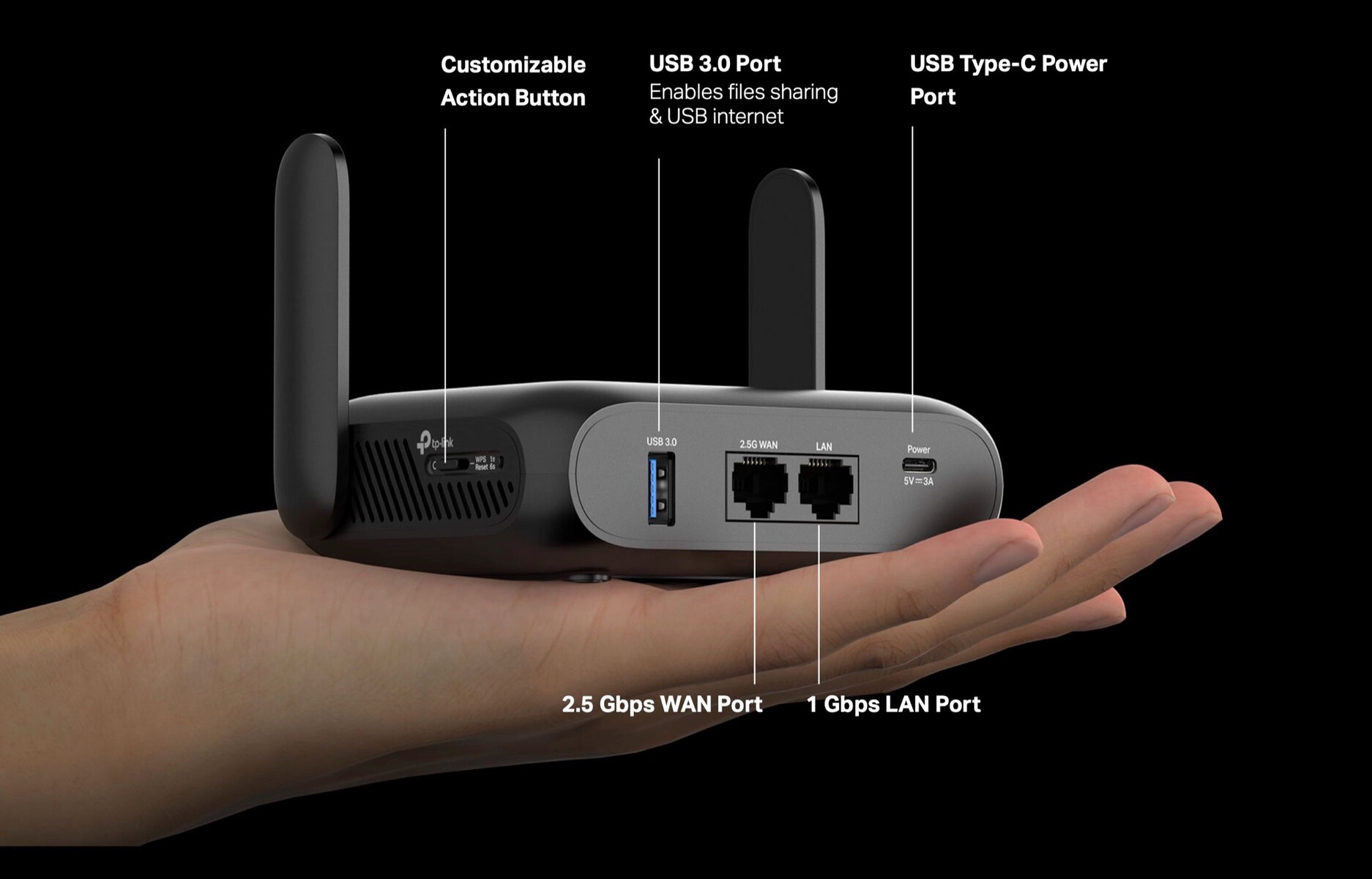
Using a portable router can lower lag by creating a stable and fast connection near your gaming device. This reduces delays and keeps gameplay smooth, especially in areas with weak Wi-Fi signals. Portable routers help maintain steady speeds for better gaming performance.
Reducing lag during gameplay is crucial for a smooth gaming experience. A portable router can help in achieving this by optimizing your network. Here are some effective ways to reduce lag.Minimizing Interference
Position your portable router away from electronic devices. These devices can cause interference, impacting your connection. Place the router in a central location. This ensures even signal distribution across your gaming area. Avoid placing it near walls or metal objects. These can block signals, causing lag.Prioritizing Gaming Traffic
Use Quality of Service (QoS) settings on your router. These settings prioritize gaming traffic over other data. Ensure your router supports QoS features. Access the router’s settings through its web interface. Set gaming applications as a priority to reduce lag. This ensures a stable connection during intense gaming sessions.Monitoring Network Performance
Regularly check your network’s performance through your router’s dashboard. Look for any unusual spikes in data usage. This can indicate network issues. Monitor connected devices and disconnect unnecessary ones. Fewer devices connected means better performance. Use network monitoring tools to identify problem areas. Adjust settings as needed to maintain optimal performance.Advanced Tips And Tricks
Mastering your portable router for gaming means going beyond just plugging it in. You can boost your gaming experience significantly by using some advanced settings and tricks. These tips help you get the most stable connection, better speed, and fewer interruptions.
Using Vpns With Portable Routers
Adding a VPN to your portable router can protect your privacy and reduce lag in certain cases. Some games or servers may block your IP, but a VPN lets you bypass these restrictions smoothly.
Make sure your VPN supports router installation. Some VPNs have apps or firmware you can install directly on the router, which secures all devices connected to it.
Keep in mind that VPNs can sometimes slow your connection. Test different servers to find one that balances speed and security for your gaming needs.
Connecting Multiple Devices Efficiently
Gaming alongside friends? Your portable router can handle several devices if set up right. Prioritize gaming traffic by enabling Quality of Service (QoS) settings on your router.
This prioritization reduces lag by giving your game data bandwidth preference over other activities like video streaming or downloads. Assigning static IP addresses to your gaming devices can also improve stability.
Watch the number of connected devices. Too many active connections can choke your bandwidth, causing lag spikes and disconnections.
Troubleshooting Common Issues
If your game suddenly lags or disconnects, first check your router’s signal strength and placement. Walls and interference from other electronics can weaken the connection.
Restarting your router often clears minor bugs that cause slowdowns. Also, keep your router’s firmware updated to benefit from the latest performance fixes.
Still struggling? Use ping tests to identify if your connection issues come from the router or your internet provider. This helps you decide the next step in troubleshooting.

Credit: www.amazon.com
Credit: www.notebookcheck.net
Frequently Asked Questions
What Is A Portable Router For Gaming?
A portable router is a compact device that provides a reliable internet connection for gaming on the go. It enhances network stability and reduces lag, ensuring smooth gameplay anywhere. It connects multiple devices and supports faster speeds, ideal for mobile and remote gaming setups.
How To Set Up A Portable Router For Gaming?
To set up, connect your portable router to a power source and activate its hotspot feature. Link your gaming device to the router’s Wi-Fi network. Adjust settings like QoS to prioritize gaming traffic. This setup boosts connection speed and reduces latency for better gaming performance.
Can Portable Routers Reduce Gaming Lag?
Yes, portable routers can reduce lag by offering a stable and dedicated internet connection. They minimize network interference and packet loss. Using features like QoS prioritizes gaming data, which lowers latency and improves response times during gameplay, especially in mobile or crowded network environments.
What Features Matter In A Gaming Portable Router?
Look for high-speed Wi-Fi standards (like Wi-Fi 6), low latency, and QoS support. Dual-band or tri-band frequencies help reduce congestion. Portability, battery life, and easy setup are also key. These features ensure consistent, fast, and reliable connections for uninterrupted gaming.
Conclusion
A portable router can improve your gaming experience anywhere. It offers stable internet for smooth gameplay and less lag. Setting it up is simple, even for beginners. Carry it easily on trips or to friends’ houses. Remember to keep your router updated for best results.
Enjoy gaming without worrying about slow connections. Portable routers make gaming more fun and reliable on the go. Try one to see the difference yourself.