Are you tired of slow WiFi complaints from your Airbnb guests? Setting up mesh WiFi can solve that problem and keep your visitors happy.
Imagine your guests streaming movies, video chatting, and browsing without any interruptions. This guide will show you exactly how to set up mesh WiFi in your Airbnb, step by step. By the end, you’ll have fast, reliable internet throughout your entire property, making your listing stand out and earning you better reviews.
Ready to boost your Airbnb experience? Let’s dive in!
Credit: edgeup.asus.com
Benefits Of Mesh Wifi For Airbnb
Setting up mesh WiFi for your Airbnb brings clear advantages that can enhance your guests’ experience and simplify your property management. Unlike traditional routers, mesh systems cover large spaces with consistent, fast internet. This means fewer complaints and better reviews, which directly impact your success as a host.
Improved Coverage And Speed
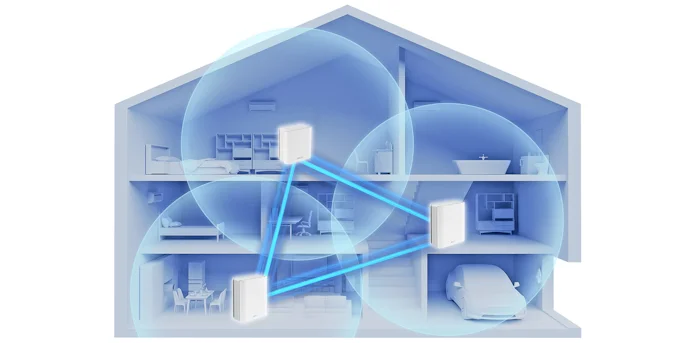
Mesh WiFi systems use multiple nodes spread throughout your property. This setup eliminates dead zones and weak signals that frustrate guests. Whether your Airbnb is a cozy apartment or a multi-floor house, mesh ensures every corner gets reliable, high-speed internet.
Imagine a guest streaming a movie in the living room while another works from the bedroom without interruptions. That’s the kind of smooth experience mesh WiFi delivers, helping you avoid negative feedback about slow or spotty connections.
Seamless Roaming For Guests
Guests move around your property, and mesh WiFi lets their devices switch between nodes automatically. They don’t have to reconnect manually or lose connection when walking from the kitchen to the patio.
This seamless roaming feels natural and hassle-free, which guests appreciate. You want your visitors to feel at home, not like they’re troubleshooting internet issues every few minutes.
Easy Network Management
Mesh systems come with user-friendly apps that let you monitor and control your network remotely. You can see which devices are connected, pause WiFi access, or prioritize bandwidth for certain users.
This control helps you maintain a smooth operation, especially if you manage multiple Airbnb listings. You won’t need to call a technician for simple fixes or guess why the WiFi is slow — you’ll have clear insights at your fingertips.
Choosing The Right Mesh System
Choosing the right mesh WiFi system is key for Airbnb hosts. It ensures guests get strong, stable internet everywhere. A good system covers all rooms and handles many devices at once. It also fits your home’s size and your budget. Picking the right mesh WiFi setup can make your Airbnb more appealing and increase positive reviews.
Factors To Consider
- Coverage area: Match the system to your property’s size.
- Device capacity: Check how many devices the system supports.
- Speed: Look for fast connections for streaming and work.
- Easy setup: Choose systems with simple installation steps.
- Guest access: Support for guest network with separate login.
- Security: Strong encryption keeps your network safe.
Popular Mesh Wifi Brands
- Google Nest Wifi: Known for ease and good coverage.
- Netgear Orbi: Offers high speed and wide range.
- TP-Link Deco: Budget-friendly with solid performance.
- Amazon Eero: Simple setup and reliable connections.
- Linksys Velop: Strong signal with flexible node placement.
Budget Vs Performance
Higher-priced mesh systems often deliver better speed and range. They handle more devices without slowing down. Cheaper options work well for small spaces or fewer guests. Balance cost with your Airbnb size and guest needs. Investing in good WiFi can improve guest satisfaction. Avoid the cheapest models that may cause slow or spotty connections.
Preparing Your Space
Getting your Airbnb ready for a mesh WiFi setup means preparing the space carefully to ensure strong, consistent internet coverage. The right preparation not only boosts signal strength but also improves your guests’ overall experience. Let’s look at how you can set up your space to make the most out of your mesh network.
Ideal Router Placement
Place your main router in a central location to evenly distribute the WiFi signal throughout your Airbnb. Avoid hiding it inside cabinets or behind large objects, as this weakens the signal. Open areas, like living rooms or hallways, often work best.
Think about where your guests spend most of their time—near the couch, dining area, or bedrooms—and position the router close enough to cover those spots without obstacles. Don’t forget to elevate the router off the floor for better signal spread.
Minimizing Interference
Interference can seriously reduce your mesh WiFi’s effectiveness. Keep your routers and nodes away from electronics like microwaves, cordless phones, and baby monitors, which can disrupt signals. Metal surfaces and thick walls also block WiFi, so avoid placing your devices near them.
Have you noticed dead spots in your home? These often happen because of interference. Moving your nodes just a few feet can solve these issues and keep your network stable.
Power And Network Requirements
Ensure each mesh node has easy access to a power outlet. Running extension cords or power strips may work temporarily, but they can clutter the space and create hazards for guests. Check that your electrical setup supports the number of devices you plan to use.
Your internet connection speed matters too. A high-speed broadband plan with sufficient upload and download speeds will keep your mesh system running smoothly. Consider testing your current speed and upgrading if necessary to avoid frustrating slowdowns during peak usage.

Credit: www.youtube.com
Step-by-step Setup Process
Begin by placing the main mesh wifi router near your modem for a strong signal. Connect additional nodes around your Airbnb to cover all rooms evenly. Use the app to follow simple prompts and finalize the setup quickly.
Setting up a mesh WiFi for your Airbnb can transform your guest experience, ensuring seamless connectivity in every corner of your property. This step-by-step guide simplifies the process, making it easy for you to enhance your hosting game. From unboxing to network configuration, let’s dive into the details to get your Airbnb tech-ready.Unboxing And Initial Setup
Begin by unpacking your mesh WiFi system, which typically includes a main router and several nodes. Ensure all components are present, including power cords and Ethernet cables. Place the main router in a central location, preferably near your modem. Connect it using an Ethernet cable. Power it up and watch for indicator lights, signaling that it’s ready for the next step.Connecting Nodes
Position the nodes strategically around your property. Think about areas where guests spend the most time, like the living room, kitchen, or patio. Plug each node into a power source. Most systems have an app that guides you through the connection process, ensuring each node communicates effectively with the main router. Check the signal strength on your app. Are there any dead zones? Adjust the node positions if necessary to optimize coverage.Configuring Network Settings
Access your mesh system’s app to configure network settings. Give your network a name that guests can easily recognize, and set a strong, memorable password. Consider enabling guest network features. It offers an added layer of security, ensuring guests can connect without accessing your main network. Regularly update your system’s firmware through the app. This keeps your network secure and up-to-date with the latest features. Have you ever walked through your property, smartphone in hand, testing the WiFi in each room? This simple act ensures your guests enjoy uninterrupted streaming or work sessions. Setting up a mesh WiFi system might seem daunting, but these steps make it a breeze. What will your guests say when they experience flawless connectivity?Optimizing Wifi For Guests
Optimizing wifi for your Airbnb guests isn’t just about speed; it’s about creating a smooth, reliable experience that makes their stay hassle-free. Guests expect easy access and stable connections whether they’re streaming, working, or just browsing. Paying attention to how you set up your network can prevent frustration and boost positive reviews.
Creating Guest Networks
Setting up a separate guest network keeps your main devices safe and offers visitors easy access without complex passwords. You can name the guest network something simple and welcoming, like “Airbnb Guest Wifi.”
Many routers allow you to create this network quickly through their settings. Guests appreciate a hassle-free connection, so avoid long or confusing passwords.
Have you ever struggled to connect to a network on your own trip? Making the process easy for your guests can leave a lasting good impression.
Setting Bandwidth Limits
Sharing your wifi doesn’t mean sharing unlimited speed. Setting bandwidth limits on the guest network prevents one user from hogging all the speed and slowing down the connection for others.
This is especially useful if you host multiple guests or have smart devices that rely on wifi. You can usually set these limits in your router’s control panel.
Think about times when slow internet ruined a streaming night or a video call—setting limits helps avoid these issues for your guests.
Ensuring Network Security
Security is crucial when providing wifi to strangers. Use WPA3 or at least WPA2 encryption to protect your network from unauthorized access.
Change default router passwords and update your firmware regularly to patch vulnerabilities. Also, consider disabling network features like remote management that could expose your setup to risks.
Would you trust a network that didn’t take security seriously? Showing you care about safety builds trust and protects your devices.
Troubleshooting Common Issues
Setting up mesh WiFi for your Airbnb can improve guest experience. Yet, some issues may arise during or after setup. Troubleshooting these common problems helps keep your network stable and fast.
Connectivity Problems
Devices may struggle to connect or drop the WiFi signal. Check that all mesh nodes are powered on and within range. Avoid placing nodes near thick walls or metal objects. Restarting the router and mesh units often restores connection. Confirm your network name (SSID) and password are correct on guest devices.
Slow Speeds
Slow internet frustrates guests. Ensure the mesh nodes are spaced properly to cover the entire space. Avoid placing nodes too close or too far apart. Limit the number of devices connected simultaneously. Check for interference from microwaves or cordless phones. Run speed tests near each node to identify weak spots.
Firmware Updates
Firmware keeps your mesh system secure and efficient. Regularly check for updates via the mesh app or website. Updates fix bugs and improve performance. Schedule updates during low-guest times to avoid interruptions. Enable automatic updates if available for convenience and security.
Maintaining Your Mesh Wifi System
Maintaining your mesh WiFi system is essential to keep your Airbnb guests happy and ensure smooth online experiences. A well-maintained network prevents slow connections and downtime, which can lead to negative reviews. Paying attention to your system regularly helps you spot issues early and keep the connection reliable.
Regular Monitoring
Check your mesh system’s app or dashboard frequently to monitor network performance. Look for unusual drops in signal strength or slow speeds in certain areas of your rental. This helps you identify dead zones before guests complain.
Set alerts if your system supports them, so you get notified immediately about outages or problems. This proactive approach saves you from last-minute emergencies and keeps your guests connected.
Updating Hardware
Keep your mesh WiFi hardware updated with the latest firmware. Manufacturers often release updates that fix bugs and improve security. Running outdated software can leave your network vulnerable or slow.
Consider replacing older mesh nodes every few years. Newer models offer better coverage, faster speeds, and improved security features that enhance your guests’ experience.
Adapting To Changing Needs
Think about how your Airbnb usage changes over time. Are you adding more rooms or hosting more guests? You might need to add extra mesh nodes to cover new areas or support more devices.
Ask yourself if guests use the internet differently now than before. Streaming, video calls, and remote work demand faster, more stable connections. Adjust your mesh setup accordingly to meet these growing needs.

Credit: www.youtube.com
Frequently Asked Questions
What Is Mesh Wifi And Why Use It For Airbnb?
Mesh WiFi uses multiple devices to create seamless internet coverage. It ensures strong signals in all Airbnb rooms. This improves guest satisfaction and reduces connectivity complaints. Mesh systems are easy to manage and expand as needed.
How Do I Choose The Best Mesh Wifi System?
Consider coverage area, number of devices, and budget. Look for easy setup, strong security features, and guest network options. Reading reviews from Airbnb hosts helps identify reliable models. Choose a system that fits your property’s size and internet needs.
Can Mesh Wifi Improve Airbnb Guest Experience?
Yes, mesh WiFi provides stable and fast internet throughout the property. Guests can stream, work, and browse without interruptions. It reduces dead zones and connection drops. A better WiFi experience often leads to higher reviews and repeat bookings.
How Do I Set Up Mesh Wifi In An Airbnb?
Start by placing the main router near the modem. Add mesh nodes in rooms with weak signals. Use the system’s app for guided setup and network management. Create a separate guest network to protect your personal data.
Conclusion
Setting up mesh WiFi for your Airbnb brings steady internet everywhere. Guests enjoy strong signals in every room. This helps avoid slow connections and dropped calls. A smooth online experience makes guests happier. It also reduces complaints and improves your reviews.
Simple steps and the right devices make setup easy. Keep your guests connected and comfortable. Reliable WiFi adds value to your rental. Start today for better guest stays tomorrow.