Are you tired of slow internet spots in your home? You’ve got a mesh WiFi system, but still struggle with weak signals in some rooms.
The secret to solving this is all about where and how you position your mesh WiFi nodes. Placing them in the right spots can boost your connection and give you seamless coverage everywhere. Keep reading, and you’ll discover simple, proven tips to set up your mesh WiFi nodes perfectly—so you never lose signal again.
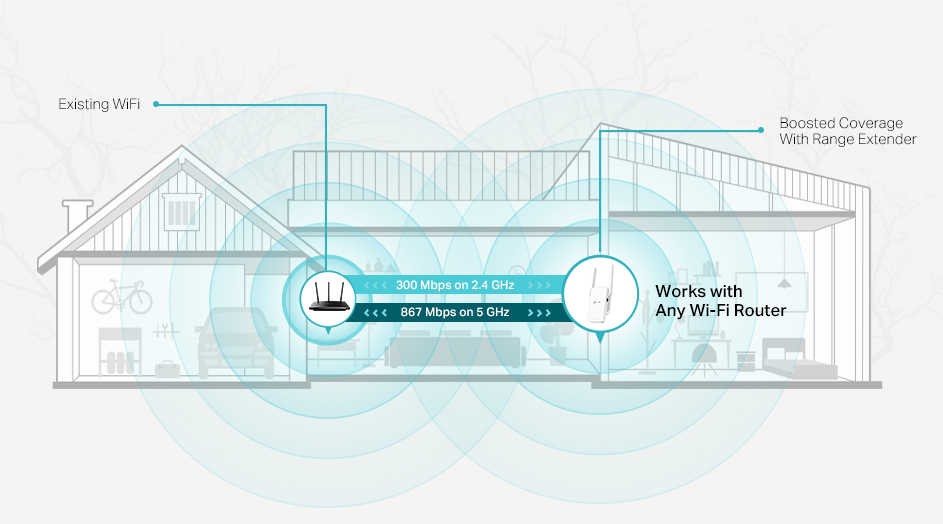
Credit: www.tp-link.com
Mesh Wifi Basics
Getting the most out of your mesh WiFi setup starts with understanding the basics. Mesh WiFi systems use multiple devices called nodes to create a seamless network across your home or office. Knowing what these nodes do and why they matter helps you position them for the best coverage and speed.
What Are Mesh Wifi Nodes
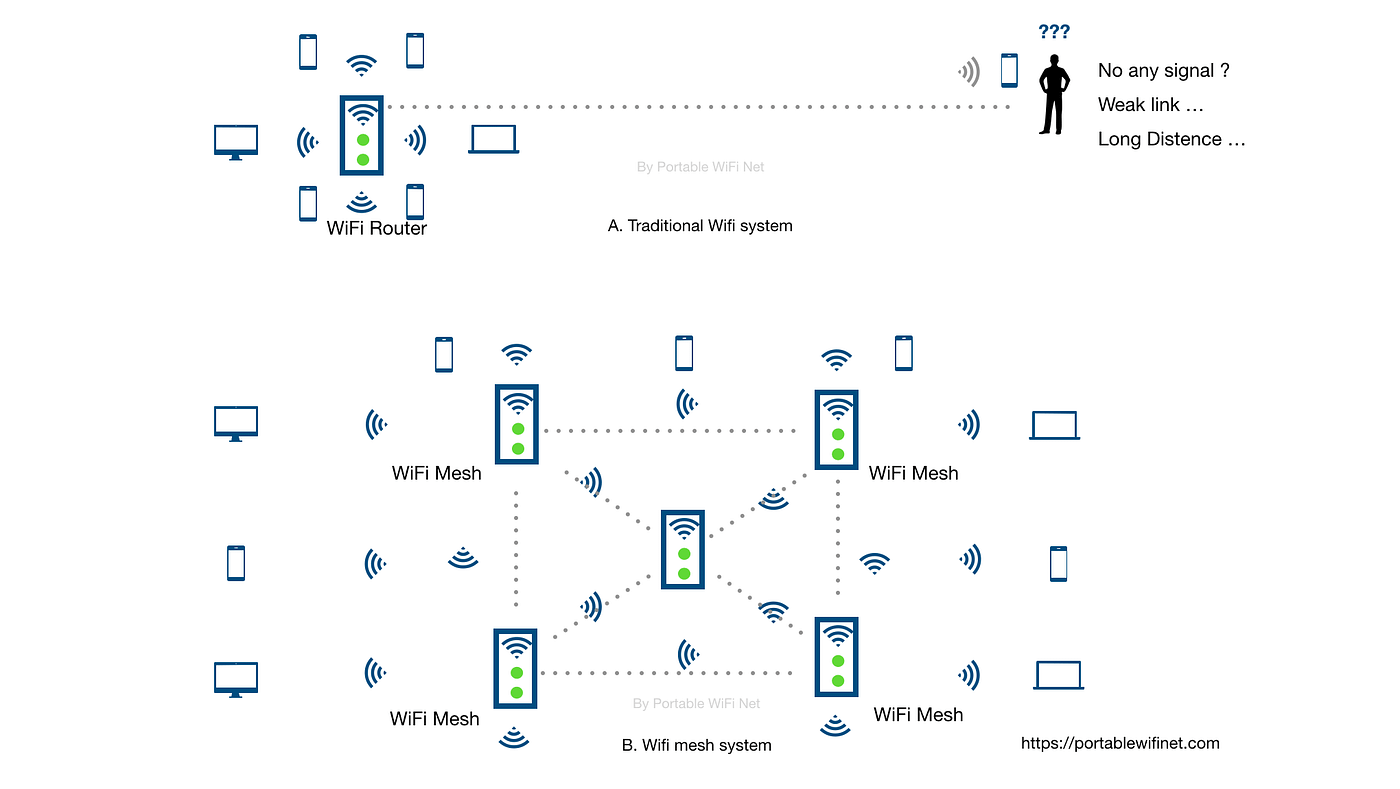
Mesh WiFi nodes are small devices that work together to extend your internet signal. Unlike a single router, these nodes communicate with each other to cover every corner of your space. Each node acts like a mini-router, spreading the WiFi signal further and filling in dead zones.
Think of nodes as team members passing the internet baton smoothly. When you move around, your device switches between nodes automatically without dropping the connection. This is why mesh WiFi feels more reliable than traditional setups.
Benefits Over Traditional Routers
Traditional routers send WiFi from one central point, which often leaves weak spots in larger or multi-level homes. Mesh WiFi nodes solve this by creating multiple access points. This means better coverage without the need for manual switching or additional cables.
- Consistent Speed:Mesh nodes balance the load, preventing slowdowns when many devices connect.
- Easy Expansion:You can add more nodes to cover new areas as needed.
- Simple Setup:Most mesh systems come with apps that guide you through node placement and management.
Have you noticed how your internet speed drops in certain rooms? Mesh WiFi can fix that by making your whole space feel like a single strong network. Wouldn’t it be great to stream, work, or game anywhere without interruptions?
Ideal Node Placement
Ideal node placement ensures strong, reliable WiFi throughout your home. Proper positioning reduces dead zones and boosts overall speed. Nodes should work together to cover every corner. Avoid placing nodes too far apart or too close to each other. Each node needs a clear path to communicate well.
Central Location Tips
Place each node near the center of the area it covers. This helps signals reach all rooms evenly. Avoid corners or edges of your home for main nodes. Rooms with many devices benefit from having a node nearby. Use open spaces like living rooms or hallways for better coverage.
- Keep nodes on high shelves or tables
- Allow space around nodes for better signal flow
- Keep nodes away from walls that block signals
Avoiding Signal Obstacles
Walls, furniture, and appliances can block WiFi signals. Metal, concrete, and mirrors are especially bad for signals. Avoid placing nodes near these obstacles. Large objects and thick walls reduce node communication. Keep nodes away from microwaves, cordless phones, and baby monitors to avoid interference.
- Keep nodes clear of heavy furniture like cabinets
- Place nodes away from thick walls or floors
- Avoid placing nodes behind large TVs or mirrors
Distance Between Nodes
Getting the distance between your mesh WiFi nodes right is crucial for a strong and reliable network. Place them too far apart, and your signal weakens, causing slow speeds and dropped connections. Set them too close, and you might face interference, which can also hurt performance.
Optimal Spacing Guidelines
Most mesh WiFi systems recommend placing nodes about 30 to 50 feet apart indoors. This range often balances maintaining a strong connection while covering enough area. However, walls, floors, and furniture can reduce this distance significantly.
If your home has thick walls or multiple floors, try to place nodes closer—around 20 to 30 feet apart. In open spaces, you might stretch that distance out to 50 feet or a bit more. Test your setup by walking around with a device to see where the signal drops.
Balancing Coverage And Speed
Think about what matters most to you: wide coverage or fast speeds. Nodes placed further apart increase coverage but can slow down data because the signal has to travel longer. Nodes closer together boost speed but might limit how much area you cover.
One practical tip is to position nodes where you use the internet most. For example, if your home office is far from the router, place a node nearby to keep speeds high there. You can then space out other nodes to cover less-used areas.
Have you tried adjusting node placement based on your daily routines? Small tweaks in distance can drastically improve your WiFi experience without buying extra equipment.
Using Multiple Nodes
Using multiple mesh WiFi nodes can enhance your home network. It spreads internet coverage across larger areas efficiently. Proper placement ensures a strong, consistent connection throughout your space. Let’s explore two crucial aspects of using multiple nodes effectively.
Expanding Coverage Area
Place the first node near your main internet source. This ensures a strong signal from the start. Each additional node should connect to the primary node. Spread them evenly to cover the desired area. Avoid placing nodes in isolated corners or behind thick walls. This can weaken the signal. Aim for an open space with fewer obstacles. This helps the signal travel smoothly.
Avoiding Overlapping Signals
Avoid placing nodes too close together. Overlapping signals can cause interference. This reduces the efficiency of your network. Ensure each node covers its unique area without excessive overlap. Test your network speed at various locations. Adjust node placement based on speed test results. This helps maintain optimal performance.
Node Height And Orientation
Node height and orientation affect the strength and coverage of your mesh WiFi network. Proper placement helps avoid dead zones and ensures smooth connections. Small changes in height or direction can improve signal spread significantly.
Elevating Nodes For Better Reach
Place mesh nodes higher off the ground to reduce obstacles. Walls, furniture, and people absorb signals at low levels. Higher placement allows signals to travel farther and cover more area.
Try placing nodes on shelves or mounting them on walls. Avoid floors, basements, or enclosed spaces. Even a few feet of elevation can improve coverage and reduce interference.
Adjusting Antenna Direction
Check the orientation of node antennas. Point them toward areas where you need strong coverage. Many nodes have adjustable antennas for fine-tuning signal direction.
Try different angles to find the best signal path. Avoid pointing antennas directly at walls or metal objects. Small adjustments can boost signal strength and network stability.
Interference And Signal Strength
Interference and signal strength play a key role in placing mesh WiFi nodes. Strong signals ensure smooth internet across your home. Interference can weaken the connection and slow down speeds. Understanding these factors helps position nodes for the best coverage.
Identifying Interference Sources
Many devices cause interference with WiFi signals. Microwaves, cordless phones, and baby monitors use similar frequencies. Walls, metal objects, and large furniture also block signals. Knowing these obstacles helps avoid placing nodes near them.
- Keep nodes away from kitchen appliances.
- Avoid placing nodes near thick walls or metal shelves.
- Place nodes in open areas for better signal flow.
Tools To Measure Signal Quality
Signal strength affects your internet speed and reliability. Use apps to measure WiFi signal quality around your home. These tools show signal strength and interference levels. Popular apps include WiFi Analyzer and NetSpot.
- Walk around with the app to test different spots.
- Look for areas with weak signals or high interference.
- Adjust node placement based on app results for best coverage.
Advanced Placement Strategies
Advanced placement strategies can make a big difference in how well your mesh WiFi system performs. Instead of just guessing where to put your nodes, use smart techniques to ensure every corner of your home gets strong, reliable coverage. These strategies help you avoid common pitfalls like signal interference or weak zones.
Using Floor Plans
Start by looking at your home’s floor plan, whether it’s a digital file or a simple sketch. Identify walls, thick floors, and large furniture that might block WiFi signals. Knowing where these obstacles are helps you choose spots that keep signals clear.
Mark potential node locations on the plan. Spaces near the center of open areas often work best, but don’t ignore spots near high-usage rooms like offices or living rooms. This visual approach prevents random placement and saves you time testing different spots.
Have you ever placed a node only to find it’s right behind a thick wall? Using a floor plan first can stop that from happening.
Leveraging Mesh System Apps
Many mesh WiFi systems come with apps designed to guide you in placing your nodes. These apps often include tools to run speed tests and signal strength checks at various locations. Use these features to get real-time feedback on where your nodes perform best.
Some apps also suggest ideal node placement based on your home’s layout and device usage. Follow these recommendations but don’t rely on them blindly—combine app data with your own observations. This helps you fine-tune node locations for the best overall coverage.
Think about the last time you guessed where to put a router. Wouldn’t it be easier if an app could tell you exactly where the signal is strongest? That’s exactly what these tools offer.

Credit: www.reddit.com
Maintenance And Optimization
Maintaining and optimizing your mesh WiFi nodes ensures steady, reliable internet throughout your home. Regular care keeps the network strong and adapts to changes in your space. Simple actions help improve coverage and speed over time.
Regular Firmware Updates
Firmware updates fix bugs and improve device performance. Check for updates often through the mesh system’s app or website. Installing the latest firmware keeps security tight and adds new features. It helps your nodes work smoothly with the latest devices.
Repositioning For Changing Needs
Rooms and furniture change, so your WiFi nodes may need moving. Test signal strength in different areas regularly. Move nodes closer to high-use spots or away from interference sources like microwaves. Small shifts can boost coverage and reduce dead zones. Keep the layout flexible to match your lifestyle.
Credit: medium.com
Frequently Asked Questions
How Far Should Mesh Wifi Nodes Be Placed Apart?
Place mesh WiFi nodes 30 to 50 feet apart for optimal coverage. Avoid placing them too far to prevent weak signals. Adjust distance based on home size and obstacles like walls or furniture.
Where Is The Best Location For Mesh Wifi Nodes?
Place mesh nodes in open, central locations away from walls and electronics. Higher positions improve signal reach. Avoid corners or basements to reduce interference and maximize WiFi performance.
Can Mesh Wifi Nodes Work Through Walls?
Yes, but signal strength weakens through walls. Thick or metal walls reduce WiFi speed and range. Use additional nodes near walls to maintain strong coverage throughout your home.
How Many Mesh Wifi Nodes Do I Need?
The number depends on home size and layout. Generally, 2-3 nodes cover 1500-3000 sq ft. Large or multi-story homes may require more nodes for seamless coverage.
Conclusion
Placing mesh WiFi nodes well improves your internet speed greatly. Keep nodes in open spaces, away from walls and metal objects. Make sure each node stays close enough to the others for a strong signal. Test your connection in different rooms to find the best spots.
Good placement means fewer dead zones and smoother browsing. Simple steps lead to a better WiFi experience at home or work. Try these tips today and enjoy a stronger, faster network.