Have you ever wondered if your travel router can block certain websites? Whether you’re trying to keep distractions away or protect your devices from harmful content while on the go, knowing what a travel router can do is key.
You might expect it to control your internet access, but can it really block websites like a full security system? You’ll discover the truth about travel routers and website blocking—so you can take control of your online experience wherever you are.
Keep reading to find out how to make your travel router work for you.
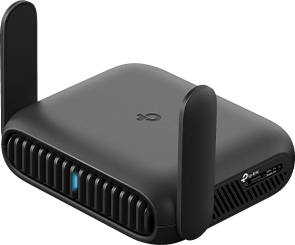
Credit: www.tp-link.com
How Travel Routers Work
Understanding how travel routers work can help you decide if they meet your needs, especially when it comes to controlling internet access like blocking websites. These compact devices create your own private network, giving you more control over your online environment wherever you go. Let’s dive into the basics of their functions and the types of connections they support.
Basic Functions
Travel routers primarily create a secure Wi-Fi hotspot from a wired or wireless internet source. They act as a middleman between your devices and the internet, allowing multiple devices to connect simultaneously.
Many models come with features like:
- Network encryptionto protect your data
- Guest networksto separate visitors from your main network
- Parental controlsthat may include website blocking capabilities
Have you ever wished to block distracting sites while traveling? Some travel routers let you set up filters and restrictions, but the exact options depend on the device’s firmware. Knowing this helps you pick a router that fits your control needs.
Connection Types
Travel routers support various input connections to suit different internet sources. You can connect via:
- Ethernet cable:Plug into hotel or airport wired internet for stable access.
- Wi-Fi:Connect to an existing wireless network and share it securely.
- SIM card slot (in some models):Use mobile data when no other network is available.
Each connection type has its own pros and cons. Ethernet offers speed and reliability, while Wi-Fi connections are more flexible but may have restrictions. SIM card travel routers give you freedom but depend on mobile coverage.
Have you checked what kind of internet you’ll have access to on your next trip? Knowing this can guide your choice of travel router and its blocking features.

Credit: www.youtube.com
Website Blocking Capabilities
Travel routers offer different options to control internet access. One key feature is their ability to block websites. This helps users avoid unwanted content or distractions while connected to public or shared networks.
Some travel routers come with built-in tools for website blocking. Others allow adding third-party software to increase control. These options vary in complexity and effectiveness.
Built-in Filtering Features
Many travel routers include basic filtering options. Users can block websites by entering domain names or keywords. This filtering works directly on the router, so all connected devices follow the rules.
Some models provide preset categories to block, such as adult content or social media. This saves time and effort in setting restrictions. The router then stops traffic to these sites automatically.
Settings for built-in filters are usually easy to access through the router’s dashboard. This makes it simple to add or remove blocked websites. The filtering works without extra software or devices.
Third-party Software Integration
Travel routers may support third-party software for advanced website blocking. These tools offer more options like scheduling, detailed reports, and stronger filtering rules.
Examples include parental control apps and network security suites. They connect with the router to monitor and control internet use. This setup can block websites by categories, keywords, or specific URLs.
Integrating third-party software requires some technical steps. Users must install the software and link it to the router’s network. This allows deeper control over web traffic and better customization.
Limitations Of Travel Routers
Travel routers are handy tools for managing your internet connection on the go. However, they come with certain limitations, especially when it comes to blocking websites. Understanding these drawbacks helps you decide if a travel router fits your needs or if you should look for alternative solutions.
Hardware Constraints
Travel routers are compact and designed for portability, which means their hardware is often less powerful than standard routers. This limited processing power can affect their ability to handle complex tasks like filtering or blocking websites efficiently.
Many travel routers have minimal memory and slower CPUs, so running advanced content-blocking features may slow down your network or even cause the router to crash. Have you ever noticed a lag when trying to load blocked sites? That could be due to hardware limits.
Additionally, some travel routers lack the necessary ports or interfaces to connect external devices that might help with enhanced blocking capabilities. This restricts your options if you want to extend your network’s security.
Firmware Restrictions
The firmware on travel routers is often stripped down to keep the device simple and user-friendly. This means fewer options for customization, including limited or no support for website-blocking features.
Many travel routers don’t allow you to install third-party firmware like OpenWRT or DD-WRT, which offer advanced controls for blocking sites. If your router’s firmware is locked, you’re stuck with whatever blocking tools the manufacturer provides, and these are usually basic or non-existent.
Even when blocking features are available, they might only support blocking by IP address or domain name, which can be bypassed easily with VPNs or proxy servers. Have you tried blocking a site only to find it accessible through a different URL? Firmware limits often cause this problem.
Alternatives For Website Blocking
Travel routers are great for creating secure connections while on the go, but they might not be the best at blocking specific websites. If you’re seeking alternatives to control internet access, you have other tools at your disposal. These options can provide you with more comprehensive and flexible solutions for managing web content.
Using Vpns
VPNs, or Virtual Private Networks, are a robust option for controlling internet access. They not only encrypt your data, keeping it safe from prying eyes, but also allow you to change your virtual location. This can be useful if you want to access content restricted in your current location or block certain websites by connecting to regions where they are unavailable.
Imagine being in a coffee shop in Paris and wanting to access content only available in the US. A VPN can make it seem like you’re browsing from New York, making those restrictions disappear. However, you can also use VPNs to block access to unwanted websites by choosing servers in countries where those sites are restricted.
Parental Control Apps
Parental control apps are another powerful tool for website blocking. These apps allow you to monitor and manage the content accessible on devices, making them ideal for families and educators. They provide options to block specific websites, set time limits, and even filter content based on age appropriateness.
Consider a scenario where your child has homework to complete but is easily distracted by social media. Parental control apps can help you block these distractions during study time, ensuring they focus on their tasks. This way, you maintain a balance between access and protection, tailored specifically to your needs.
By exploring these alternatives, you can enhance your internet experience, ensuring safety and control while traveling or at home. Which of these options would you consider trying first? Each offers unique benefits, so think about what aligns best with your goals and lifestyle.
Practical Use Cases
Travel routers offer more than just internet access on the go. They can control which websites users can visit. This feature helps manage online activity in different situations. Here are practical ways travel routers can block websites for specific needs.
Business Travel Scenarios
Business travelers often connect to public Wi-Fi networks. These networks can be unsafe or distracting. Travel routers can block social media and entertainment sites. This helps maintain focus and security during work hours.
Companies use travel routers to protect sensitive data. They block access to risky websites that may cause malware infections. This reduces the chance of cyber attacks while traveling.
- Block non-work-related sites to improve productivity
- Restrict access to potentially harmful websites
- Ensure secure browsing on public networks
Family And Parental Settings
Parents can use travel routers to manage children’s internet use. They can block adult content and unsafe websites. This keeps children safe while using hotel Wi-Fi or public hotspots.
Travel routers allow setting time limits for internet access. This helps balance screen time during vacations or trips. Families can enjoy safer, controlled online experiences anywhere.
- Filter inappropriate content for kids
- Set schedules for internet use
- Prevent access to distracting or dangerous sites
Security And Privacy Considerations
Security and privacy are key concerns when using travel routers, especially if you want to block certain websites. Understanding how these devices protect your data and the dangers of open networks can help you make smarter choices on the go. Let’s break down what you need to know to keep your information safe.
Data Protection
Travel routers can enhance your data protection by creating a private network that encrypts your internet traffic. This means your online activities are harder to intercept by outsiders. However, not all travel routers offer the same level of encryption, so it’s important to choose one that supports strong security protocols like WPA3.
Think about the last time you connected to a hotel Wi-Fi without a travel router. Your data was likely visible to anyone else on that network. Using a travel router adds a layer of defense, but you still need to keep your router’s firmware updated to protect against new vulnerabilities.
Risks Of Open Networks
Open networks are a magnet for hackers and can expose your devices to attacks. When you connect to an unsecured Wi-Fi, malicious users can easily monitor your traffic or even inject harmful content. Travel routers help by allowing you to avoid directly connecting to these risky networks.
Even with a travel router, you must be cautious. Some devices may not block dangerous websites automatically, leaving you exposed to phishing or malware sites. Would you trust your router to filter harmful content, or should you use additional security tools like VPNs and browser extensions?
- Always verify the security features of your travel router before use.
- Consider combining travel routers with VPN services for better privacy.
- Regularly check your router settings to block unwanted websites manually.

Credit: www.theverge.com
Frequently Asked Questions
Can Travel Routers Block Specific Websites?
Yes, many travel routers offer built-in features to block specific websites. Users can configure filters using the router’s admin panel. This helps restrict access to unwanted or harmful sites, enhancing security and control over internet usage while traveling.
How Do Travel Routers Filter Web Content?
Travel routers filter content by using URL blocking or DNS filtering. They check requested websites against a blocklist and deny access if matches occur. This technique helps manage safe browsing and limits distractions or inappropriate content on connected devices.
Are All Travel Routers Capable Of Website Blocking?
Not all travel routers support website blocking. Features vary by brand and model. Before purchasing, check if the router includes parental controls or URL filtering options. Advanced models typically offer better control over internet access.
Can Website Blocking On Travel Routers Improve Security?
Yes, blocking harmful sites on travel routers can enhance online safety. It prevents access to phishing or malware-infected sites. This reduces the risk of cyberattacks while using public or unfamiliar Wi-Fi networks during travel.
Conclusion
Travel routers mainly share internet connections but do not block websites. Website blocking usually depends on network settings or software, not the router itself. Some routers have built-in controls, but travel routers rarely include these features. Users must rely on other tools or services to control access.
Understanding the difference helps avoid confusion. Travel routers are best for better Wi-Fi access on the go. For blocking sites, consider parental controls or firewall settings on your device or network. Stay informed and choose tools that fit your needs.
Simple steps make online safety easier.