Are you wondering if your budget router can be upgraded with better antennas? You’re not alone.
Many people want to improve their Wi-Fi signal without spending a fortune on a new device. But do budget routers even have replaceable antennas? Understanding this can help you boost your internet speed and coverage without breaking the bank. Keep reading to find out what you need to know before making any changes to your router.
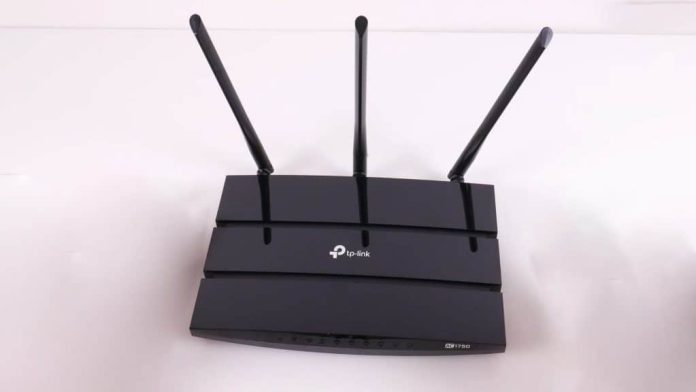
Credit: www.pcvarge.com
Budget Router Antenna Types
Budget routers come with different types of antennas. These antennas affect how well your Wi-Fi signal spreads around your home or office. Understanding the types helps you choose a router that fits your needs. Some budget routers have fixed antennas, while others allow antenna replacement or upgrades.
Internal Vs External Antennas
Internal antennas are built inside the router’s case. They keep the router neat and compact. These antennas usually cannot be replaced or upgraded. External antennas stick out from the router. They often offer better signal coverage. Many external antennas can be adjusted or swapped for stronger ones. Budget routers mostly have internal antennas, but some include small external ones.
Common Antenna Designs
- Dipole Antennas:Most common in budget routers. They provide a simple, omnidirectional signal.
- Patch Antennas:Usually internal. Focus the signal in one direction.
- Omnidirectional Antennas:Spread the signal evenly in all directions. Found in both internal and external types.
- High-Gain Antennas:Boost the signal strength. More common in mid-range or advanced routers.
Budget routers mostly use simple dipole or omnidirectional antennas. These designs keep costs low while offering decent coverage.
Replaceable Antennas In Budget Models
When shopping for a budget router, one common question is whether these affordable devices allow you to upgrade or replace their antennas. Replaceable antennas can significantly improve your Wi-Fi coverage and signal strength without buying a new router. But do budget models offer this feature? Let’s take a closer look.
Typical Features Of Budget Routers
Budget routers usually focus on offering essential functions without extra bells and whistles. You’ll often find:
- Fixed or built-in antennas that are not designed to be removed or replaced.
- Basic Wi-Fi standards like 802.11n or 802.11ac, which might limit performance improvements.
- Compact designs aimed at saving cost and space, often leading to internal antennas.
These design choices keep the price low but can restrict customization options like antenna replacement. However, some budget models still surprise users by including external antennas with standard connectors.
How To Identify Replaceable Antennas
Wondering if your budget router’s antennas can be swapped out? Here’s how to check:
- Look for visible connectors:External antennas usually screw onto the router with connectors like RP-SMA or SMA. If you see a joint where the antenna meets the router body, it’s often replaceable.
- Check the product manual or specs:Manufacturers sometimes mention if antennas are detachable or fixed. A quick glance at the documentation can save you time.
- Inspect the antenna shape and flexibility:Rigid, non-movable antennas are often internal or fixed, while flexible or swivel antennas are more likely to be replaceable.
Identifying replaceable antennas yourself can empower you to enhance your router’s reach. Have you ever boosted your home Wi-Fi simply by swapping out an antenna? It might be easier than you think.
Benefits Of Replaceable Antennas
Replaceable antennas offer several practical benefits that can make a big difference in your home or office Wi-Fi experience. They give you control over your network’s reach and strength without needing to buy a whole new router. This flexibility is especially useful if you want to enhance coverage or boost signal strength in specific areas.
Improved Signal Strength
Swap out weak antennas for stronger ones to boost your router’s signal. A better antenna can push your Wi-Fi signal further, reducing dead zones in your home. Imagine streaming a movie in your backyard without interruptions—that’s the kind of improvement a replaceable antenna can deliver.
Have you noticed your connection drops in certain rooms? Upgrading the antenna might be the simple fix you need instead of investing in expensive mesh systems.
Customizing Coverage
Replaceable antennas let you tailor your Wi-Fi coverage to match your space. You can choose antennas designed for long-range coverage or ones that focus on specific directions. This means you can direct the signal toward your office or a gaming setup for better performance.
This customization is especially handy if your budget router doesn’t naturally cover your entire space well. Instead of settling for weak spots, adjust your antennas to fit your unique layout and needs.

Credit: www.alibaba.com
Limitations And Challenges
Budget routers often lack replaceable antennas, limiting upgrade options. This can affect signal strength and range. Users may face challenges improving performance without hardware changes.
When considering budget routers, one common question arises. Can their antennas be replaced? While some routers offer this flexibility, there are notable limitations and challenges. Understanding these can help in making an informed decision.Compatibility Issues
Budget routers often face compatibility issues with replacement antennas. Not all antennas fit every model, leading to connectivity problems. This can affect the router’s performance, causing frustration. Users may struggle to find antennas that match their specific router. This lack of compatibility can limit their options.Quality Concerns
Quality of replacement antennas varies significantly. Budget options might not meet user expectations. Poor quality antennas can weaken signal strength, reducing internet speed. This impacts online activities like streaming or gaming. Reliable antennas often come at a higher cost. Users may need to balance affordability and performance.Expert Tips For Upgrading Antennas
Upgrading your router’s antenna can improve your Wi-Fi signal and coverage. Small changes make a big difference in performance. Understanding the right antenna type and proper installation helps maximize your router’s potential.
Selecting The Right Antenna
Choose antennas compatible with your router’s frequency bands. Most budget routers use 2.4 GHz or dual-band antennas. Look for antennas with a higher gain to boost signal strength. Directional antennas focus the signal in one direction, while omnidirectional antennas spread it evenly. Consider your home layout to pick the best type.
- Check connector type (SMA or RP-SMA) before buying.
- Higher gain antennas extend range but narrow coverage angle.
- Omnidirectional antennas work well for open spaces.
- Directional antennas fit better for long-distance or focused coverage.
Installation Best Practices
Proper antenna installation improves signal quality and router performance. Turn off the router before starting the upgrade. Carefully unscrew the old antenna without damaging the connector. Attach the new antenna firmly to ensure a good connection.
- Position antennas vertically for best all-around coverage.
- Keep antennas away from metal objects and thick walls.
- Adjust antenna angles to reduce dead spots in your home.
- Test signal strength after installation to confirm improvement.
Alternative Ways To Boost Router Performance
Boosting your router’s performance does not always require expensive upgrades or hardware changes. Many budget routers do not have replaceable antennas, but several other strategies can help improve their signal strength and speed. These simple adjustments can enhance your internet experience without extra cost.
Firmware Updates
Keeping your router’s firmware up to date is essential. Manufacturers often release updates to fix bugs and improve performance. Updated firmware can enhance security and optimize network stability. Check your router’s settings regularly for available updates. Installing the latest firmware can lead to faster speeds and fewer connection drops.
Positioning And Environment
Where you place your router affects its signal quality. Position the router in a central spot of your home. Avoid placing it near thick walls or metal objects that block signals. Keep the router elevated, like on a shelf or table. Reduce interference by moving other electronics away from the router. Small changes in positioning can greatly boost your Wi-Fi coverage.
Credit: www.bestbuy.com
Frequently Asked Questions
Do Budget Routers Usually Have Replaceable Antennas?
Most budget routers come with fixed antennas. Replaceable antennas are rare in entry-level models. Higher-end routers often offer replaceable antennas for better customization and range.
Can I Upgrade My Budget Router’s Antenna?
Upgrading a budget router’s antenna is usually not possible. Fixed antennas are soldered or integrated. For better performance, consider buying a router with detachable antennas.
Why Do Some Routers Have Non-removable Antennas?
Non-removable antennas reduce manufacturing costs and simplify design. They also prevent user damage or incorrect installation. This is common in budget routers to keep prices low.
Does Replacing Router Antennas Improve Wi-fi Range?
Replacing antennas can improve Wi-Fi range if the router supports detachable antennas. High-gain antennas boost signal strength and coverage. However, fixed antennas cannot be upgraded.
Conclusion
Budget routers sometimes have replaceable antennas, but not always. Many models come with fixed antennas to save cost. Replaceable antennas can improve signal strength and range. Check the product details before buying to be sure. Swapping antennas is easy and can boost your Wi-Fi.
Still, basic routers often lack this feature. Think about your needs and budget carefully. A router with replaceable antennas may offer better flexibility. Choose wisely for a stronger and more reliable connection.