Are you tired of juggling multiple devices and cables when you travel? Imagine having a small gadget that not only boosts your internet connection but also stores your important files on the go.
That’s where travel routers come in. But here’s the question: do travel routers have SD card slots? If you’ve ever wondered whether you can easily share photos, videos, or documents directly through your travel router, this article will clear things up for you.
Keep reading to discover how this feature can simplify your travel experience and why it might just be the game-changer you didn’t know you needed.
Travel Routers And Sd Card Slots
Travel routers have become a handy gadget for anyone on the move, offering reliable internet access wherever you go. But you might wonder if these compact devices come with SD card slots and what that means for your travel setup. Understanding the relationship between travel routers and SD card slots can help you decide if this feature fits your needs.
What Travel Routers Are
Travel routers are small, portable devices designed to share a single internet connection with multiple devices. They create a private Wi-Fi network from wired or wireless sources, perfect for hotels, airports, or even camping sites.
These routers often focus on convenience and security. They let you connect laptops, phones, and tablets without worrying about public Wi-Fi risks. Some models also offer extra features like VPN support or USB ports for storage.
Purpose Of Sd Card Slots
Some travel routers include SD card slots, but not all. When present, these slots allow you to add external storage to the router, making it a mini file server on the go.
This means you can share photos, videos, or documents with everyone connected to your network without needing internet access. Imagine traveling with friends and easily streaming a movie stored on your SD card to multiple devices.
Have you ever struggled to share large files when traveling? An SD card slot on your travel router can solve that by turning your device into a portable media hub.
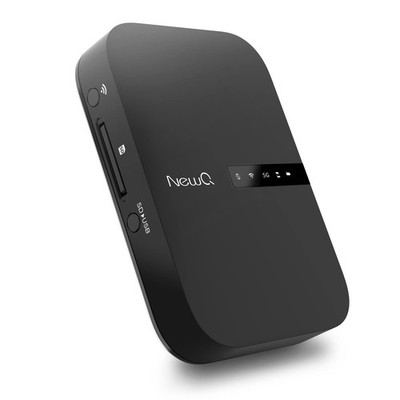
Credit: www.ebay.ca
Types Of Travel Routers With Sd Card Slots
Travel routers with SD card slots offer a unique blend of connectivity and storage options. These devices not only create a wireless network on the go but also let you share files directly from an SD card. This feature is especially useful for travelers who want to access photos, documents, or media without needing a laptop or cloud service.
There are several types of travel routers that come equipped with SD card slots. Some focus on compact design, while others provide advanced features for power users. Knowing which model suits your travel habits can help you make the most of this handy functionality.
Popular Models Featuring Slots
- TP-Link TL-WR902AC:A compact and affordable option, this router supports micro SD cards and lets you share files with multiple devices.
- GL.iNet GL-AR750S Slate:Known for its versatility, it features an SD card slot and supports VPNs, ideal for secure travel.
- RAVPower FileHub:This model doubles as a power bank and travel router, with an SD card slot for easy media sharing on the go.
- HooToo TripMate Titan:A popular choice for photographers, it offers robust SD card support and can stream media directly to your devices.
Features Enabled By Sd Card Slots
SD card slots on travel routers allow you to create a personal cloud without internet access. Imagine having all your travel photos accessible to your tablet or smartphone instantly.
They also enable easy file sharing between devices, which can be a lifesaver during group trips or business travel. Plus, some routers support media streaming apps that turn your SD card into a mini media server.
Have you ever been frustrated by slow hotel Wi-Fi while trying to access files? With an SD card slot on your travel router, you can bypass that issue entirely by connecting directly to your stored content.
Benefits Of Sd Card Slots In Travel Routers
Travel routers with SD card slots offer more than just internet connectivity. They provide versatile ways to manage and access your files while on the move. Adding an SD card slot means you can carry your data, media, and backups with you without needing extra devices.
File Sharing On The Go
With an SD card slot, your travel router becomes a portable file server. You can easily share documents, photos, and videos with multiple devices connected to the router’s network. This is especially handy during group trips or business meetings where quick file access is essential.
Imagine being able to hand off a presentation to a colleague instantly without emailing or using cloud services. It saves time and avoids the hassle of unstable internet connections.
Media Streaming Capabilities
Storing movies, music, or podcasts on an SD card plugged into your travel router allows you to stream media directly to your devices. This means no need to rely on streaming apps or mobile data, which can be costly or unavailable abroad.
Think about long flights or road trips where internet access is limited. Having your favorite entertainment ready to stream from the router can make these journeys more enjoyable and less stressful.
Backup And Storage Options
Travel routers with SD card slots offer a practical backup solution for your important files. You can quickly save photos from your camera, documents, or other data to the SD card without carrying a separate external drive.
This setup also protects your data if your devices run out of space or get lost. Wouldn’t it be reassuring to have an automatic backup right in your travel router?
How To Use Sd Card Slots In Travel Routers
Using SD card slots in travel routers adds great value. It lets you share files easily without extra devices. You can store photos, videos, and documents on the SD card. Then, access these files from any device connected to the router’s network. This feature is handy for travelers who want quick access to important data on the go.
Setting Up The Sd Card
First, insert a compatible SD card into the router’s slot. Make sure the card is formatted correctly, usually FAT32 or exFAT. Check the router’s manual for the supported formats. Next, log in to the router’s admin panel through a web browser. Find the storage or USB settings section. Enable the SD card sharing feature. Assign a network name or folder for easy access. Save the settings and restart the router if needed.
Accessing Files Remotely
Connect your device to the travel router’s Wi-Fi network. Open the file manager or browser on your device. Enter the router’s IP address or network path to access the SD card. You can view, download, or upload files depending on permissions. Some routers offer mobile apps for smoother file management. This setup works without internet, ideal for remote places. Always remember to disconnect safely to avoid data loss.
Security Considerations
Protect your data by setting strong passwords on the router. Limit access to trusted devices only. Disable file sharing when not in use. Keep the router’s firmware updated to fix security flaws. Avoid storing sensitive information on the SD card. Use encryption if your router supports it. Regularly back up important files to another device. These steps help keep your files safe during travel.
Limitations And Alternatives
Travel routers offer convenience but have certain limits, especially about storage options. Not all models come with SD card slots. This can restrict how you share or save files on the go. Understanding these limits helps in choosing the right device.
There are other ways to expand storage and share files through travel routers. Exploring alternatives can enhance your travel experience without extra hassle.
Common Restrictions
- Many travel routers lack built-in SD card slots.
- Limited support for external storage devices in some models.
- File sharing speeds may be slower without direct SD card access.
- Compatibility issues with various SD card types and sizes.
- Some routers only support USB storage, not SD cards.
Other Storage Options For Travel Routers
- USB flash drives often work as external storage.
- Network-attached storage (NAS) devices connect for larger capacity.
- Cloud storage services sync files remotely through the router.
- Using a smartphone or tablet as a media server via Wi-Fi.
- Some routers allow connecting external hard drives via USB ports.

Credit: www.ebay.ca
Choosing The Right Travel Router
Many travel routers include SD card slots for easy file sharing and extra storage. This feature helps access media or documents on the go without internet. Choose a router with an SD card slot if you need portable data access during travel.
Choosing the right travel router can significantly enhance your connectivity experience when you’re on the move. Whether you’re a digital nomad, a frequent business traveler, or someone who simply wants reliable internet access during vacations, selecting a router that suits your specific needs is essential. A travel router with an SD card slot offers added convenience and functionality, but is it the right choice for you?Evaluating Your Needs
Understanding what you need from a travel router is the first step. Consider how you plan to use it—do you require just basic internet access, or do you need to share media files quickly? If you often find yourself in situations where you need to share documents, photos, or videos, a router with an SD card slot might be beneficial. Think about the environments you’ll be using the router in. If you’re frequently in remote locations, a router with robust connectivity options can be crucial. Moreover, assess the number of devices you’ll connect simultaneously; some routers handle multiple connections better than others.Comparing Models With And Without Sd Slots
The market offers a range of travel routers, some with SD card slots and others without. Models with SD slots provide the added advantage of media sharing directly from the card. This can be particularly useful for photographers who need to back up images on the go. On the other hand, routers without SD slots might offer other features, such as longer battery life or a more compact design. For someone who values portability over additional storage, these might be preferable. To make the right choice, create a comparison table listing the features you prioritize, such as:| Feature | Model A (with SD slot) | Model B (without SD slot) |
|---|---|---|
| Media Sharing | Yes | No |
| Battery Life | 6 hours | 10 hours |
| Size | Compact | Ultra Compact |

Credit: www.amazon.ca
Frequently Asked Questions
Do All Travel Routers Have Sd Card Slots?
No, not all travel routers include SD card slots. Some models offer this feature for file sharing and storage. Always check the product specifications before purchasing to ensure it meets your needs for SD card support.
What Are The Benefits Of Sd Card Slots In Travel Routers?
SD card slots allow easy file sharing across connected devices. They enable portable media storage and quick access to documents. This feature enhances convenience during travel by eliminating the need for additional storage devices.
Can Travel Routers Without Sd Card Slots Share Files?
Yes, travel routers without SD card slots can share files using USB drives or cloud storage. However, they lack direct SD card support, which may limit storage options and ease of access for some users.
How To Choose A Travel Router With An Sd Card Slot?
Look for routers that specifically mention SD card support in their specs. Consider compatibility with your SD card type and storage capacity. Also, read user reviews to confirm reliable performance and ease of use.
Conclusion
Travel routers sometimes include SD card slots for extra storage. This feature helps share files easily while traveling. Not all models offer this, so check before buying. An SD card slot adds value but is not always necessary. Choose a travel router that fits your specific needs and budget.
Stay connected and carry your files with ease. Travel routers can make your trips smoother and more convenient.