Are you frustrated with slow WiFi or dead zones in your home? You might be wondering if a mesh WiFi system can work with your modem router combo.
The good news is, it often can—but there are a few important things you need to know first. Understanding how these devices interact can save you time, money, and a lot of headaches. Keep reading, and you’ll discover exactly how to get the best wireless coverage without switching out all your equipment.
Your internet experience is about to get a major upgrade!
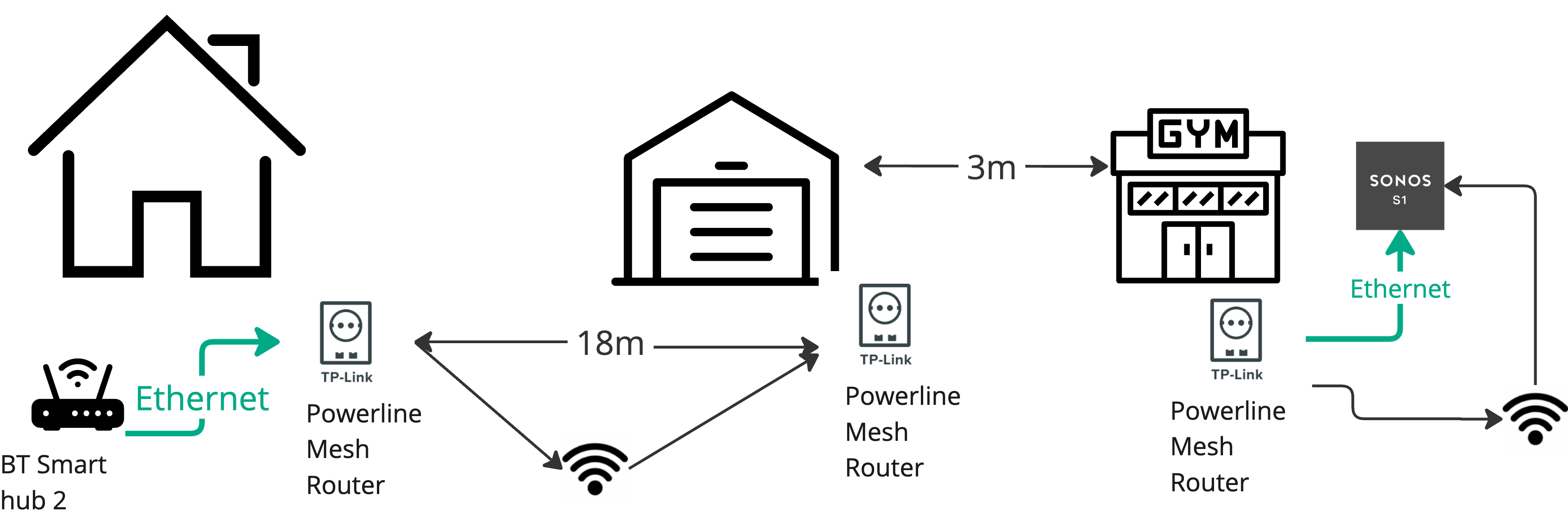
Credit: en.community.sonos.com
How Mesh Wifi Works
Understanding how mesh WiFi works can help you decide if it fits well with your modem router combo setup. Mesh WiFi systems are designed to create a seamless and strong internet connection throughout your home by using multiple devices that communicate with each other. This approach differs from traditional routers, offering better coverage and more reliable connections.
Key Components
A mesh WiFi system typically consists of a main router and several satellite nodes placed around your home. The main router connects directly to your modem or modem router combo, while the satellites extend the network’s reach. These nodes work together to form a single, unified network that your devices can connect to automatically.
Each node has its own radio and antenna, allowing them to talk to each other and your devices. This setup helps avoid dead zones by spreading the signal more evenly. Have you ever noticed how some corners of your home have weak WiFi? Mesh nodes solve that problem by filling those gaps.
Signal Coverage
Mesh WiFi systems excel at providing wider and more consistent signal coverage than a single router. Instead of relying on one central point, mesh nodes distribute the signal across multiple locations. This means your connection remains strong even as you move from room to room.
Because each node communicates with others, the system dynamically chooses the best path for your data. This flexibility reduces interference and maintains speed. Imagine streaming a movie in the basement without buffering—that’s the kind of coverage mesh WiFi offers.
Device Connectivity
Mesh WiFi handles multiple devices seamlessly by managing connections intelligently. When your phone or laptop moves through your home, the system automatically switches it to the nearest node with the strongest signal. You don’t need to manually connect to different networks.
This smart handoff keeps your experience smooth, whether you’re video calling, gaming, or browsing. It also balances the load among nodes, preventing any single device from slowing down the network. How many devices do you have connected right now? A mesh system can handle them without breaking a sweat.

Credit: www.reddit.com
Modem Router Combo Basics
Understanding the basics of a modem router combo is key before deciding if mesh WiFi can work with your setup. These devices combine two essential functions into one box, simplifying your home network. Let’s break down what they do, what features they offer, and their pros and cons.
Functionality
A modem router combo acts as both the gateway to your internet service provider and the wireless access point for your devices.
It receives the internet signal via cable or DSL and then shares it wirelessly or through Ethernet ports inside your home.
This dual role saves space and reduces the number of devices you need to manage.
Common Features
- Integrated Modem:Connects directly to your ISP’s network.
- Wireless Router:Creates a WiFi network for your devices.
- Ethernet Ports:Allow wired connections for stable performance.
- Basic Security:Firewalls and WPA2 encryption to protect your network.
- Simple Setup:Often includes user-friendly interfaces for quick installation.
Some models also offer parental controls and guest networks, but features vary widely.
Advantages And Limitations
Using a modem router combo keeps your setup neat and reduces cable clutter. It’s ideal if you want a straightforward, all-in-one solution without extra devices.
However, limitations arise when you try to expand your network. Combo units may not handle advanced network setups or mesh WiFi systems as smoothly as separate devices.
Have you experienced slow WiFi in certain rooms despite having a modem router combo? This limitation often pushes users to consider mesh networks for better coverage.
Compatibility Factors
Understanding compatibility factors is crucial when pairing a mesh WiFi system with a modem router combo. Some modem routers might not work well with mesh networks due to differences in design and settings. This section covers key points that affect compatibility and helps ensure a smooth setup.
Connection Types
The type of connection between the mesh system and modem router combo matters a lot. Most mesh systems connect via Ethernet cables to the modem router. The modem router must have available LAN ports for this. Some setups use a bridge mode or access point mode to reduce conflicts. Knowing the connection type helps avoid network issues.
Network Settings
Network settings on the modem router can affect the mesh system’s performance. Settings like DHCP, IP address range, and NAT should be compatible. The modem router might need to disable its WiFi to let the mesh system handle wireless connections. Setting the modem router to bridge mode often helps by turning off its routing functions.
Firmware Considerations
Firmware plays a key role in compatibility. Both the modem router and mesh system should have the latest firmware updates. Updated firmware fixes bugs and improves device communication. Some modem routers have limited support for mesh systems in older firmware versions. Regular updates keep the network stable and secure.
Setup Methods
Setting up a mesh WiFi system with a modem router combo requires careful planning. Different setup methods affect network performance and ease of use. Choose the right method to ensure smooth internet coverage throughout your home.
Bridge Mode Configuration
Bridge mode disables the routing features of your modem router combo. It turns the device into a simple modem. This allows the mesh system to handle all routing tasks. Bridge mode helps avoid conflicts between devices. The mesh system manages IP addresses and network traffic.
To enable bridge mode, access your modem router’s settings. Look for the bridge mode option and activate it. Connect your mesh router’s main node to the modem router. This setup creates a seamless WiFi network with better control.
Access Point Mode Setup
Access point mode lets your modem router keep routing duties. The mesh system works as an extension of the existing network. This method is easier to set up. It avoids changing modem router settings.
Connect the mesh router’s main node to the modem router using an Ethernet cable. Set the mesh system to access point mode in its settings. This setup extends WiFi coverage without double network layers.
Using Double Nat
Double NAT occurs when both the modem router and mesh system perform routing. This can cause issues with online games, VPNs, or port forwarding. Still, it works without changing modem settings.
Connect the mesh router to the modem router normally. Keep both devices in their default routing modes. Use this setup if you cannot access modem router settings. Be aware of possible network conflicts and slower speeds.
Troubleshooting Tips
Troubleshooting mesh WiFi with a modem router combo can fix many connection problems. Understanding common issues and how to optimize your network improves performance. Keeping firmware up to date also helps maintain a smooth experience. Follow these tips to ensure your mesh system works well with your modem router combo.
Common Issues
- Mesh nodes not connecting to the main router.
- Slow internet speeds despite a strong signal.
- Frequent disconnections or dropped WiFi.
- Interference from other wireless devices.
- Incorrect router settings causing conflicts.
Performance Optimization
- Place mesh nodes in open areas for better coverage.
- Avoid physical obstructions like walls and large furniture.
- Use the same WiFi band on all devices for consistency.
- Reduce the number of connected devices to prevent overload.
- Restart your modem router combo and mesh nodes regularly.
Firmware Updates
- Check the manufacturer’s website for the latest firmware.
- Update both modem router combo and mesh nodes simultaneously.
- Firmware updates fix bugs and improve compatibility.
- Set automatic updates if available for convenience.
- Backup your settings before performing updates.
Benefits Of Combining Mesh And Modem Router
Combining a mesh Wi-Fi system with a modem router combo brings several benefits. This setup enhances internet connectivity in your home or office. Let’s explore some key advantages.
Improved Coverage
A mesh Wi-Fi system covers larger areas effectively. It eliminates dead zones and ensures a stable connection. Each mesh node acts like a separate router. This extends the Wi-Fi signal throughout your space. Everyone enjoys a strong connection no matter where they are.
Simplified Network Management
Managing your network becomes easier with this combination. You can control the entire system through a single app. Monitor usage, set up guest networks, and manage connected devices with ease. It simplifies tasks for users who aren’t tech-savvy.
Cost Efficiency
Using a modem router combo with mesh Wi-Fi can save money. You avoid buying separate devices for each function. This setup reduces the need for additional equipment. Maintenance costs drop too, as fewer devices need servicing.
When To Choose Separate Devices
Choosing separate devices for your modem and router instead of relying on a modem router combo can make a big difference, especially if your network needs go beyond basic internet use. Separate devices give you more control, better performance options, and room to grow as your digital life expands. Understanding when to pick separate devices can help you avoid frustration and get the most out of your home network.
Advanced Features
Separate devices often come with advanced features that are missing from modem router combos. For instance, high-end routers offer better Quality of Service (QoS) settings, VPN support, and more detailed parental controls. If you want to prioritize gaming traffic or set up guest networks easily, a dedicated router will give you those options.
Modem router combos tend to focus on convenience, not deep customization. If you find yourself wanting to tweak your network settings frequently or need features like multi-band support and advanced security protocols, separate devices are the way to go.
Customization Needs
Are you someone who enjoys customizing your network setup? Separate devices allow you to choose the best modem for your ISP and pair it with a router that fits your exact needs. This flexibility means you can upgrade one device without replacing the other.
For example, if you switch internet providers, your modem might need to change, but your router can stay the same. This keeps your network stable while saving you money and effort. Customization also means you can optimize your router’s placement without worrying about the modem’s location.
Scalability
Planning to expand your network in the future? Separate devices make scaling easier. You can add mesh WiFi nodes or upgrade to a more powerful router without changing your modem.
This flexibility is key if your home grows or if you add smart home devices that demand more bandwidth. With a modem router combo, you might face limits on adding extra hardware or achieving better speeds.
Think about how your internet use might change in the next few years. Will your network need to support more devices or cover a larger area? If yes, separate devices give you the freedom to grow without a complete overhaul.

Credit: www.reddit.com
Frequently Asked Questions
Can Mesh Wifi Replace A Modem Router Combo?
Yes, mesh WiFi can replace your modem router combo. However, you need a separate modem to connect to your ISP. Mesh systems focus on improving WiFi coverage, not modem functionality. You can use mesh with a modem router combo by disabling its WiFi.
How Does Mesh Wifi Work With Modem Router Combo?
Mesh WiFi works by connecting to the modem router combo’s LAN port. It creates a seamless WiFi network across your home. The combo device acts as a modem, while mesh nodes handle WiFi distribution. This setup improves speed and coverage without changing your internet plan.
Do I Need To Disable Wifi On Modem Router Combo?
Yes, disabling WiFi on your modem router combo is recommended. This prevents interference between the combo’s WiFi and the mesh network. It ensures the mesh system manages all wireless traffic for better performance. Disabling WiFi simplifies your network and reduces signal conflicts.
Will Mesh Wifi Improve Speed With Modem Router Combo?
Mesh WiFi can improve speed by reducing dead zones and boosting signal strength. However, your internet speed also depends on your ISP plan and modem quality. Mesh optimizes WiFi distribution but cannot increase the base internet speed provided by your modem router combo.
Conclusion
Mesh WiFi can work well with a modem router combo. It helps spread WiFi signals evenly in your home. You just need to set it up correctly. Make sure your modem router supports bridge mode or access point mode. This stops network conflicts and keeps your internet fast.
Mesh systems give you better coverage and fewer dead zones. They make WiFi simple and strong, even with one device doing two jobs. Try it to enjoy smoother internet in every corner of your house.