Are you tired of lag ruining your gaming sessions? Choosing the right router can make all the difference.
A dual band router promises faster speeds and less interference, but is it really good for gaming? If you want smooth gameplay and a strong connection, understanding how a dual band router works is key. Keep reading to find out if this router is the game-changer your setup needs.

Credit: www.ign.com
Dual Band Router Basics
Understanding the basics of a dual band router is essential if you want to boost your gaming experience. These routers offer two different frequency bands, which can impact speed, range, and connection stability. Knowing how these bands work helps you make better decisions for your gaming setup.
What Is A Dual Band Router
A dual band router broadcasts two separate wireless signals at the same time: one on the 2.4 GHz band and one on the 5 GHz band. This means you can connect devices to either frequency depending on your needs.
This setup helps reduce interference and congestion, especially if many devices are connected at once. For gaming, it allows you to prioritize your connection on the less crowded band for smoother gameplay.
2.4 Ghz Vs 5 Ghz Bands
The 2.4 GHz band covers a wider area and penetrates walls better, but it is slower and more prone to interference from household devices like microwaves and cordless phones.
The 5 GHz band offers faster speeds and less interference but has a shorter range and weaker ability to pass through solid objects.
Think about your gaming space: If your console or PC is close to the router, using the 5 GHz band will likely give you faster and more stable connections. But if you game in a different room or far from the router, the 2.4 GHz band might keep you connected more reliably.

Credit: www.newegg.ca
Gaming Needs And Network
Gaming demands more from your network than casual browsing or streaming. Understanding what your gaming setup requires can help you decide if a dual band router fits your needs. Your network’s speed, latency, and connection stability directly influence your gameplay experience.
Speed Requirements For Gaming
Speed plays a crucial role in gaming, especially for fast-paced online titles. Most multiplayer games recommend at least 3 Mbps for download and 1 Mbps for upload speeds.
However, if you stream your gameplay or download large updates, you’ll need much higher speeds. Dual band routers offer both 2.4 GHz and 5 GHz bands, which can help manage these demands efficiently.
Are you using the right band to get the best speeds for your gaming device?
Impact Of Latency And Lag
Latency, or ping, measures the delay between your command and the game server’s response. High latency results in lag, which ruins the gaming experience.
The 5 GHz band on a dual band router usually provides lower latency due to less interference. This can make a noticeable difference in competitive gaming where every millisecond counts.
Have you checked your ping on both bands to identify which one gives you smoother gameplay?
Stable Connections For Multiplayer
Multiplayer gaming thrives on a stable connection. Sudden drops or fluctuations can cause disconnections or rubberbanding in-game.
Dual band routers can separate gaming traffic from other household devices by assigning your console or PC to the 5 GHz band and less critical devices to 2.4 GHz.
- This separation reduces congestion and keeps your gaming connection steady.
- It also helps when multiple players or devices are online simultaneously.
Could dedicating a band exclusively to your gaming devices reduce interruptions in your sessions?
Benefits Of Dual Band For Gaming
Dual band routers offer clear benefits for gaming. They provide more stable connections and can handle more devices at once. This means less lag and smoother gameplay. The two separate frequency bands help keep your gaming traffic fast and reliable.
Reduced Interference And Congestion
Dual band routers operate on both 2.4 GHz and 5 GHz bands. The 2.4 GHz band often faces interference from many devices like microwaves and Bluetooth gadgets. The 5 GHz band is less crowded, reducing interference. This leads to a cleaner connection with fewer interruptions during gaming.
Better Device Management
With dual band routers, you can assign devices to different bands. Gaming consoles and PCs can use the faster 5 GHz band. Other devices like phones and smart home gadgets can connect on 2.4 GHz. This separation prevents network congestion and keeps gaming devices running smoothly.
Improved Speed On 5 Ghz Band
The 5 GHz band supports higher speeds than 2.4 GHz. It is ideal for games that need quick data transfers. Faster speeds reduce lag and help maintain steady connections. This band also supports modern Wi-Fi standards, enhancing overall gaming performance.
Potential Drawbacks To Consider
Dual band routers offer impressive speed and performance for gamers. Yet, they are not without drawbacks. Before investing in one, it’s crucial to understand potential issues. These can impact your gaming experience.
Range Limitations On 5 Ghz
The 5 GHz band provides faster speeds but has a shorter range. It struggles with penetrating walls and obstacles. This limitation can affect signal strength in larger homes. Gamers may experience connectivity drops in distant rooms.
Compatibility Issues
Not all devices support dual-band technology. Older gaming consoles or devices might only work on the 2.4 GHz band. This can lead to slower speeds and less reliable connections. It’s essential to check device compatibility before purchasing a dual band router.
Setup And Optimization Challenges
Setting up a dual band router can be complex. Users may need to manually assign devices to the appropriate band. This process requires some technical knowledge. Without proper optimization, you may not experience the router’s full potential.
Comparing Dual Band With Other Routers
Choosing the right router can make a big difference in your gaming experience. Dual band routers are popular, but how do they stack up against other types? Understanding the strengths and weaknesses of single band, tri-band, and newer technologies helps you decide what fits your gaming setup best.
Single Band Routers
Single band routers operate on the 2.4 GHz frequency only. This frequency offers decent range but often faces interference from household devices like microwaves and cordless phones. If you live in a busy area with many Wi-Fi networks, this can cause lag and slower speeds during intense gaming sessions.
For casual gaming or smaller spaces, a single band router might do the job. However, if you want stable and faster connections, especially for multiplayer games, it may fall short. Have you noticed your game lagging when others stream video on your network? That’s a common sign you need more than a single band.
Tri-band Routers
Tri-band routers add an extra 5 GHz band to the mix, offering two separate 5 GHz frequencies along with the 2.4 GHz band. This means more devices can connect without crowding a single band, which reduces interference and improves overall speed. For heavy gamers with multiple devices, tri-band routers can handle higher traffic smoothly.
But tri-band routers often cost more and might be overkill if you don’t have many devices or don’t run bandwidth-heavy applications simultaneously. If you stream, game, and work online all at once, investing in tri-band can be worth it. Would you benefit from splitting your devices across multiple bands to avoid slowdowns?
Wi-fi 6 And Future Technologies
Wi-Fi 6 routers support both dual and tri-band setups but introduce smarter ways to manage connections. They reduce latency and improve speed by handling multiple devices more efficiently. This is a game-changer for gamers who face lag spikes when others are online.
Looking ahead, Wi-Fi 6E and Wi-Fi 7 are pushing the envelope further with faster speeds and lower latency. If you want your gaming setup to stay relevant for years, choosing a router with Wi-Fi 6 or newer tech is a smart move. Are you ready to upgrade your router to keep up with the demands of modern online gaming?
Tips For Optimizing Gaming Performance
Optimizing gaming performance on a dual band router requires careful attention to several factors. Small changes can reduce lag and improve connection stability. Focus on settings that enhance speed and lower interference.
Choosing The Right Band
Dual band routers offer 2.4 GHz and 5 GHz bands. Use 5 GHz for faster speeds and less interference. This band suits gaming in the same room as the router. The 2.4 GHz band covers a larger area but is slower and crowded. Choose the band based on your distance and device support.
Router Placement And Environment
Place the router in an open, central spot. Avoid walls and metal objects that block signals. Keep the router away from microwaves and cordless phones. Elevate the router on a shelf or table for better coverage. Clear the area of devices that cause interference.
Firmware Updates And Settings
Keep your router’s firmware up to date. Updates fix bugs and improve performance. Access the router’s admin panel to check for updates. Adjust Quality of Service (QoS) settings to prioritize gaming traffic. Disable unused features that slow down the connection. Restart the router regularly to maintain speed.
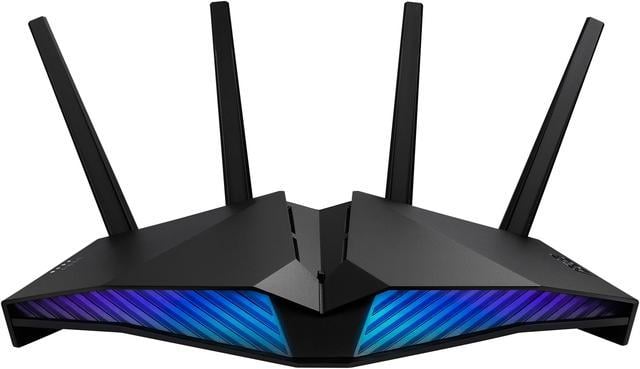
Credit: www.newegg.ca
Frequently Asked Questions
Is A Dual Band Router Better For Gaming Performance?
Yes, a dual band router improves gaming by offering less interference. It separates traffic between 2. 4GHz and 5GHz bands. This reduces lag and ensures smoother gameplay for multiple devices.
Can Dual Band Routers Reduce Gaming Lag?
Dual band routers reduce lag by managing network traffic efficiently. The 5GHz band provides faster speeds and lower latency, ideal for gaming. This helps maintain stable connections and minimizes interruptions during online play.
Should Gamers Use 2.4ghz Or 5ghz Band?
Gamers should use the 5GHz band for better speed and lower latency. The 2. 4GHz band is slower and more crowded. 5GHz offers a more stable and faster connection for gaming.
Does A Dual Band Router Support Multiple Gaming Devices?
Yes, dual band routers support multiple gaming devices efficiently. They distribute devices across two bands to avoid congestion. This ensures each device gets enough bandwidth for smooth online gaming.
Conclusion
Dual band routers offer a good balance for gaming needs. They reduce interference and improve connection quality. Gamers get more stable speeds on the 5 GHz band. The 2. 4 GHz band helps with longer range and device support. Choosing the right band depends on your home setup.
For better gaming, place the router close to your device. A dual band router can handle multiple devices well. It keeps your gaming smooth and reduces lag. Overall, dual band routers suit most gamers’ needs. Simple, reliable, and effective for better gaming at home.